---
layout: doc
title: deliteful/ScrollableContainer
---
# deliteful/ScrollableContainer
`deliteful/ScrollableContainer` is a container widget with scrolling capabilities.
This widget which can scroll its contents horizontally and/or vertically.
Its scrolling capabilities and API are provided by its parent class
[`delite/Scrollable`](/delite/docs/master/Scrollable.md).
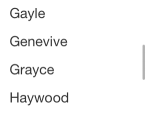
*Example of deliteful/ScrollableContainer on mobile:*
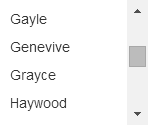
*Example of deliteful/ScrollableContainer on desktop:*
##### Table of Contents
[Element Instantiation ](#instantiation)
[Using ScrollableContainer](#using)
[Element Styling](#styling)
[User Interactions](#interactions)
[Events](#events)
[Extending ScrollableContainer](#extending)
[Enterprise Use](#enterprise)
## Element Instantiation
For details on the instantiation lifecycle, see [`delite/Widget`](/delite/docs/master/Widget.md).
### Declarative Instantiation
```js
require(["deliteful/ScrollableContainer",
"requirejs-domready/domReady!"
], function () {
});
```
```html
...
...
```
### Programmatic Instantiation
```js
require([
"deliteful/ScrollableContainer"
], function (ScrollableContainer) {
var sc = new ScrollableContainer({scrollDirection: "both"});
sc.placeAt(document.body);
// add content to the scrollable container:
var child = document.createElement("div");
sc.addChild(child);
// If needed, listen to native "scroll" events:
sc.on("scroll", function (event) {
...
});
});
```
## Using ScrollableContainer
By default, the scrolling capabilities are added to the widget's root node
(that is, the widget itself). A sublcass of `deliteful/ScrollableContainer`
can chose the node thanks to the property `scrollableNode`.
This property must be set by the subclass at latest in its `initializeRendering()`
method.
### Scroll Direction
The widget provides several scrolling modes through the `scrollDirection` property.
For details, see [`Using delite/Scrollable`](/delite/docs/master/Scrollable.md#using).
### Programmatic Scroll
In additional to the interactive scroll, the API of `deliteful/ScrollableContainer` provides methods
for programmatic scroll. For details, see [`Using delite/Scrollable`](/delite/docs/master/Scrollable.md#using).
## Element Events
During interactive or programmatic scrolling, native "scroll" events are emitted.
For details, see [`Events in delite/Scrollable`](/delite/docs/master/Scrollable.md#events).
## Element Styling
Style is defined by the CSS classes from the themes of the widget.
In addition to the CSS classes defined by the superclass `delite/Scrollable`
(see [`Element Styling in delite/Scrollable`](/delite/docs/master/Scrollable.md#styling),
`deliteful/ScrollableContainer` adds an empty marker class `d-scrollable-container`.
## User Interactions
The scrolling interaction is handled natively by the browser in a multi-channel
responsive manner. For details, see [`Interactions in delite/Scrollable`](/delite/docs/master/Scrollable.md#interactions).
## Extending ScrollableContainer
By default, the scrolling capabilities are added to the widget's root node
(that is, the widget itself). A sublcass of `deliteful/ScrollableContainer`
can chose the node thanks to the property `scrollableNode`.
This property must be set by the subclass at latest in its `initializeRendering()`
method.
*First use-case: creating a widget extending `deliteful/ScrollableContainer`*
```js
define(["delite/register", "deliteful/ScrollableContainer", ...],
function (register, Scrollable, ...) {
return register("mywidget", [HTMLElement, ScrollableContainer, ...], {
...
initializeRendering: dcl.superCall(function (sup) {
return function () {
// Create a child element:
var myScrollableDiv = document.createElement("div");
...
this.appendChild(myScrollableDiv);
// Indicate the scrollable child element:
this.scrollableNode = myScrollableDiv;
sup.apply(this, arguments);
};
})
});
```
Characteristics:
- Fits for widgets with one single scrollable element.
- Exposes the API of the parent classes, including the scrolling API of `delite/Scrollable`.
*Second use-case: creating a widget embedding widgets extending `deliteful/ScrollableContainer`*
```js
define(["delite/register", "deliteful/ScrollableContainer", ...],
function (register, Scrollable, ...) {
// In this use-case, does not extend delite/Scrollable
// nor deliteful/ScrollableContainer
return register("mywidget", [HTMLElement, ...], {
...
initializeRendering: dcl.superCall(function (sup) {
return function () {
var scrollableNode =
// or your own scrollable widget
new ScrollableContainer(...);
...
this.appendChild(scrollableNode);
// If needed, add other scrollable widgets as child elements
sup.apply(this, arguments);
};
})
});
```
Characteristics:
- Allows a widget to have more than one scrollable element.
- Allows to hide the API of the parent classes, including the scrolling API of `delite/Scrollable`.
## Enterprise Use
`deliteful/ScrollableContainer`'s characteristics in terms of accessibility,
globalization, security, and browser support are similar to those of `delite/Scrollable`.
For details, see
[`Enterprise Use of delite/Scrollable`](/delite/docs/master/Scrollable.md#interactions).