
deadem


 **Deadem** is a JavaScript parser for Deadlock (Valve Source 2 Engine) demo/replay files, compatible with Node.js and modern browsers.
┌ Node.js Browser ┐

## Contents
* [Installation](#installation)
Installing and including the library in your project.
* [Examples](#examples)
Running example scripts and working with demo files.
* [Overview](#overview)
Core concepts and architecture of the parser.
* [Understanding Demo](#understanding-demo)
Structure and content of demo files.
* [Understanding Parser](#understanding-parser)
Parser internals and state management.
* [Understanding Interceptors](#understanding-interceptors)
Extracting data during parsing.
* [Configuration](#configuration)
Customizing parser options and behavior.
* [Usage](#usage)
Basic usage example with real game data.
* [Demo File](#demo-file)
Parsing demo using `.dem` file.
* [HTTP Broadcast](#http-broadcast)
Parsing demo using `HTTP Broadcast`.
* [Data Extraction](#data-extraction)
Extracting data during parsing.
* [Compatibility](#compatibility)
Supported environments and versions.
* [Performance](#performance)
Benchmark results across platforms.
* [Building](#building)
Setup and build instructions.
* [License](#license)
Project licensing information.
* [Acknowledgements](#acknowledgements)
Credits to upstream and inspiring projects.
## Installation
### Node.js
```shell
npm install deadem --save
```
```js
import { Parser } from 'deadem';
```
### Browser
```js
```
```js
const { Parser } = window.deadem;
```
## Examples
### Node.js
The example scripts will, by default, look for demo files in the `/demos` folder. There are two types of files used:
- `DemoSource.REPLAY` files with the `.dem` extension
- `DemoSource.HTTP_BROADCAST` files with the `.bin` extension
If no local demo file is found, the scripts will automatically download the required file from a public S3 bucket:
```text
https://deadem.s3.us-east-1.amazonaws.com/deadlock/demos/${matchId}-{gameBuild?}.dem (for REPLAY files)
https://deadem.s3.us-east-1.amazonaws.com/deadlock/demos/${matchId}-{gameBuild?}.bin (for HTTP_BROADCAST files)
```
A list of all available demo files can be found in the [DemoFile](./packages/examples-common/data/DemoFile.js) class.
| № | Description | Commands |
| ------------------------------------------------------------------------------------------------------------ | ----------------------------------------- | ---------------------------------------------------------------------------------------------------------------------------------------------------- |
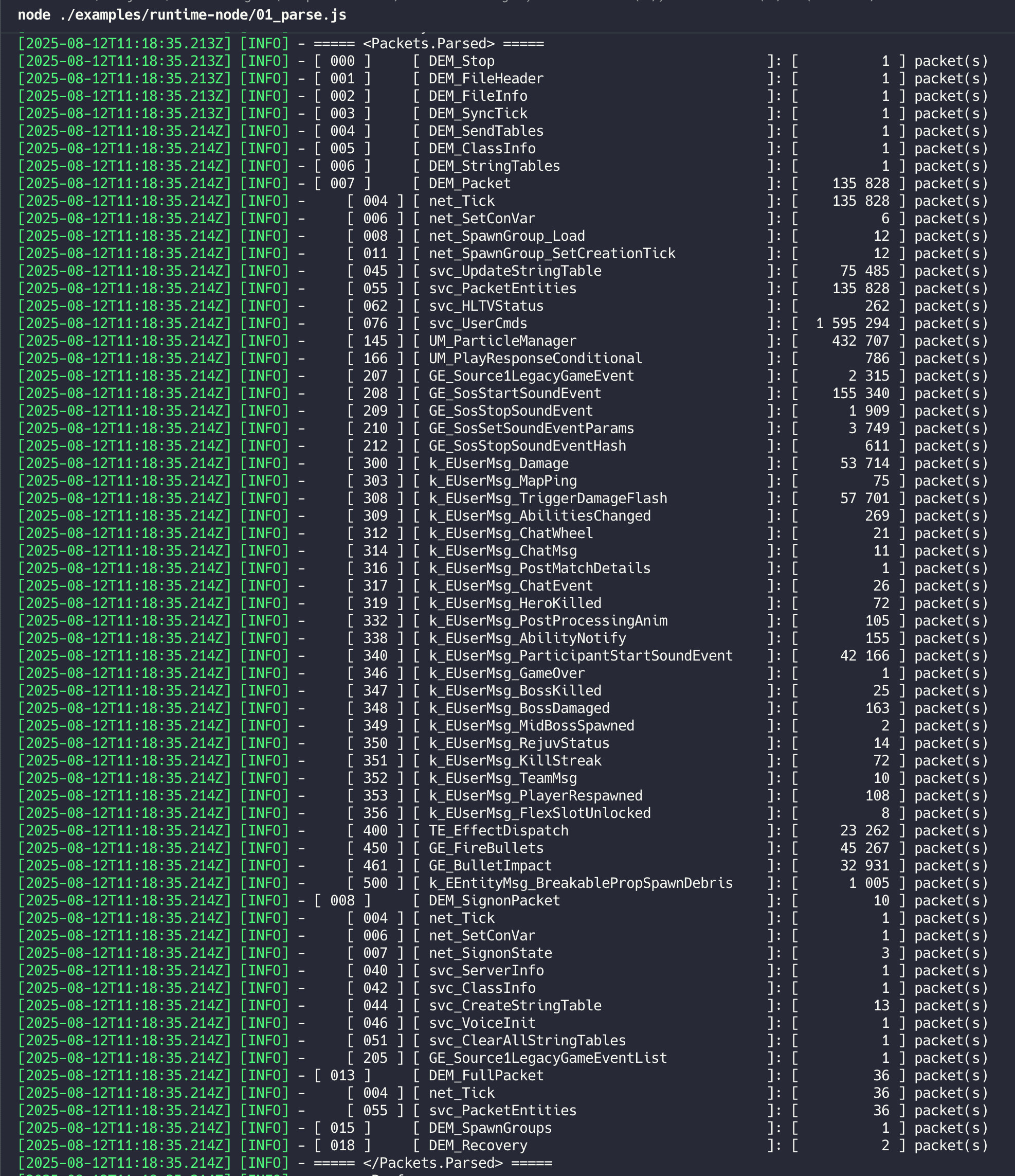
| [01](./packages/examples-node/scripts/01_parse.js) | Parse a single replay file | `node ./packages/examples-node/scripts/01_parse.js` |
| [02](./packages/examples-node/scripts/02_parse_multiple.js) | Parse multiple replay files | `node ./packages/examples-node/scripts/02_parse_multiple.js --matches="36126255,36127043"`
`node ./packages/examples-node/scripts/02_parse_multiple --matches=all` |
| [03](./packages/examples-node/scripts/03_parse_http_broadcast.js) | Parse HTTP Broadcast data from web server | `node ./packages/examples-node/scripts/03_parse_http_broadcast.js` |
| [04](./packages/examples-node/scripts/04_parse_http_broadcast_file.js) | Parse HTTP Broadcast data from file | `node ./packages/examples-node/scripts/04_parse_http_broadcast_file.js` |
| [05](./packages/examples-node/scripts/05_http_broadcast_save_to_file.js) | Save HTTP Broadcast data to a file | `node ./packages/examples-node/scripts/05_http_broadcast_save_to_file.js` |
| [10](./packages/examples-node/scripts/10_parse_game_time.js) | Parse game duration from replay | `node ./packages/examples-node/scripts/10_parse_game_time.js` |
| [11](./packages/examples-node/scripts/11_parse_top_damage_dealer.js) | Identify top damage dealer | `node ./packages/examples-node/scripts/11_parse_top_damage_dealer.js` |
| [12](./packages/examples-node/scripts/12_parse_chat.js) | Extract chat messages | `node ./packages/examples-node/scripts/12_parse_chat.js` |
| [13](./packages/examples-node/scripts/13_parse_kill_feed.js) | Extract kill feed events | `node ./packages/examples-node/scripts/13_parse_kill_feed.js` |
| [14](./packages/examples-node/scripts/14_parse_ability_feed.js) | Extract ability usage events | `node ./packages/examples-node/scripts/14_parse_ability_feed.js` |
| [15](./packages/examples-node/scripts/15_parse_mid_boss_deaths.js) | Parse mid boss death events | `node ./packages/examples-node/scripts/15_parse_mid_boss_deaths.js` |
| [16](./packages/examples-node/scripts/16_parse_tower_deaths.js) | Parse tower destruction events | `node ./packages/examples-node/scripts/16_parse_tower_deaths.js` |
### Browser
| № | Description | Commands |
| ----------------------------------------------------------------------------------------- | -------------------------- | ----------- |
| [01](https://deadem.com) | Deadem Explorer | `npm start` |
## Overview
### Understanding Demo
The demo file consists of a sequential stream of outer packets, referred to in this project as [DemoPacket](./packages/lib/src/data/DemoPacket.js).
Each packet represents a type defined in [DemoPacketType](./packages/lib/src/data/enums/DemoPacketType.js).
Most [DemoPacket](./packages/lib/src/data/DemoPacket.js) types, once parsed, become plain JavaScript objects containing structured data. However,
some packet types — such as `DemoPacketType.DEM_PACKET`, `DemoPacketType.DEM_SIGNON_PACKET`, and
`DemoPacketType.DEM_FULL_PACKET` — encapsulate an array of inner packets, referred to in this project as [MessagePacket](./packages/lib/src/data/MessagePacket.js). These inner packets
correspond to a message types defined in [MessagePacketType](./packages/lib/src/data/enums/MessagePacketType.js).
Similarly, most [MessagePacket](./packages/lib/src/data/MessagePacket.js) types also parse into regular data objects. There are two notable exceptions that require additional parsing:
1. **Entities** ([Developier Wiki](https://developer.valvesoftware.com/wiki/Networking_Entities)) - `MessagePacketType.SVC_PACKET_ENTITIES`: contains granular (or full) updates to existing entities (i.e. game world objects).
2. **String Tables** ([Developer Wiki](https://developer.valvesoftware.com/wiki/String_Table_Dictionary)) - `MessagePacketType.SVC_CREATE_STRING_TABLE`, `MessagePacketType.SVC_UPDATE_STRING_TABLE`, `MessagePacketType.SVC_CLEAR_ALL_STRING_TABLES`: granular (or full) updates to existing string tables (see [StringTableType](./packages/lib/src/data/enums/StringTableType.js)).
> ⚠️ **Warning**
>
> Demo files contain only the minimal data required for visual playback — not all game state information is preserved or available. Additionally, the parser may skip packets it cannot decode.
>
> You can retrieve detailed statistics about parsed and skipped packets by calling `parser.getStats()`.
### Understanding Parser
The parser accepts a readable stream and incrementally parses individual packets from it.
It maintains an internal, **mutable** instance of [Demo](./packages/lib/src/data/Demo.js), which represents the current state of the game. You can access it by calling:
```js
const demo = parser.getDemo();
```
> Note: The parser overwrites the existing state with each tick and **does not** store past states.
### Understanding Interceptors
Interceptors are user-defined functions that hook into the parsing process **before** or **after** specific stages (called [InterceptorStage](./packages/lib/src/data/enums/InterceptorStage.js)).
They allow to inspect and extract desired data during parsing.
Currently, there are three supported stages:
- `InterceptorStage.DEMO_PACKET`
- `InterceptorStage.MESSAGE_PACKET`
- `InterceptorStage.ENTITY_PACKET`
Use the following methods to register hooks:
- **Before** the [Demo](./packages/lib/src/data/Demo.js) state is affected:
`parser.registerPreInterceptor(InterceptorStage.DEMO_PACKET, hookFn);`
- **After** the [Demo](./packages/lib/src/data/Demo.js) state is affected:
`parser.registerPostInterceptor(InterceptorStage.DEMO_PACKET, hookFn);`
The diagram below provides an example of the parsing timeline, showing when **pre** and **post** interceptors are invoked at each stage:
```text
...
PRE DEMO_PACKET
└─ DEM_FILE_HEADER
POST DEMO_PACKET
...
PRE DEMO_PACKET
└─ DEM_SEND_TABLES
POST DEMO_PACKET
...
PRE DEMO_PACKET
└─ DEM_PACKET
├─ PRE MESSAGE_PACKET
│ └─ NET_TICK
└─ POST MESSAGE_PACKET
├─ PRE MESSAGE_PACKET
│ └─ SVC_ENTITIES
│ ├─ PRE ENTITY_PACKET
│ │ └─ ENTITY_1
│ └─ POST ENTITY_PACKET
│ ├─ PRE ENTITY_PACKET
│ │ └─ ENTITY_2
│ └─ POST ENTITY_PACKET
└─ POST MESSAGE_PACKET
POST DEMO_PACKET
...
```
Each interceptor receives different arguments depending on the `InterceptorStage`:
| Interceptor Stage | Hook Type | Hook Signature |
|-------------------|----------------|-----------------------------------------------------------------------------------------------------------------------------------------------------------------------------------------------------------|
| `DEMO_PACKET` | `pre` / `post` | (demoPacket: [DemoPacket](./packages/lib/src/data/DemoPacket.js)) => void |
| `MESSAGE_PACKET` | `pre` / `post` | (demoPacket: [DemoPacket](./packages/lib/src/data/DemoPacket.js), messagePacket: [MessagePacket](./packages/lib/src/data/MessagePacket.js)) => void |
| `ENTITY_PACKET` | `pre` / `post` | (demoPacket: [DemoPacket](./packages/lib/src/data/DemoPacket.js), messagePacket: [MessagePacket](./packages/lib/src/data/MessagePacket.js), events: Array<[EntityMutationEvent](./packages/lib/src/data/entity/EntityMutationEvent.js)>) => void |
> ❗ **Important**
>
> Interceptors hooks are **blocking** — the internal packet analyzer waits for hooks to complete before moving forward.
## Configuration
### Parsing
Below is a list of available options that can be passed to the `ParserConfiguration`:
| Option | Description | Type | Default |
| --------------- | ------------------------------------------------------------------------------------------------------------------------------------------------------------------------- | ------ | ------- |
| `breakInterval` | How often (in packets) to yield to the event loop to avoid blocking. The smaller the value, the more responsive the interface will be (may slow down parser performance). | number | `1000` |
| `parserThreads` | Number of **additional** threads used by the parser. | number | `0` |
### Logging
The library provides a [Logger](./packages/lib/src/core/Logger.js) class with several pre-defined logging strategies. For example:
- `Logger.CONSOLE_WARN` — only logs warnings and errors.
- `Logger.NOOP` - disables all logging.
```js
import { Logger, Parser, ParserConfiguration } from 'deadem';
const configuration = new ParserConfiguration({ parserThreads: 2 }, Logger.CONSOLE_WARN);
const parser = new Parser(configuration);
```
## Usage
### Demo File
```js
import { createReadStream } from 'node:fs';
import { Parser, Printer } from 'deadem';
const parser = new Parser();
const printer = new Printer(parser);
const readable = createReadStream(PATH_TO_DEM_FILE);
await parser.parse(readable);
printer.printStats();
```
### HTTP Broadcast
```js
import { BroadcastAgent, BroadcastGateway, DemoSource, Parser, Printer } from 'deadem';
const FROM_BEGINNING = false;
const MATCH_ID = 38624662;
const broadcastGateway = new BroadcastGateway('dist1-ord1.steamcontent.com/tv');
const broadcastAgent = new BroadcastAgent(broadcastGateway, MATCH_ID);
const parser = new Parser();
const printer = new Printer(parser);
const readable = broadcastAgent.stream(FROM_BEGINNING);
await parser.parse(readable, DemoSource.HTTP_BROADCAST);
printer.printStats();
```
### Data Extraction
```js
...
...
// #1: Extraction of chat messages
parser.registerPostInterceptor(InterceptorStage.MESSAGE_PACKET, (demoPacket, messagePacket) => {
if (messagePacket.type === MessagePacketType.CITADEL_USER_MESSAGE_CHAT_MESSAGE) {
console.log(`CHAT_MESSAGE: player slot [ ${messagePacket.data.playerSlot} ], message [ ${messagePacket.data.text} ]`);
}
});
const topDamageDealer = {
player: null,
damage: 0
};
// #2: Getting top hero-damage dealer
parser.registerPostInterceptor(InterceptorStage.ENTITY_PACKET, async (demoPacket, messagePacket, events) => {
events.forEach((event) => {
const entity = event.entity;
if (entity.class.name === 'CCitadelPlayerController') {
const data = entity.unpackFlattened();
if (data.m_iHeroDamage > topDamageDealer.damage) {
topDamageDealer.player = data.m_iszPlayerName;
topDamageDealer.damage = data.m_iHeroDamage;
}
}
});
});
await parser.parse(readable);
console.log(`Top damage dealer is [ ${topDamageDealer.player} ] with [ ${topDamageDealer.damage} ] damage`);
```
## Compatibility
Tested with Deadlock demo files from game build `6140` and below.
* **Node.js:** v16.17.0 and above.
* **Browsers:** All modern browsers, including the latest versions of Chrome, Firefox, Safari, Edge.
## Performance
By default, entities are **parsed but not unpacked**. Parser performance may vary depending on the number
of `entity.unpackFlattened()` calls.
The table below shows performance results **without calling `entity.unpackFlattened()`** for MacBook Pro with M3 chip:
### 1. `configuration.parserThreads = 0`:
| # | Runtime | Speed, ticks per second | Speed, game seconds per second (tick rate — 64) | Time to parse a 30-minute game, seconds | Max Memory Usage, mb |
| --- | --------------------- | ----------------------- | ----------------------------------------------- | --------------------------------------- | -------------------- |
| 1 | Node.js v22.14.0 | 8 542 ± 1.30% | 133.47 ± 1.30% | ~13.53 | 329 ± 6.21% |
| 2 | Browser Chrome v133.0 | 7 650 ± 0.59% | 119.53 ± 0.59 | ~15.06 | - |
| 3 | Node.js v16.20.2 | 5 405 ± 0.61% | 84.45 ± 0.26% | ~21.31 | 270 ± 6.98% |
| 4 | Browser Safari v18.3 | 5 295 ± 1.27% | 82.73 ± 1.27% | ~21.76 | - |
### 2. `configuration.parserThreads = 3`:
| # | Runtime | Speed, ticks per second | Speed, game seconds per second (tick rate — 64) | Time to parse a 30-minute game, seconds | Max Memory Usage, mb | Performance Gain (vs 0 p. threads), % |
| --- | --------------------- | ----------------------- | ----------------------------------------------- | --------------------------------------- | -------------------- | ------------------------------------- |
| 1 | Node.js v22.14.0 | 11 292 ± 0.26% | 176.44 ± 0.26% | ~10.20 | 639.16 ± 4.94% | 32.19 |
| 2 | Browser Chrome v133.0 | 9 560 ± 0.43% | 149.38 ± 0.43% | ~12.05 | - | 24.97 |
| 3 | Node.js v16.20.2 | 8 696 ± 0.26% | 135.86 ± 0.26% | ~13.25 | 497.86 ± 6.57% | 60.89 |
| 4 | Browser Safari v18.3 | 7 073 ± 0.44% | 110.52 ± 0.44% | ~16.29 | - | 33.58 |
## Building
### 1. Installing dependencies
```shell
npm install
```
### 2. Compiling .proto
```shell
npm run proto:json
```
### 3. Building a bundle
```shell
npm run build
```
## License
This project is licensed under the [MIT](./LICENSE) License.
## Acknowledgements
This project was inspired by and built upon the work of the following repositories:
- [dotabuff/manta](https://github.com/dotabuff/manta) - Dotabuff's Dota 2 replay parser in Go.
- [saul/demofile-net](https://github.com/saul/demofile-net) - CS2 / Deadlock replay parser in C#.
Huge thanks to their authors and contributors!