# DCENT Web SDK Integration Guide
### VERSION HISTORY
| version | date | modification |
| ----------- | ------------ | ---------------------------------------------------------- |
| v0.6.2-beta | 2019. 04. 07 | First version of D'CENT Web SDK connector release |
| v0.7.0-beta | 2019. 05. 07 | add KLAYTN transaction function |
| v0.8.0 | 2020. 06. 05 | add 'getSignedMessage' function |
| v0.9.0 | 2020. 06. 22 | add interface for BITCOIN transaction |
| v0.10.0 | 2020. 09. 28 | add interface for Ripple full transaction |
| v0.10.1 | 2020. 11. 30 | modify description for Ripple full transaction |
| v0.10.3 | 2021. 03. 15 | add XDC transaction function |
| v0.10.4 | 2021. 05. 06 | add Select address function |
| v0.10.5 | 2021. 12. 23 | support sign data function |
| v0.11.0 | 2022. 03. 08 | add interface for Hedera transaction |
| v0.11.2 | 2022. 04. 21 | modify getEthereumSignedTransaction interface for EIP-2718 |
| v0.12.0 | 2023. 02. 15 | add Tron & Stellar transaction transaction functions |
| v0.12.1 | 2023. 05. 03 | add support coin group for syncAccount |
| v0.13.0 | 2023. 05. 16 | add Tezos & Vechain & Near & Havah transaction function |
| v0.13.1 | 2023. 05. 17 | Fixed fee display issue |
| v0.14.0 | 2023. 05. 25 | add Polkadot & Comsmos & Coreum & Near Token |
| v0.14.1 | 2023. 05. 25 | Fix Polkadot decimals |
| v0.14.2 | 2023. 11. 20 | add Algorand transaction function |
| v0.15.0 | 2023. 12. 18 | add Parachain(Astar) transaction function |
## 1. INTRODUCTION
D'CENT Web SDK allows your web application to quickly create an wallet application using D'CENT dongle.
This guide explains how to install DCENT Web SDK and use the SDK for your web wallet application.
## 2. Architecture
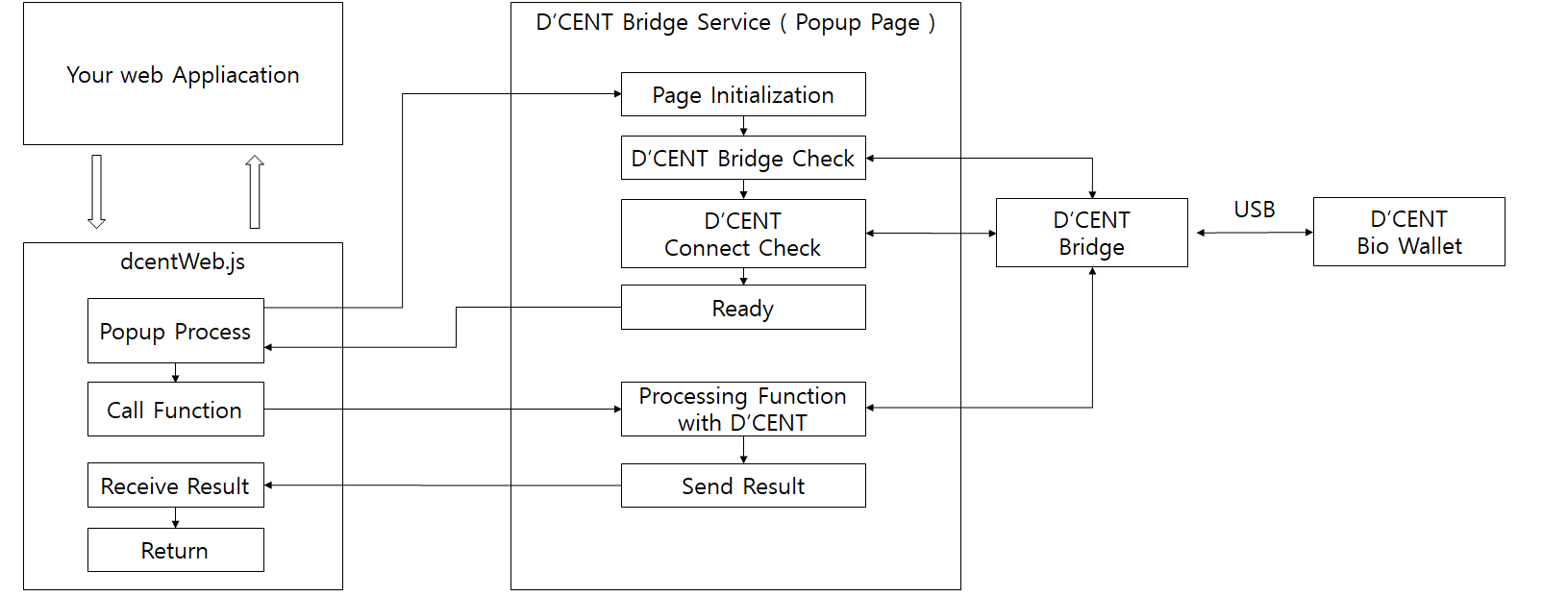
The figure below is a D'CENT Web SDK structure.
When the functions is called, if the D'CENT Bridge Service is not running as a popup, the popup window is automatically opened internally and a request to process the function is transmitted.
## 3. PACKAGES
D'CENT Web SDK includes:
- doc : Integration guide and API documentation of DCENT Web SDK.
- src : DCENT Web SDK library file.
## 4. GETTING STARTED
Developers can develop wallet application using our web sdk. Install the `dcent-web-connector` from npm repository.
```js
const DcentWebConnector = require('dcent-web-connector')
```
Developer can access api through `window.DcentWebConnector` object or `DcentWebConnector` object.
### Requirement
- Must have a `D'CENT Biometric wallet`. You can get "Order Now" page of D'CENT homepage. (http://dcentwallet.com)
- You need to install the lastest `D'CENT Bridge`. (http://bridge.dcentwallet.com/download)
- D'CENT Biometric will be connected with your PC or Labtop using USB Cable(Micro USB 5-pin type).
## 5. DEVELOPMENT
### Functions
All API functions return a `Promise`.
When function processing is completed, it is resolved. If an error occurs, it is rejected.
In either case, respond with a JSON object.
### Returned JSON object type
```js
{
"header": {
"version": "1.0",
"request_from": "",
"status": ""
},
"body": {
"command" : "",
"parameter" : {}
}
}
```
### Common Errors
If D'CENT wallet isn't connected via USB, you'll get the following error:
```js
{
"header": {
"version": "1.0",
"request_from": "wam",
"status": "error"
},
"body": {
"error": {
"code": "no_device",
"message": "D'CENT Biometric Wallet is not connected"
}
}
}
```
If the bridge service popup window is closed while calling a function and waiting, the following error occurs:
```js
{
"header": {
"version": "1.0",
"request_from": "dcent-web",
"status": "error"
},
"body": {
"error": {
"code": "pop-up_closed",
"message": "Pop-up windows has been closed"
}
}
}
```
When executing a function that requires user authentication, an error occurs if the user cancels the authentication.
The following shows the user cancel error in the Ethereum signed Transaction.
```js
{
"header": {
"version": "1.0",
"request_from": "ethereum",
"status": "error"
},
"body": {
"command": "transaction",
"error": {
"code": "user_cancel",
"message": "user cancel"
}
}
}
```
### DcentWebConnector initialize
`dcent-web-connector` provides functions for using D'CENT Biometric Wallet.
```js
var result
try{
result = await DcentWebConnector.info()
}catch(e){
result = e
}
```
`info()` returns :
```js
{
"header": {
"version": "1.0",
"request_from": "",
"status": ""
},
"body": {
"command" : "",
"parameter" : {
"version": "1.0.0",
"isUsbAttached": "true | false"
}
}
}
```
When the function is called from your web application, if D'CENT Bridge Service is not running as a pop-up, `dcent-web-connector` will automatically open a pop-up window and send a function request
### Set TimeOut Time
Sets the maximum time the function will run.
Once set the timeout Time, it is valid until the value is set again.
The default value is 60 seconds.
You can set the timeout time by calling `setTimeOutMs ()` as shown below.
```js
try {
await DcentWebConnector.setTimeOutMs(60000) // 60 sec, The default value is 60 seconds.
} catch (e) {
console.log(e)
}
```
All functions except setTimeOutMs function are called and then respond with `JSON Object` as below when timeout occurs.
```json
{
"header": {
"version": "1.0",
"response_from": "dcent-web",
"status": "error"
},
"body": {
"error": {
"code": "time_out",
"message": "The function execution time has expired"
}
}
}
```
### Close pop-up window
`dcent-web-connector` will automatically open a pop-up window and send a function request.
After each request to device is ended, it is recommended to close popup for enhancing user experience.
```js
var result
try{
result = await DcentWebConnector.info()
}catch(e){
result = e
}
// close pop-up window of D'CENT Bridge Service
DcentWebConnector.popupWindowClose()
```
### Set Device Connection Listener
Set listener for device connection state. Before processing a functions request, `dcent-web-connector` check the device connection state. If the state is changed, the device connection listener will be called.
```js
// device connection listener ( callback )
function connectionListener(state) {
if (state === DcentWebConnector.state.CONNECTED) {
console.log('DCENT is Connected');
} else if (state === DcentWebConnector.state.DISCONNECTED) {
console.log('DCENT is Disconnected');
}
}
try {
// set the device connection listener
DcentWebConnector.setConnectionListener(connectionListener)
} catch(e) {
}
```
### Get Device Info
You can get connected device information using `getDeviceInfo()` function.
```js
// Get connected device information
var result
try{
result = await DcentWebConnector.getDeviceInfo()
}catch(e){
result = e
}
```
`getDeviceInfo()` returns :
```json
{
"header": {
"version": "1.0",
"response_from": "device",
"status": "success"
},
"body": {
"command": "get_info",
"parameter": {
"device_id": "1234567890123456789012345678901234567890123456789012345678901234",
"fw_version": "1.2.1.7c65",
"ksm_version": "1.0.0.1139",
"state": "secure",
"coin_list": [
{
"name": "BITCOIN"
},
{
"name": "ETHEREUM"
},
{
"name": "ERC20"
},
{
"name": "RSK"
},
{
"name": "RRC20"
},
{
"name": "RIPPLE"
},
{
"name": "MONACOIN"
},
{
"name": "EOS"
},
{
"name": "KLAYTN"
}
],
"fingerprint": {
"max": 2,
"enrolled": 1
},
"label": "My D'CENT"
}
}
}
```
- deviceId : device unique identifier
- label : label of the device
- fw_Version : firmware version of the device
- ksm_Version : KSM(software running on SE) version of the device
- coin_List : the list of coin which the device supported
(Refer to https://dcentwallet.com/SupportedCoin)
### Set Device Label
If you want to change the label of device, you can do it using `setLabel()` fucntion.
```js
var result
try{
result = await DcentWebConnector.setLabel("IoTrust")
}catch(e){
result = e
}
```
After execute above code, you can see the modified label on your device when reboot the device.
### Add & Sync Account
> As of firmware version 2.9.2 or later, the D'CENT biometric wallet device does not support updating the balance.
You can add account using `syncAccount()` function. You can create an account by specifying the coin type and key path of the account you want to add.
If you want to add token type coin account, you must specify the coin name as the first 14 digits of contract address.
```js
let account_infos = [{
coin_group: DcentWebConnector.coinGroup.ETHEREUM,
coin_name: DcentWebConnector.coinName.ETHEREUM,
label: 'ETHEREUM_1', // account label
balance: '0 ETH', // {String} balance of account. This string will be displayed on device.
address_path: "m/44'/60'/0'/0/0" // key path of the account. This address_path is displayed on the device with the corresponding address and QR code.
}]
var result
try{
// Ethereum account will be created.
result = await DcentWebConnector.syncAccount(account_infos)
}catch(e){
result = e
}
```
`syncAccount()` method can be used also for updating account. If the account of the specified key path is already exist, the `syncAccount()` method do not create account just sync the account information. For example, if you want to change the label of account or modify the balance, you can use the `syncAccount()` method.
```js
let account_infos = [{
coin_group: DcentWebConnector.coinGroup.ETHEREUM,
coin_name: DcentWebConnector.coinName.ETHEREUM,
label: 'ETH_1', // account label
balance: '1 ETH', // {String} balance of account. This string will be displayed on device.
address_path: "m/44'/60'/0'/0/1" // key path of the account. This address_path is displayed on the device with the corresponding address and QR code.
}]
// This Ethereum account is already created.
// So the Ethereum account label and balance will be just modified.
var result
try{
// Ethereum account will be updated.
result = await DcentWebConnector.syncAccount(account_infos)
}catch(e){
result = e
}
```
### address_path
address_path follows the BIP44 rules.
```
m / purpose' / coin_type' / account' / change / address_index
```
Accounts are distinguished by `account` in address_path.
```js
let account_infos = [{
coin_group: DcentWebConnector.coinGroup.ETHEREUM,
coin_name: DcentWebConnector.coinName.ETHEREUM,
label: 'ETH_2', // account label
balance: '0 ETH', // balance of account. This string will be displayed on device.
address_path: "m/44'/60'/1'/0/0" // key path of the account. This address_path is displayed on the device with the corresponding address and QR code.
}]
var result
try{
// A New Ethereum account is created.
result = await DcentWebConnector.syncAccount(account_infos)
}catch(e){
result = e
}
```
### Retrieve Account
You can retrieve account list of connected device using `getAccountInfo()` function.
```js
var result
try{
// A New Ethereum account is created.
result = await DcentWebConnector.getAccountInfo()
}catch(e){
result = e
}
```
Returned account object has:
```json
{
"header": {
"version": "1.0",
"response_from": "coin",
"status": "success"
},
"body": {
"command": "get_account_info",
"parameter": {
"account": [
{
"coin_group": "ETHEREUM",
"coin_name": "ETHEREUM",
"label": "eth_1",
"address_path": "m/44'/60'/0'/0/0"
}
]
}
}
}
```
- label : label of account
- coinGroup : coin group name of account
- coinName : coin name of account
- addressPath : address path of account
### Get Address
You can get address of account using `getAddress()` function.
```js
var coinType = DcentWebConnector.coinType.ETHEREUM
var keyPath = "m/44'/60'/0'/0/0" // key path of the account
var result
try{
// Get Ethereum Address corresponding to keyPath
result = await DcentWebConnector.getAddress(coinType, keyPath)
}catch(e){
result = e
}
```
Returned response object has:
```json
{
"header": {
"version": "1.0",
"response_from": "ethereum",
"status": "success"
},
"body": {
"command": "get_address",
"parameter": {
"address": "0x354609C4c9a15d4265cF6D94010568D5Cf4d0c1B",
"pubkey": "0x"
}
}
}
```
The address string format is depend on the coin type.
For some coin type(ex. TEZOS), include pubkey as a property of the response parameter.
For ss58 addresses used by the Substrate ecosystems such as Astar, prefix is added.
The value of prefix is the prefix for each network defined in [ss58-registry](https://github.com/paritytech/ss58-registry).
```js
var coinType = DcentWebConnector.coinType.PARA
var keyPath = "m/44'/810'/0'/0/0" // key path of the Astar's account
var prefix = 5 // The address prefix of Astar
var result
try{
// Get the address corresponding to keyPath & prefix
result = await DcentWebConnector.getAddress(coinType, keyPath, prefix)
}catch(e){
result = e
}
```
Please note that `Astar EVM` features an EVM (Ethereum Virtual Machine) compatible runtime environment, so it is the same as getting the address of ETHEREUM account.
Returned response object has:
```json
{
"header": {
"version": "1.0",
"response_from": "para",
"status": "success"
},
"body": {
"command": "get_address",
"parameter": {
"address": "YzsEz5dG8TDqG49pGaejLrFoD4oeNTEX7yWt4qcCV4TA9LB"
}
}
}
```
### Get XPUB
You can get xpub using `getXPUB()` function.
The BIP32 key path must be at least 2 depth or more.
```js
var keyPath = "m/44'/0'" // key path of the account
var result
try{
// Get extended public key corresponding to keyPath
result = await DcentWebConnector.getXPUB(keyPath)
}catch(e){
result = e
}
```
Returned response object has:
```json
{
"header": {
"version": "1.0",
"response_from": "coin",
"status": "success"
},
"body": {
"command": "xpub",
"parameter": {
"public_key": "xpub6Bp87egy.....EdAH4sMeqY3"
}
}
}
```
The public_key is xpub value.
### Select Address
Show you address list and you can select an address using `selectAddress()` function.
```js
var result
try{
// Get extended public key corresponding to keyPath
let addresses = [
{
address: '0x1234567812345678123456781234567812345678',
path: `m'/44'/60'/0'/0/0`
},
{
address: '0xabcdabcdabcdabcdabcdabcdabcdabcdabcdabcd',
path: `m'/44'/8217'/0'/0/0`
}
]
result = await DcentWebConnector.selectAddress(addresses)
}catch(e){
result = e
}
```
Returned response object has:
```json
{
"header": {
"version": "1.0",
"response_from": "bridge",
"status": "success"
},
"body": {
"command": "select_address",
"parameter": {
"selected_index": 0,
"selected_address": {
"address": "0x1234567812345678123456781234567812345678",
"path": "m'/44'/60'/0'/0/0"
}
}
}
}
```
The 'selectedIndex' is index of addresses array.
### Ethereum Signed Message
You can get a signature value to sign a user message with that private key With a given key path (BIP32).
The input message is prefixed with 'Ethereum sign message' and then hashed and signed.
```js
var message = 'This is a message!'
var result
try {
result = await DcentWebConnector.getEthereumSignedMessage(message, "m/44'/60'/0'/0/0");
} catch (e) {
console.log(e)
result = e
}
```
Returned response object has:
```json
{
"header": {
"version": "1.0",
"response_from": "ethereum",
"status": "success"
},
"body": {
"command": "msg_sign",
"parameter": {
"address": "0x54b9c508aC61Eaf2CD8F9cA510ec3897CfB09382",
"sign": "0x0d935339......06a6291b"
}
}
}
```
### Signed Data
You can get a signature value to sign message with that private key With a given key path (BIP32).
The input data is consist of EIP-712 palyload and version(V3 and V4, 'V1' is not supported)
```js
// V4 example
var message = {
version: 'V4',
payload: {
domain: { ... },
message: { ... },
primaryType: { ... }
types: { EIP712Domain: { ... }, ...}
}
}
var key = "m/44'/60'/0'/0/0"
var result
try {
result = await DcentWebConnector.getSignedData(key, message);
} catch (e) {
console.log(e)
result = e
}
```
Returned response object has:
```json
{
"header": {
"version": "1.0",
"response_from": "ethereum",
"status": "success"
},
"body": {
"command": "sign_data",
"parameter": {
"address": "0x54b9c508aC61Eaf2CD8F9cA510ec3897CfB09382",
"sign": "0x0d935339......06a6291b"
}
}
}
```
### Signed Message
You can get a signature value to sign a user message with that private key With a given key path (BIP32).
The input message is prefixed depending on the coin type and then hashed and signed.
```js
var message = 'This is a message!'
var key = "m/44'/60'/0'/0/0"
var result
try {
result = await DcentWebConnector.getSignedMessage( DcentWebConnector.coinType.ETHEREUM, key, message);
} catch (e) {
console.log(e)
result = e
}
```
Returned response object has:
```json
{
"header": {
"version": "1.0",
"response_from": "ethereum",
"status": "success"
},
"body": {
"command": "msg_sign",
"parameter": {
"address": "0x54b9c508aC61Eaf2CD8F9cA510ec3897CfB09382",
"sign": "0x0d935339......06a6291b"
}
}
}
```
### Signed Data
You can get a signature value to sign a user data with that private key With a given key path (BIP32).
```js
var data = '0x10111213141516171819'
var key = "m/44'/60'/0'/0/0"
var result
try {
result = await DcentWebConnector.getSignedData( key, data);
} catch (e) {
console.log(e)
result = e
}
```
Returned response object has:
```json
{
"header": {
"version": "1.0",
"response_from": "ethereum",
"status": "success"
},
"body": {
"command": "sign_data",
"parameter": {
"address": "0x54b9c508aC61Eaf2CD8F9cA510ec3897CfB09382",
"sign": "0x0d935339......06a6291b"
}
}
}
```
### Sign Transaction
The D'CENT Web SDK provides functions for signing transaction of coins.
**getEthereumSignedTransaction()**
- This fuction for :
- ETHEREUM
- RSK
- Parameters :
- coinType
- nonce
- gasPrice
- gasLimit
- to (address)
- value
- data
- key path for signing
- chain ID
- txType:number EIP 2718 TransactionType(optional)
- typeOptions:Object `{'accessList': [], 'maxPriorityFeePerGas': '0x0', 'maxFeePerGas': '0x0'}`
- Returned response object:
```json
{
"header": {
"version": "1.0",
"response_from": "ethereum",
"status": "success"
},
"body": {
"command": "transaction",
"parameter": {
"sign_v": "0x78",
"sign_r": "0xf9e4c3ed......9557ad37",
"sign_s": "0x697a2abf......b76c4cb2",
"signed": "f86c0884......b76c4cb2"
}
}
}
```
**getTokenSignedTransaction()**
- This fuction for :
- ERC20
- RRC20
- Parameters :
- coinType
- nonce
- gasPrice
- gasLimit
- key path for signing
- chain ID
- contract information :
```js
// example
{
name: 'OmiseGO',
address: '0xd26114cd6EE289AccF82350c8d8487fedB8A0C07',
to: '0x354609C4c9a15d4265cF6D94010568D5Cf4d0c1B',
decimals: 18,
value: '100000000000000000',
symbol: 'OMG'
}
```
- Returned response object:
```json
{
"header": {
"version": "1.0",
"response_from": "erc20",
"status": "success"
},
"body": {
"command": "transaction",
"parameter": {
"signed": "0xf8a91584......cc79c29a",
"sign": {
"sign_v": "0x26",
"sign_r": "0x33930787......d4456f53",
"sign_s": "0x708126c7......cc79c29a"
}
}
}
}
```
**getKlaytnSignedTransaction()**
- This fuction for :
- KLAYTN
- KLAYTN_KCT
- Parameters :
- coinType
- nonce
- gasPrice
- gasLimit
- to (address)
- value
- data
- key path for signing
- chain ID
- Transaction type
- from (address)
- fee ratio
- contract information :
```js
// example
{
name: 'COSM',
decimals: 18,
symbol: 'COSM'
}
```
- Returned response object:
```json
{
"header": {
"version": "1.0",
"response_from": "klaytn",
"status": "success"
},
"body": {
"command": "transaction",
"parameter": {
"sign_v": "0x4055",
"sign_r": "0x5b1a8134......697ce449",
"sign_s": "0x6aea20f1......9eb816fb"
}
}
}
```
For broadcast the sign value, you must encoding the parameter values using RLP.
Klaytn provides 'caver-js' library. You can make raw transaction for broadcasting using 'caver-js'.
(https://docs.klaytn.com/bapp/sdk/caver-js/api-references)
**getBitcoinSignedTransaction()**
- This fuction for :
- BITCOIN
- MONACOIN
- Parameters :
- transaction: this value generated by `getBitcoinTransactionObject()`
- Useage:
```js
// generate Bitcoin Transaction object
let transaction = DcentWebConnector.getBitcoinTransactionObject(DcentWebConnector.coinType.BITCOIN)
// Set input parameter(previous tx) in Bitcoin Transaction object
transaction = DcentWebConnector.addBitcoinTransactionInput(transaction,
'0100000001e297417c46........293fce63b88ac00000000', // full of previous tx data
1, // index of previous tx output to be sent
DcentWebConnector.bitcoinTxType.p2pkh, // bitcoin tx type for this UTXO
"m/44'/0'/0'/1/0") // signing key path
transaction = DcentWebConnector.addBitcoinTransactionInput(transaction,
'0100000001e297417c46.........93fce63b88ac00000000',
0,
DcentWebConnector.bitcoinTxType.p2pkh,
"m/44'/0'/0'/0/7")
// Set output parameter(spending information) in Bitcoin Transaction object
transaction = DcentWebConnector.addBitcoinTransactionOutput(transaction,
DcentWebConnector.bitcoinTxType.p2pkh, // transaction type or this field can indicate output as a “change”
'10000', // amount of coin to spend. Satoshi unit.
['1traqiFvydVk2hWdCj3WGRJbe4CGtfyHA']) // Base58Check encoded address of the receiver.
result = await DcentWebConnector.getBitcoinSignedTransaction(transaction)
```
- Returned response object:
```json
{
"header": {
"version": "1.0",
"response_from": "erc20",
"status": "success"
},
"body": {
"command": "transaction",
"parameter": {
"signed": "0100000002233ee1fbcf.....71e088ac00000000"
}
}
}
```
**getXrpSignedTransaction()**
- This fuction for :
- XRP(Ripple)
- Parameters :
- transaction: this value conforms JSON format of Transaction Types in [XRP Doc](https://xrpl.org/transaction-formats.html).
- key: key path, wallet sign with that private key with a given key path (BIP32 ex) "m/44'/144'/0'/0/0").
- Requirements:
- `D'CENT Bridge` version 1.1.4 or higher is required.
- D'CENT Biometric Wallet version 2.4.0. or higher is required.
- Useage:
```js
const transactionJson = {
"TransactionType": "AccountSet", // or use defined value `DcentWebConnector.xrpTxType.AccountSet`
"Account": "rfQrsnD8ywrgSX457qshpBTDru7EDnM2Lb",
"Fee": "10",
"Sequence": 34,
"MessageKey": "02000000000000000000000000415F8315C9948AD91E2CCE5B8583A36DA431FB61",
"Flags": 2147483648, // if exist then D'Cent check that `tfFullyCanonicalSig` is set?
}
var result
try {
result = await DcentWebConnector.getXrpSignedTransaction(transactionJson, "m/44'/144'/0'/0/0");
} catch (e) {
console.log(e)
result = e
}
```
- Returned response object:
```json
{
"header": {
"version": "1.0",
"response_from": "ripple",
"status": "success"
},
"body": {
"command": "get_sign",
"parameter": {
"sign": "3045022100e81c9e2...8e373e30b8f5e0a33eb094ffc7c8d009ad71fd7581b6b89ef9",
"pubkey": "02c65f2a496909123973282c47edbd0e760bb44bb0d87ec1b30115b2ce3072c766",
"accountId": "462a5a061ebe03fb52e5bca443233bcc6d0e9699"
}
}
}
```
- Send a Multi-Signed Transaction
- Reference the [XRP Doc](https://xrpl.org/send-a-multi-signed-transaction.html)
- Multi-signing a Transaction
1. First, prepare by referring to [Set Up Multi-Signing](https://xrpl.org/set-up-multi-signing.html) (You can get address of account using `getAddress()` function.)
2. Get signature
```js
// You can use xrp library for encoding
//const api = require('ripple-binary-codec')
//const addrs = require('ripple-address-codec')
const transactionJson = {
"TransactionType": "Payment",
"Account": "rfQrsnD8ywrgSX457qshpBTDru7EDnM2Lb",
"Fee": "30", // normal cost * (1 + N)
"Sequence": 45,
"Amount": "1234567",
"Flags": 2147483648,
"Destination": "rJZMdVmbqFPi5oMyzGKJhHW9mNHwpiYKpS",
"SigningPubKey": "", // Must be blank
}
var result
var signer = {}
try {
// Keypath is SignerEntry's key path
result = await DcentWebConnector.getXrpSignedTransaction(transactionJson, "m/44'/144'/1'/0/0");
signer = {
"Account": "rBV2LGGm5XAc5KbL7hBaPnLnUJ5aTQzVj9", // addrs.encodeAccountID(Buffer.from(result.accountId,'hex'))
"SigningPubKey": result.pubkey,
"TxnSignature": result.sign
}
} catch (e) {
console.log(e)
result = e
}
```
For broadcast the sign transaction, you must reconstruct transaction include `TxnSignature` & `SigningPubKey` for normal (single-signature) or `Signers` array for multi-signed-transaction
**getHederaSignedTransaction()**
- This fuction for :
- Hedera(HTS)
- Parameters :
- unsignedTx: unsigned hexadecimal tx [Hedera Docs](https://docs.hedera.com/guides/getting-started/transfer-hbar)
- path: key path, wallet sign with that private key with a given key path (BIP32 ex) "m/44'/3030'/0'").
- symbol: symbol, It is a symbol that the wallet displays on the screen.
- decimals: hedera or hts token's decimals.
- Requirements:
- `D'CENT Bridge` version 1.2.1 or higher is required.
- D'CENT Biometric Wallet version 2.19.3. or higher is required.
- Useage:
```js
const _buf2hex = (buffer) => { // buffer is an ArrayBuffer
return Array.prototype.map.call(new Uint8Array(buffer), x => ('00' + x.toString(16)).slice(-2)).join('')
}
const client = HederaSDK.Client.forMainnet()
const nodeList = client._network.getNodeAccountIdsForExecute()
const validStart = Timestamp.generate()
const fromAccountId = AccountId.fromString('accountIdString')
const txId = new TransactionId(fromAccountId, validStart)
const tx = new HederaSDK.TransferTransaction()
// when you transfer hbar
tx.addHbarTransfer(fromAccountId, HederaSDK.Hbar.fromTinybars('-' + amountTinybar))
tx.addHbarTransfer('toAccountIdString', HederaSDK.Hbar.fromTinybars(amountTinybar))
// or you can transfer token like this.
tx.addTokenTransfer(contractAddress, fromAccountId, HederaSDK.Hbar.fromTinybars('-' + amountTinybar))
tx.addTokenTransfer(contractAddress, 'toAccountIdString', HederaSDK.Hbar.fromTinybars(amountTinybar))
tx.setNodeAccountIds([nodeList[nodeList.length - 1]])
tx.setTransactionId(txId)
tx.setTransactionMemo('')
tx.setMaxTransactionFee(fee)
tx.freezeWith(client)
const bodyBytes = tx._signedTransactions[0].bodyBytes
const unsignedTx = _buf2hex(bodyBytes)
const transactionJson = {
unsignedTx: unsignedTx,
path: `m/44'/3030'/0'`,
symobl: HBAR,
decimals: 8
}
var result
try {
result = await DcentWebConnector.getHederaSignedTransaction(transactionJson)
} catch (e) {
console.log(e)
result = e
}
```
- Returned response object:
```json
{
"header": {
"version": "1.0",
"response_from": "hedera",
"status": "success"
},
"body": {
"command": "transaction",
"parameter": {
"signed_tx": "0x31aa13b5e04cb6fc6381ea0520bf7f6727ebdb6e96cd7ca8625bb3e3dd36cf0e2cee4ece13aa9f7ddc09ee10c74aa00af954201829d8016317f10f5a921dcc0d",
"pubkey": "0x9a5c753d02038e512c06867556324b37181c9c1fc19c21c27752c520e8f0d822"
}
}
}
```
**getHederaSignedMessage()**
This is a function used to perform the hedera_signMessage method specified in the [HIP-820](https://hips.hedera.com/hip/hip-820).
You can get a signature value to sign a user message with that private key With a given key path (BIP32).
- Parameters :
- unsignedMsg: the UTF-8 encoded message with a prefix appended to it.
- path: key path, wallet sign with that private key with a given key path (BIP32 ex) "m/44'/3030'/0'").
- Requirements:
- `D'CENT Bridge` version 1.5.5 or higher is required.
- D'CENT Biometric Wallet version 2.30.3. or higher is required.
- Useage:
```js
function stringToHexString (str) {
const buf = Buffer.from(str.toString(), 'utf8')
return buf.toString('hex')
}
var message = `This is hedera_signMessage's message`
var unsignedMsg = stringToHexString("\x19Hedera Signed Message:\n" + message.length + message)
const transactionJson = {
unsignedMsg: unsignedMsg,
path: `m/44'/3030'/0'`
}
var result
try {
result = await DcentWebConnector.getHederaSignedMessage(transactionJson)
} catch (e) {
console.log(e)
result = e
}
```
- Returned response object has:
```json
{
"header": {
"version": "1.0",
"response_from": "hedera",
"status": "success"
},
"body": {
"command": "sign_msg",
"parameter": {
"sign_msg": "0x6fb261a69f45f58d5dc33297a7db0fd80cbbd90137a2597ff870a374ecbd2cb99d22bac9a28e91a84902a6b5b0a4316a9c7d4e7ae242f2e2172d57d2a9b7530c",
"pubkey": "0x97ee5dbe1b00e35ac9674cdc9915503108acae33d9dc2aa2247e69d4e456c594"
}
}
}
```
**getStellarSignedTransaction()**
- This fuction for :
- Stellar(XLM)
- Parameters :
- transactionJson: this value conforms JSON format of Transaction Types in [Stellar Docs](https://developers.stellar.org/docs/tutorials/send-and-receive-payments)
- Requirements:
- `D'CENT Bridge` version 1.4.0 or higher is required.
- D'CENT Biometric Wallet version 2.20.0. or higher is required.
- Useage:
```js
const _buf2hex = (buffer) => { // buffer is an ArrayBuffer
return Array.prototype.map.call(new Uint8Array(buffer), x => ('00' + x.toString(16)).slice(-2)).join('');
}
const server = new StellarSdk.Server('https://horizon.stellar.org')
const account = await server.loadAccount(address)
// Operation
const operationXdr = StellarSdk.Operation.createAccount({
destination: toAddr,
startingBalance: amount
})
// Builder
const transactionBuilder = new StellarSdk.TransactionBuilder(account, {
fee: StellarSdk.BASE_FEE,
networkPassphrase: StellarSdk.Networks.TESTNET
})
.addOperation(operationXdr)
.setTimeout(300)
.build()
const unsignedTx = _buf2hex(transactionBuilder.signatureBase())
const transactionJson = {
unsignedTx: unsignedTx,
fee: StellarSdk.BASE_FEE
path: `m/44'/148'/0'`,
}
var result
try {
result = await DcentWebConnector.getStellarSignedTransaction(transactionJson);
} catch (e) {
console.log(e)
result = e
}
```
- Returned response object:
```json
{
"header": {
"version": "1.0",
"response_from": "stellar",
"status": "success"
},
"body": {
"command": "transaction",
"parameter": {
"signed_tx": "0x9b1cb82eb924178980b1d35f99ae24142d25ba08efabd1dfe7f4741028d03f3fe80770b395176b9d49381d98660e2746d38986b4e31af738524ca0936a7aa901",
"pubkey": "0x283957814f67abe6eda79128d3d54655a1ec8c595aece2c12f0848461a4ef659"
}
}
}
```
**getTronSignedTransaction()**
- This fuction for :
- Tron(TRX)
- Tron Token(TRC, call `getTrcTokenSignedTransaction()`)
- Parameters :
- transactionJson: this value conforms JSON format of Transaction Types in [Tron Docs](https://github.com/tronscan/tronscan-node-client)
- Requirements:
- `D'CENT Bridge` version 1.4.0 or higher is required.
- D'CENT Biometric Wallet version 2.3.0. or higher is required.
- Useage:
```js
const decode58Check = require('@tronscan/client/src/utils/crypto').decode58Check
const { Transaction } = require('@tronscan/client/src/protocol/core/Tron_pb')
const googleProtobufAnyPb = require('google-protobuf/google/protobuf/any_pb.js')
const _buf2hex = (buffer) => { // buffer is an ArrayBuffer
return Array.prototype.map.call(new Uint8Array(buffer), x => ('00' + x.toString(16)).slice(-2)).join('');
}
const baseURL = 'https://api.trongrid.io'
// get node info
const command = '/wallet/getnodeinfo'
const reponse = await axios.get(baseURL + command)
let dataInfo = response.data
let arrBlcokInfo = dataInfo.block.split(',')
const nodeInfo = {
number: arrBlcokInfo[0].split(':')[1],
hash: arrBlcokInfo[1].split(':')[1],
}
let transferContract = new TronscanSdk.TransferContract()
transferContract.setToAddress(Uint8Array.from(decode58Check(toAddr)))
transferContract.setOwnerAddress(Uint8Array.from(decode58Check(fromAddr)))
transferContract.setAmount(amount)
let anyValue = new googleProtobufAnyPb.Any();
anyValue.pack(transferContract.serializeBinary(), 'protocol.' + typeName)
let contract = new Transaction.Contract();
contract.setType(contractType)
contract.setParameter(anyValue)
const refBlockHash = Buffer.from(nodeInfo.hash, 'hex').slice(8, 16).toString('base64');
const blockNumber = Number(nodeInfo.number);
const refBlockBytes = getBlockBytes(blockNumber).toString('base64');
let raw = new Transaction.raw()
raw.addContract(contract);
raw.setRefBlockNum(blockNumber)
raw.setRefBlockBytes(refBlockBytes)
raw.setRefBlockHash(refBlockHash)
raw.setTimestamp(Date.now());
raw.setExpiration(Date.now() + (100 * 60 * 60 * 1000)) // 10 hours
if (contractType === Transaction.Contract.ContractType.TRIGGERSMARTCONTRACT) {
raw.setFeeLimit(50 * 1000000) // transfer fee limit
}
let transaction = new Transaction();
transaction.setRawData(raw);
const unsignedTx = _buf2hex(raw.serializeBinary())
const transactionJson = {
unsignedTx: unsignedTx,
fee: fee
path: `m/44'/195'/0'/0/0`,
}
var result
try {
result = await DcentWebConnector.getTronSignedTransaction(transactionJson);
} catch (e) {
console.log(e)
result = e
}
```
- Returned response object:
- The property of the response's parameter, the pubkey is deprecated.
```json
{
"header": {
"version": "1.0",
"response_from": "tron",
"status": "success"
},
"body": {
"command": "transaction",
"parameter": {
"signed_tx": "0x35544659743d463715380a2f66205ac9c38feb04033c29a5d415f8b009f566664a1972ac8be256308ec9b38a726f02eec103fc74963d7caf783cd55f1d7610d900",
"pubkey": "0x000000000000000000000000000000000000000000000000000000000000000000000000000000000000000000000000000000000000000000000000000000000000"
}
}
}
```
**getTezosSignedTransaction()**
- This fuction for :
- TEZOS(XTZ)
- TEZOS Token(XTZ_FA)
- Parameters :
- unsignedTx: unsigned hexadecimal tx [Tezos Docs](https://tezostaquito.io/docs/quick_start)
- path: key path, wallet sign with that private key with a given key path (BIP32 ex) "m/44'/1729'/0'/0/0").
- fee: fee, It is fee that wallet displays on the screen.
- symbol: symbol, It is a symbol that the wallet displays on the screen.
- decimals: tezos or tezos token's decimals.
- Requirements:
- `D'CENT Bridge` version 1.5.0 or higher is required.
- D'CENT Biometric Wallet version 2.23.1 or higher is required.
- testnet: version 2.24.1 or higher is required.
- Useage:
```js
import { TezosToolkit, Estimate } from '@taquito/taquito'
import * as tezosUtils from '@taquito/utils'
import { Tzip12Module, tzip12 } from '@taquito/tzip12'
import BigNumber from 'bignumber.js'
const Tezos = new TezosToolkit('https://YOUR_PREFERRED_RPC_URL');
const TezosContext = Tezos._context
// https://github.com/ecadlabs/taquito/blob/3640373e5acd160767234e10bab4fe18ac3cb586/packages/taquito/src/prepare/prepare-provider.ts#L868
const BlockHash = await TezosContext.readProvider.getBlockHash('head~2')
const BlockProto = await TezosContext.readProvider.getNextProtocol('head')
const counter = Number(await TezosContext.readProvider.getCounter(account.recvAddress, 'head'))
let ops = []
ops.push({
kind: 'transaction',
fee,
amount: DcentWebConnector.unitConverter(amount, decimals).num.toString(),
gas_limit,
storage_limit,
destination: toAddr,
counter: (counter + 1 + index).toString(),
source: recvAddress,
})
const prepared = {
opOb: {
branch: BlockHash,
contents: ops,
protocol: BlockProto
},
counter: counter
}
const forgedBytes = await Tezos.estimate.forge(prepared)
const sigHash = '03' + forgedBytes.opbytes
const transactionJson = {
coinType: DcentWebConnector.coinType.TEZOS,
sigHash: sigHash,
path: `m/44'/1729'/0'/0/0`,
decimals, // 6,
fee: fee,
symbol: 'XTZ',
}
var result
try {
result = await DcentWebConnector.getTezosSignedTransaction(transactionJson);
} catch (e) {
console.log(e)
result = e
}
```
- Returned response object:
```json
{
"header": {
"version": "1.0",
"response_from": "tezos",
"status": "success"
},
"body": {
"command": "transaction",
"parameter": {
"signed_tx": "0x31aa13b5e04cb6fc6381ea0520bf7f6727ebdb6e96cd7ca8625bb3e3dd36cf0e2cee4ece13aa9f7ddc09ee10c74aa00af954201829d8016317f10f5a921dcc0d"
}
}
}
```
**getVechainSignedTransaction()**
- This fuction for :
- VECHAIN(VET)
- VECHAIN Token(VECHAIN_ERC20)
- Parameters :
- unsignedTx: unsigned hexadecimal tx [Vechain Docs](https://thorify.vecha.in/#/)
- path: key path, wallet sign with that private key with a given key path (BIP32 ex) "m/44'/818'/0'/0/0").
- fee: fee, It is fee that wallet displays on the screen.
- symbol: symbol, It is a symbol that the wallet displays on the screen.
- decimals: vechain or vechain token's decimals.
- Requirements:
- `D'CENT Bridge` version 1.5.0 or higher is required.
- D'CENT Biometric Wallet version 2.23.2. or higher is required.
- Useage:
```js
import { thorify } from 'thorify'
import BigNumber from 'bignumber.js'
const Web3 = require("web3"); // Recommend using require() instead of import here
const web3 = thorify(new Web3(), 'http://localhost:8669')
//https://github.com/vechain/thorify/blob/72988996cead74f9c73e38860c2e055ca35a108e/src/extend/accounts.ts#L12
let clauses = {
from: recvAddress,
to: toAddr,
value: DcentWebConnector.unitConverter(amount, decimals).num.toString(),
gas
}
let rawData = await web3.eth.accounts.signTransaction(clauses, VechainConfig.DummyKey)
rawData = rawData.rawTransaction.substr(0, rawData.rawTransaction.length - 134).slice(2)
let rawBuf = Buffer.from(rawData, 'hex')
let length = rawData.length / 2
let adjustedRaw = ''
let size = 0
if (rawBuf[0] < 0xc0) {
adjustedRaw = null
}
if (rawBuf[0] <= 0xf7) {
adjustedRaw = rawData.slice(2)
} else if (rawBuf[0] <= 0xff) {
switch (rawBuf[0] - 0xf7) {
case 1:
size = 1
break
case 2:
size = 2
break
default:
adjustedRaw = null
}
adjustedRaw = rawData.slice(2 + (size * 2))
} else {
adjustedRaw = null
}
length = adjustedRaw.length / 2
if (length < 56) {
adjustedRaw = (0xc0 + length).toString(16) + adjustedRaw
} else if (length < 256) {
adjustedRaw = '0xf8' + (length).toString(16) + adjustedRaw
} else {
adjustedRaw = '0xf9' + (length).toString(16) + adjustedRaw
}
const transactionJson = {
coinType: DcentWebConnector.coinType.VECHAIN,
sigHash: adjustedRaw.slice(2),
path: `m/44'/818'/0'/0/0`,
decimals, // 18
fee: fee,
symbol: 'VET',
}
var result
try {
result = await DcentWebConnector.getVechainSignedTransaction(transactionJson);
} catch (e) {
console.log(e)
result = e
}
```
- Returned response object:
```json
{
"header": {
"version": "1.0",
"response_from": "vechain",
"status": "success"
},
"body": {
"command": "transaction",
"parameter": {
"signed_tx": "0x31aa13b5e04cb6fc6381ea0520bf7f6727ebdb6e96cd7ca8625bb3e3dd36cf0e2cee4ece13aa9f7ddc09ee10c74aa00af954201829d8016317f10f5a921dcc0d"
}
}
}
```
**getNearSignedTransaction()**
- This fuction for :
- NEAR(NEAR)
- NEAR Token
- Parameters :
- unsignedTx: unsigned hexadecimal tx [Near Docs](https://docs.near.org/ko/tools/near-api-js/reference/modules/transaction#signtransaction)
- path: key path, wallet sign with that private key with a given key path (BIP32 ex) "m/44'/397'/0'").
- fee: fee, It is fee that wallet displays on the screen.
- symbol: symbol, It is a symbol that the wallet displays on the screen.
- decimals: near or near token's decimals.
- optionParam: hexadecimal value of the token method type is used only in near token.
- '02' : Function call(ft_transfer)
- '~~04' : Stake~~ (**The method will be supported later.)**
- ~~'08' : Delegate~~ (**The method will be supported later)**
- Requirements:
- `D'CENT Bridge` version 1.5.0 or higher is required.
- near token: version 1.5.1 or higher is required.
- D'CENT Biometric Wallet version 2.24.0. or higher is required.
- near token: version 2.27.1 or higher is required.
- Useage:
```js
const {connect, utils, providers} = require('near-api-js')
const nearTransaction = require('near-api-js/lib/transaction')
const nearSerialize = require('borsh')
const connectionConfig = {
networkId: "mainnet",
nodeUrl: "https://rpc.mainnet.near.org",
};
const nearConnection = await connect(connectionConfig);
let nonceOfAccessKey = await nearConnection.connection.provider.query({
request_type: 'view_access_key_list',
account_id: address,
finality: 'final'
})
const blockHash = await nearConnection.connection.provider.block({ finality: 'final' }).then(block => {
const encodedBlockHash = block.header.hash
return Buffer.from(bs58Lib.decode(encodedBlockHash))
})
const nonce = ++nonceOfAccessKey;
const publicKey = utils.PublicKey.from(bs58Lib.encode(Buffer.from(address, 'hex')))
var actions = [nearTransaction.transfer(utils.parseNearAmount(BigNumber(amount).toString(10)).replace(',', ''))];
let transaction = new nearTransaction.SignedTransaction({
transaction: {
signerId: address,
publicKey: publicKey,
nonce: nonce,
receiverId: toAddr,
actions: actions,
blockHash: blockHash
},
signature: new nearTransaction.Signature({
keyType: transaction.publicKey.keyType,
})
})
let unsignedTx = nearSerialize.serialize(nearTransaction.SCHEMA, transaction)
const transactionJson = {
coinType: DcentWebConnector.coinType.NEAR,
sigHash: unsignedTx.toString('hex'),
path: `m/44'/397'/0'`,
decimals, // 24
fee,
symbol: 'NEAR',
}
var result
try {
result = await DcentWebConnector.getNearSignedTransaction(transactionJson);
} catch (e) {
console.log(e)
result = e
}
```
- Returned response object:
```json
{
"header": {
"version": "1.0",
"response_from": "near",
"status": "success"
},
"body": {
"command": "transaction",
"parameter": {
"signed_tx": "0x31aa13b5e04cb6fc6381ea0520bf7f6727ebdb6e96cd7ca8625bb3e3dd36cf0e2cee4ece13aa9f7ddc09ee10c74aa00af954201829d8016317f10f5a921dcc0d"
}
}
}
```
**getHavahSignedTransaction()**
- This fuction for :
- HAVAH(HTS)
- HAVAH Token(HSP20)
- Parameters :
- unsignedTx: unsigned hexadecimal tx [Hevah(ICON) Docs](https://docs.icon.community/getting-started/how-to-run-a-local-network/decentralizing-a-local-network)
- path: key path, wallet sign with that private key with a given key path (BIP32 ex) "m/44'/858'/0'/0/0").
- fee: fee, It is fee that wallet displays on the screen.
- symbol: symbol, It is a symbol that the wallet displays on the screen.
- decimals: havah or havah token's decimals.
- optionParam: hexadecimal value of the havah method type is used only in havah token.
- '01' : Token Transfer
- '02' : Token Deposit
- '03' : Token Message
- ~~'04': Token Deploy~~ (**The method will be supported later)**
- Requirements:
- `D'CENT Bridge` version 1.5.0 or higher is required.
- D'CENT Biometric Wallet version 2.26.0. or higher is required.
- Useage:
```js
import IconService from 'icon-sdk-js'
const { IconBuilder, IconAmount, IconConverter, IconUtil } = IconService
const httpProvider = new HttpProvider('https://ctz.solidwallet.io/api/v3');
const iconService = new IconService(httpProvider);
// networkId of node 1:mainnet, 2~:etc
const networkId = new BigNumber("3"); // input node’s networkld
const version = new BigNumber("3"); // version
// Recommended icx transfer step limit :
// use 'default' step cost in the response of getStepCosts API
const stepLimit = await this.getDefaultStepCost(); // Please refer to the above description.
// Timestamp is used to prevent the identical transactions. Only current time is required (Standard unit : us)
// If the timestamp is considerably different from the current time, the transaction will be rejected.
const timestamp = (new Date()).getTime() * 1000;
const value = IconAmount.of(Number(amount), IconAmount.Unit.ICX).toLoop()
// Enter transaction information
const { IcxTransactionBuilder } = IconBuilder
const icxTransactionBuilder = new IcxTransactionBuilder();
const transaction = icxTransactionBuilder
.nid(networkId)
.from(walletAddress)
.to(MockData.WALLET_ADDRESS_2)
.value(value)
.version(version)
.stepLimit(stepLimit)
.timestamp(timestamp)
.nonce(IconConverter.toBigNumber(1))
.build();
const rawData = Buffer.from(IconUtil.generateHashKey(IconConverter.toRawTransaction(tx))).toString('hex')
const sigHash = rawData
const transactionJson = {
coinType: DcentWebConnector.coinType.HAVAH,
sigHash: sigHash,
path: `m/44'/858'/0'/0/0`,
decimals: IconAmount.Unit.ICX,
fee,
symbol: 'HVH',
}
var result
try {
result = await DcentWebConnector.getHavahSignedTransaction(transactionJson);
} catch (e) {
console.log(e)
result = e
}
```
- Returned response object:
```json
{
"header": {
"version": "1.0",
"response_from": "havah",
"status": "success"
},
"body": {
"command": "transaction",
"parameter": {
"signed_tx": "0x31aa13b5e04cb6fc6381ea0520bf7f6727ebdb6e96cd7ca8625bb3e3dd36cf0e2cee4ece13aa9f7ddc09ee10c74aa00af954201829d8016317f10f5a921dcc0d"
}
}
}
```
**getPolkadotSignedTransaction()**
- This fuction for :
- POLKADOT(DOT)
- Parameters :
- unsignedTx: unsigned hexadecimal tx [Polkadot Docs](https://wiki.polkadot.network/docs/build-transaction-construction)
- path: key path, wallet sign with that private key with a given key path (BIP32 ex) "m/44'/354'/0'/0/0").
- fee: fee, It is fee that wallet displays on the screen.
- symbol: symbol, It is a symbol that the wallet displays on the screen.
- decimals: polkadot's decimals.
- Requirements:
- `D'CENT Bridge` version 1.5.0 or higher is required.
- D'CENT Biometric Wallet version 2.19.1 or higher is required.
- Useage:
```js
import { ApiPromise, HttpProvider } from '@polkadot/api'
const httpProvider = new HttpProvider('https://rpc.polkadot.io');
const api = await ApiPromise({ provider: httpProvider });
// Wait until we are ready and connected
await api.isReady;
const blockNumber = await api.rpc.chain.getHeader()
const blockHash = await api.rpc.chain.getBlockHash(blockNumber.number.toHex())
// create SignerPayload
const signerPayload = api.createType('SignerPayload', {
genesisHash: api.genesisHash,
runtimeVersion: api.runtimeVersion,
version: api.extrinsicVersion,
blockHash: blockHash,
blockNumber: blockNumber.number,
era: api.createType('ExtrinsicEra', {
current: blockNumber.number,
period: 50
}),
nonce,
address: to,
method: api.tx.balances.transfer(to, amount).method,
});
const sigHash = signerPayload.toRaw().data
const transactionJson = {
coinType: DcentWebConnector.coinType.POLKADOT,
sigHash: sigHash,
path: `m/44'/354'/0'/0/0`,
decimals, // 10
fee,
symbol: 'DOT',
}
var result
try {
result = await DcentWebConnector.getPolKadotSignedTransaction(transactionJson);
} catch (e) {
console.log(e)
result = e
}
```
- Returned response object:
```json
{
"header": {
"version": "1.0",
"response_from": "polkadot",
"status": "success"
},
"body": {
"command": "transaction",
"parameter": {
"signed_tx": "0x31aa13b5e04cb6fc6381ea0520bf7f6727ebdb6e96cd7ca8625bb3e3dd36cf0e2cee4ece13aa9f7ddc09ee10c74aa00af954201829d8016317f10f5a921dcc0d"
}
}
}
```
**getCosmosSignedTransaction()**
- This fuction for :
- COSMOS(ATOM)
- COREUM(CORE)
- Parameters :
- unsignedTx: unsigned hexadecimal tx [Cosmos Docs](https://github.com/cosmostation/cosmosjs)
- path: key path, wallet sign with that private key with a given key path (BIP32 ex) "m/44'/118'/0'/0/0").
- fee: fee, It is fee that wallet displays on the screen.
- symbol: symbol, It is a symbol that the wallet displays on the screen.
- decimals: cosmos or coreum's decimals.
- Requirements:
- `D'CENT Bridge` version 1.5.0 or higher is required.
- D'CENT Biometric Wallet version 2.21.0 or higher is required.
- COREUM: 2.25.0 or higher is required.
- Useage:
```js
import message from "@cosmostation/cosmosjs/src/messages/proto";
// signDoc = (1)txBody + (2)authInfo
// ---------------------------------- (1)txBody ----------------------------------
const pubKeyAny = new message.google.protobuf.Any({
type_url: '/cosmos.crypto.secp256k1.PubKey',
value: Buffer.from('0a21ffffffffffffffffffffffffffffffffffffffffffffffffffffffffffffffffff', 'hex') //temp value
})
const msgSend = new message.cosmos.bank.v1beta1.MsgSend({
from_address: recAddress,
to_address: toAddress,
amount: [{ denom: "uatom", amount: String(100000) }] // 6 decimal places (1000000 uatom = 1 ATOM)
});
const msgSendAny = new message.google.protobuf.Any({
type_url: "/cosmos.bank.v1beta1.MsgSend",
value: message.cosmos.bank.v1beta1.MsgSend.encode(msgSend).finish()
});
const txBody = new message.cosmos.tx.v1beta1.TxBody({ messages: [msgSendAny], memo: "" });
// --------------------------------- (2)authInfo ---------------------------------
const signerInfo = new message.cosmos.tx.v1beta1.SignerInfo({
public_key: pubKeyAny,
mode_info: { single: { mode: message.cosmos.tx.signing.v1beta1.SignMode.SIGN_MODE_DIRECT } },
sequence // nonce
});
const feeValue = new message.cosmos.tx.v1beta1.Fee({
amount: [{ denom: "uatom", amount: String(5000) }],
gas_limit: 200000
});
const authInfo = new message.cosmos.tx.v1beta1.AuthInfo({ signer_infos: [signerInfo], fee: feeValue });
const bodyBytes = message.cosmos.tx.v1beta1.TxBody.encode(txBody).finish()
const authInfoBytes = message.cosmos.tx.v1beta1.AuthInfo.encode(authInfo).finish()
const signDoc = new message.cosmos.tx.v1beta1.SignDoc({
body_bytes: bodyBytes,
auth_info_bytes: authInfoBytes,
chain_id,
account_number,
})
let signMessage = message.cosmos.tx.v1beta1.SignDoc.encode(signDoc).finish()
const sigHash = Buffer.from(signMessage).toString('hex')
const transactionJson = {
coinType: DcentWebConnector.coinType.COSMOS, // or COREUM
sigHash: sigHash,
path: `m/44'/118'/0'/0/0`, // (COREUM -> m/44'/990'/0'/0/0)
decimals, // 6
fee,
symbol: 'ATOM', // (COREUM -> CORE)
}
var result
try {
result = await DcentWebConnector.getCosmomsSignedTransaction(transactionJson);
} catch (e) {
console.log(e)
result = e
}
```
- Returned response object:
```json
{
"header": {
"version": "1.0",
"response_from": "cosmos",
"status": "success"
},
"body": {
"command": "transaction",
"parameter": {
"signed_tx": "0x31aa13b5e04cb6fc6381ea0520bf7f6727ebdb6e96cd7ca8625bb3e3dd36cf0e2cee4ece13aa9f7ddc09ee10c74aa00af954201829d8016317f10f5a921dcc0d",
"pubkey": "0x0202903dcb31139bf92e096c3ec85fb9a94ab7dbf02d6234ded604d15ee9650480"
}
}
}
```
**getAlgorandSignedTransaction()**
- This fuction for :
- ALGORAND(ALGO)
- ALGORAND ASSET(ALGO-ASSET)
- ALGORAND APP(ALGO-APP)
- Parameters :
- unsignedTx: unsigned hexadecimal tx [Algorand Developer Transaction Reference Docs](https://developer.algorand.org/docs/get-details/transactions/transactions/)
- path: key path, wallet sign with that private key with a given key path (BIP32 ex) "m/44'/283'/0'/0/0").
- fee: fee, It is fee that wallet displays on the screen.
- symbol: symbol, It is a symbol that the wallet displays on the screen.
- decimals: havah or havah token's decimals.
- optionParam: hexadecimal value of the havah method type is used only in havah token.
- '00' : ALGORAND Transfer
- '01' : ALGORAND ASSET Transfer
- '02' : ALGORAND ASSET OPTIN
- '03' : ALGORAND APP Contract call
- '04' : ALGORAND APP OPTIN
- '05' : ALGORAND ASSET FT Create
- '06' : ALGORAND ASSET NFT Create
- Requirements:
- `D'CENT Bridge` version 1.5.0 or higher is required.
- D'CENT Biometric Wallet version 2.29.1. or higher is required.
- Useage:
```js
import algosdk from 'algosdk'
const algodClient = new algosdk.Algodv2('', 'https://mainnet-api.algonode.cloud', '')
const indexerClient = new algosdk.Indexer('', 'https://mainnet-idx.algonode.cloud', '')
// An account for Algorand should keep cost for maintaining the account.
const balanceInfo = await algodClient.accountInformation(walletAddress).do()
const blanace = balanceInfo.amount.toString()
const maintenance = balaceInfo['min-balance'].toString()
// Make a transaction
const suggestedParams = await algodClient.getTransactionParams().do()
const tx = algosdk.makePaymentTxnWithSuggestedParamsFromObject({
suggestedParams,
from: walletAddress,
to: someWhere,
amount: value, // Unit is microAlgos
memo: new Uint8Array(Buffer.from('Something what you want', 'hex')) || undefined
})
// Create JSON-formatted data for getting a signature
const unsignedRawData = Uint8ArrayToHex(tx.bytesToSign())
const sigHash = rawData
const transactionJson = {
coinType: DcentWebConnector.coinType.ALGORAND,
sigHash: unsignedRawData,
path: `m/44'/283'/0'/0/0`,
decimals: 6, // for ALGORAND
fee: tx.fee,
symbol: 'ALGO',
optionParams: '00'
}
var result
try {
result = await DcentWebConnector.getAlgorandSignedTransaction(transactionJson);
} catch (e) {
console.log(e)
result = e
}
```
- Returned response object:
```json
{
"header": {
"version": "1.0",
"response_from": "algorand",
"status": "success"
},
"body": {
"command": "transaction",
"parameter": {
"signed_tx": "31aa13b5e04cb6fc6381ea0520bf7f6727ebdb6e96cd7ca8625bb3e3dd36cf0e2cee4ece13aa9f7ddc09ee10c74aa00af954201829d8016317f10f5a921dcc0d"
}
}
}
```
**getParachainSignedTransaction()**
- This fuction for :
- Parachain - Astar(ASTR)
- Parachain Asset- Astar Asset(XC20)
- Parameters :
- unsignedTx: unsigned hexadecimal tx [Polkadot Docs](https://wiki.polkadot.network/docs/build-transaction-construction)
- path: key path, wallet sign with that private key with a given key path (BIP32 ex) "m/44'/810'/0'/0/0").
- fee: fee, It is fee that wallet displays on the screen.
- symbol: symbol, It is a symbol that the wallet displays on the screen.
- decimals: Parachain's decimals.
- RPCUrl: Network RPC endpoints.
- fee symbol: fee's symbol, It is a symbol that the wallet displays on the screen.
- fee decimals: fee's decimals.
- Requirements:
- `D'CENT Bridge` version 1.5.3 or higher is required.
- D'CENT Biometric Wallet version 2.30.1 or higher is required.
- Useage:
```js
import { ApiPromise, HttpProvider } from '@polkadot/api'
const httpProvider = new HttpProvider('https://evm.astar.network');
const api = await ApiPromise({ provider: httpProvider });
// Wait until we are ready and connected
await api.isReady;
const blockNumber = await api.rpc.chain.getHeader();
const blockHash = await api.rpc.chain.getBlockHash(blockNumber.number.toHex());
// create SignerPayload
const signerPayload = api.createType('SignerPayload', {
genesisHash: api.genesisHash,
runtimeVersion: api.runtimeVersion,
version: api.extrinsicVersion,
blockHash: blockHash,
blockNumber: blockNumber.number,
era: api.createType('ExtrinsicEra', {
current: blockNumber.number,
period: 50
}),
nonce,
address: to,
method: api.tx.balances.transfer(to, amount).method, // For tokens, method: api.tx.assets.transfer(contract, to, amount).method,
});
const sigHash = signerPayload.toRaw().data;
const transactionJson = {
coinType: DcentWebConnector.coinType.PARA,
sigHash: sigHash,
path: `m/44'/810'/0'/0/0`,
decimals, // 18
fee,
symbol: 'ASTR',
RPCUrl: 'https://evm.astar.network',
feeSymbol: 'ASTR',
feeDecimals, // 18
};
var result;
try {
result = await DcentWebConnector.getParachainSignedTransaction(transactionJson);
} catch (e) {
console.log(e);
result = e;
}
```
- Returned response object:
```json
{
"header": {
"version": "1.0",
"response_from": "para",
"status": "success"
},
"body": {
"command": "transaction",
"parameter": {
"signed_tx": "0x00263b3ed036c74d15d875c7246abe73404c82763f3300316eb782cafdf5bd93f4f47f0fe34d823f9d07f8db7b2cb81051e58a1e58993c70888916c0ef6c3c910f"
}
}
}
```
Please note that for `Astar EVM` transactions, you can use the getEthereumSignedTransaction() and getTokenSignedTransaction() methods with the chain ID set to 592.
Please Refer to the `index.html` to learn more about how to use the SDK APIs. There is an Web project using our Web SDK.