# Panels
A Panel is a defined area in the Rancher UI where custom UI components can be shown.
Panels are added to Rancher via the `addPanel` method.
## addPanel
*(Rancher version v2.7.2)*
This method adds a panel/content to the UI.
Method:
```ts
plugin.addPanel(where: String, when: LocationConfig, options: Object);
```
_Arguments_
`where` string parameter admissable values for this method:
| Key | Type | Description |
|---|---|---|
|`PanelLocation.DETAILS_MASTHEAD`| String | Location for a panel on the Details Masthead area of a Resource Detail page (only for modes `detail` (v2.7.2), `edit` (v2.7.2), `config` (v2.7.2) and `create` (v2.7.7)) |
|`PanelLocation.DETAIL_TOP`| String | Location for a panel on the Detail Top area of a Resource Detail page (only for modes `detail` (v2.7.2), `edit` (v2.7.2), `config` (v2.7.) and `create` (v2.7.7)) |
|`PanelLocation.RESOURCE_LIST`| String | Location for a panel on a Resource List View page (above the table area - only for mode `list` (v2.7.2)) |
`when` Object admissable values:
`LocationConfig` as described above for the [LocationConfig object](./common#locationconfig).
### PanelLocation.DETAILS_MASTHEAD options
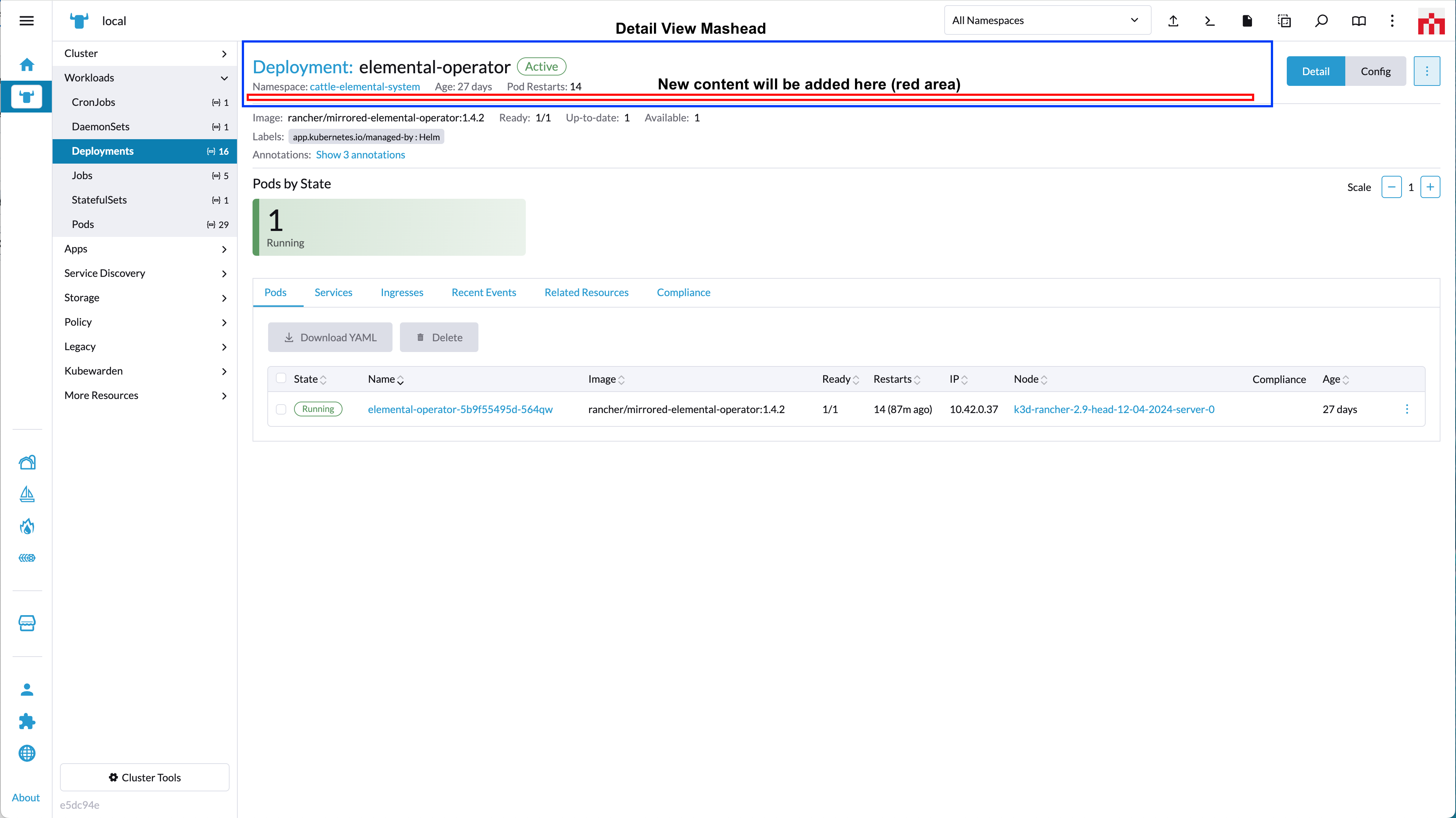
`options` config object. Admissable parameters for the `options` with `'PanelLocation.DETAILS_MASTHEAD'` are:
| Key | Type | Description |
|---|---|---|
|`component`| Function | Component to be rendered as content on the "detail view" Masthead component |
Usage example for `'PanelLocation.DETAILS_MASTHEAD'`:
```ts
plugin.addPanel(
PanelLocation.DETAILS_MASTHEAD
{ resource: ['catalog.cattle.io.clusterrepo'] },
{ component: () => import('./MastheadDetailsComponent.vue') }
);
```
### PanelLocation.DETAIL_TOP options

`options` config object. Admissable parameters for the `options` with `'PanelLocation.DETAIL_TOP'` are:
| Key | Type | Description |
|---|---|---|
|`component`| Function | Component to be rendered as content on the "detail view" detailTop component |
Usage example for `'PanelLocation.DETAIL_TOP'`:
```ts
plugin.addPanel(
PanelLocation.DETAIL_TOP,
{ resource: ['catalog.cattle.io.clusterrepo'] },
{ component: () => import('./DetailTopComponent.vue') }
);
```
### PanelLocation.RESOURCE_LIST options
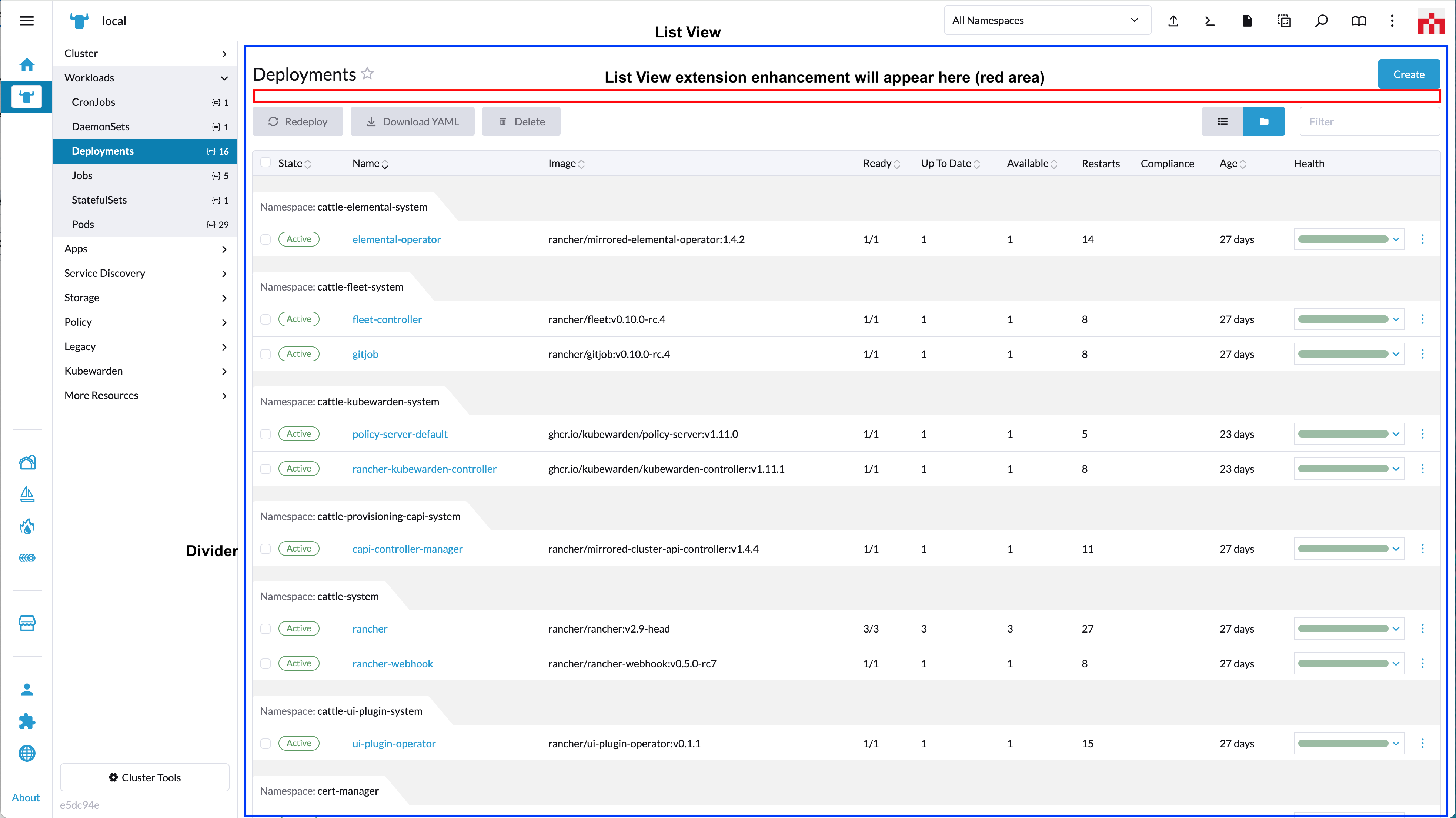
`options` config object. Admissable parameters for the `options` with `'PanelLocation.RESOURCE_LIST'` are:
| Key | Type | Description |
|---|---|---|
|`component`| Function | Component to be rendered as content above a table on a "list view" |
Usage example for `'PanelLocation.RESOURCE_LIST'`:
```ts
plugin.addPanel(
PanelLocation.RESOURCE_LIST,
{ resource: ['catalog.cattle.io.app'] },
{ component: () => import('./BannerComponent.vue') }
);
```