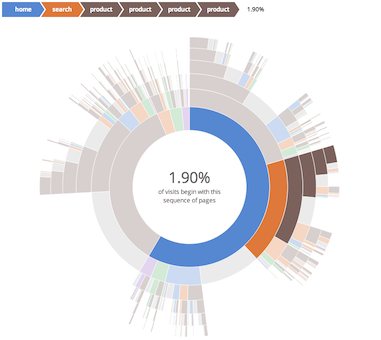
This component is based on [an example](https://bl.ocks.org/kerryrodden/7090426) by [Kerry Rodden](https://bl.ocks.org/kerryrodden), who based his on an interactive [D3 sunburst visualization](http://bl.ocks.org/mbostock/4063423).
A good use case is to summarize navigation paths through a web site, as in the sample synthetic data file (visit_sequences.csv). The visualization makes it easy to understand visits that start directly on a product page (e.g. after landing there from a search engine), compared to visits where users arrive on the site's home page and navigate from there. Where a funnel lets you understand a single pre-selected path, this allows you to see all possible paths.
## Installation
This library has a peer-dependency on d3 >= v6.
If you need support for d3@3 please use d3-
### Browser
```html
```
### node (browserify, webpack ...)
```js
npm install d3 d3-sunburst
```
```js
var d3 = require('d3');
var Sunburst = require('d3-sunburst');
```
## Usage
For now see [examples](./examples/) on how to use this component.
```js
var sunburst = new Sunburst();
sunburst.setData([
["account-account-account", 22781],
["account-account-end", 3311],
["account-account-home", 906]
]);
```
## Features
* works with data that is in a CSV format (you don't need to pre-generate a hierarchical JSON file, unless your data file is very large)
* interactive breadcrumb trail helps to emphasize the sequence, so that it is easy for a first-time user to understand what they are seeing
* percentages are shown explicitly, to help overcome the distortion of the data that occurs when using a radial presentation
If you want to simply reuse this with your own data, here are some tips for generating the CSV file:
* no header is required (but it's OK if one is present)
* use a hyphen to separate the steps in the sequence
* the step names should be one word only, and ideally should be kept short. Non-alphanumeric characters will probably cause problems (I haven't tested this).
* every sequence should have an "end" marker as the last element, *unless* it has been truncated because it is longer than the maximum sequence length (6, in the example). The purpose of the "end" marker is to distinguish a true end point (e.g. the user left the site) from an end point that has been forced by truncation.
* each line should be a complete path from root to leaf - don't include counts for intermediate steps. For example, include "home-search-end" and "home-search-product-end" but not "home-search" - the latter is computed by the partition layout, by adding up the counts of all the sequences with that prefix.
* to keep the number of permutations low, use a small number of unique step names, and a small maximum sequence length. Larger numbers of either of these will lead to a very large CSV that will be slow to process (and therefore require pre-processing into hierarchical JSON).
[Kerry Rodden](https://bl.ocks.org/kerryrodden) created this example in his work at Google, but it is not part of any Google product. It is covered by the Apache license (see the [LICENSE](LICENSE.md) file).