# D3 flextree plugin
[](https://www.jsdelivr.com/package/npm/d3-flextree)
This plugin provides a more general version of the [D3 tree layout
module](https://github.com/d3/d3-hierarchy#tree). Unlike `tree`, this plugin
allows for nodes of variable sizes; like `tree`, the algorithm is fast, running
in *O(n)* time.
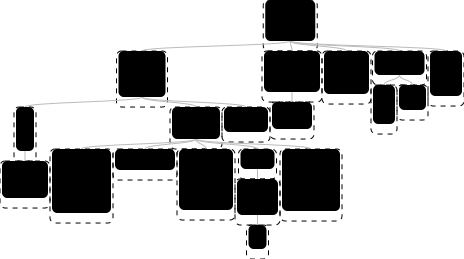
See [the demo](https://klortho.github.io/d3-flextree/).
`flextree()` is a factory function that returns a ***layout*** instance. A
*layout* is a function that computes the positions of nodes in a
tree diagram. Properties attached to the layout control various parameters
of the algorithm.
[Try d3-flextree in your browser](https://npm.runkit.com/d3-flextree).
## Installing
If you use npm, `npm install d3-flextree`.
Otherwise, download the [latest
release](https://github.com/Klortho/d3-flextree/releases/latest).
AMD, CommonJS, and browser environments are supported.
Alternatively, you can use it straight from the jsdelivr CDN at
[https://cdn.jsdelivr.net/npm/d3-flextree@2.0.0/build/d3-flextree.min.js](https://cdn.jsdelivr.net/npm/d3-flextree@2.0.0/build/d3-flextree.min.js). or [d3-flextree.js](https://cdn.jsdelivr.net/npm/d3-flextree@2.0.0/build/d3-flextree.js)
## Overview
Computing the layout of a tree data structure involves two steps: first,
create a *hierarchy* from the data, and second, invoke the layout function.
In a Node environment:
```javascript
const flextree = require('d3-flextree').flextree;
const layout = flextree();
const tree = layout.hierarchy({
size: [1, 1],
children: [
{ size: [2, 4] },
{ size: [3, 1],
children: [
{ size: [4, 1] },
],
},
],
});
layout(tree);
tree.each(node => console.log(`(${node.x}, ${node.y})`));
```
In a browser, `flextree` is attached to a `d3` global (which is created
if necessary):
```html
```
When creating the hierarchy, the library uses the `children` accessor
function to determine the children of a data node. When the layout is
computed, two other accessor functions are used: `nodeSize` (to get the
node sizes) and `spacing` (to determine how far apart adjacent
nodes in the diagram should be placed).
The example above uses the default accessors:
```javascript
children: data => data.children,
nodeSize: node => node.data.size,
spacing: 0,
```
If the data is structured differently, the `children` and `nodeSize`
accessors can be customized. For example, here is the same tree encoded in a
nested array structure, along with the code to compute the layout using a
`spacing` function that increases the gap between more distantly related
nodes:
```javascript
const data = [
1, 1,
[ 2, 4 ],
[ 3, 1,
[ 4, 1 ],
],
];
const layout = flextree({
children: data => {
const kd = data.slice(2);
return kd.length ? kd : null;
},
nodeSize: node => node.data.slice(0, 2),
spacing: (nodeA, nodeB) => nodeA.path(nodeB).length,
});
const tree = layout.hierarchy(data);
layout(tree);
console.log(layout.dump(tree)); //=> prints the results
```
The accessors can also be set using D3-style chained methods:
```javascript
const layout = flextree()
.children(data => {
const kd = d.slice(2);
return kd.length ? kd : null;
})
.nodeSize(node => node.data.slice(0, 2))
.spacing((nodeA, nodeB) => nodeA.path(nodeB).length);
```
One thing to keep in mind is that the argument passed to the
`children` accessor is a node in the *data* structure,
whereas the arguments to `nodeSize` and `spacing` are nodes of
the *hierarchy*.
The `layout.hierarchy` method is a convenience form
of the [`d3.hierarchy`](https://github.com/d3/d3-hierarchy#hierarchy)
function, and creates a set of objects that are instances of
a class that derives from `d3.hierarchy`. It's not required to
use the d3-flextree version. The following code is equivalent to
the example above, with three custom accessors. Note that the
`children` accessor needs to be passed as the second argument
to the `d3.hierarchy` function:
```javascript
const layout = flextree({
nodeSize: node => node.data.slice(0, 2),
spacing: (nodeA, nodeB) => nodeA.path(nodeB).length,
});
const tree = hierarchy(data, data => {
const kd = d.slice(2);
return kd.length ? kd : null;
});
layout(tree);
```
## API Reference
# flextree(accessors)
Creates a new *layout* with the specified accessors. Any subset of
`children`, `nodeSize`, and `spacing` can be specified in the
argument object. If one is not specified, then the default is used:
```javascript
children: data => data.children,
nodeSize: node => node.data.size,
spacing: 0,
```
The accessors can also be changed using chained methods, for example:
```javascript
const layout = flextree()
.spacing((nodeA, nodeB) => nodeA.path(nodeB).length);
```
# layout.hierarchy(data)
Creates a new *hierarchy* from the data, using the `children` accessors
in effect when called. This is an enhanced version of the
[`d3.hierarchy`](https://github.com/d3/d3-hierarchy#hierarchy)
function, and produces a tree of instances of a class derived from
`d3.hierarchy`.
Each node of the hierarchy inherits all of the methods defined
in [d3.hierarchy](https://github.com/d3/d3-hierarchy), including:
* *node*.[ancestors](https://github.com/d3/d3-hierarchy#node_ancestors)()
* *node*.[descendants](https://github.com/d3/d3-hierarchy#node_descendants)()
* *node*.[leaves](https://github.com/d3/d3-hierarchy#node_leaves)()
* *node*.[path](https://github.com/d3/d3-hierarchy#node_path)(*target*)
* *node*.[links](https://github.com/d3/d3-hierarchy#node_links)()
* *node*.[sum](https://github.com/d3/d3-hierarchy#node_sum)(*value*)
* *node*.[count](https://github.com/d3/d3-hierarchy#node_count)()
* *node*.[sort](https://github.com/d3/d3-hierarchy#node_sort)(*compare*)
* *node*.[each](https://github.com/d3/d3-hierarchy#node_each)(*function*)
* *node*.[eachAfter](https://github.com/d3/d3-hierarchy#node_eachAfter)(*function*)
* *node*.[eachBefore](https://github.com/d3/d3-hierarchy#node_eachBefore)(*function*)
* *node*.[copy](https://github.com/d3/d3-hierarchy#node_copy)() - this
method is re-implemented in flextree, such that it preserves the
class.
In addition, each of the objects in the returned hierarchy has
several property getters. Many of these will be meaningless
until `layout` is called on this tree. They include:
* `x` - the computed *x*-coordinate of the node position.
* `y` - the computed *y*-coordinate of the node position.
* `data` - reference to the original data object
* `nodes` - all of the nodes in this subtree (same as `descendants()`)
* `parent` - the parent node, or `null` for the root.
* `children` - the array of child nodes, or `null` for leaf nodes.
* `numChildren`
* `hasChildren`
* `noChildren`
* `depth` - the depth of the node, starting at 0 for the root.
* `height` - the distance from this node to its deepest descendent,
or 0 for leaf nodes.
* `length` - number of nodes in this subtree
* `size` - size of this node (the values fetched by the `nodeSize` accessor)
as a two-element array.
* `xSize`
* `ySize`
* `top`
* `bottom`
* `left`
* `right`
* `extents` - the minimum `top` and `left`, and the maximum `bottom` and
`right` values for all of the nodes in this subtree
# layout(tree)
Computes the layout of a *hierarchy*. `x` and `y` properties are
set on each node, and many other properties useful in rendering
are available -- see the list above.
Although the layout is defined in terms of *x* and *y*, these represent an
arbitrary coordinate system. For example, you can treat *x* as a radius
and *y* as an angle to produce a radial rather than Cartesian layout.
# layout.children([children])
If *children* is specified, sets the specified children accessor function.
If *children* is not specified, returns the current children accessor
function, which by default assumes that the input data is an object with
a children property, whose value is either an array or `null` if there
are no children:
```javascript
data => data.children
```
Note that unlike the other accessors, this takes a *data* node
as an argument. This is used only in the creation of a hierarchy,
prior to computing the layout, by the `layout.hierarchy` method.
# layout.nodeSize([nodeSize])
If *nodeSize* is specified as a two-element array `[xSize, ySize]`, then
this sets that as the fixed size for every node in the tree. If *nodeSize*
is a function, then that function is passed the hierarchy node as an argument,
and should return a two-element array. If *nodeSize* is not specified, this
returns the current setting.
The default `nodeSize` assumes that a node's size is available as a
property on the data item:
```javascript
node => node.data.size
```
# layout.spacing([spacing])
If a *spacing* argument is given as a constant number, then the layout
will insert the given fixed spacing between every adjacent node.
If it is given as a function, then that function will be passed two
nodes, and should return the minimum allowable spacing between those
nodes. If *spacing* is not specified,
this returns the current spacing, which defaults to `0`.
To increase the spacing for nodes as the distance of their relationship
increases, you could use, for example:
```javascript
layout.spacing((nodeA, nodeB) => nodeA.path(nodeB).length);
```
## The Algorithm
The existing D3 tree layout is based on an algorithm developed originally
by Reingold and Tilford in their paper from 1981, [Tidier Drawings of
Trees][1]. The algorithm was improved over time by others, including Walker,
in a paper in 1989, [A Node-Positioning Algorithm for General Trees][2], and
the latest improvement by Bucheim, Junger, and Leipert in 2002, described in their
paper, [Improving Walker's Algorithm to Run in Linear Time][2].
A limitation of that algorithm is that it applies to trees in which all of
the nodes are the same size. This is adequate for many applications, but
a more general solution, allowing variable node sizes, is often
preferable.
In a paper from 2013, A.J. van der Ploeg enhanced the algorithm to allow
for variable-sized nodes, while keeping its linear runtime nature. He
described the algorithm in his paper, [Drawing Non-layered Tidy Trees in
Linear Time][3]. The author also provided a working Java application
on GitHub at
[cwi-swat/non-layered-tidy-trees](https://github.com/cwi-swat/non-layered-tidy-trees).
This module is a port from that Java code into JavaScript.
[1]: http://emr.cs.iit.edu/~reingold/tidier-drawings.pdf
[2]: http://www.cs.unc.edu/techreports/89-034.pdf
[2]: http://dirk.jivas.de/papers/buchheim02improving.pdf
[3]: http://oai.cwi.nl/oai/asset/21856/21856B.pdf