# Custom Captcha
Extending Google reCaptcha v3 with a custom checkbox.
This script creates a custom "skin" for the Google reCaptcha, using the v3 invisible captcha.
You can make your own branded reCaptcha to make a unique experience.
## **⚠️ Warning**
### This captcha is using invisible reCaptcha v3 which is based on scoring instead of a visual challenge.
## Usage:
### Add this to the \:
```html
```
### Add this to your form(s):
```html
```
### And finally initialize the widget:
```js
CustomCaptcha.init("");
```
### Configuration:
| parameter | description | values | default |
| ------------ | ---------------------------------------- | -------------------------- | -------------------- |
| logo | the captcha brand logo | \ | favicon\* |
| name | the name used in the form | \ | g-recaptcha-response |
| text | the text displayed in the bottom right | \ | reCAPTCHA |
| lang | language of the "I'm not a robot" | en, hu, de, sk, ro, hr, fr | browser default |
| label | Custom text instead of "I'm not a robot" | \ | "I'm not a robot" |
| theme | the color scheme of the widget | light, dark | light |
| required | makes the field required (recommended) | | not set |
| logo-rounded | makes the logo rounded | | not set |
\* By default the brand logo is the website favicon. If the website has no favicon or it is not available for some reason then it will fall back to the reCAPTCHA logo.
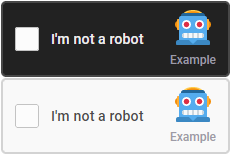
### Default configuration on initialization:
```html
```
```js
CustomCaptcha.init({
siteKey: "",
text: "Example",
logo: "https://cdn.jsdelivr.net/gh/twitter/twemoji/assets/svg/1f916.svg",
theme: "dark"
});
```
### Configuration on the element:
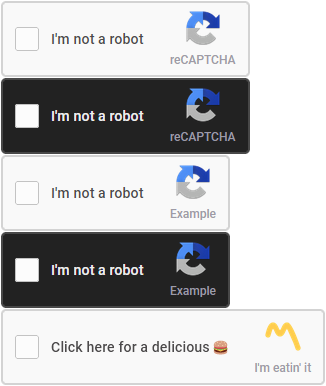
```html
```
## Placeholder:
### Until you initialize the widget you can show a placeholder text
```html
Please wait while the Captcha is loading...
```
## How to get siteKey?
- Go to the [Google reCaptcha admin](https://www.google.com/recaptcha/admin/create) page
- Choose **reCaptcha v3**
- Add your domain(s) under **Domains**
- Click on **Submit**
- Copy the **site key** and use it in **init**
## **⚠️ Please note**
### You need to process captcha score in your backend
### Example code for validating response:
```php
function validate_captcha_response($code){
if($_SERVER['HTTP_HOST']=="localhost") return true;
if(!$code || strlen($code)<32){
$secret = "";
$ip = $_SERVER['REMOTE_ADDR'];
$gcaptcha = json_decode(file_get_contents("https://www.google.com/recaptcha/api/siteverify?secret=$secret&response=$code&remoteip=$ip"), true);
return ($gcaptcha['success'] == true && $gcaptcha['score'] >= 0.8 && $gcaptcha['hostname'] == $_SERVER['SERVER_NAME']);
}
return false;
}
```