---
nav:
title: Config
title: Markdown Config
order: 2
---
All Markdown configurations are configured in the form of FrontMatter at the top of the Markdown file, for example
```
---
title: configure page title
---
Additional Markdown content
```
Currently the theme supports the following Markdown configurations.
## Multi-level sidebar
> This configuration needs to be distinguished from the `sidebarEnhance` parameter. The `sidebarEnhance` parameter is to deal with issues such as multi-level file directories, custom sidebars, and preventing multi-level sidebar clicks and jumps. The Markdown configuration is in the same Under the file directory, functions such as grouping and three-level sidebars are realized through configuration.
This configuration only takes effect in none sidebarGroupModePath mode.
Configuring multi-level sidebars mainly depends on two fields `group` and `type`, `group` configures the first-level sidebar, and `type` configures the second-level sidebar. First level sidebar configuration:
```
---
group: '全局样式'
order: 0
title: '色彩'
---
---
group: '全局样式'
order: 1
title: '布局'
---
```

Second level sidebar configuration:
```
---
group: '设计模式'
order: 0
title: '概览'
---
---
group: '设计模式'
type: '模板文档'
order: 1
title: '表单页'
---
---
group: '设计模式'
type: '模板文档'
order: 0
title: '数据可视化页'
---
```

The `group` field type supports object format, which is used to adjust the display order of `group`. For example, setting the `order` field in `group` can adjust the order of `global style` and `design mode`:
```
---
group:
title: '全局样式'
order: 2
order: 1
title: '布局'
---
---
group:
title: '设计模式'
order: 1
order: 0
title: '概览'
---
```

Similarly, `type` field type also supports object format, which is used to adjust the display order of `type`.
## Hide the sidebar
To hide the sidebar just set the `sidebar` value to `false` in FrontMatter:
```md
---
sidebar: false
nav: example
title: hide sidebar
order: 3
---
```
## Menu bar Tag configuration +0.3.4
In order to display the menu bar update or identify the status, the menu supports tag configuration:
```md
---
tag:
title: new
color: success
---
```
The menu is then rendered as:
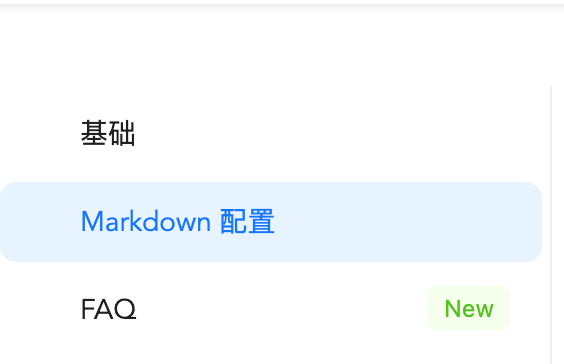 You can also directly use the simple mode and configure it directly as a string. In this case, the default color is `processing`.
```md
---
tag: new
---
```
You can also directly use the simple mode and configure it directly as a string. In this case, the default color is `processing`.
```md
---
tag: new
---
```