# crosspane

<a href="https://github.com/yunwoo-yu/crosspane/blob/main/README.ko.md">한국어</a>

<p>
  <a href="https://www.npmjs.com/package/crosspane"><img alt="npm version" src="https://img.shields.io/npm/v/crosspane.svg?color=cb3837"></a>
  <a href="https://github.com/yunwoo-yu/crosspane/actions/workflows/ci.yml"><img alt="CI" src="https://github.com/yunwoo-yu/crosspane/actions/workflows/ci.yml/badge.svg"></a>
  <a href="https://github.com/yunwoo-yu/crosspane/blob/main/LICENSE"><img alt="MIT license" src="https://img.shields.io/badge/license-MIT-blue.svg"></a>
  <img alt="node 20+" src="https://img.shields.io/node/v/crosspane.svg">
</p>

**Debug web screens where devtools can't reach.**

In-app webviews, in-app browsers (KakaoTalk, Instagram, Line), kiosks, TVs, security-hardened
builds — the places where `chrome://inspect` shows nothing and Safari's Develop menu stays
empty. crosspane gives those screens a console, a network log and a shareable capture file.

> **⚠️ Beta** — APIs and CLI flags may change between minor versions until 1.0.
> Bug reports and feedback are very welcome — please [open an issue](https://github.com/yunwoo-yu/crosspane/issues).
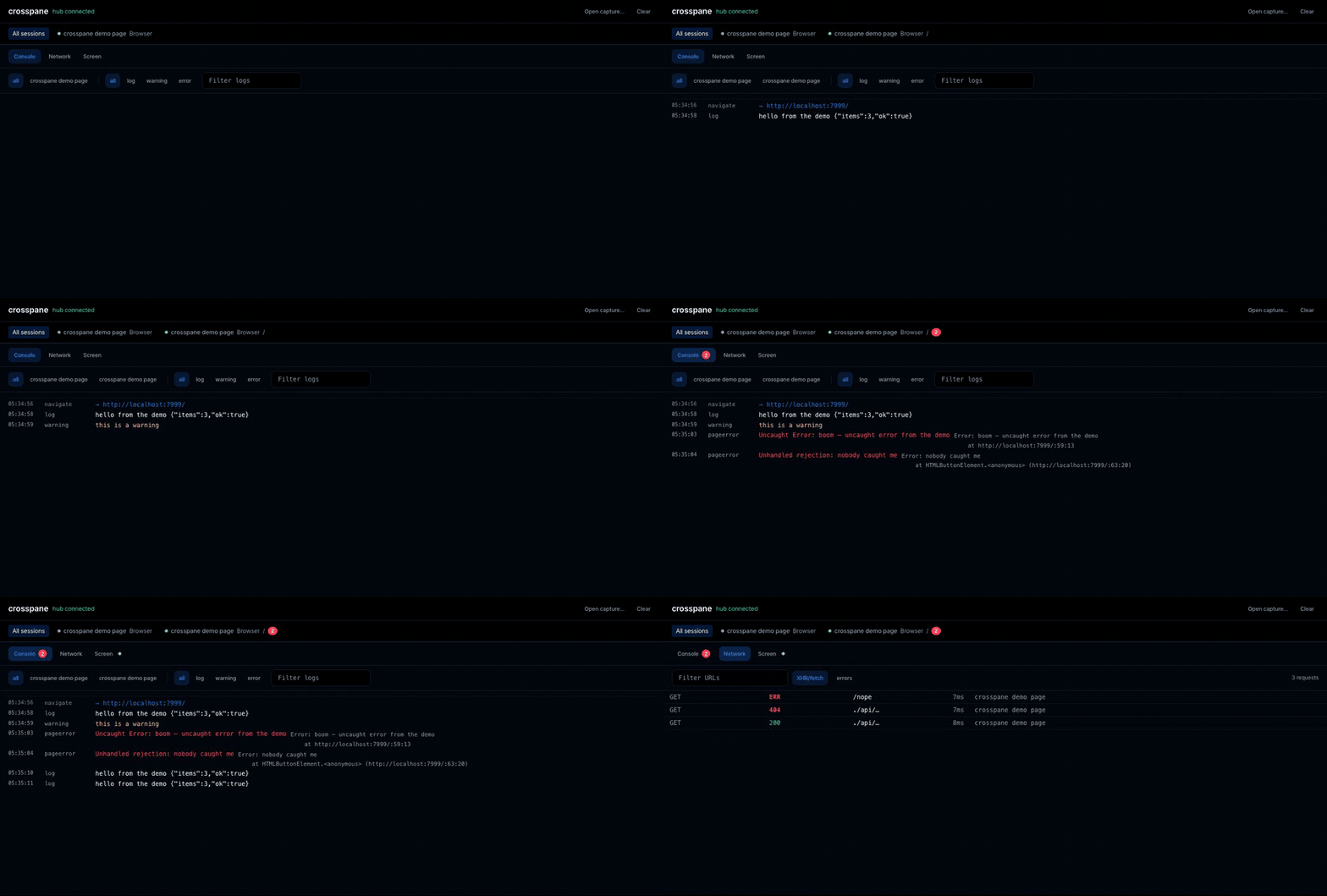
![Console and network events from a webview arriving in the crosspane dashboard in real time](https://raw.githubusercontent.com/yunwoo-yu/crosspane/main/docs/images/demo.gif)

*A page with no devtools access, streaming its console and network activity to the dashboard.*

## How it works

```
your app (dev/QA build)                 your machine
┌──────────────────────────┐            ┌──────────────────────────┐
│  @crosspane/agent        │  live WS   │  crosspane hub           │
│  console · errors        │ ─────────► │  dashboard on :7788      │
│  fetch/XHR · navigation  │            │  console · network       │
│  crash-resistant buffer  │            │                          │
└──────────┬───────────────┘            └──────────────────────────┘
           │  export .crosspane.json  ──────────►  drop into the dashboard
           │  (no network needed — works behind ISMS-P / MDM locks)
```

Two ways to get the data out, because networks aren't always available:

- **Live** — the agent streams to the hub (your LAN by default, or through a tunnel or your
  own origin), you watch in real time, and can save any session to a file from the dashboard
- **Offline** — the agent keeps the last N events in a ring buffer; export one JSON file,
  send it to a developer, replay it in the same dashboard

## Quick start

**1. Run the hub**

```bash
npx crosspane                  # dashboard on http://localhost:7788
```

It tells you where to look and, once a page connects, what it is streaming:

```
crosspane dashboard → http://localhost:7788
● session · checkout webview  https://staging.example.com/pay
```

So you know the page found the hub without opening the dashboard — the thing you most want
to know when nothing shows up. The dashboard itself is in English or Korean, following your
browser and switchable in the header.

**2. Add the agent to your app** (dev/QA builds only — see [Shipping safely](#shipping-safely))

```bash
npm install @crosspane/agent
```

**Call it once, as early as your app can run code.** Anything that happens before the call is
not hooked — requests are partly recovered from resource timing afterwards, but **console logs
from before the call are gone for good.** So it belongs at the top of your entry point, above
your own imports, not inside a component that mounts later.

| Your setup | File | Where in it |
|---|---|---|
| **Next.js** (App Router) | a new `app/crosspane.tsx` with `'use client'`, imported from `app/layout.tsx` | top level of that module — see below |
| **Next.js** (Pages Router) | `pages/_app.tsx` | top of the file, outside the component |
| **Vite** (React/Vue/Svelte/Solid) | `src/main.ts` / `src/main.tsx` | first lines, before `createApp` / `createRoot` |
| **Create React App** | `src/index.tsx` | first lines, before `createRoot` |
| **SvelteKit** | `src/routes/+layout.svelte` | inside `<script>`, guarded by `browser` |
| **Astro** | your base layout's `<script>` | before other scripts |
| **No bundler** | a `<script>` in `<head>` | before your other scripts — [see the agent README](https://github.com/yunwoo-yu/crosspane/tree/main/packages/agent#without-a-bundler) |

```ts
// src/main.tsx — Vite, CRA. First lines of the file.
import { initCrosspane } from '@crosspane/agent'

initCrosspane({
  label: 'checkout webview',
  serverUrl: import.meta.env.VITE_CROSSPANE_URL,   // omit entirely on localhost
})

// ...your own imports and createRoot() below
```

**Next.js App Router needs one extra step.** `app/layout.tsx` is a server component: calling
`initCrosspane()` there runs it on the server, where there is no page to hook — it does not
crash, it just **silently does nothing**, which is harder to notice than a crash. Put it in a
client module instead:

```tsx
// app/crosspane.tsx
'use client'
import { initCrosspane } from '@crosspane/agent'

// Top level, not inside the component and not in useEffect — a module runs as soon as the
// client bundle loads, while useEffect waits for React to mount and misses your early logs.
initCrosspane({
  label: 'checkout webview',
  serverUrl: process.env.NEXT_PUBLIC_CROSSPANE_URL,
})

export function Crosspane() {
  return null
}
```

```tsx
// app/layout.tsx — render it once, anywhere inside <body>
import { Crosspane } from './crosspane'
```

Calling `initCrosspane()` twice is safe — the second call returns the same agent rather than
hooking anything again — so a hot reload or a double-mounted layout won't duplicate events.

Offline capture works the same everywhere; wire it to a debug gesture or a hidden QA menu:

```ts
const agent = initCrosspane({ label: 'checkout webview' })

// In a webview, prefer copyCapture() — downloads often fail silently there
// (see "Getting captures off a locked device")
agent.exportFile()   // downloads <label>.crosspane.json
```

That's the whole setup on localhost — the agent finds the hub by itself, so you can leave
`serverUrl` out entirely. For every other environment you set that one env var and nothing else
changes: see [One setup for every environment](#one-setup-for-every-environment).

**Pass the env var through `serverUrl` as the examples do, rather than letting the agent read
it on its own.** Both work on localhost, but only the explicit one connects when you open the
page from a phone at `http://<your-lan-ip>:3000` — an env var can be baked in by CI, so an
address the agent picked up by itself needs a per-device opt-in before it will stream anywhere
but localhost. Handing it to `serverUrl` is you saying it out loud, so no opt-in is asked for.

`agent.live` tells you an address was resolved — **not that the hub answered.** It is `true`
even when nothing is listening there. To see whether sessions actually arrive, watch the hub's
terminal: it prints `● session · <label>` the moment a page connects.

**3. Reproduce the bug.** Console logs, uncaught errors, unhandled rejections, failed
requests and navigations show up in the dashboard — or in the exported file.

### One setup for every environment

The only thing that differs between localhost, a phone on your Wi-Fi, a deployed staging URL and
production is **how the page reaches your hub**. Give it one address that works from all of them
and there is nothing else to vary.

```ts
initCrosspane({
  label: 'checkout webview',
  serverUrl: process.env.NEXT_PUBLIC_CROSSPANE_URL,  // Vite: import.meta.env.VITE_CROSSPANE_URL
})
```

```
NEXT_PUBLIC_CROSSPANE_URL=https://crosspane.example.com
```

Just the address, like any other base URL — nothing appended, and the same value is fine in every
environment including production. Sending sessions needs no credential; **reading** them needs a
token that never leaves your machine, which is why a page source anyone can read gives nothing
away.

**For a deployed page — a staging URL on your phone — one flag:**

```bash
crosspane --lan-tls
```

The hub serves `https://<your-lan-ip-with-dashes>.local-ip.sh:7788` with a certificate devices
already trust, so an `https://` page on the same Wi-Fi can reach your laptop. Put that address
in the env var above. **No tunnel, no account, nothing installed on the device** — measured on a
real Android phone against a deployed site, with no permission prompt shown. Read the trade-offs
under *"If you can't route logs through a tunnel"* below before you rely on it.

For a hub reachable from **anywhere** — a teammate's network, CI, a device that isn't on your
Wi-Fi — use a tunnel instead:

```bash
crosspane --tunnel --write-env
```

That starts a tunnel with your installed `cloudflared` or `ngrok`, advertises its address, and
writes it into `.env.local` for you — so during local and on-device development there is nothing
to copy at all. Stop the hub and the tunnel and the env entry go with it. Session logs transit the
tunnel provider, which is why it's an explicit flag; crosspane never downloads a binary for you.

For a **deployed** app the address goes into your deployment config, so it must not change. Add a
hostname and crosspane sets the permanent tunnel up for you:

```bash
cloudflared tunnel login                                        # once, opens a browser
crosspane --tunnel --hostname crosspane.example.com             # every day
```

The second command creates the named tunnel, routes DNS to it and runs it — and it's idempotent,
so it's also the command you run tomorrow. Your deployment config keeps
`https://crosspane.example.com` forever.

Only the login can't be automated: a permanent public hostname belongs to an account somewhere, and
that account needs a browser once. (Measured while looking for a way around it: ngrok's free plan
refuses custom subdomains outright — *"Only paid plans may create endpoints with custom
subdomains"*. Tailscale Funnel gives a stable `*.ts.net` with no domain at all, if you'd rather not
use Cloudflare; point `--public-url` at it.)

### Who actually streams

By default every install with that address streams. That's what you want in a dev or QA build. If
the same build reaches people you don't want sending you logs, gate it on something your app
already knows — with `enabled: false` the agent installs **no hooks at all**:

```ts
initCrosspane({ serverUrl: HUB, enabled: () => user.isQA })
```

A feature flag, an internal-account check, a toggle in a hidden debug menu — anything. This is the
right gate for **a webview the app opens itself**, which is most of what this tool is for: there's
no address bar in one, so nothing URL-based can work there.

If the page has no user model at all (a static site, a kiosk), `isDebugActivated` gates on a link
instead — open the page once with `?__crosspane=on` and that device streams until
`?__crosspane=off`:

```ts
import { initCrosspane, isDebugActivated } from '@crosspane/agent'
initCrosspane({ serverUrl: HUB, enabled: isDebugActivated })
```

`agent.live` tells you which state you ended up in.

<details>
<summary>If you can't route logs through a tunnel</summary>

A tunnel is one flag but it does send session logs through a third party, which some teams can't
accept. Any of these replaces it, and the app-side code above does not change — only the address:

| | how | trade-off |
|---|---|---|
| **A team hub** | run the hub on real infrastructure with a normal certificate | nothing transits anyone else; needs somewhere to run it |
| **Your own certificate** | `crosspane --host 0.0.0.0 --tls-cert cert.pem --tls-key key.pem` | nothing leaves your network — but only works when the **page is on that network too** (an internal staging site, say). A page served from the public internet can never reach it, certificate or not |
| **Reverse proxy on your origin** | `crosspane --public-url https://staging.example.com/__crosspane`, and point that path at the hub | same origin, no third party; needs one route in your app server, forwarding the WebSocket upgrade |
| **Plain HTTP on your LAN** | `crosspane --host 0.0.0.0 --write-env` | simplest, and right for a dev server you open from a phone on the same Wi-Fi. A deployed page can't use it — see below |
| **No network at all** | `agent.copyCapture()` | unaffected by addresses, certificates and origins; the main path on a locked-down build |

**A deployed page reaching a hub on your LAN is a permission, not a prohibition.** Chrome answers
`LocalNetworkAccessPermissionDenied` — and `local-network-access` is a real permission whose state
is `prompt` in an ordinary browser, like camera or microphone. Measured with that check lifted and
nothing else changed: `https://example.com` → `wss://<lan-ip>.local-ip.sh/agent` delivered a session
and a console event to the hub, over a genuine Let's Encrypt certificate.

`--lan-tls` is that path, in one flag — it implies `--host 0.0.0.0`, since reaching the hub from
another device is the whole point:

```bash
crosspane --lan-tls
```

Know what you're getting before you rely on it:

- **Browsers ask once; in-app webviews don't.** Chrome shows a local-network permission prompt —
  allow it. Inside an Android WebView (which is what KakaoTalk, Instagram and Line in-app browsers
  are) Chrome currently grants Local Network Access **unconditionally**, with no prompt at all,
  because WebView has no way for the host app to grant new permission types.
- **That changes with Android 17.** `ACCESS_LOCAL_NETWORK` becomes a mandatory runtime permission
  for apps targeting API 37+, and **WebView traffic inherits the permission state of the host app**.
  So on Android 17 the in-app browser can only reach your laptop if KakaoTalk (or whichever app it
  is) holds that permission — and those apps have little reason to ask for it. Treat `--lan-tls` as
  something that works well today and may stop working, not as a foundation. iOS has been like this
  since 14: the local-network check applies to `WKWebView`, and the host app must declare
  `NSLocalNetworkUsageDescription`.
- **Offline capture is the path that can't be taken away.** `agent.copyCapture()` needs no network,
  no certificate and no permission, which is why it stays the fallback for a locked-down build.
- **Some networks won't resolve it.** Corporate resolvers and many routers drop public DNS answers
  that point at private addresses (rebinding protection). crosspane checks at startup and tells you
  so rather than failing silently.
- **The certificate's private key is public** — that's how `*.local-ip.sh` works, and it's the only
  way to get a trusted certificate for an address that isn't yours. So this buys *trust*, not
  secrecy: someone on your Wi-Fi could decrypt the traffic. It replaces plain HTTP, which they could
  read anyway, and reading sessions still needs the `?t=` token. Don't use it on a network where
  that matters — use your own certificate or a tunnel.
- **It depends on `local-ip.sh` staying up**, both for DNS and for the certificate (fetched once and
  cached until a week before expiry).

A **self-signed certificate does not work** in app webviews either: since Android 7, apps don't
trust user-installed CAs. That's why crosspane accepts a certificate but never generates one — and
why `--tls-cert` is for a hub the page can actually reach (an internal network, or a public one).

Anyone who knows your hub's address can send junk sessions to it — never read one. If that matters
for a hub that's long-lived and shared, `--ingest-key <key>` requires a `?k=` from senders too, at
the cost of carrying it in your env var.

</details>

## What you get

- **Console** — `console.*` with argument serialization, uncaught errors with stacks,
  unhandled promise rejections. Filter by level, search, follow-tail
- **Network** — every request the page makes, not just the ones we can intercept. fetch and
  XHR are hooked (status, duration, failures, optional body previews); images, CSS, scripts,
  `sendBeacon`, `EventSource` **and requests that fired before the agent loaded** are recovered
  from resource timing. Requests hidden by a filter are always counted on screen, so an empty
  list never means "we didn't record it"
- **Timeline** — logs, requests, clicks and performance in **one stream**, filterable by kind.
  devtools splits these across tabs, so you rebuild the causality in your head; here you read
  `click button#pay` → `POST 500 /api/pay` → `payment failed` in three consecutive lines
- **User interactions** — clicks, form submits, control keys and typing **length**. What you
  typed is never captured, so a password can't leak into a log
- **Rendering and responsiveness** — LCP, CLS, INP, FCP, TTFB and long tasks, so "why is this
  slow" is answerable in a webview that has no devtools
- **Navigation timeline** — SPA route changes included, so logs are grouped by screen
- **Session list** — several devices at once, each labeled, live/ended state, error badges
- **Save and replay** — save what you're watching live to a `.crosspane.json`, or drop a file
  someone sent you back into the dashboard; identical UI either way
- **Screen recording** (opt-in) — add `@crosspane/agent-replay` to record the DOM and play
  it back in the Screen tab, in the same timeline as the logs
- **MCP server** — `crosspane mcp` lets a coding agent read the sessions itself, so you can
  ask "why did the payment webview fail?" instead of copying logs out of the dashboard
- **English and Korean** — the dashboard follows your browser's language and switches in the
  header; the choice sticks

![Replaying a recorded session in the Screen tab](https://raw.githubusercontent.com/yunwoo-yu/crosspane/main/docs/images/dashboard-screen-replay.png)

## Why not just use remote debugging?

Use it when you can — `chrome://inspect` and Safari Web Inspector are better tools.
crosspane exists for when they don't work:

| Situation | Remote inspector | crosspane |
|---|---|---|
| Release build without `setWebContentsDebuggingEnabled` / `isInspectable` | ✗ nothing appears | ✓ |
| App protection (ISMS-P style) that kills the app on debugger attach | ✗ | ✓ |
| Tester on another desk / another city with no Mac | ✗ | ✓ export a file |
| In-app browser inside someone else's app | ✗ | ✓ (if you control the page) |
| Kiosk, TV, embedded display | ✗ | ✓ |
| Breakpoints, DOM inspection, profiling | ✓ | ✗ — use the real inspector |

## Shipping safely

crosspane collects console output and request metadata. Treat it as a debug build feature:

```ts
// Keep it on, gated — this is what lets you debug the bug that only happens in production
initCrosspane({ serverUrl: HUB, enabled: isDebugActivated })

// Or drop it from store builds entirely, if you never want it shipped
if (process.env.NODE_ENV !== 'production') {
  const { initCrosspane } = await import('@crosspane/agent')
  initCrosspane({ label: 'checkout webview' })
}
```

- `enabled: false` installs **no hooks at all** — `console`/`fetch`/XHR stay untouched, so a
  visitor who hasn't opted in is unaffected
- The address in your build is just an address: sending sessions needs no credential, and
  **reading** them needs a token that stays on your machine. That's why it's safe in a page whose
  source anyone can read — see [SECURITY.md](https://github.com/yunwoo-yu/crosspane/blob/main/SECURITY.md)
- Response bodies are **not** captured unless you pass `captureBodies: true`
- The agent has no dependencies and adds ~5 KB gzipped

## CLI

```
crosspane [options]

--port <n>     dashboard port (default: 7788; the default port falls back +1 when taken,
               an explicit port does not)
--host <addr>  bind address (default: 127.0.0.1 — local only. Use 0.0.0.0 to receive
               live agent sessions from phones/devices on your network)
--lan-tls      serve the hub over https/wss on your LAN with a certificate devices
               already trust, so a deployed https:// page can reach it from the same
               Wi-Fi. Implies --host 0.0.0.0
--tunnel       start a tunnel with an installed cloudflared or ngrok and advertise its
               address. Session logs transit that provider; nothing is downloaded for you
--hostname <name>
               a permanent address instead of a throwaway one — with --tunnel, crosspane
               creates and routes a named Cloudflare tunnel (idempotent)
--tls-cert <file> / --tls-key <file>
               serve over https/wss with your own certificate
--public-url <url>
               advertise this address instead of the LAN one, for a tunnel or a reverse
               proxy in front of the hub. Given once, remembered
--write-env [file]
               write this hub's address into an env file (default .env.local) so the
               agent needs no arguments; removed again when the hub stops
--ingest-key <key>
               require senders to include ?k=<key> too. Off by default, so the address
               is all your app needs
--no-auth      disable the read token that exposing the hub adds — only on a network you
               fully trust
--no-open      don't open the dashboard automatically
--verbose      diagnostic logging — attach to bug reports
-v, --version  print the version
-h, --help     show help
```

Exposing the hub generates two credentials, and the difference matters: a **write-only ingest
key** (`?k=`) is safe in a deployed page whose source anyone can read, while the **read token**
(`?t=`) belongs only in your dashboard URL. crosspane never puts the read token in an address
meant for your app.

While the hub runs it prints each session as it joins and leaves, with the page's URL — so you
can tell "my app can't reach the hub" from "my app isn't running that code" without opening
anything.

## Ask a coding agent instead (MCP)

`crosspane mcp` exposes the running hub's sessions over the Model Context Protocol, so a
coding agent can read the console and network itself. Register it once:

```json
{ "mcpServers": { "crosspane": { "command": "crosspane", "args": ["mcp"] } } }
```

Then, with the hub running and a device attached, ask in plain language — *"the checkout
webview on the test phone is stuck on the spinner, what's failing?"* The agent calls
`list_sessions`, then `get_errors`, and reads the stack and the failed request itself.

| Tool | Returns |
|---|---|
| `list_sessions` | attached sessions with labels, platform and event counts |
| `get_errors` | exceptions, console errors and failed requests, in order |
| `get_console` | console output, filterable by level and text |
| `get_network` | requests with status and duration, `failedOnly` to narrow |
| `get_timeline` | everything chronologically, to see the lead-up to a failure |

Sessions can be named by id, by label, or by part of a label; omit it entirely when only one
device is attached. Pass `--hub <url>` if the hub isn't on the default port.

## Agent API

```ts
const agent = initCrosspane({
  label?: string            // shown in the dashboard (default: document.title)
  enabled?: boolean | (() => boolean)
  serverUrl?: string        // usually omit — resolved automatically (see below)
  bufferSize?: number       // ring buffer size (default: 2000 events)
  captureBodies?: boolean   // capture response bodies (default: false)
  bodyPreviewLimit?: number // default: 2048 chars
})

agent.live           // → true if a hub address was resolved (NOT that the hub answered)
agent.capture()      // → SessionCapture object (send it wherever you like)
agent.exportFile()   // → downloads .crosspane.json
agent.copyCapture()  // → Promise<boolean>, puts the JSON on the clipboard
agent.dispose()      // → restores console/fetch/XHR, closes the live connection
```

`serverUrl` is resolved in this order, so you rarely pass it:

| Page is on | Live mode connects to |
| --- | --- |
| `localhost` | `http://localhost:7788` automatically, or the injected address if there is one |
| any other host | the injected address — **only** on devices activated with `?__crosspane=on` |
| anywhere, no injected address | nothing; the ring buffer still records for offline capture |

Passing `serverUrl` yourself always wins and never needs activation — writing it down is
already a deliberate act. Injected addresses are treated more carefully because CI puts
them there, so they can end up in a production build.

## Getting captures off a locked device

Offline capture is the main path on a security-locked build, so the capture has to be able
to leave the device. **Do not assume the download works** — `exportFile()` creates a blob
and clicks a link, which a webview only honours if the host app implements downloads
(`setDownloadListener` on Android, `WKDownloadDelegate` on iOS); in-app browsers usually
block it outright, and there is no way to detect the failure from JavaScript.

Worse, the modern escape hatches are unavailable exactly where you need them. An in-house
build served from `http://<lan-ip>` is **not a secure context**, so `navigator.clipboard`
and `navigator.share` are not merely restricted — they are `undefined` (measured, not
assumed). Pick a route that survives that:

| Route | Works without app changes | Notes |
|---|---|---|
| `agent.copyCapture()` | ✓ | Falls back to `execCommand('copy')` on non-secure origins. Needs a user gesture — call it from a tap, not on a timer. Returns `false` if it couldn't copy: **show that to the tester**, or they'll blame the tool instead of reporting the bug |
| Native bridge | ✗ (a few lines of app code) | The most reliable route for RN / native webviews — see below |
| `agent.exportFile()` | ✗ | Fine in a desktop browser or a webview whose host implements downloads |
| Live mode | ✓ | Best when the device can reach your machine; the hub also saves sessions itself. From an `https://` page the hub needs `wss://` — see [Debugging an `https://` page](#debugging-an-https-page) |

For a native webview, hand the object to the app and let it write a file or open a share
sheet — it is a plain JSON-serializable value:

```ts
// React Native WebView
window.ReactNativeWebView?.postMessage(JSON.stringify(agent.capture()))

// iOS WKWebView (app registers a "crosspane" script message handler)
window.webkit?.messageHandlers?.crosspane?.postMessage(agent.capture())

// Android (app calls addJavascriptInterface(obj, "CrosspaneNative"))
window.CrosspaneNative?.save(JSON.stringify(agent.capture()))
```

## Platform support

The agent is plain DOM JavaScript — it runs in any modern webview or browser:
Android WebView, WKWebView, React Native WebView, Flutter InAppWebView, in-app browsers,
Electron, kiosk browsers. The hub runs on macOS, Windows and Linux (Node ≥ 20).

## Roadmap

- [x] Screen recording via rrweb — [@crosspane/agent-replay](https://github.com/yunwoo-yu/crosspane/tree/main/packages/agent-replay)
- [x] MCP server — `crosspane mcp`, so coding agents query session logs directly
- [ ] Attach mode: Android WebView over CDP (`adb`) for full DevTools on debug builds
- [ ] iOS WebKit Inspector attach via pymobiledevice3
- [ ] Framework adapters (React Native bridge, Flutter)

## Development

```bash
pnpm install
pnpm build
pnpm try       # hub on :7788 + demo page on :7999 — open the demo page and click things
```

```bash
pnpm test      # unit + integration
pnpm coverage  # same, with the coverage ratchet enforced
pnpm typecheck # sources and tests
pnpm smoke     # end-to-end: real hub process + agent round-trip (no browsers needed)
```

See [ARCHITECTURE.md](https://github.com/yunwoo-yu/crosspane/blob/main/ARCHITECTURE.md) for the
design, [docs/decisions.md](https://github.com/yunwoo-yu/crosspane/blob/main/docs/decisions.md) for
why things are shaped the way they are, and
[CONTRIBUTING.md](https://github.com/yunwoo-yu/crosspane/blob/main/CONTRIBUTING.md) to get started.

Try it in 30 seconds with the [demo page](https://github.com/yunwoo-yu/crosspane/tree/main/examples/demo).

## License

[MIT](https://github.com/yunwoo-yu/crosspane/blob/main/LICENSE)
