# Create Windowless App
[](https://github.com/yoavain/create-windowless-app/actions?query=workflow%3ACodeQL)
[](https://github.com/yoavain/create-windowless-app/actions)




[](https://snyk.io/advisor/npm-package/create-windowless-app)
[](https://snyk.io//test/github/yoavain/create-windowless-app?targetFile=package.json)
[](https://codecov.io/gh/yoavain/create-windowless-app)
[](https://renovatebot.com)


Create a windowless Node.js app.
You can also start from this template repository [create-windowless-app-template](https://github.com/yoavain/create-windowless-app-template)
Create Windowless App works on Windows 64-bit only
If something doesn't work, please [file an issue](https://github.com/yoavain/create-windowless-app/issues/new).
Pre-Requisites for template to work:
* `NodeJS` version `20.0.0` or higher
* `npm` version `9.0.0` or higher
* `MSBuild.exe` must be in the PATH environment variable
* `signtool` must be in the PATH environment variable
## Quick Overview
```sh
npx create-windowless-app my-app
```
Note: There's an open issue regarding running npx on Windows when the user folder path contains a space.
For more info and a workaround: [npx#146](https://github.com/zkat/npx/issues/146)
Or with npm
You can install create-windowless-app globally:
```sh
npm install -g create-windowless-app
```
And then you can run:
```sh
create-windowless-app my-app
```

Or in interactive mode:
```sh
npx create-windowless-app --interactive
```

## Project Structure
create-windowless-app creates the following files:
```
my-app
├── node_modules
├── package.json
├── sea-config.json
├── tsconfig.json (TypeScript projects)
├── tsconfig.build.json (TypeScript projects)
├── webpack.config.ts (TypeScript projects)
├── webpack.config.js (JavaScript projects)
├── launcher/
│ ├── launcher.cs
│ ├── launcher.csproj
│ ├── launcher.ico
│ └── launcherCompiler.js (JavaScript) / launcherCompiler.ts (TypeScript)
├── resources/
│ └── bin/
│ └── my-app-launcher.exe
├── src/
│ └── index.js (JavaScript) / index.ts (TypeScript)
└── utils/
└── (utility files)
```
No configuration or complicated folder structures, just the files you need to build your app.
Once the installation is done, you can build the project
```sh
cd my-app
npm run build
```
Then you can find in your my-app\dist folder the following files:
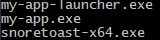
* *my-app.exe* is the compiled app, with Node.js bundled (using [Single Executable Applications](https://nodejs.org/api/single-executable-applications.html))
* *my-app-launcher.exe* is the compiled launcher.cs file that executes my-app.exe without a console window
* *snoretoast-x64.exe* allows windows notification (using [node-notifier](https://github.com/mikaelbr/node-notifier))
* *my-app.log* will be generated on first run (using [winston logger](https://github.com/winstonjs/winston))
## create-windowless-app CLI
```
create-windowless-app [options]
Options:
--no-typescript use javascript rather than typescript
--icon override default launcher icon file
--verbose print additional logs
--interactive interactive mode
Only is required.
```
## Why?
Node.js does not have a native windowless mode (like java has javaw).
Sometimes, you want to run an app as a scheduled task that runs in the background, or run a long task (i.e. a server) but do not want a console that must always be open.
Best solution I could find is using a script that executes the Node.js in windowless mode
This package comes to do the following:
1) Compile a Node.js (javascript/typescript) project into an *.exe file bundled with Node.js, so no installation is needed
2) Compile a C# launcher that executes the compiled project, in windowless mode
## Template project
The "Hello World" template is a POC containing 2 features you might want when running a windowless app:
1) Logger
2) Notifications
The template project build script does the following things
1) Compiles TypeScript to JavaScript (if in a TypeScript template)
2) Runs WebPack to bundle all JavaScript into a single file, and copy binary files into the "dist" folder
3) Runs Node's single executable applications scripts to compile the single WebPack JavaScript output file to an exe file bundled with Node.js (Currently experimental in Node.js 20)