# Create TYPO3 Nuxt App

[![NPM version](https://img.shields.io/npm/v/create-nuxt-typo3-app.svg?style=flat)](https://npmjs.com/package/create-nuxt-typo3-app)

[![NPM downloads](https://img.shields.io/npm/dm/create-nuxt-typo3-app.svg?style=flat)](https://npmjs.com/package/create-nuxt-typo3-app)

[![CircleCI](https://img.shields.io/circleci/project/github/nuxt/create-nuxt-typo3-app/master.svg?style=flat)](https://circleci.com/gh/nuxt/create-nuxt-typo3-app/master)

> Create a [Nuxt.js](https://github.com/nuxt/nuxt.js) project in seconds

This is a fork of [create-nuxt-app](https://www.npmjs.com/package/create-nuxt-app)

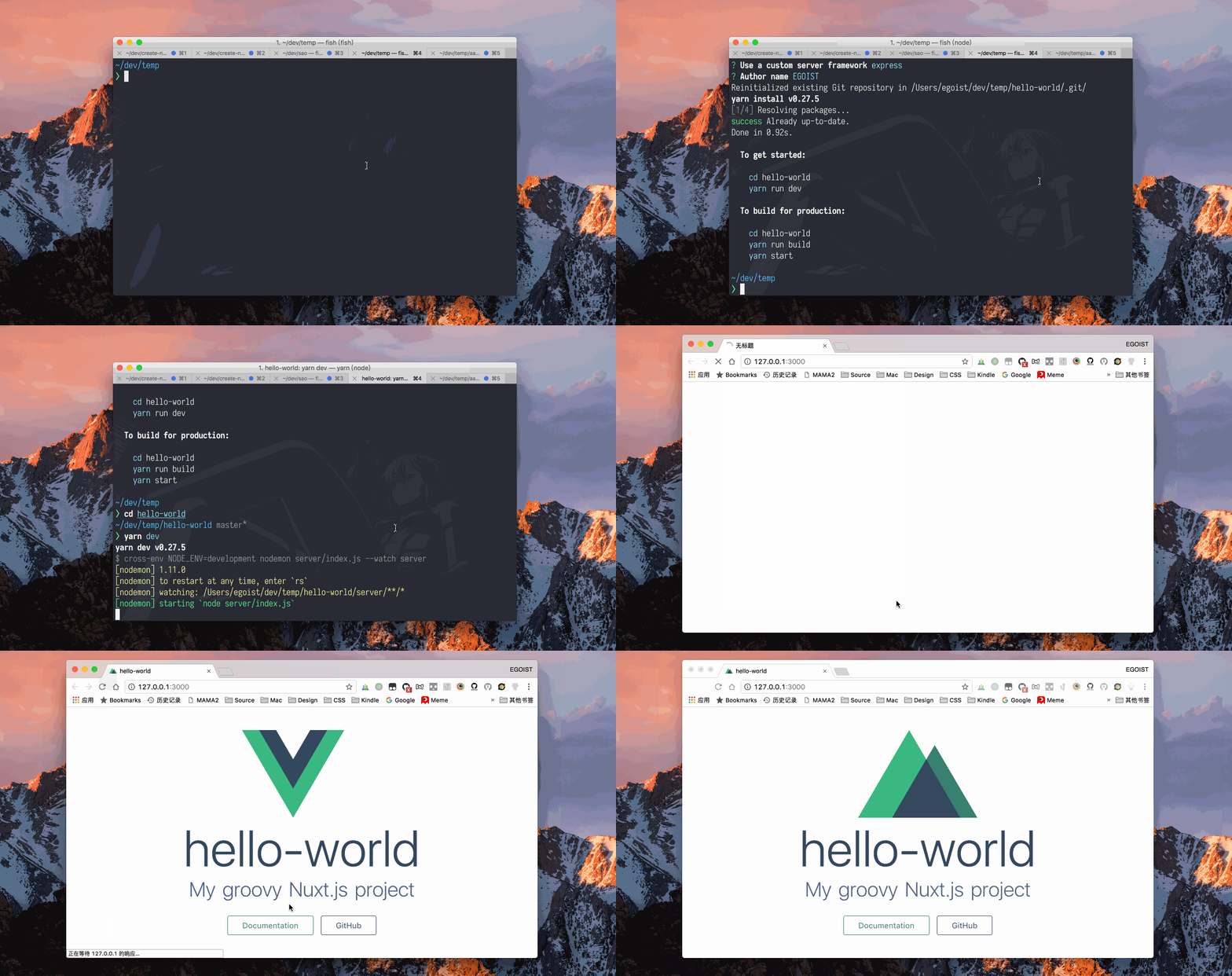
<details><summary>Preview</summary>

![preview](https://ooo.0o0.ooo/2017/08/05/5984b16ed9749.gif)
</details>

## Usage

Make sure you have [npx](https://www.npmjs.com/package/npx) installed (`npx` is shipped by default since [npm](https://www.npmjs.com/get-npm) `5.2.0`)

```bash
npx create-nuxt-typo3 <my-project>
```

Or starting with npm v6.1 you can do:

```bash
npm init nuxt-typo3 <my-project>
```

Or with [yarn](https://yarnpkg.com/en/):

```bash
yarn create nuxt-typo3 <my-project>
```

## Features :tada:

1. Choose the package manager
    - Yarn
    - Npm
1. Choose programming language
    - JavaScript
    - TypeScript
1. Choose your favorite UI framework:
    - None (feel free to add one later)
    - [Ant Design Vue](https://github.com/vueComponent/ant-design-vue)
    - [Bootstrap](https://github.com/bootstrap-vue/bootstrap-vue)
    - [Buefy](https://buefy.github.io)
    - [Bulma](https://github.com/jgthms/bulma)
    - [Element](https://github.com/ElemeFE/element)
    - [Framevuerk](https://github.com/framevuerk/framevuerk)
    - [iView](https://www.iviewui.com/)
    - [Tachyons](https://github.com/tachyons-css/tachyons)
    - [Tailwind CSS](https://github.com/tailwindcss/tailwindcss)
    - [Vuetify](https://github.com/vuetifyjs/vuetify)
3. Choose between integrated server-side frameworks:
    - None (Nuxt default server)
    - [Adonis](https://github.com/adonisjs/adonis-framework)
    - [Express](https://github.com/expressjs/express)
    - [Fastify](https://github.com/fastify/fastify)
    - [Feathers](https://github.com/feathersjs/feathers)
    - [Hapi](https://github.com/hapijs/hapi)
    - [Koa](https://github.com/koajs/koa)
    - [Micro](https://github.com/zeit/micro)
1. Choose the runtime for TypeScript (if you choose TypeScript)
    - Default
    - [@nuxt/typescript-runtime](https://github.com/nuxt/typescript)
1. Choose Nuxt.js modules:
    - [Nuxt-typo3](https://github.com/TYPO3-Initiatives/nuxt-typo3)
    - [Axios](https://github.com/nuxt-community/axios-module)
    - [Progressive Web App (PWA) Support](https://github.com/nuxt-community/pwa-module)
5. Choose linting tools:
    - [ESLint](https://github.com/nuxt/eslint-config)
    - [Prettier](https://github.com/prettier/prettier)
    - [Lint staged files](https://github.com/okonet/lint-staged)
6. Check the features needed for your project:
    - [PWA](https://pwa.nuxtjs.org/)
    - Linter / Formatter
    - [Prettier](https://prettier.io/)
    - [Axios](https://github.com/nuxt-community/axios-module)
    - [Tachyons](https://tachyons.io)
7. Choose your favorite test framework:
    - None
    - [Jest](https://github.com/facebook/jest)
    - [AVA](https://github.com/avajs/ava)
8. Choose rendering mode
    - [Universal (SSR)](https://nuxtjs.org/guide/#server-rendered-universal-ssr-)
    - [SPA](https://nuxtjs.org/guide/#single-page-applications-spa-)

## CLI Options

### `--edge`

Alias: `-e`.

To install [nuxt-edge](https://www.npmjs.com/package/nuxt-edge) instead of [nuxt](https://www.npmjs.com/package/nuxt), add the command line option `--edge`:

```bash
npx create-nuxt-typo3 <my-project> --edge
```

Or

```bash
npm init nuxt-typo3 <my-project> --edge
```

Or

```bash
yarn create nuxt-typo3 <my-project> --edge
```

### `--info`

Alias: `-i`. Print out debugging information relating to the local environment and exit.

### `--help`

Alias: `-h`. Show the help information and exit, include: usage, command and all cli options.

### `--verbose`

Show debug logs

### `--version`

Alias: `-v`. Show version number and exit.

## Credits

- [egoist](https://github.com/egoist)
- [clarko](https://github.com/clarkdo)
- All our contributors ([list](https://github.com/nuxt/create-nuxt-nuxt-app-app/contributors)).