# [fit] React ❤ TS
##[fit] Advanced TypeScript Patterns
^ - React Loves TypeScript
React Heart TypeScript
Advanced TypeScript Patterns
Came up with the name
without ever saying it out loud
So.. React loves TypeScript it is!
---
## Marc Missey
### Senior Engineer @Twilio Sendgrid
#### @marcmissey - Twitter
@marc - Denver Devs
^ For this talk we'll go over some of the TypeScript patterns that my team learned while
rewriting SendGrid's Marketing Campaigns app for the 3rd time
---
# [fit]  React
^ - Just a quick show of hands
How many of you use React on a daily basis?
---
# [fit] **Type**Script
^ - and how many use TypeScript?
How about both React and TypeScript?
So FIRST I want to talk a bit about what I find to be the #1 Benefit of TypeScript
---
# [fit] **Maintainability**
---
# **Benefits to Maintainability**
^ A few major benefits to using TS
When you break something, You know what you broke.
No need to guess
- Confidence in refactoring
---
# **Benefits to Maintainability**
^ Lowers the cognitive load
main goal in SendGrid architecture
- Confidence in refactoring
- Intellisense in IDEs
---
# **Benefits to Maintainability**
^ If you've ever had a quick bug fix and thought:
Well I'll just let this function take an object OR and array
TS will make sure that you do so in the safest way possible
- Confidence in refactoring
- Intellisense in IDEs
- Prevents _"clever"_ code mistakes
---
# **Benefits to Maintainability**
^ TS allows our new engineers to understand our code much faster
and become contributing team members super quickly
- Confidence in refactoring
- Intellisense in IDEs
- Prevents _"clever"_ code mistakes
- Easier to read and understand
---
# But this talk is **not** a sales pitch
^ It's an exercise in reaching...
---
# [fit] TypeScript **Nirvana** 🧘🏻♂️
---
# [fit] TypeScript **Nirvana** 🧘🏻♂️
# aka: Maximizing Type Inference
^ By that I mean:
Making TypeScript do the heavy lifting for you
You should only have to type a variable once,
Once it's typed, TS should know what that is no matter
How it's transformed or where it's passed to.
You to create type interfaces as contracts between your components
And TypeScript will tell you when you break those contracts
BUT - Maximizing Type Inference is not super easy in React
My team struggled a ton initially
We knew patterns in React,
but not how to get TS to stop complaining
It took us a couple of sprints, but eventually we figured out some great patterns for typing React in an easy and reusable way
---
# **Patterns For Strongly Typed...**
- State Management
- Redux Connected Components
- Higher Order Components
- Miscellaneous
---
# [fit] **Demo**
# [fit] **App**
### github.com/mmissey/ts-base
---
# [fit] 
---
# [fit] 
---
# [fit] **Strongly** Typed
# [fit] _State Management_
^ If you've worked on a React/Redux app, you've probably seen a flow like this.
This is the Flux Paradigm
---
# [fit] 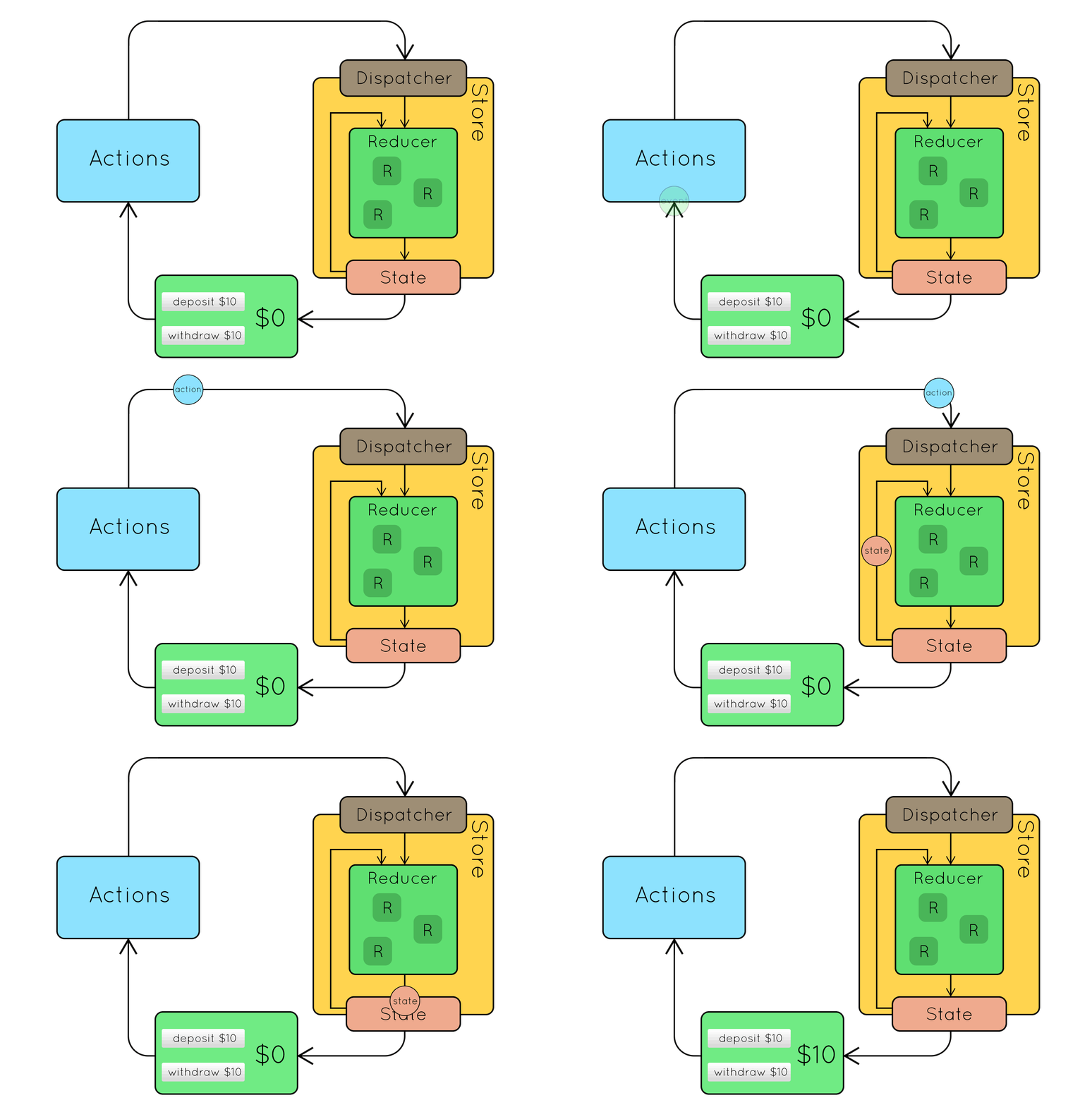
---
### [fit] ActionTypes -> Actions -> Side Effects -> Actions -> Reducer -> Containers -> Components
---
#### Code Example
---
# **Patterns For Strongly Typed...**
- ✅ State Management
- Redux Connected Components
- Higher Order Components
- Miscellaneous
---
# [fit] **Redux**
# [fit] **Connected**
# [fit] **Components**
---
```typescript
import { connect } from "redux";
import { login, logout } from "./actionCreators";
const mapStateToProps = state => {
return {
user: state.user
};
};
const mapDispatchToProps = dispatch => {
return {
login: (userId: string) => dispatch(login(userId)),
logout: () => dispatch(logout)
};
};
export const connectUser = connect(
mapStateToProps,
mapDispatchToProps
);
export default cmp => connectUser(cmp);
```
---
#### Code Example
---
# **Patterns For Strongly Typed...**
- ✅ State Management
- ✅ Redux Connected Components
- Higher Order Components
- Miscellaneous
---
# [fit] **Higher Order**
# [fit] **Components**
---
```javascript
const ImagesFetcher = (Component) =>
class extends React.Component{
state = { isLoading: false }
public componentDidMount() {
if (!this.props.images.length && !this.state.isLoading) {
this.props.fetchImages("wheredidthesodago");
this.setState({ isLoading: true })
}
}
public componentDidUpdate(prevProps) {
if (this.props.images && this.state.isLoading) {
this.setState({ isLoading: false })
}
}
public render() {
return ;
}
};
```
---
#### Code Example
---
# **Patterns For Strongly Typed...**
- ✅ State Management
- ✅ Redux Connected Components
- ✅ Higher Order Components
- Miscellaneous
---
# [fit] **Miscellaneous**
---
# Miscellaneous
1. Typed Webpack
2. Type definition files
3. Untyped dependancies
4. Enums
5. Conditional types
6. Reading long error messages (don't panic)
---
# **Additional Resources**
- [@Piotrwitek's React Redux TypeScript Guide](https://github.com/piotrwitek/react-redux-typescript-guide)
- [React HoC Patterns in TypeScript](https://medium.com/@jrwebdev/react-higher-order-component-patterns-in-typescript-42278f7590fb)
- [Ultimate React Component Patterns](https://levelup.gitconnected.com/ultimate-react-component-patterns-with-typescript-2-8-82990c516935)
- [A.Sharif's Notes on TypeScript](https://dev.to/busypeoples/notes-on-typescript-pick-exclude-and-higher-order-components-40cp)
- [TypeScript Deep Dive on Gitbooks](https://basarat.gitbooks.io/typescript/content/docs/getting-started.html)
- [React Hooks in TypeScript](https://medium.com/@jrwebdev/react-hooks-in-typescript-88fce7001d0d)
---
# [fit] Thank You!
#### @marcmissey - Twitter
@marc - Denver Devs