
 # Version 1.2.3
Stable release:
[](https://badge.fury.io/js/cordova-plugin-local-notification)
A notification is a message you display to the user outside of your app's normal UI. When you tell the system to issue a notification, it first appears as an icon in the notification area. To see the details of the notification, the user opens the notification drawer. Both the notification area and the notification drawer are system-controlled areas that the user can view at any time.
# Version 1.2.3
Stable release:
[](https://badge.fury.io/js/cordova-plugin-local-notification)
A notification is a message you display to the user outside of your app's normal UI. When you tell the system to issue a notification, it first appears as an icon in the notification area. To see the details of the notification, the user opens the notification drawer. Both the notification area and the notification drawer are system-controlled areas that the user can view at any time.
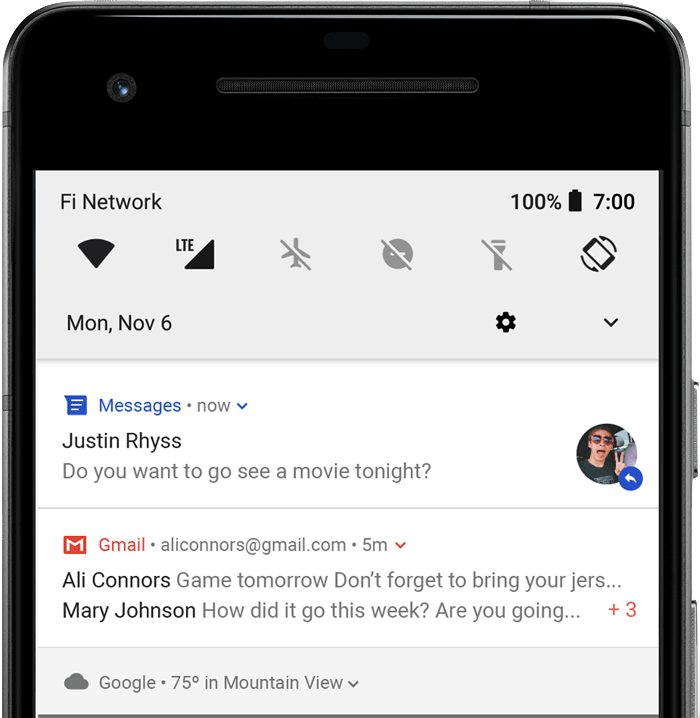 ### Notification components
- Header area
- Content area
- Action area
### How notifications may be noticed
- Showing a status bar icon
- Appearing on the lock screen
- Playing a sound or vibrating
- Peeking onto the current screen
- Blinking the device's LED
### Supported platforms
- Android 7.0+ (minimum version by cordova-android 13.0.0) with a minimum WebView Version 60 (Android 8 is shipped with a WebView version 58 and must be updated with Google Play Store before)
- iOS 11.3+ (minimum version by cordova-ios 7.0.0)
### Installation
The plugin can be installed via [Cordova-CLI][CLI] and is publicly available on [NPM][npm].
#### NPM
Execute from the projects root folder:
$ cordova plugin add cordova-plugin-local-notification
Install a specific version:
$ cordova plugin add cordova-plugin-local-notification@VERSION
#### Git
Install the latest head version:
$ cordova plugin add https://github.com/katzer/cordova-plugin-local-notifications.git
Install from a branch:
$ cordova plugin add https://github.com/katzer/cordova-plugin-local-notifications.git#branch
Install from a tag:
$ cordova plugin add https://github.com/katzer/cordova-plugin-local-notifications.git#v1.0.0
Install from a specific commit:
$ cordova plugin add https://github.com/katzer/cordova-plugin-local-notifications.git#5e4f131
#### Local
Install from local source:
$ cordova plugin add
### Notification components
- Header area
- Content area
- Action area
### How notifications may be noticed
- Showing a status bar icon
- Appearing on the lock screen
- Playing a sound or vibrating
- Peeking onto the current screen
- Blinking the device's LED
### Supported platforms
- Android 7.0+ (minimum version by cordova-android 13.0.0) with a minimum WebView Version 60 (Android 8 is shipped with a WebView version 58 and must be updated with Google Play Store before)
- iOS 11.3+ (minimum version by cordova-ios 7.0.0)
### Installation
The plugin can be installed via [Cordova-CLI][CLI] and is publicly available on [NPM][npm].
#### NPM
Execute from the projects root folder:
$ cordova plugin add cordova-plugin-local-notification
Install a specific version:
$ cordova plugin add cordova-plugin-local-notification@VERSION
#### Git
Install the latest head version:
$ cordova plugin add https://github.com/katzer/cordova-plugin-local-notifications.git
Install from a branch:
$ cordova plugin add https://github.com/katzer/cordova-plugin-local-notifications.git#branch
Install from a tag:
$ cordova plugin add https://github.com/katzer/cordova-plugin-local-notifications.git#v1.0.0
Install from a specific commit:
$ cordova plugin add https://github.com/katzer/cordova-plugin-local-notifications.git#5e4f131
#### Local
Install from local source:
$ cordova plugin add 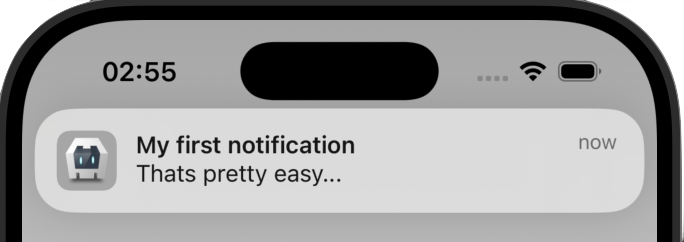 You have always to set an unique ID for every notification. The plugin does not automatically set an ID. If you do not set an ID, it will default to `1`. If you reuse an ID of a previous scheduled notification, the previous one will be canceled.
The plugin allows to schedule multiple notifications at once:
```js
cordova.plugins.notification.local.schedule([
{
id: 1,
title: 'My first notification'
},
{
id: 2,
title: 'My second notification'
}
]);
```
## Notification Limits
On each platform are limits about how much notifications can be scheduled:
- iOS: 64
- Android: 500
Repeating notifications count as 1 notification.
## Properties
A notification does have a set of configurable properties. See [all properties](#properties-1).
## Permissions
On iOS and Android 13+ permissions must be requested from the user before notifications can be posted. This is done automatically, when scheduling a notification. If you want do it manually, you can use [requestPermission](#requestpermission). Please keep in mind, that the user can still change the permission later in the system. If you want to check, if you have still the permission to post notifications, use [hasPermission](#haspermission).
You have always to set an unique ID for every notification. The plugin does not automatically set an ID. If you do not set an ID, it will default to `1`. If you reuse an ID of a previous scheduled notification, the previous one will be canceled.
The plugin allows to schedule multiple notifications at once:
```js
cordova.plugins.notification.local.schedule([
{
id: 1,
title: 'My first notification'
},
{
id: 2,
title: 'My second notification'
}
]);
```
## Notification Limits
On each platform are limits about how much notifications can be scheduled:
- iOS: 64
- Android: 500
Repeating notifications count as 1 notification.
## Properties
A notification does have a set of configurable properties. See [all properties](#properties-1).
## Permissions
On iOS and Android 13+ permissions must be requested from the user before notifications can be posted. This is done automatically, when scheduling a notification. If you want do it manually, you can use [requestPermission](#requestpermission). Please keep in mind, that the user can still change the permission later in the system. If you want to check, if you have still the permission to post notifications, use [hasPermission](#haspermission).
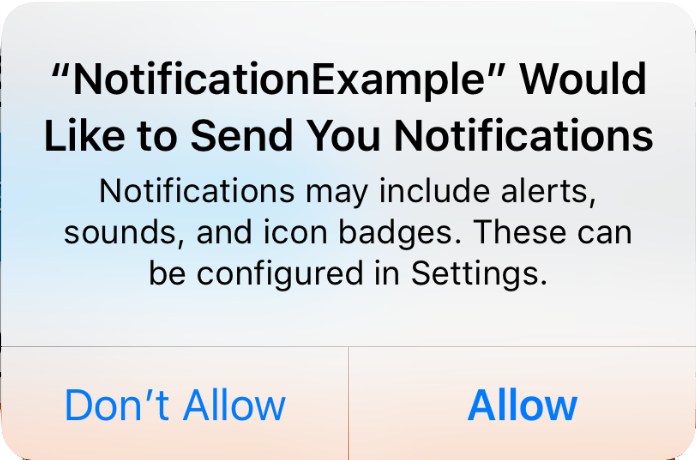
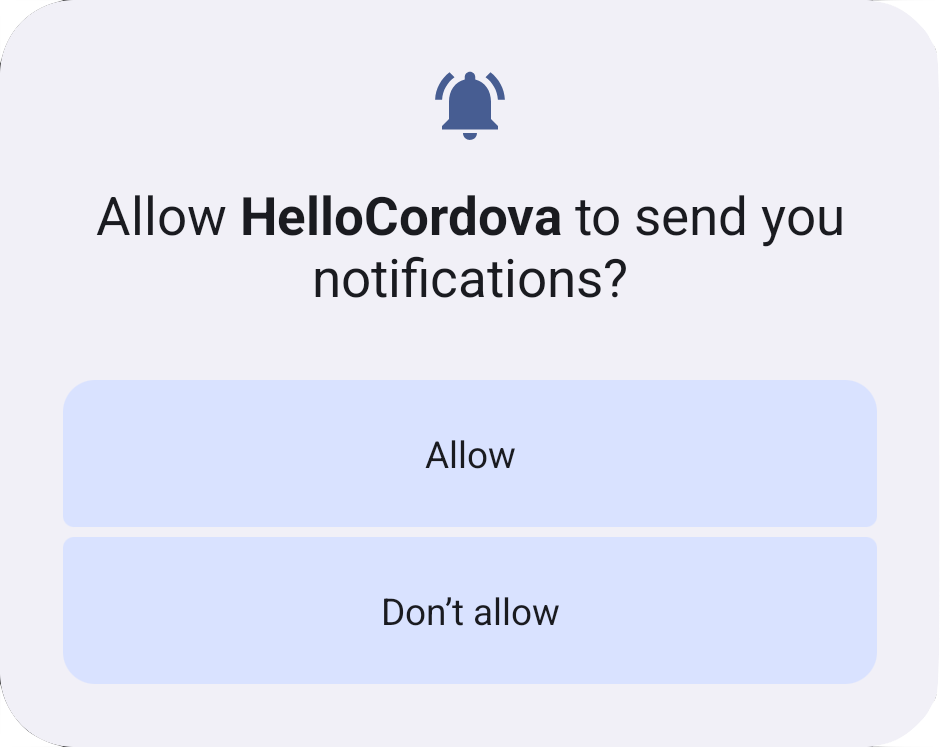 On Android, the permissions must be requested since Android 13. In earlier versions no permissions must be granted.
## Android specials
### Notification channels
Since Android 8 notification channels must be created to post noitifications. A [default channel](#default-channel) will be created for you, if you do not create one. You can also create your own channel by [createChannel](#createchannel) or when [scheduling a notification](#create-channel-by-posting-a-notification). For deleting a channel use [deleteChannel](#deletechannel).
### Inexact alarms since Android 12
Since Android 12 alarms will be scheduled inexact by default. On Android 12 (API level 31) and higher, the system invokes the alarm within one hour of the supplied trigger time, unless any battery-saving restrictions are in effect such as battery saver or Doze. Most apps can schedule tasks and events using inexact alarms to complete several common use cases. If your app's core functionality depends on a precisely-timed alarm — such as for an alarm clock app or a calendar app — then it's OK to use an exact alarm instead.
See [Schedule exact alarms](#android-schedule-exact-alarms), if you want use exact alarms.
See [Android documentation](https://developer.android.com/develop/background-work/services/alarms/schedule) for more information.
### App hibernation / App unused
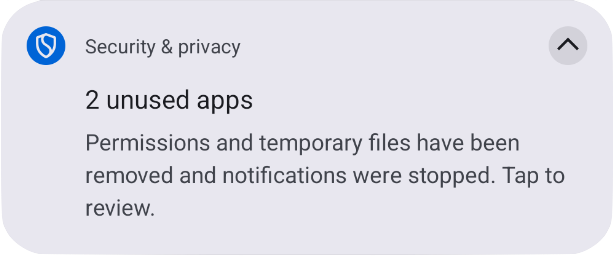
If your app runs on Android 12 and newer and the user doesn't interact with your app for 3 months, the system places your app in a hibernation state which will cancel all pending notifications and revokes permissions. When the user interacts with your app again, the app exits hibernation and the notifications will be re-scheduled. It doesn't count as app usage if the user dismisses a notification. If the app is hibernated, the user will get informed about it:
On Android, the permissions must be requested since Android 13. In earlier versions no permissions must be granted.
## Android specials
### Notification channels
Since Android 8 notification channels must be created to post noitifications. A [default channel](#default-channel) will be created for you, if you do not create one. You can also create your own channel by [createChannel](#createchannel) or when [scheduling a notification](#create-channel-by-posting-a-notification). For deleting a channel use [deleteChannel](#deletechannel).
### Inexact alarms since Android 12
Since Android 12 alarms will be scheduled inexact by default. On Android 12 (API level 31) and higher, the system invokes the alarm within one hour of the supplied trigger time, unless any battery-saving restrictions are in effect such as battery saver or Doze. Most apps can schedule tasks and events using inexact alarms to complete several common use cases. If your app's core functionality depends on a precisely-timed alarm — such as for an alarm clock app or a calendar app — then it's OK to use an exact alarm instead.
See [Schedule exact alarms](#android-schedule-exact-alarms), if you want use exact alarms.
See [Android documentation](https://developer.android.com/develop/background-work/services/alarms/schedule) for more information.
### App hibernation / App unused
If your app runs on Android 12 and newer and the user doesn't interact with your app for 3 months, the system places your app in a hibernation state which will cancel all pending notifications and revokes permissions. When the user interacts with your app again, the app exits hibernation and the notifications will be re-scheduled. It doesn't count as app usage if the user dismisses a notification. If the app is hibernated, the user will get informed about it:
 The documentation says that permissions are also revoked, but testing the hibernation behavior on an Android 15 emulator showed, that the app keeps the permission to post notifications.
#### Notes
- Android introduced this behavior in Android 11 and additionally backported this to Android 6 to 10 through the Google Play Store but only the permissions are revoked and not the pending notifications. Because permissions are only needed since Android 13, this does not affect this plugin. Since Android 12 notifications are also canceled besides revoking the permissions.
- You can manually test the hibernation behavior, see [App hibernation > Manually invoke hibernation behavior](https://developer.android.com/topic/performance/app-hibernation#manually-invoke).
- To see a complete list, what counts as app usage and what not, see [App hibernation > App usage](https://developer.android.com/topic/performance/app-hibernation#app-usage).
- 3 months are based on executing `adb shell device_config get permissions \ auto_revoke_unused_threshold_millis2` which will return `7776000000` milliseconds on an Android 15 Emulator which are nearly 3 months (~2.96 months).
#### Manage App hibernation
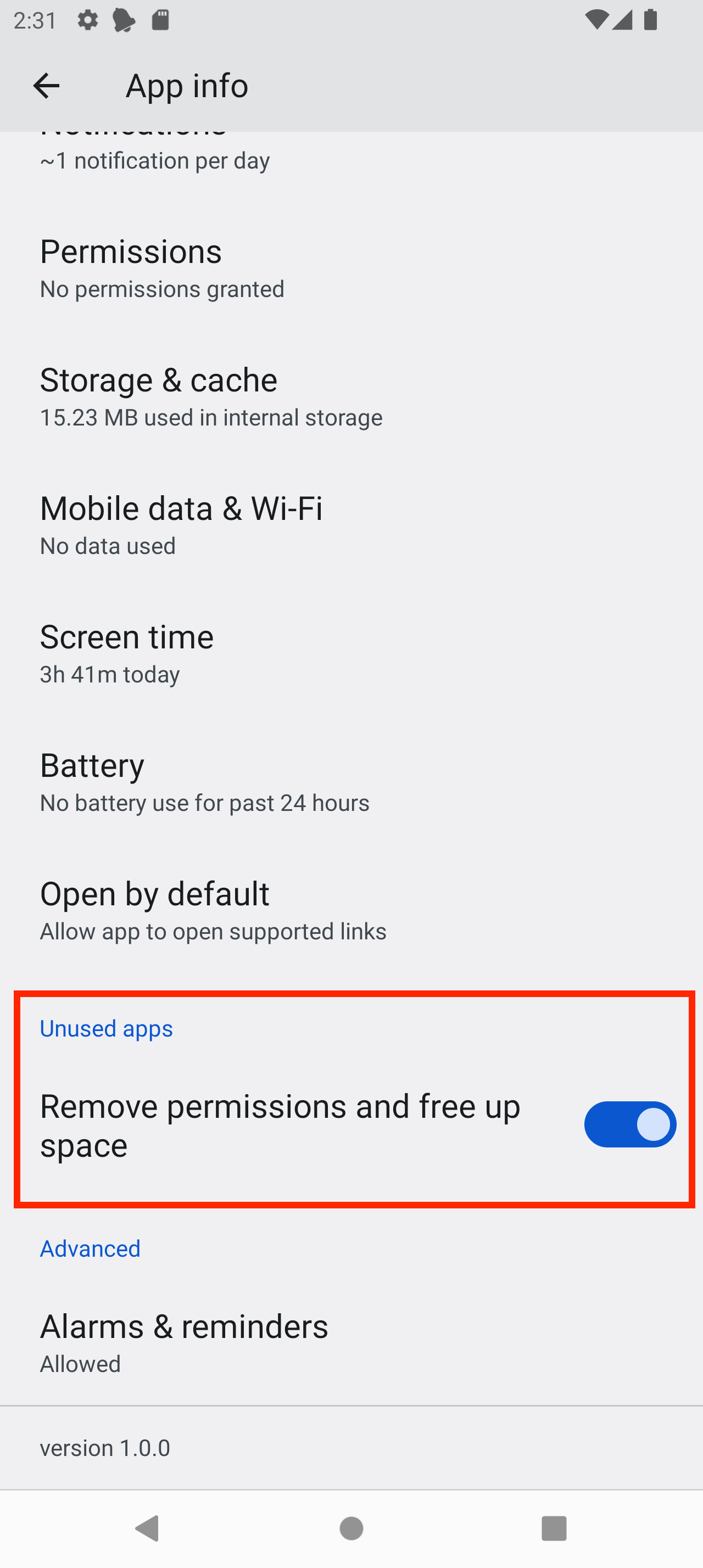
You can get the status of the setting by calling [getUnusedAppRestrictionsStatus](#getunusedapprestrictionsstatus). To redirect the user to the setting, call [openManageUnusedAppRestrictions](#openmanageunusedapprestrictions). Before opening the setting, you can inform the user about this behavior and explain which setting he has to deactivate. When opening the settings, the system will not scroll to the right entry and the setting is named differently on different Android versions:
Sample Android 12:
The documentation says that permissions are also revoked, but testing the hibernation behavior on an Android 15 emulator showed, that the app keeps the permission to post notifications.
#### Notes
- Android introduced this behavior in Android 11 and additionally backported this to Android 6 to 10 through the Google Play Store but only the permissions are revoked and not the pending notifications. Because permissions are only needed since Android 13, this does not affect this plugin. Since Android 12 notifications are also canceled besides revoking the permissions.
- You can manually test the hibernation behavior, see [App hibernation > Manually invoke hibernation behavior](https://developer.android.com/topic/performance/app-hibernation#manually-invoke).
- To see a complete list, what counts as app usage and what not, see [App hibernation > App usage](https://developer.android.com/topic/performance/app-hibernation#app-usage).
- 3 months are based on executing `adb shell device_config get permissions \ auto_revoke_unused_threshold_millis2` which will return `7776000000` milliseconds on an Android 15 Emulator which are nearly 3 months (~2.96 months).
#### Manage App hibernation
You can get the status of the setting by calling [getUnusedAppRestrictionsStatus](#getunusedapprestrictionsstatus). To redirect the user to the setting, call [openManageUnusedAppRestrictions](#openmanageunusedapprestrictions). Before opening the setting, you can inform the user about this behavior and explain which setting he has to deactivate. When opening the settings, the system will not scroll to the right entry and the setting is named differently on different Android versions:
Sample Android 12:
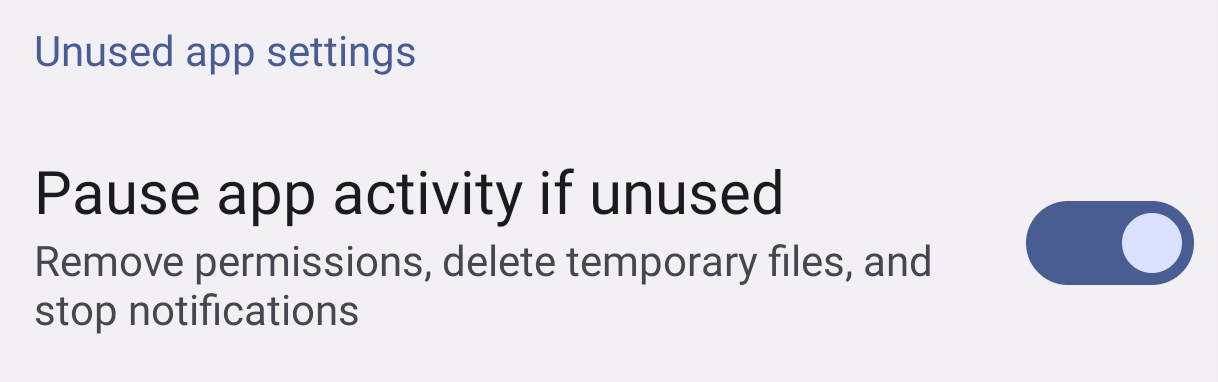
 On other Android versions it is named differently:
Android 13/14:
On other Android versions it is named differently:
Android 13/14:
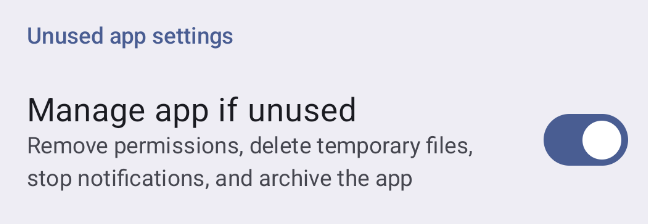
 Android 15:
 ### Doze and Standby
Android has two power-saving features that extend battery life for users by managing how apps behave when a device isn't connected to a power source: Doze and App Standby. Doze reduces battery consumption by deferring background CPU and network activity for apps when the device is unused for long periods of time. App Standby defers background network activity for apps with no recent user activity.
To fire notifications when the device is in doze mode, you can schedule notifications with the property [androidAllowWhileIdle](#property-androidallowwhileidle).
App Standby does not affect you when showing a notification.
You can read everything about it in the [Android documentatation](https://developer.android.com/training/monitoring-device-state/doze-standby).
### Alarm rescheduling
#### App Update
Android removes all alarms when the app is updated. The plugin reschedules all alarms by a [BroadcastReceiver](https://developer.android.com/develop/background-work/background-tasks/broadcasts) listening to [ACTION_MY_PACKAGE_REPLACED](https://developer.android.com/reference/android/content/Intent#ACTION_MY_PACKAGE_REPLACED).
#### Device reboot
Android removes all alarms when the device reboots. The plugin reschedules all alarms by a [BroadcastReceiver](https://developer.android.com/develop/background-work/background-tasks/broadcasts) listening to [ACTION_BOOT_COMPLETED](https://developer.android.com/reference/android/content/Intent#ACTION_BOOT_COMPLETED), but only after the device has been unlocked.
#### User grants exact alarms
If you use [SCHEDULE_EXACT_ALARM](#exact-alarms-user-grants-permission) for scheduling exact alarms and the user permits the permission in the "Alarms & Reminders", inexact alarms will be rescheduled as exact alarms. This is done by a [BroadcastReceiver](https://developer.android.com/develop/background-work/background-tasks/broadcasts) listening to [ACTION_SCHEDULE_EXACT_ALARM_PERMISSION_STATE_CHANGED](https://developer.android.com/reference/android/app/AlarmManager#ACTION_SCHEDULE_EXACT_ALARM_PERMISSION_STATE_CHANGED). This action will not be called if the user revokes the permission. All exact alarms will be canceled then.
[](README.md#android-15-alarms-get-canceled-on-force-stop)
#### Android 15: Alarms get canceled on `Force stop`
Since Android 15 all pending alarms will get canceled if the user force stops an app, this is a change by Google, see https://developer.android.com/about/versions/15/behavior-changes-all#enhanced-stop-states. The alarms will be re-registered, if the user starts the app again. If the user clears the app from the app stack the alarms will not get canceled.
Keep in mind, that force stopping is only known by advised users and if they do it, they have a reason to do this and they should be aware, that the app will no longer function correctly as the System also states when clicking on `Force stop` by showing an alert with the message `If you force stop an app, it may misbehave.`
## Actions
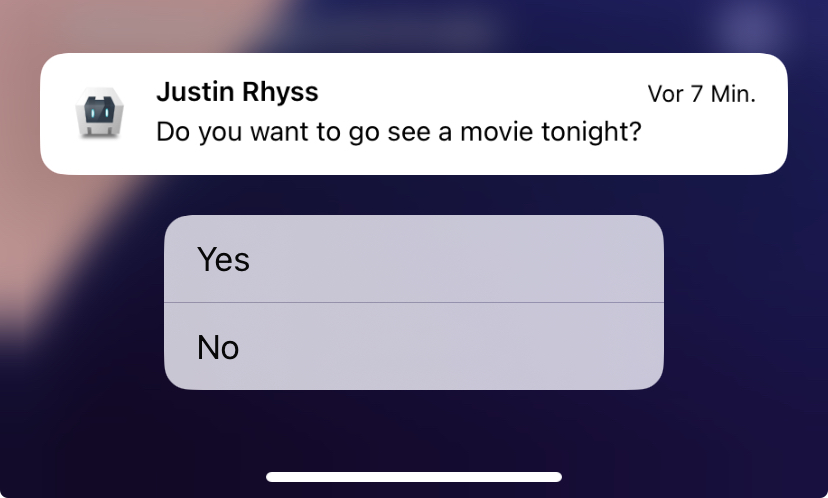
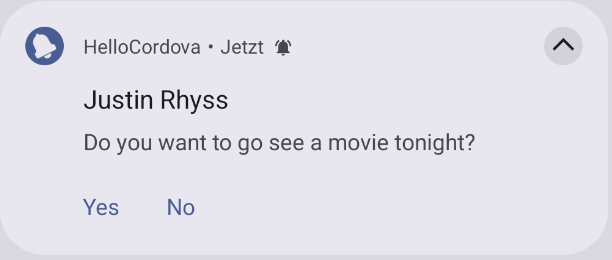
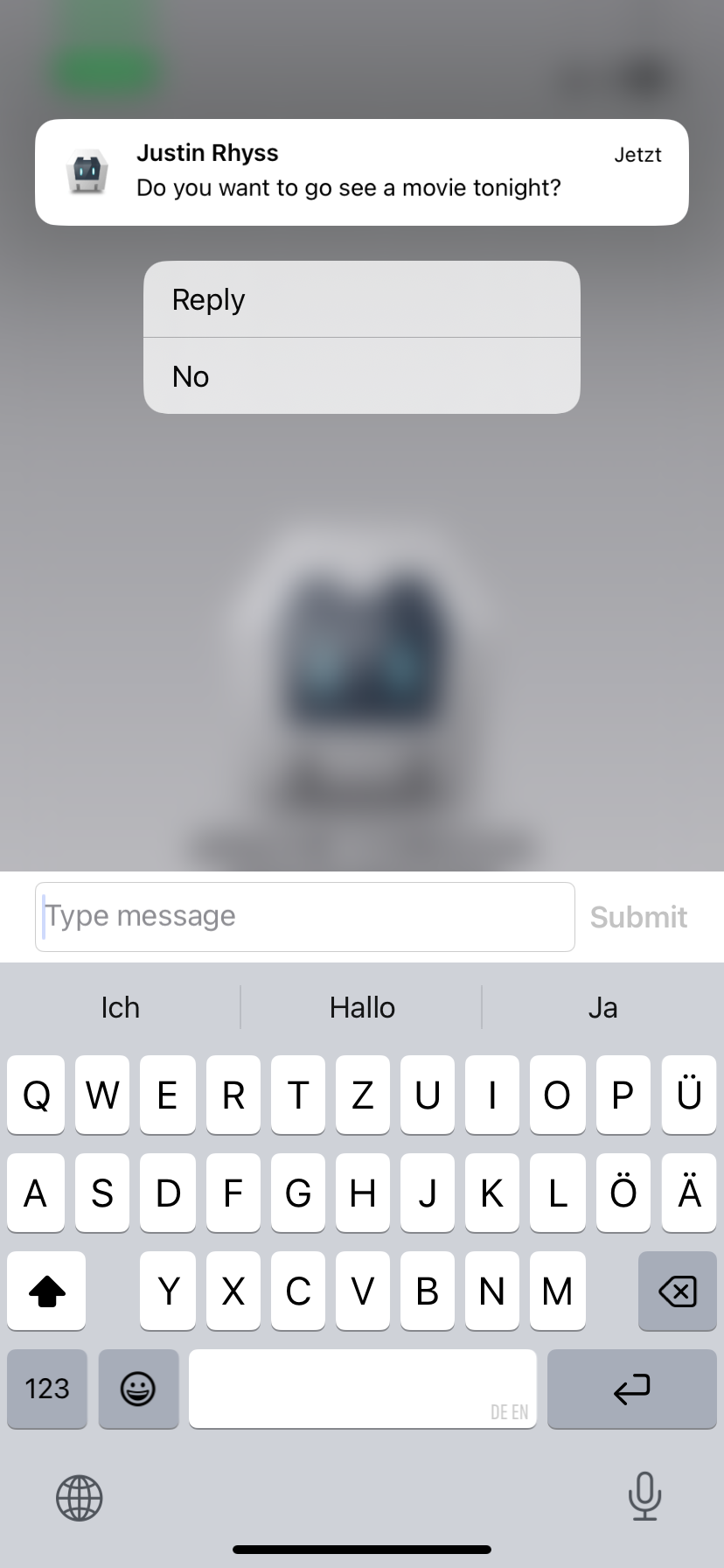
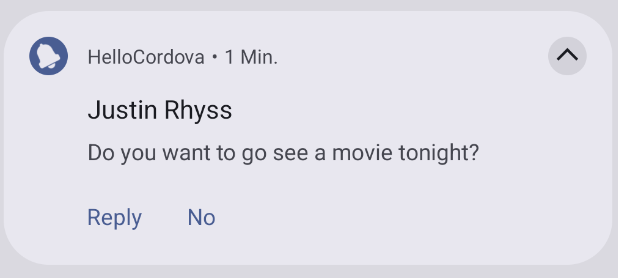
You can add actions to a notification, which can be a button or an input.
Before you can use them you have to create an action group with some actions.
```javascript
// Creates an action group with the id 'YES_NO_CATEGORY' and two actions.
cordova.plugins.notification.local.addActions('YES_NO_CATEGORY', [
{
id: 'YES_ACTION', // Action id
title: 'Yes', // Action button title
launch: true // Click on action will open the app
},
{
id: 'NO_ACTION',
title: 'No'
}
]);
```
To see which properties can be set see [Action properties](#action-properties).
By default a click on an action will not open the app. To launch the app when a notification was clicked, set `launch: true`.
Note for Android: If `launch` is not set and the app is killed, the event will be hold back in a background process of the app to wait for the next time the app starts, but could be lost, if the system kills the app background process.
If the `type` of an action is not set, it defaults to `button`.
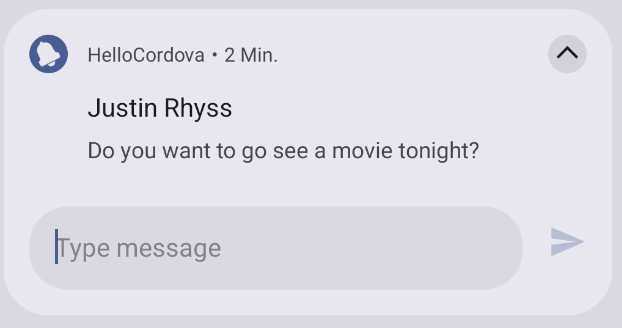
After the action group is defined, you can assign it to a notification:
```javascript
cordova.plugins.notification.local.schedule({
id: 1,
title: 'Justin Rhyss',
text: 'Do you want to go see a movie tonight?',
actions: 'YES_NO_CATEGORY'
});
```
### Doze and Standby
Android has two power-saving features that extend battery life for users by managing how apps behave when a device isn't connected to a power source: Doze and App Standby. Doze reduces battery consumption by deferring background CPU and network activity for apps when the device is unused for long periods of time. App Standby defers background network activity for apps with no recent user activity.
To fire notifications when the device is in doze mode, you can schedule notifications with the property [androidAllowWhileIdle](#property-androidallowwhileidle).
App Standby does not affect you when showing a notification.
You can read everything about it in the [Android documentatation](https://developer.android.com/training/monitoring-device-state/doze-standby).
### Alarm rescheduling
#### App Update
Android removes all alarms when the app is updated. The plugin reschedules all alarms by a [BroadcastReceiver](https://developer.android.com/develop/background-work/background-tasks/broadcasts) listening to [ACTION_MY_PACKAGE_REPLACED](https://developer.android.com/reference/android/content/Intent#ACTION_MY_PACKAGE_REPLACED).
#### Device reboot
Android removes all alarms when the device reboots. The plugin reschedules all alarms by a [BroadcastReceiver](https://developer.android.com/develop/background-work/background-tasks/broadcasts) listening to [ACTION_BOOT_COMPLETED](https://developer.android.com/reference/android/content/Intent#ACTION_BOOT_COMPLETED), but only after the device has been unlocked.
#### User grants exact alarms
If you use [SCHEDULE_EXACT_ALARM](#exact-alarms-user-grants-permission) for scheduling exact alarms and the user permits the permission in the "Alarms & Reminders", inexact alarms will be rescheduled as exact alarms. This is done by a [BroadcastReceiver](https://developer.android.com/develop/background-work/background-tasks/broadcasts) listening to [ACTION_SCHEDULE_EXACT_ALARM_PERMISSION_STATE_CHANGED](https://developer.android.com/reference/android/app/AlarmManager#ACTION_SCHEDULE_EXACT_ALARM_PERMISSION_STATE_CHANGED). This action will not be called if the user revokes the permission. All exact alarms will be canceled then.
[](README.md#android-15-alarms-get-canceled-on-force-stop)
#### Android 15: Alarms get canceled on `Force stop`
Since Android 15 all pending alarms will get canceled if the user force stops an app, this is a change by Google, see https://developer.android.com/about/versions/15/behavior-changes-all#enhanced-stop-states. The alarms will be re-registered, if the user starts the app again. If the user clears the app from the app stack the alarms will not get canceled.
Keep in mind, that force stopping is only known by advised users and if they do it, they have a reason to do this and they should be aware, that the app will no longer function correctly as the System also states when clicking on `Force stop` by showing an alert with the message `If you force stop an app, it may misbehave.`
## Actions
You can add actions to a notification, which can be a button or an input.
Before you can use them you have to create an action group with some actions.
```javascript
// Creates an action group with the id 'YES_NO_CATEGORY' and two actions.
cordova.plugins.notification.local.addActions('YES_NO_CATEGORY', [
{
id: 'YES_ACTION', // Action id
title: 'Yes', // Action button title
launch: true // Click on action will open the app
},
{
id: 'NO_ACTION',
title: 'No'
}
]);
```
To see which properties can be set see [Action properties](#action-properties).
By default a click on an action will not open the app. To launch the app when a notification was clicked, set `launch: true`.
Note for Android: If `launch` is not set and the app is killed, the event will be hold back in a background process of the app to wait for the next time the app starts, but could be lost, if the system kills the app background process.
If the `type` of an action is not set, it defaults to `button`.
After the action group is defined, you can assign it to a notification:
```javascript
cordova.plugins.notification.local.schedule({
id: 1,
title: 'Justin Rhyss',
text: 'Do you want to go see a movie tonight?',
actions: 'YES_NO_CATEGORY'
});
```
 |
| 
 |
#### Read input data
You have to subscribe to the event of the action id. The parameter `event` in the event callback will contain the input data of the user:
```javascript
cordova.plugins.notification.local.on('REPLY_ACTION', (notification, event) => {
// User made an input, event.text contains the input
console.log("user input data=" + event.text);
});
```
##### Android sepcifics
When a notification has an input action, it can't be cleared from the statusbar (see
[Stackoverflow](https://stackoverflow.com/questions/54219914/cancel-notification-with-remoteinput-not-working) or [plugin issue #2080](https://github.com/katzer/cordova-plugin-local-notifications/issues/2080)).
Google recommends to update the notification after the user made an input and show the reply without the actions. This plugin does this, but without showing the reply of the user and directly clear the notification after the update. Because the notiification will be updated after the input, you will get also an `update` event for that notification.
### Handle action events
See [Subscribe to an action event](#subscribe-to-an-action-event).
### Action properties
#### Common
These common properties can be specified for an action of type `button` or `input`:
| Property | Android | iOS | Description |
| :----------- | :------ | :-- | :---------- |
| id | x | x | Action id. Also needed to listen to the [action event](#subscribe-to-an-action-event). |
| title | x | x | Title of the action button |
| launch | x | x | If the app should be launched, when the user clicks on an action button or sends the input of an action input. Default is `false`. |
| ui | | x |
|
#### Read input data
You have to subscribe to the event of the action id. The parameter `event` in the event callback will contain the input data of the user:
```javascript
cordova.plugins.notification.local.on('REPLY_ACTION', (notification, event) => {
// User made an input, event.text contains the input
console.log("user input data=" + event.text);
});
```
##### Android sepcifics
When a notification has an input action, it can't be cleared from the statusbar (see
[Stackoverflow](https://stackoverflow.com/questions/54219914/cancel-notification-with-remoteinput-not-working) or [plugin issue #2080](https://github.com/katzer/cordova-plugin-local-notifications/issues/2080)).
Google recommends to update the notification after the user made an input and show the reply without the actions. This plugin does this, but without showing the reply of the user and directly clear the notification after the update. Because the notiification will be updated after the input, you will get also an `update` event for that notification.
### Handle action events
See [Subscribe to an action event](#subscribe-to-an-action-event).
### Action properties
#### Common
These common properties can be specified for an action of type `button` or `input`:
| Property | Android | iOS | Description |
| :----------- | :------ | :-- | :---------- |
| id | x | x | Action id. Also needed to listen to the [action event](#subscribe-to-an-action-event). |
| title | x | x | Title of the action button |
| launch | x | x | If the app should be launched, when the user clicks on an action button or sends the input of an action input. Default is `false`. |
| ui | | x |  Can be set to `decline` which will display the action button with special highlighting to indicate that it performs a destructive task. Sets natively [UNNotificationActionOptionDestructive](https://developer.apple.com/documentation/usernotifications/unnotificationactionoptions/destructive?language=objc). |
| needsAuth | | x | If set to `true` the action can be performed only on an unlocked device. When the user selects an action with this option, the system prompts the user to unlock the device. After unlocking, the system notifies your app of the selected action. You might use option to perform actions that require accessing data that is encrypted while the device is locked. Sets natively [UNNotificationActionOptionAuthenticationRequired](https://developer.apple.com/documentation/usernotifications/unnotificationactionoptions/authenticationrequired?language=objc). |
| icon | x | |
Can be set to `decline` which will display the action button with special highlighting to indicate that it performs a destructive task. Sets natively [UNNotificationActionOptionDestructive](https://developer.apple.com/documentation/usernotifications/unnotificationactionoptions/destructive?language=objc). |
| needsAuth | | x | If set to `true` the action can be performed only on an unlocked device. When the user selects an action with this option, the system prompts the user to unlock the device. After unlocking, the system notifies your app of the selected action. You might use option to perform actions that require accessing data that is encrypted while the device is locked. Sets natively [UNNotificationActionOptionAuthenticationRequired](https://developer.apple.com/documentation/usernotifications/unnotificationactionoptions/authenticationrequired?language=objc). |
| icon | x | |  Is not supported anymore for normal notifications since Android 7, see [Google Blog article for notifications on Android 7](https://android-developers.googleblog.com/2016/06/notifications-in-android-n.html). It will be only used on Android Wear. |
#### Action input properties
These properties can additionally be specified for an `input` action:
| Property | Android | iOS | Description |
| :----------- | :------ | :-- | :---------- |
| emptyText | x | x | Placeholder text for input field. |
| submitTitle | | x | Title for submit button. Defaults to `Submit`. |
| editable | x | | Specifies whether the user can provide arbitrary text values. If you specify `false`, you must provide a non-null and non-empty array for `choices`. Default is `true`. |
| choices | x | | A String array of pre-defined choices for users input. You must provide a non-null and non-empty array if you disabled free form input by setting `editable` to `false`. |
## Triggers
Notifications may trigger immediately or depend on calendar or location.
### Fixed date
Trigger at a fixed date:
```js
cordova.plugins.notification.local.schedule({
id: 1,
title: 'Design team meeting',
text: '3:00 - 4:00 PM',
trigger: { at: new Date(2017, 10, 27, 15) }
});
```
| Property | Type | Value | Android | iOS |
| :------------ | :------ | :--------------- | :------ | :-- |
| at | Date | | x | x |
### Relative
Relative from now:
```js
cordova.plugins.notification.local.schedule({
id: 1,
title: 'Design team meeting',
trigger: { in: 1, unit: 'hour' }
});
```
| Property | Type | Value | Android | iOS |
| :------------ | :------ | :--------------- | :------ | :-- |
| in | Int | | x | x |
| unit | String | `second`, `minute`, `hour`, `day`, `week`, `month`, `quarter`, `year` | x | x |
### Repeating
Repeat relative from now:
```js
cordova.plugins.notification.local.schedule({
id: 1,
title: 'Design team meeting',
trigger: { every: 'day', count: 5 } // count is only supported by Android
});
```
| Property | Type | Value | Android | iOS | Note |
| :------------ | :------ | :--------------- | :------ | :-- | :--- |
| before | Date | | x | | |
| firstAt | Date | | x | | |
| count | Int | | x | | |
| every | String | `minute`, `hour`, `day`, `week`, `month`, `quarter` , `year` | x | x | |
Trigger every time the date matches:
```js
cordova.plugins.notification.local.schedule({
id: 1,
title: 'Happy Birthday!!!',
trigger: { every: { month: 10, day: 27, hour: 9, minute: 0 } }
});
```
| Property | Type | Value | Android | iOS | Note |
| :------------ | :------ | :--------------- | :------ | :-- | :--- |
| before | Date | | x | | |
| after | Date | | x | | |
| count | Int | | x | | |
| every | Object | `minute`, `hour`, `day`, `weekday`, `weekdayOrdinal` , `week` , `weekOfMonth`, `month`, `quarter` | x | x | |
### Location based
iOS only
To trigger when the user enters a region:
```js
cordova.plugins.notification.local.schedule({
id: 1,
title: 'Welcome to our office',
trigger: {
type: 'location',
center: [x, y],
radius: 15,
notifyOnEntry: true
}
});
```
| Property | Type | Value | Android | iOS | Note |
| :------------ | :------ | :--------------- | :------ | :-- | :--- |
| center | Array | `[lat, long]` | | x | |
| radius | Int | | | x | |
| notifyOnEntry | Boolean | | | x | |
| notifyOnExit | Boolean | | | x | |
| single | Boolean | | | x | |
## Progress
Android only
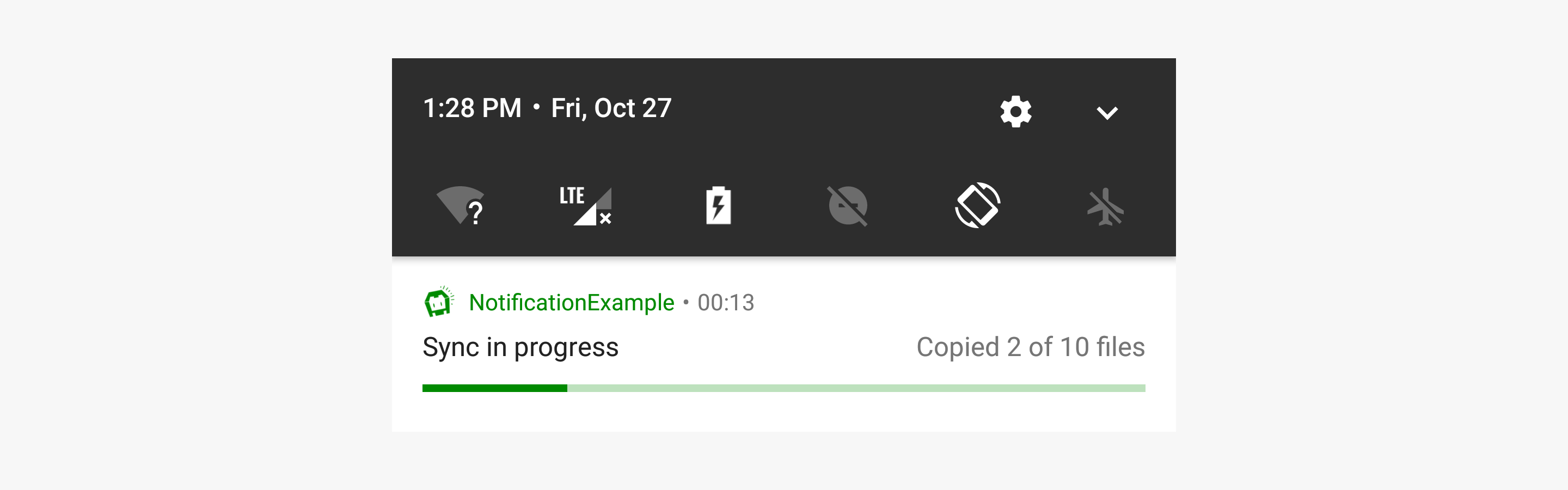
Notifications can include an animated progress indicator that shows users the status of an ongoing operation.
```js
cordova.plugins.notification.local.schedule({
id: 1,
title: 'Sync in progress',
text: 'Copied 2 of 10 files',
androidProgressBar: {
value: 20, // Default 0
maxValue: 100, // Default 100
indeterminate: false // Default false
}
});
```
Is not supported anymore for normal notifications since Android 7, see [Google Blog article for notifications on Android 7](https://android-developers.googleblog.com/2016/06/notifications-in-android-n.html). It will be only used on Android Wear. |
#### Action input properties
These properties can additionally be specified for an `input` action:
| Property | Android | iOS | Description |
| :----------- | :------ | :-- | :---------- |
| emptyText | x | x | Placeholder text for input field. |
| submitTitle | | x | Title for submit button. Defaults to `Submit`. |
| editable | x | | Specifies whether the user can provide arbitrary text values. If you specify `false`, you must provide a non-null and non-empty array for `choices`. Default is `true`. |
| choices | x | | A String array of pre-defined choices for users input. You must provide a non-null and non-empty array if you disabled free form input by setting `editable` to `false`. |
## Triggers
Notifications may trigger immediately or depend on calendar or location.
### Fixed date
Trigger at a fixed date:
```js
cordova.plugins.notification.local.schedule({
id: 1,
title: 'Design team meeting',
text: '3:00 - 4:00 PM',
trigger: { at: new Date(2017, 10, 27, 15) }
});
```
| Property | Type | Value | Android | iOS |
| :------------ | :------ | :--------------- | :------ | :-- |
| at | Date | | x | x |
### Relative
Relative from now:
```js
cordova.plugins.notification.local.schedule({
id: 1,
title: 'Design team meeting',
trigger: { in: 1, unit: 'hour' }
});
```
| Property | Type | Value | Android | iOS |
| :------------ | :------ | :--------------- | :------ | :-- |
| in | Int | | x | x |
| unit | String | `second`, `minute`, `hour`, `day`, `week`, `month`, `quarter`, `year` | x | x |
### Repeating
Repeat relative from now:
```js
cordova.plugins.notification.local.schedule({
id: 1,
title: 'Design team meeting',
trigger: { every: 'day', count: 5 } // count is only supported by Android
});
```
| Property | Type | Value | Android | iOS | Note |
| :------------ | :------ | :--------------- | :------ | :-- | :--- |
| before | Date | | x | | |
| firstAt | Date | | x | | |
| count | Int | | x | | |
| every | String | `minute`, `hour`, `day`, `week`, `month`, `quarter` , `year` | x | x | |
Trigger every time the date matches:
```js
cordova.plugins.notification.local.schedule({
id: 1,
title: 'Happy Birthday!!!',
trigger: { every: { month: 10, day: 27, hour: 9, minute: 0 } }
});
```
| Property | Type | Value | Android | iOS | Note |
| :------------ | :------ | :--------------- | :------ | :-- | :--- |
| before | Date | | x | | |
| after | Date | | x | | |
| count | Int | | x | | |
| every | Object | `minute`, `hour`, `day`, `weekday`, `weekdayOrdinal` , `week` , `weekOfMonth`, `month`, `quarter` | x | x | |
### Location based
iOS only
To trigger when the user enters a region:
```js
cordova.plugins.notification.local.schedule({
id: 1,
title: 'Welcome to our office',
trigger: {
type: 'location',
center: [x, y],
radius: 15,
notifyOnEntry: true
}
});
```
| Property | Type | Value | Android | iOS | Note |
| :------------ | :------ | :--------------- | :------ | :-- | :--- |
| center | Array | `[lat, long]` | | x | |
| radius | Int | | | x | |
| notifyOnEntry | Boolean | | | x | |
| notifyOnExit | Boolean | | | x | |
| single | Boolean | | | x | |
## Progress
Android only
Notifications can include an animated progress indicator that shows users the status of an ongoing operation.
```js
cordova.plugins.notification.local.schedule({
id: 1,
title: 'Sync in progress',
text: 'Copied 2 of 10 files',
androidProgressBar: {
value: 20, // Default 0
maxValue: 100, // Default 100
indeterminate: false // Default false
}
});
```
Android only
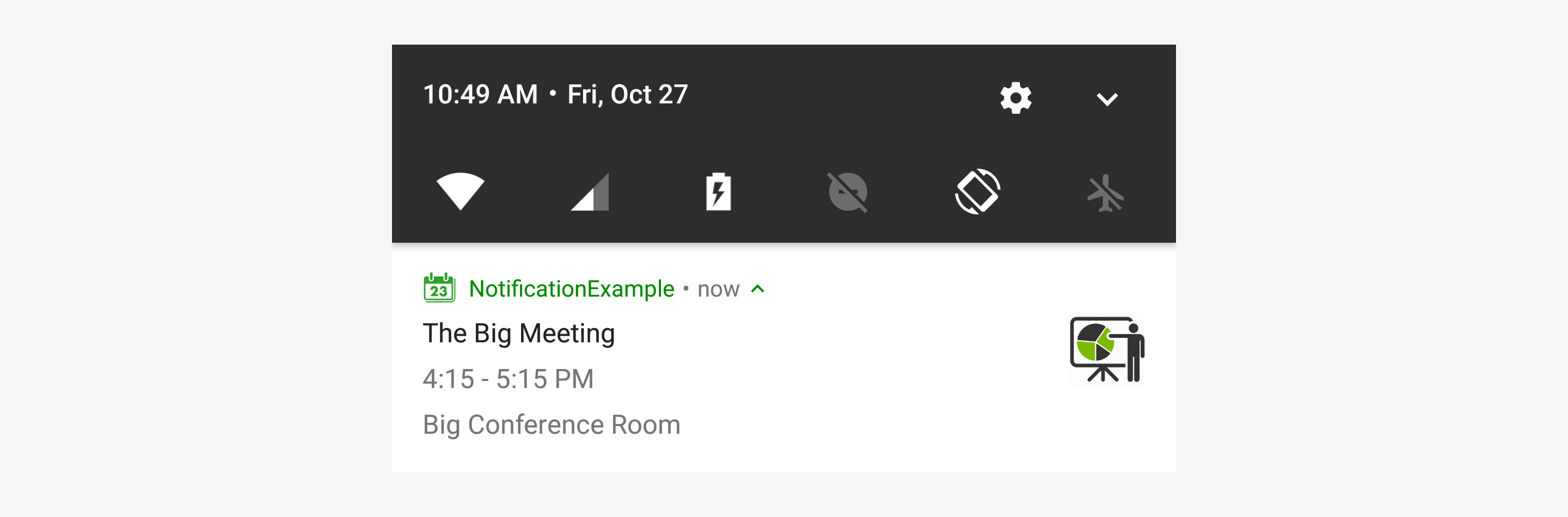
Split the text by line breaks if the message comes from a single person and just too long to show in a single line.
```js
cordova.plugins.notification.local.schedule({
id: 1,
title: 'The Big Meeting',
text: '4:15 - 5:15 PM\nBig Conference Room',
androidSmallIcon: 'res://ic_menu_my_calendar',
androidLargeIcon: 'res://large_icon'
});
```
Android only
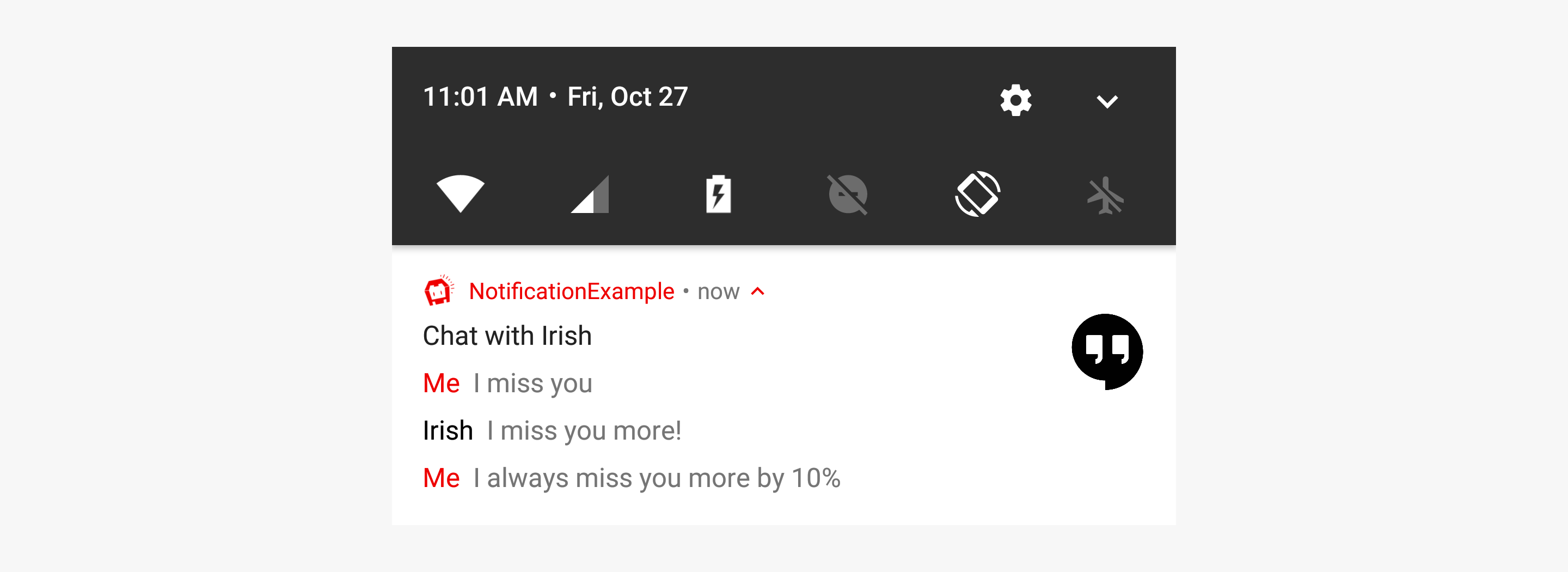
Instead of displaying multiple notifications, you can create one notification that summarizes them all.
```js
cordova.plugins.notification.local.schedule({
id: 15,
title: 'Chat with Irish',
androidLargeIcon: 'res://large_icon',
androidMessages: [
{ person: 'Me', message: 'I miss you' },
{ person: 'Irish', message: 'I miss you more!' },
{ person: 'Me', message: 'I always miss you more by 10%' }
]
});
```
Android only
Your app can present multiple notifications as a single group:
- A parent notification displays a summary of its child notifications.
- The child notifications are presented without duplicate header information.
```js
cordova.plugins.notification.local.schedule([
{
id: 1,
title: 'Design team meeting',
...
},
{
id: 2,
androidSummary: 'me@gmail.com',
androidGroup: 'email',
androidGroupSummary: true
},
{
id: 3,
title: 'Please take all my money',
...,
androidGroup: 'email'
},
{
id: 4,
title: 'A question regarding this plugin',
...,
androidGroup: 'email'
},
{
id: 5,
title: 'Wellcome back home',
...,
androidGroup: 'email'
}
]);
```
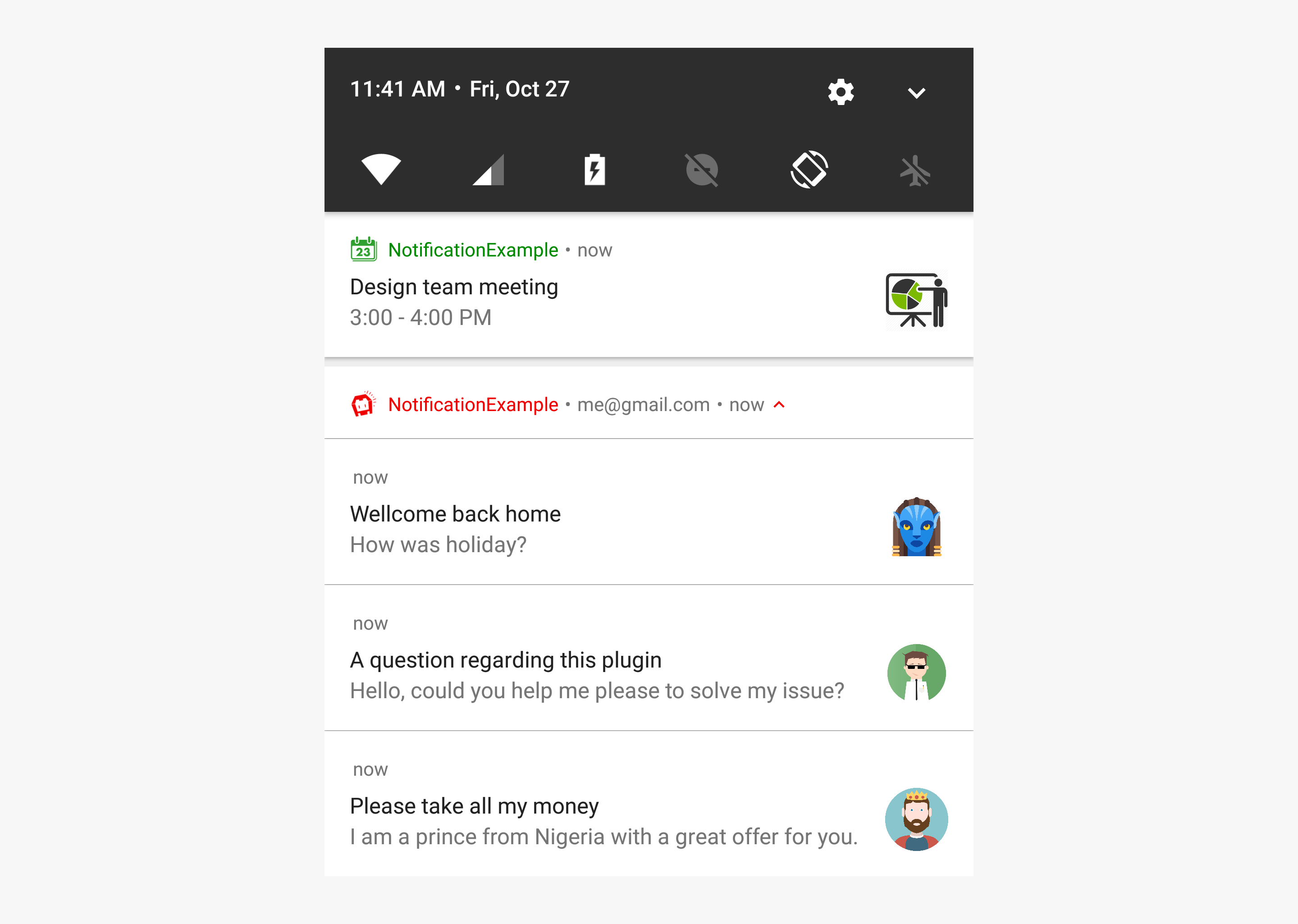
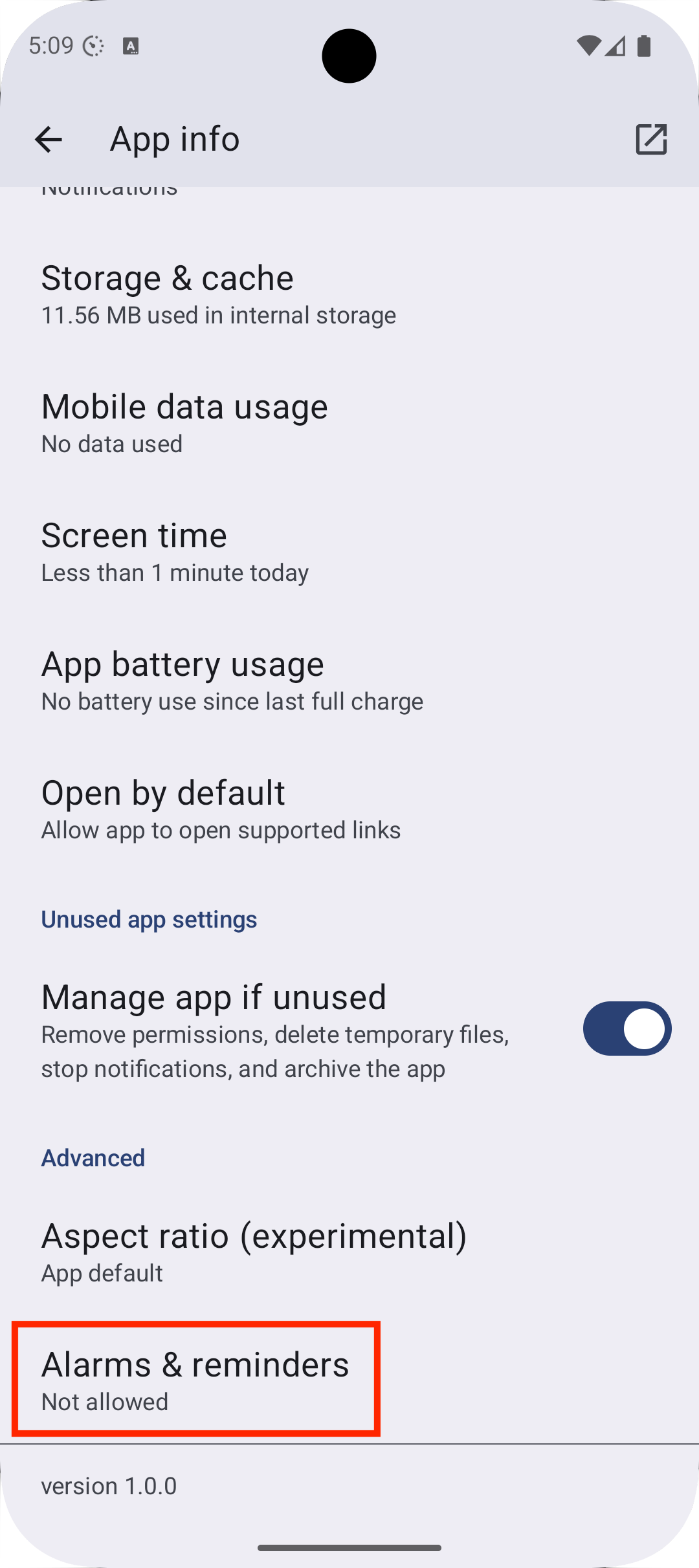 | After declaring `SCHEDULE_EXACT_ALARM` as permission, your app have a new entry in the app settings called `Alarms & reminders`, where the user can enable/disable exact alarms. |
|
| After declaring `SCHEDULE_EXACT_ALARM` as permission, your app have a new entry in the app settings called `Alarms & reminders`, where the user can enable/disable exact alarms. |
| 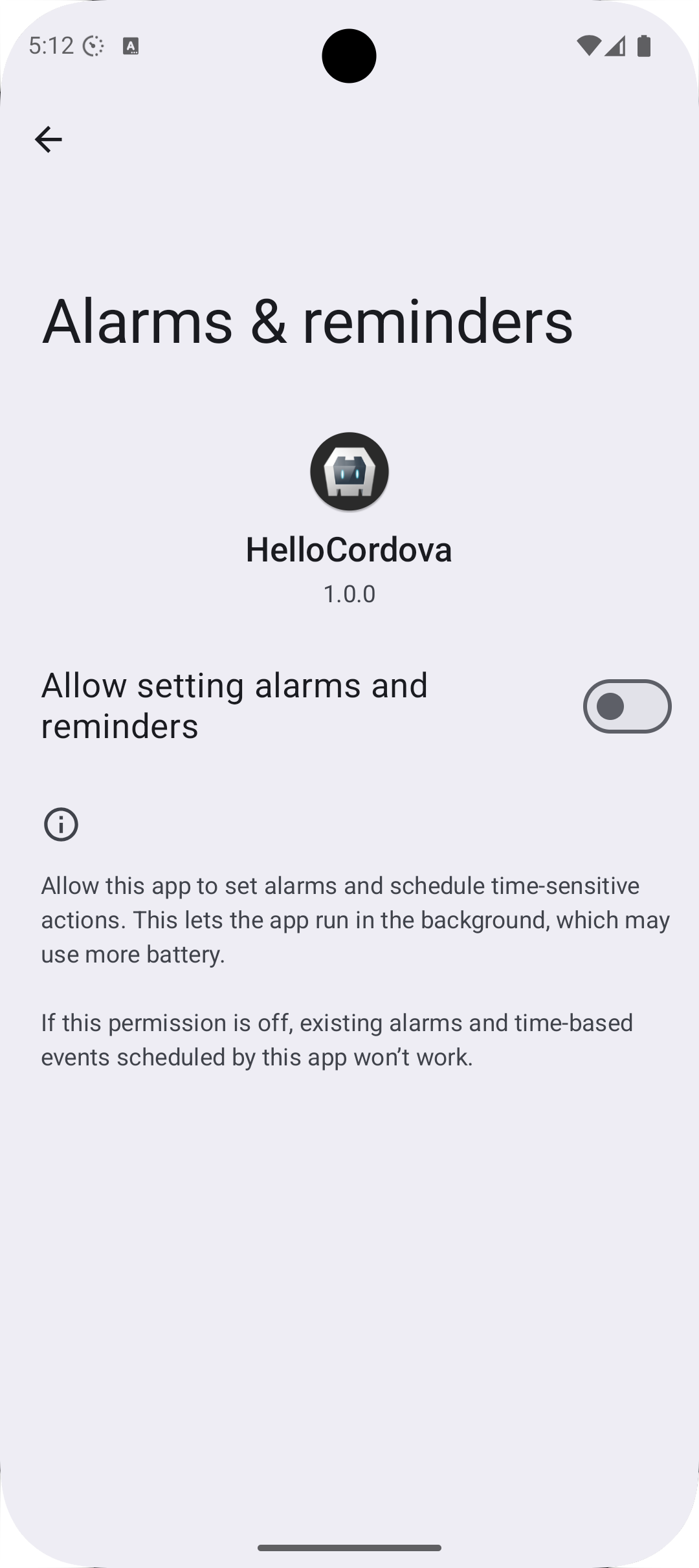 | Clicking on this entry will open the setting to enable/disable exact alarms. This screen will also been shown if you call [openAlarmSettings](#openalarmsettings) |
On Android 12 `SCHEDULE_EXACT_ALARM` is pre-granted. On Android 13 and newer the user has to permit this in the "Alarms & Reminders" setting, which you can open by [openAlarmSettings](#openalarmsettings). You can use the [resume](https://cordova.apache.org/docs/en/12.x/cordova/events/events.html#resume) event of Cordova to check if exact alarms are permitted by [canScheduleExactAlarms](#canscheduleexactalarms). If you have already posted inexact alarms, before the user granted the exact alarm permission, inexact alarms will be automatically rescheduled by this plugin as exact alarms. The downside is, when the user revokes the exact alarm permission, your app will be killed and all exact alarms will be canceled without rescheduling them as inexact alarms. You have to reschedule them the next time the user starts your app. You can read everything about it in the [Android documentation](https://developer.android.com/about/versions/14/changes/schedule-exact-alarms).
### Exact alarms: Define your app as a Calender or Alarm Clock app
This is a very special case you should think about. When you declare your app as a calendar or alarm clock app, the app have to fullfill the requirements and must be approved by Google in the Play Store. Google could remove the app from the store if the app is found to be misusing the permission.
Calendar or alarm clock apps need to send calendar reminders, wake-up alarms, or alerts when the app is no longer running. These apps can request the [USE_EXACT_ALARM](https://developer.android.com/reference/android/Manifest.permission#USE_EXACT_ALARM) permission. The `USE_EXACT_ALARM` permission will be granted on install, and apps holding this permission will be able to schedule exact alarms just like apps with the `SCHEDULE_EXACT_ALARM` permission. The advantage is, that this permission can't be revoked by the user.
To declare the `USE_EXACT_ALARM` permission in the `AndroidManifest.xml`, you can do this with your `config.xml`.
First add the Android xml namespace to your `widget` tag:
```xml
Android only
Checks if the user has enabled the "Alarms & Reminders"-setting. If not, the notificiatons will be scheduled inexact, which is still ok and will only be delayed by some minutes.
- On Android 11 and older, this method will always return `true` in the `successCallback`.
- On Android 12 the permission is granted by default
- On Android 13 and newer, the permission is not granted by default and have to be explicitly enabled by the user.
### createChannel
Android only
Creates a channel, if it not already exists. A channel is not changeable, after it is created. This is a restriction by Android.
If a notification does not specify a [androidChannelId](#property-androidchannelid) a [default channel](#default-channel) will be used.
For setting the channel, use [androidChannelId](#property-androidchannelid) when scheduling a notification.
Overview of all properties for a channel:
```js
cordova.plugins.notification.local.createChannel({
androidChannelId: "my_channel_01", // string, to separate something in the id, use "_" instead of "-"
androidChannelName: "My Channel Name", // string, defaults to "Default Channel"
androidChannelDescription: "Description of channel", // string (optional)
androidChannelImportance: "IMPORTANCE_DEFAULT", // string (optional)
androidChannelEnableLights: true, // boolean (optional), default is false
androidChannelEnableVibration: true, // boolean (optional), default is false
sound: 'www/audio/ring.mp3', // string (optional)
androidChannelSoundUsage: 5 // int (optional), default is USAGE_NOTIFICATION
}, successCallback, this)
```
Property documentation:
- [androidChannelId](#property-androidchannelid)
- [androidChannelImportance](#property-androidchannelimportance)
- [androidChannelEnableLights](#property-androidchannelenablelights)
- [androidChannelEnableVibration](#property-androidchannelenablevibration)
- [sound](#property-sound)
- [androidChannelSoundUsage](#property-androidchannelsoundusage)
### deleteChannel
Android only
Deletes a Android channel.
Example:
```javascript
cordova.plugins.notification.local.deleteChannel("my_channel_id", successCallback, this)
```
These will delete all associated notificiations for this channel. If you create a new channel with the same id, the deleted channel will be un-deleted with all of the same settings it had before it was deleted, see [NotificationManagerCompat.deleteNotificationChannel](https://developer.android.com/reference/androidx/core/app/NotificationManagerCompat#deleteNotificationChannel(java.lang.String))
### getDefaults
Returns the default values of all properties on each platform.
Example:
```js
cordova.plugins.notification.local.getDefaults();
```
### getUnusedAppRestrictionsStatus
Returns the status of unused app restrictions also called [app hibernation](#app-hibernation--app-unused), which was introduced in Android 11 and is backported to Android 6 through the Google Play Store. From Android 6 to 11, only permissions gets revoked, what does not affect notifications, because notifications needs requesting permissions only since Android 13. But because since Android 12 also notifications get canceled, the status is relevant for Android 12 and later. When unused app restrictions are active, it will return `API_30_BACKPORT` (on Android 6 to 10), `API_30` on Android 11 or `API_31`on Android 12 and later. If it is disabled, `DISABLED` will be returned.
Sample:
```javascript
cordova.plugins.notification.local.getUnusedAppRestrictionsStatus(
(status) => {
// Shortcode for getting possibile status codes for status
const statusCodes = cordova.plugins.notification.local.androidUnusedAppRestrictionsStatusCodes;
// app hibernation is active on Android 12 and later
if (status == statusCodes.API_31) {
}
},
this
);
```
Possible status codes:
| Name | Value | Description |
| :---------------------- | :-------- | ----------------------- |
| ERROR | 0 | The status of Unused App Restrictions could not be retrieved from this app e.g. if the user is in locked device boot mode. Check the logs for the reason. |
| FEATURE_NOT_AVAILABLE | 1 | There are no available Unused App Restrictions for this app. This would happen on devices older then Android 6, but this plugin supports minimum Android 7. |
| DISABLED | 2 | Any available Unused App Restrictions on the device are disabled for this app. In other words, this app is exempt from having its permissions automatically removed or being hibernated. |
| API_30_BACKPORT | 3 | Unused App Restrictions introduced by Android API 30 (Android 11), and since made available on earlier (API 23-29 = Android 6 to 10) devices are enabled for this app: permission auto-reset. Note: This value is only used on API 29 (Android 10) or earlier devices. |
| API_30 | 4 | Unused App Restrictions introduced by Android API 30 (Android 11) are enabled for this app: permission auto-reset. Note: This value is only used on API 30 (Android 11) or later devices. |
| API_31 | 5 | Unused App Restrictions introduced by Android API 31 (Android 12) are enabled for this app: permission auto-reset and app hibernation. Note: This value is only used on API 31 (Android 12) or later devices. |
### hasPermission
Checks if the app has permissions to post notifications.
```js
cordova.plugins.notification.local.hasPermission(function (granted) { ... });
```
### iOSClearBadge
Clears the badge.
### openAlarmSettings
Android only. Since Android 12 (SDK 31).
Opens the `Alarms & reminders` setting as an Activity when running on Android 12 (SDK 31) or later, where the user can enable exact alarms.
This is only available, if [SCHEDULE_EXACT_ALARM](#exact-alarms-user-grants-permission) is declared as permission in the `AndroidManifest.xml`.
This method will not wait for the user to be returned back to the app. For this, the `resume`-event can be used. The callback will just return `OK`, after starting the activity.
- If the user grants permission, already inexact scheduled notifications will be rescheduled as exact alarms.
- If exact alarms were already granted and the user revokes it, the app will be killed and all scheduled notifications will be canceled. The app have to schedule the notifications as inexact alarms again, when the app is opened the next time, see https://developer.android.com/develop/background-work/services/alarms/schedule#using-schedule-exact-permission.
- On Android older then 12, it will just call the `successCallback`, without doing anything.
### openManageUnusedAppRestrictions
Opens the unused app restriction settings directly in your app. The `successCallback` will be called if the user returns to your app.
Sample:
```javascript
cordova.plugins.notification.local.openManageUnusedAppRestrictions((result) => {
// User has returned from the settings
}, this);
```
You can check in the `successCallback` what the user selected, by calling [getUnusedAppRestrictionsStatus](#getunusedapprestrictionsstatus).
### openNotificationSettings
Opens the notifications settings of the app on Android 8 and newer. This method will not wait for the user to be returned back to the app. For this, the `resume`-event can be used.
- On Android, the callback will just return "OK", after starting the activity.
- On Android older then 8, it opens the app details.
- On iOS it's not possible to open the notification settings, it will open the app settings.
### requestPermission
Request permission to post notifications. This is called automatically by the plugin when scheduling notifications, but you can also request it manually before scheduling notifications:
```js
cordova.plugins.notification.local.requestPermission(function (granted) { ... });
```
If this method is called, a dialog will be shown to the user to ask for the permission.
The user can still allow/deny the permission through the system settings.
To check if permissions are granted, without calling this method, use [hasPermission](#haspermission).
### setDefaults
Changes default values of properties.
Example:
```js
cordova.plugins.notification.local.setDefaults({
androidChannelId: "my_channel_01",
title: "My default Title"
});
```
## Properties
### Changed properties
List of changed properties on newer plugin versions.
#### Changes since version `1.1.0`
There were some properties renamed. You can still use the old ones, but you will get a deprecation warning in the log and they will be removed in future versions.
| Old Property | New Property |
| :---------------------- | :-------------------------- |
| autoClear | androidAutoCancel |
| badge | badgeNumber |
| channelDescription | androidChannelDescription |
| channelId | androidChannelId |
| channelImportance | androidChannelImportance |
| channelName | androidChannelName |
| clock | Use for `clock: boolean` = `androidShowWhen: boolean` and for `clock: 'chronometer'` = `androidUsesChronometer: true` |
| color | androidColor |
| defaults | androidDefaults |
| description | androidChannelDescription |
| foreground | iOSForeground |
| group | androidGroup |
| groupSummary | androidGroupSummary |
| icon | androidLargeIcon |
| iconType | androidLargeIconType |
| importance | androidChannelImportance |
| lockscreen | androidLockscreen |
| mediaSession | *Property was removed* |
| onlyAlertOnce | androidOnlyAlertOnce |
| prio | Use `androidChannelImportance`, `androidAlarmType` and `androidAllowWhileIdle` instead. |
| priority | Use `androidChannelImportance`, `androidAlarmType` and `androidAllowWhileIdle` instead. |
| progressBar | androidProgressBar |
| smallIcon | androidSmallIcon |
| sticky | androidOngoing |
| soundUsage | androidChannelSoundUsage |
| ongoing | androidOngoing |
| summary | androidSummary |
| text as Array | androidMessages |
| timeoutAfter | androidTimeoutAfter |
| titleCount | androidTitleCount |
| wakeup | androidWakeUpScreen |
##### Changes on androidProgressBar
The default value changed from:
```json
{enabled: false, value:0, maxValue:100, indeterminate:false}
```
to
`null`
The property `androidProgressBar.enabled` is not supported anymore.
Just set `androidProgressBar: null` to disable the progressbar.
##### Changes on sound
The property `sound` takes no longer additionally a boolean, now only a string, which points to a sound file.
- The value `sound: true` is replaced with `sound: 'default'`
- The value `sound: false` is replaced with `sound: null`
### Changes since version `1.1.1`
There were some properties renamed. You can still use the old ones, but you will get a deprecation warning in the log and they will be removed in future versions.
| Old Property | New Property | Reason |
| :---------------------- | :---------------------------- | ----------------------- |
| vibrate | androidChannelEnableVibration | The vibration cannot be controlled on iOS. So this is a Android only property and can only be set on a channel. See [androidChannelEnableVibration](#property-androidchannelenablevibration)|
### Common properties
These properties can be used on all platforms, but some may behave differently on each platform.
| Property | Default | Comment |
| :----------------------| :-----------------|:--------------------------|
| [actions](#actions) | `[]` | Actions of a notification |
| [attachments](#property-attachments) | `[]` | List of resources, to attach to the notification. |
| [badgeNumber](#property-badgenumber) | Android: `1`, iOS: `-1` | Sets the badge for the application. The behaviour differs on Android and iOS. |
| data | `null` | Custom data for the notification. Can be used, when the notification is send back to the app, e.g. by clicking on it. |
| [id](#property-id) | `1` | ID of a notification as number. |
| launch | `true` | If a click on the notification should launch the app. |
| [priority](#property-priority) | `0` (=PRIORITY_DEFAULT) | Deprecated. Use [androidChannelImportance](#property-androidchannelimportance), [androidAlarmType](#property-androidalarmtype) and [androidAllowWhileIdle](#property-androidallowwhileidle) |
| silent | `false` | iOS: Don't show a notification, make no sound, no vibration, when app is in foreground. Android: Don't show a notification (Does not create a Builder. Must be tested if that works) |
| text | `""` | Text of the notification. Android features: 1. If the text contains line breaks (`\n`) the notification style [NotificationCompat.InboxStyle](https://developer.android.com/reference/androidx/core/app/NotificationCompat.InboxStyle) will be used. 2. If the text is longer then 44 chars, the notifications style [NotificationCompat.BigTextStyle](https://developer.android.com/reference/androidx/core/app/NotificationCompat.BigTextStyle) will be used. |
| [sound](#property-sound) | `default` | Sets the sound of a notification. On iOS it also turns on/off the vibration. |
| title | `""` (Sets the app name) | Title of the notification. Has to be a String. If it is empty, the app name will be used. |
| [trigger](#triggers) | `{at: new Date(), type : "calendar"}`| Notifications may trigger depend on time or location (iOS only) |
### Android properties
These properties are only available on Android.
| Property | Default | Comment |
| :----------------------| :-----------------|:--------------------------|
| [androidAlarmType](#property-androidalarmtype) | `RTC_WAKEUP` | |
| [androidAllowWhileIdle](#property-androidallowwhileidle) | `false` | Alarm will be allowed to execute even when the system is in low-power idle (a.k.a. doze) modes. |
| androidAutoCancel | `true` | Make this notification automatically dismissed when the user touches it |
| androidChannelDescription | `null` | Sets the `description` of a [notification channel](#notification-channels). |
| [androidChannelEnableLights](#property-androidchannelenablelights) | `false` | Can be `true` or `false`and sets whether notifications posted to a [notification channel](#android-channels) should display notification lights, on devices that support that feature. |
| [androidChannelEnableVibration](#property-androidchannelenablevibration) | `false` | Enables the vibration of a channel. |
| [androidChannelId](#property-androidchannelid) | `default_channel` | Specifies the channel id to be posted on. |
| androidChannelImportance | `IMPORTANCE_DEFAULT` | Sets the [importance](#property-androidchannelimportance) of a [notification channel](#notification-channels) |
| androidChannelName | `Default channel` | Set the `channelName` for the notification to be posted on. See [Android Notification Channels](#notification-channels) for more information. |
| androidChannelSoundUsage | `5` (=USAGE_NOTIFICATION) | Sets the [androidChannelSoundUsage](#property-androidchannelsoundusage) of a [notification channel](#notification-channels). |
| [androidColor](#property-androidcolor) | `null` | The notification background color for the small icon in the notification style. |
| [androidGroup](#grouping) | `null` | Set this notification to be part of a group of notifications sharing the same key. Grouped notifications may display in a cluster or stack on devices which support such rendering. To make this notification the summary for its group, also call setGroupSummary(boolean). A sort order can be specified for group members by using setSortKey(String) (not implemented yet). Calls [Notification.Builder#setGroup(java.lang.String)](https://developer.android.com/reference/android/app/Notification.Builder#setGroup(java.lang.String)) |
| [androidGroupSummary](#grouping) | `false` | Set this notification to be the group summary for a group of notifications. Grouped notifications may display in a cluster or stack on devices which support such rendering. Requires a group key also be set using setGroup(String). The group summary may be suppressed if too few notifications are included in the group. Calls [Notification.Builder#setGroupSummary(boolean)](https://developer.android.com/reference/android/app/Notification.Builder#setGroupSummary(boolean)) |
| [androidLargeIcon](#property-androidlargeicon) | `null` | Add a large icon to the notification content view. |
| androidLargeIconType | `square` | Can be `square` or `circle` |
| androidLockscreen | `true` | If the entire notification should be shown on all lockscreens and while screen sharing. If the value is `true`, [Notification#VISIBILITY_PUBLIC](https://developer.android.com/reference/android/app/Notification#VISIBILITY_PUBLIC) will be set, otherwise [Notification#VISIBILITY_SECRET](https://developer.android.com/reference/android/app/Notification#VISIBILITY_SECRET). Sets [Notification#visibility](https://developer.android.com/reference/android/app/Notification#visibility). |
| androidMessages | `null` | Array of messages to [summarize](#summarizing) notifications. [NotificationCompat.MessagingStyle](https://developer.android.com/reference/androidx/core/app/NotificationCompat.MessagingStyle) will be used. |
| androidOngoing | `false` | Set whether this is an ongoing notification. Ongoing notifications cannot be dismissed by the user on locked devices, or by notification listeners, and some notifications (call, device management, media) cannot be dismissed on unlocked devices. |
| androidOnlyAlertOnce | `false` | Set this flag if you would only like the sound, vibrate and ticker to be played if the notification is not already showing (see [documentation](https://developer.android.com/reference/android/app/Notification.Builder#setOnlyAlertOnce(boolean))). |
| androidProgressBar | `null` | See [documentation](#progress) |
| androidShowWhen | `true` | If the Notification should show the when date. Before Version 1.1.0 called `clock`. |
| [androidSmallIcon](#property-androidsmallicon) | `res://ic_popup_reminder` (=Bell icon) | Set the small icon resource, which will be used to represent the notification in the status bar. |
| [androidSummary](#property-androidsummary) | `null` | |
| androidTimeoutAfter | `0` | Specifies a duration in milliseconds after which this notification should be canceled, if it is not already canceled. `0` means no automatic cancellation. |
| androidTitleCount | `%n%` | Additional text added to the title for displaying the number of messages if there is more than one. Only used, if using MessagingStyle. Use `%n%` in the string for specifying the location of the number. |
| androidUsesChronometer | `false` | Show the Notification#when field as a stopwatch. Instead of presenting when as a timestamp, the notification will show an automatically updating display of the minutes and seconds since when. Useful when showing an elapsed time (like an ongoing phone call). Was former handeld by `clock: 'chronometer'` |
| androidWakeUpScreen | `true` | If the screen should go on, when a notification arrives |
| androidDefaults | `0` | Android 7 only. Sets the default notification options that will be used only on Android 7. Bitwise-or of: DEFAULT_SOUND, DEFAULT_VIBRATE, DEFAULT_LIGHTS. |
| led | `false` | Android 7 only. Can be a Hex-String like `#FF00FF` or `{color: '#FF00FF', on: 500, off: 500}` and sets the led of a notification. Replaced by [androidChannelEnableLights](#property-androidchannelenablelights). |
### iOS properties
These properties are only available on iOS.
| Property | Default value | Comment |
| :--------------------------------------- | :-------------------- | :------------------------ |
| [iOSForeground](#property-iosforeground) | `true` | Displays a notification banner, when app is in foreground. |
#### Some notes:
- A progressbar is natively not supported by iOS, [see Stackoverflow](https://stackoverflow.com/questions/48500532/progress-view-in-local-notification/48500734#48500734)
- The vibration cannot be turned off separately. It can only be turned off, if no sound is set.
### Default values
Default values for the properties can be get by [getDefaults](#getdefaults).
Values can be changed by [setDefaults](#setdefaults)
### Available properties
#### Property `androidAllowWhileIdle`
Default: `false`
Alarm will be allowed to execute even when the system is in low-power idle (a.k.a. doze) modes.
This type of alarm must only be used for situations where it is actually required that the alarm go off while in idle -- a reasonable example would be for a calendar notification that should make a sound so the user is aware of it. When the alarm is dispatched, the app will also be added to the system's temporary power exemption list for approximately 10 seconds to allow that application to acquire further wake locks in which to complete its work.
This executes [AlarmManager.setAndAllowWhileIdle](https://developer.android.com/reference/android/app/AlarmManager#setAndAllowWhileIdle(int,%20long,%20android.app.PendingIntent)) or [AlarmManager.setExactAndAllowWhileIdle](https://developer.android.com/reference/android/app/AlarmManager#setExactAndAllowWhileIdle(int,%20long,%20android.app.PendingIntent)) depending on [canScheduleExactAlarms](#canscheduleexactalarms).
#### Property `androidAlarmType`
Default: `RTC_WAKEUP`
If the alarm should be scheduled on a specific time or in relevance to the time, when the device was booted and if the alarm should wakeup the device cpu (not the screen). See also the Android documentation [Choose an alarm type](https://developer.android.com/develop/background-work/services/alarms/schedule#type).
| Value | Support | Description |
|:-----------------|:--------|:------------|
| [RTC_WAKEUP](https://developer.android.com/reference/android/app/AlarmManager#RTC_WAKEUP) | x | Alarm time in `System.currentTimeMillis()` (wall clock time in UTC), which will wake up the device (the CPU not the screen) when it goes off. |
| [RTC](https://developer.android.com/reference/android/app/AlarmManager#RTC) | x | Alarm time in `System.currentTimeMillis()` (wall clock time in UTC). This alarm does not wake the device up; if it goes off while the device is asleep, it will not be delivered until the next time the device wakes up. |
| [ELAPSED_REALTIME_WAKEUP](https://developer.android.com/reference/android/app/AlarmManager#ELAPSED_REALTIME_WAKEUP) | - | Alarm time in `SystemClock.elapsedRealtime()` (time since boot, including sleep), which will wake up the device (the CPU, not the screen) when it goes off. |
| [ELAPSED_REALTIME](https://developer.android.com/reference/android/app/AlarmManager#ELAPSED_REALTIME) | - | Alarm time in `SystemClock.elapsedRealtime()` (time since boot, including sleep). This alarm does not wake the device up; if it goes off while the device is asleep, it will not be delivered until the next time the device wakes up. |
#### Property `androidChannelEnableLights`
Default: `false`
Can be `true` or `false`and sets whether notifications posted to a [notification channel](#notification-channels) should display notification lights, on devices that support that feature.
Android documentation: https://developer.android.com/reference/android/app/NotificationChannel#enableLights(boolean)
#### Property `androidChannelEnableVibration`
Default: `false`
Sets the vibration of a [notification channel](#notification-channels) by setting [NotificationChannel#enableVibration(boolean)](https://developer.android.com/reference/android/app/NotificationChannel#enableVibration(boolean)). On Android 7 this sets the vibration of a notification directly.
#### Property `androidChannelId`
Default: `default_channel`
Sets the `channelId` for the notification to be posted on. Use [Snake Case](https://en.wikipedia.org/wiki/Snake_case) for the id, which means, the id should be written in lowercase and words should be separated by underscores (`_`) and not hyphens (`-`) or whitespaces.
#### Property `androidChannelImportance`
Default: `"IMPORTANCE_DEFAULT"`
The property can have one of the following values:
| Value | Description |
|:-----------------|:------------|
| [IMPORTANCE_NONE](https://developer.android.com/reference/androidx/core/app/NotificationManagerCompat#IMPORTANCE_NONE()) | A notification with no importance: shows nowhere, is blocked. |
| [IMPORTANCE_MIN](https://developer.android.com/reference/androidx/core/app/NotificationManagerCompat#IMPORTANCE_MIN()) | Min notification importance: only shows in the shade, below the fold. |
| [IMPORTANCE_LOW](https://developer.android.com/reference/androidx/core/app/NotificationManagerCompat#IMPORTANCE_LOW()) | Low notification importance: shows everywhere, but is not intrusive. |
| [IMPORTANCE_DEFAULT](https://developer.android.com/reference/androidx/core/app/NotificationManagerCompat#IMPORTANCE_DEFAULT()) | Default notification importance: shows everywhere, allowed to makes noise, but does not visually intrude. |
| [IMPORTANCE_HIGH](https://developer.android.com/reference/androidx/core/app/NotificationManagerCompat#IMPORTANCE_HIGH()) | Higher notification importance: shows everywhere, allowed to makes noise and peek. |
| [IMPORTANCE_MAX](https://developer.android.com/reference/androidx/core/app/NotificationManagerCompat#IMPORTANCE_MAX()) | Highest notification importance: shows everywhere, allowed to makes noise, peek, and use full screen intents. |
See the [Android documentation](https://developer.android.com/develop/ui/views/notifications#importance) about this property.
See also [NotificationChannel#NotificationChannel(java.lang.String,%20java.lang.CharSequence,%20int)](https://developer.android.com/reference/android/app/NotificationChannel#NotificationChannel(java.lang.String,%20java.lang.CharSequence,%20int))
#### Property `androidChannelSoundUsage`
Default: `5` (=`USAGE_NOTIFICATION`)
The property can have one of the following values:
| Property value | Android variable | Description |
|:-----------------|:-----------------|:------------|
| 0 | [USAGE_UNKNOWN](https://developer.android.com/reference/android/media/AudioAttributes#USAGE_UNKNOWN) | Usage value to use when the usage is unknown. |
| 1 | [USAGE_MEDIA](https://developer.android.com/reference/android/media/AudioAttributes#USAGE_MEDIA) | Usage value to use when the usage is media, such as music, or movie soundtracks. |
| 2 | [USAGE_VOICE_COMMUNICATION](https://developer.android.com/reference/android/media/AudioAttributes#USAGE_VOICE_COMMUNICATION)| Usage value to use when the usage is voice communications, such as telephony or VoIP. |
| 3 | [USAGE_VOICE_COMMUNICATION_SIGNALLING](https://developer.android.com/reference/android/media/AudioAttributes#USAGE_VOICE_COMMUNICATION_SIGNALLING) | Usage value to use when the usage is in-call signalling, such as with a "busy" beep, or DTMF tones. |
| 4 | [USAGE_ALARM](https://developer.android.com/reference/android/media/AudioAttributes#USAGE_ALARM) | Usage value to use when the usage is an alarm (e.g. wake-up alarm). |
| 5 | [USAGE_NOTIFICATION](https://developer.android.com/reference/android/media/AudioAttributes#USAGE_NOTIFICATION) | Usage value to use when the usage is notification. See other notification usages for more specialized uses. |
| 6 | [USAGE_NOTIFICATION_RINGTONE](https://developer.android.com/reference/android/media/AudioAttributes#USAGE_NOTIFICATION_RINGTONE) | Usage value to use when the usage is telephony ringtone. |
| 7 | [USAGE_NOTIFICATION_COMMUNICATION_REQUEST](https://developer.android.com/reference/android/media/AudioAttributes#USAGE_NOTIFICATION_COMMUNICATION_REQUEST) | This constant was deprecated in API level 33. Use USAGE_NOTIFICATION which is handled the same way as this usage by the audio framework. Usage value to use when the usage is a request to enter/end a communication, such as a VoIP communication or video-conference. |
| 8 | [USAGE_NOTIFICATION_COMMUNICATION_INSTANT](https://developer.android.com/reference/android/media/AudioAttributes#USAGE_NOTIFICATION_COMMUNICATION_INSTANT) | This constant was deprecated in API level 33. Use USAGE_NOTIFICATION which is handled the same way as this usage by the audio framework. Usage value to use when the usage is notification for an "instant" communication such as a chat, or SMS. |
| 9 | [USAGE_NOTIFICATION_COMMUNICATION_DELAYED](https://developer.android.com/reference/android/media/AudioAttributes#USAGE_NOTIFICATION_COMMUNICATION_DELAYED) | This constant was deprecated in API level 33. Use USAGE_NOTIFICATION which is handled the same way as this usage by the audio framework. Usage value to use when the usage is notification for a non-immediate type of communication such as e-mail. |
| 10 | [USAGE_NOTIFICATION_EVENT](https://developer.android.com/reference/android/media/AudioAttributes#USAGE_NOTIFICATION_EVENT) | Usage value to use when the usage is to attract the user's attention, such as a reminder or low battery warning. |
| 11 | [USAGE_ASSISTANCE_ACCESSIBILITY](https://developer.android.com/reference/android/media/AudioAttributes#USAGE_ASSISTANCE_ACCESSIBILITY) | Usage value to use when the usage is for accessibility, such as with a screen reader. |
| 12 | [USAGE_ASSISTANCE_NAVIGATION_GUIDANCE](https://developer.android.com/reference/android/media/AudioAttributes#USAGE_ASSISTANCE_NAVIGATION_GUIDANCE) | Usage value to use when the usage is driving or navigation directions. |
| 13 | [USAGE_ASSISTANCE_SONIFICATION](https://developer.android.com/reference/android/media/AudioAttributes#USAGE_ASSISTANCE_SONIFICATION) | Usage value to use when the usage is driving or navigation directions. |
| 14 | [USAGE_GAME](https://developer.android.com/reference/android/media/AudioAttributes#USAGE_GAME) | Usage value to use when the usage is media, such as music, or movie soundtracks. |
| 16 | [USAGE_ASSISTANT](https://developer.android.com/reference/android/media/AudioAttributes#USAGE_ASSISTANT) | Usage value to use for audio responses to user queries, audio instructions or help utterances. |
See [Android Documentation](https://developer.android.com/reference/android/media/AudioAttributes.Builder#setUsage(int))
#### Property `androidColor`
Default: `null`
The notification background color for the small icon. The color will only be applied on the notification style and not on the status bar.
Set as Hex-String like `#FF0000`. Calls [Notification.Builder#setColor](https://developer.android.com/reference/android/app/Notification.Builder#setColor(int)), which sets [Notification#color](https://developer.android.com/reference/android/app/Notification#color).
#### Property `androidLargeIcon`
Default: `null`
Add a large icon to the notification content view. In the platform template, this image will be shown either on the right of the notification, with an aspect ratio of up to 16:9, or (when the notification is grouped) on the left in place of the small icon. Calls [Notification.Builder#setLargeIcon(android.graphics.Bitmap)](https://developer.android.com/reference/android/app/Notification.Builder#setLargeIcon(android.graphics.Bitmap)).
Examples:
- `res://myLargeIcon.png` - Resource from the app bundle, see [documentation](#resource-pattern-res)
- `www/myLargeIcon.png` - `www` folder, see [documentation](#resource-pattern-file)
- `shared://myLargeIcon.png` - Shared folder, see [documentation](#resource-pattern-shared), Android only
#### Property `androidSmallIcon`
Default: `res://ic_popup_reminder` (=Bell icon)
Sets the small icon resource, which will be used to represent the notification in the status bar. Since Android 8, the icon must be a monochrome icon, which can only use a white color on a transparent background. The icon will be colored by the system in respective circumstances. You can also use a vector drawable, but only for a `res:\\` paths. You can get vector drawables on [Google Fonts Icons](https://fonts.google.com/icons) as example or for using it. Just select the download for Android. To know, what vector drawables are, see the Android documentation [Vector drawables overview](https://developer.android.com/develop/ui/views/graphics/vector-drawable-resources).
The platform template for the expanded view will draw this icon in the left, unless a large icon has also been specified, in which case the small icon will be moved to the right-hand side. Calls [Notification.Builder#setSmallIcon(int)](https://developer.android.com/reference/android/app/Notification.Builder#setSmallIcon(int)).
Example: `res://myIcon.png` - Resource from the app bundle, see [documentation](#resource-pattern-res)
Only `res://` paths are allowed.
#### Property `androidSummary`
Default: `null`
Used in the following cases:
1. For [NotificationCompat.InboxStyle#setSummaryText(java.lang.CharSequence)](https://developer.android.com/reference/androidx/core/app/NotificationCompat.InboxStyle#setSummaryText(java.lang.CharSequence)), when using [NotificationCompat.InboxStyle](https://developer.android.com/reference/androidx/core/app/NotificationCompat.InboxStyle), which happens, when the `text` property has line breaks.
2. For [NotificationCompat.BigPictureStyle#setSummaryText(java.lang.CharSequence)](https://developer.android.com/reference/androidx/core/app/NotificationCompat.BigPictureStyle#setSummaryText(java.lang.CharSequence)), when [NotificationCompat.BigPictureStyle](https://developer.android.com/reference/androidx/core/app/NotificationCompat.BigPictureStyle) is used, which happens, when `attachments` are used. If `androidSummary` is not set, `text` will be used.
3. For [NotificationCompat.BigTextStyle#setSummaryText(java.lang.CharSequence)](https://developer.android.com/reference/androidx/core/app/NotificationCompat.BigTextStyle#setSummaryText(java.lang.CharSequence)), when [NotificationCompat.BigTextStyle](https://developer.android.com/reference/androidx/core/app/NotificationCompat.BigTextStyle) is used, which happens, if the `text` property is longer then 44 characters.
#### Property `attachments`
Default: `[]`
List of resources, to attach to the notification.
##### Android
Only the first entry will be used as a [bigPicture](https://developer.android.com/reference/androidx/core/app/NotificationCompat.BigPictureStyle#bigPicture(android.graphics.Bitmap)) of [NotificationCompat.BigPictureStyle](https://developer.android.com/reference/androidx/core/app/NotificationCompat.BigPictureStyle).
Support resource patterns:
- [res://](#resource-pattern-res)
- [shared://](#resource-pattern-shared)
- [www](#resource-pattern-www)
Example folded and unfolded:
| Clicking on this entry will open the setting to enable/disable exact alarms. This screen will also been shown if you call [openAlarmSettings](#openalarmsettings) |
On Android 12 `SCHEDULE_EXACT_ALARM` is pre-granted. On Android 13 and newer the user has to permit this in the "Alarms & Reminders" setting, which you can open by [openAlarmSettings](#openalarmsettings). You can use the [resume](https://cordova.apache.org/docs/en/12.x/cordova/events/events.html#resume) event of Cordova to check if exact alarms are permitted by [canScheduleExactAlarms](#canscheduleexactalarms). If you have already posted inexact alarms, before the user granted the exact alarm permission, inexact alarms will be automatically rescheduled by this plugin as exact alarms. The downside is, when the user revokes the exact alarm permission, your app will be killed and all exact alarms will be canceled without rescheduling them as inexact alarms. You have to reschedule them the next time the user starts your app. You can read everything about it in the [Android documentation](https://developer.android.com/about/versions/14/changes/schedule-exact-alarms).
### Exact alarms: Define your app as a Calender or Alarm Clock app
This is a very special case you should think about. When you declare your app as a calendar or alarm clock app, the app have to fullfill the requirements and must be approved by Google in the Play Store. Google could remove the app from the store if the app is found to be misusing the permission.
Calendar or alarm clock apps need to send calendar reminders, wake-up alarms, or alerts when the app is no longer running. These apps can request the [USE_EXACT_ALARM](https://developer.android.com/reference/android/Manifest.permission#USE_EXACT_ALARM) permission. The `USE_EXACT_ALARM` permission will be granted on install, and apps holding this permission will be able to schedule exact alarms just like apps with the `SCHEDULE_EXACT_ALARM` permission. The advantage is, that this permission can't be revoked by the user.
To declare the `USE_EXACT_ALARM` permission in the `AndroidManifest.xml`, you can do this with your `config.xml`.
First add the Android xml namespace to your `widget` tag:
```xml
Android only
Checks if the user has enabled the "Alarms & Reminders"-setting. If not, the notificiatons will be scheduled inexact, which is still ok and will only be delayed by some minutes.
- On Android 11 and older, this method will always return `true` in the `successCallback`.
- On Android 12 the permission is granted by default
- On Android 13 and newer, the permission is not granted by default and have to be explicitly enabled by the user.
### createChannel
Android only
Creates a channel, if it not already exists. A channel is not changeable, after it is created. This is a restriction by Android.
If a notification does not specify a [androidChannelId](#property-androidchannelid) a [default channel](#default-channel) will be used.
For setting the channel, use [androidChannelId](#property-androidchannelid) when scheduling a notification.
Overview of all properties for a channel:
```js
cordova.plugins.notification.local.createChannel({
androidChannelId: "my_channel_01", // string, to separate something in the id, use "_" instead of "-"
androidChannelName: "My Channel Name", // string, defaults to "Default Channel"
androidChannelDescription: "Description of channel", // string (optional)
androidChannelImportance: "IMPORTANCE_DEFAULT", // string (optional)
androidChannelEnableLights: true, // boolean (optional), default is false
androidChannelEnableVibration: true, // boolean (optional), default is false
sound: 'www/audio/ring.mp3', // string (optional)
androidChannelSoundUsage: 5 // int (optional), default is USAGE_NOTIFICATION
}, successCallback, this)
```
Property documentation:
- [androidChannelId](#property-androidchannelid)
- [androidChannelImportance](#property-androidchannelimportance)
- [androidChannelEnableLights](#property-androidchannelenablelights)
- [androidChannelEnableVibration](#property-androidchannelenablevibration)
- [sound](#property-sound)
- [androidChannelSoundUsage](#property-androidchannelsoundusage)
### deleteChannel
Android only
Deletes a Android channel.
Example:
```javascript
cordova.plugins.notification.local.deleteChannel("my_channel_id", successCallback, this)
```
These will delete all associated notificiations for this channel. If you create a new channel with the same id, the deleted channel will be un-deleted with all of the same settings it had before it was deleted, see [NotificationManagerCompat.deleteNotificationChannel](https://developer.android.com/reference/androidx/core/app/NotificationManagerCompat#deleteNotificationChannel(java.lang.String))
### getDefaults
Returns the default values of all properties on each platform.
Example:
```js
cordova.plugins.notification.local.getDefaults();
```
### getUnusedAppRestrictionsStatus
Returns the status of unused app restrictions also called [app hibernation](#app-hibernation--app-unused), which was introduced in Android 11 and is backported to Android 6 through the Google Play Store. From Android 6 to 11, only permissions gets revoked, what does not affect notifications, because notifications needs requesting permissions only since Android 13. But because since Android 12 also notifications get canceled, the status is relevant for Android 12 and later. When unused app restrictions are active, it will return `API_30_BACKPORT` (on Android 6 to 10), `API_30` on Android 11 or `API_31`on Android 12 and later. If it is disabled, `DISABLED` will be returned.
Sample:
```javascript
cordova.plugins.notification.local.getUnusedAppRestrictionsStatus(
(status) => {
// Shortcode for getting possibile status codes for status
const statusCodes = cordova.plugins.notification.local.androidUnusedAppRestrictionsStatusCodes;
// app hibernation is active on Android 12 and later
if (status == statusCodes.API_31) {
}
},
this
);
```
Possible status codes:
| Name | Value | Description |
| :---------------------- | :-------- | ----------------------- |
| ERROR | 0 | The status of Unused App Restrictions could not be retrieved from this app e.g. if the user is in locked device boot mode. Check the logs for the reason. |
| FEATURE_NOT_AVAILABLE | 1 | There are no available Unused App Restrictions for this app. This would happen on devices older then Android 6, but this plugin supports minimum Android 7. |
| DISABLED | 2 | Any available Unused App Restrictions on the device are disabled for this app. In other words, this app is exempt from having its permissions automatically removed or being hibernated. |
| API_30_BACKPORT | 3 | Unused App Restrictions introduced by Android API 30 (Android 11), and since made available on earlier (API 23-29 = Android 6 to 10) devices are enabled for this app: permission auto-reset. Note: This value is only used on API 29 (Android 10) or earlier devices. |
| API_30 | 4 | Unused App Restrictions introduced by Android API 30 (Android 11) are enabled for this app: permission auto-reset. Note: This value is only used on API 30 (Android 11) or later devices. |
| API_31 | 5 | Unused App Restrictions introduced by Android API 31 (Android 12) are enabled for this app: permission auto-reset and app hibernation. Note: This value is only used on API 31 (Android 12) or later devices. |
### hasPermission
Checks if the app has permissions to post notifications.
```js
cordova.plugins.notification.local.hasPermission(function (granted) { ... });
```
### iOSClearBadge
Clears the badge.
### openAlarmSettings
Android only. Since Android 12 (SDK 31).
Opens the `Alarms & reminders` setting as an Activity when running on Android 12 (SDK 31) or later, where the user can enable exact alarms.
This is only available, if [SCHEDULE_EXACT_ALARM](#exact-alarms-user-grants-permission) is declared as permission in the `AndroidManifest.xml`.
This method will not wait for the user to be returned back to the app. For this, the `resume`-event can be used. The callback will just return `OK`, after starting the activity.
- If the user grants permission, already inexact scheduled notifications will be rescheduled as exact alarms.
- If exact alarms were already granted and the user revokes it, the app will be killed and all scheduled notifications will be canceled. The app have to schedule the notifications as inexact alarms again, when the app is opened the next time, see https://developer.android.com/develop/background-work/services/alarms/schedule#using-schedule-exact-permission.
- On Android older then 12, it will just call the `successCallback`, without doing anything.
### openManageUnusedAppRestrictions
Opens the unused app restriction settings directly in your app. The `successCallback` will be called if the user returns to your app.
Sample:
```javascript
cordova.plugins.notification.local.openManageUnusedAppRestrictions((result) => {
// User has returned from the settings
}, this);
```
You can check in the `successCallback` what the user selected, by calling [getUnusedAppRestrictionsStatus](#getunusedapprestrictionsstatus).
### openNotificationSettings
Opens the notifications settings of the app on Android 8 and newer. This method will not wait for the user to be returned back to the app. For this, the `resume`-event can be used.
- On Android, the callback will just return "OK", after starting the activity.
- On Android older then 8, it opens the app details.
- On iOS it's not possible to open the notification settings, it will open the app settings.
### requestPermission
Request permission to post notifications. This is called automatically by the plugin when scheduling notifications, but you can also request it manually before scheduling notifications:
```js
cordova.plugins.notification.local.requestPermission(function (granted) { ... });
```
If this method is called, a dialog will be shown to the user to ask for the permission.
The user can still allow/deny the permission through the system settings.
To check if permissions are granted, without calling this method, use [hasPermission](#haspermission).
### setDefaults
Changes default values of properties.
Example:
```js
cordova.plugins.notification.local.setDefaults({
androidChannelId: "my_channel_01",
title: "My default Title"
});
```
## Properties
### Changed properties
List of changed properties on newer plugin versions.
#### Changes since version `1.1.0`
There were some properties renamed. You can still use the old ones, but you will get a deprecation warning in the log and they will be removed in future versions.
| Old Property | New Property |
| :---------------------- | :-------------------------- |
| autoClear | androidAutoCancel |
| badge | badgeNumber |
| channelDescription | androidChannelDescription |
| channelId | androidChannelId |
| channelImportance | androidChannelImportance |
| channelName | androidChannelName |
| clock | Use for `clock: boolean` = `androidShowWhen: boolean` and for `clock: 'chronometer'` = `androidUsesChronometer: true` |
| color | androidColor |
| defaults | androidDefaults |
| description | androidChannelDescription |
| foreground | iOSForeground |
| group | androidGroup |
| groupSummary | androidGroupSummary |
| icon | androidLargeIcon |
| iconType | androidLargeIconType |
| importance | androidChannelImportance |
| lockscreen | androidLockscreen |
| mediaSession | *Property was removed* |
| onlyAlertOnce | androidOnlyAlertOnce |
| prio | Use `androidChannelImportance`, `androidAlarmType` and `androidAllowWhileIdle` instead. |
| priority | Use `androidChannelImportance`, `androidAlarmType` and `androidAllowWhileIdle` instead. |
| progressBar | androidProgressBar |
| smallIcon | androidSmallIcon |
| sticky | androidOngoing |
| soundUsage | androidChannelSoundUsage |
| ongoing | androidOngoing |
| summary | androidSummary |
| text as Array | androidMessages |
| timeoutAfter | androidTimeoutAfter |
| titleCount | androidTitleCount |
| wakeup | androidWakeUpScreen |
##### Changes on androidProgressBar
The default value changed from:
```json
{enabled: false, value:0, maxValue:100, indeterminate:false}
```
to
`null`
The property `androidProgressBar.enabled` is not supported anymore.
Just set `androidProgressBar: null` to disable the progressbar.
##### Changes on sound
The property `sound` takes no longer additionally a boolean, now only a string, which points to a sound file.
- The value `sound: true` is replaced with `sound: 'default'`
- The value `sound: false` is replaced with `sound: null`
### Changes since version `1.1.1`
There were some properties renamed. You can still use the old ones, but you will get a deprecation warning in the log and they will be removed in future versions.
| Old Property | New Property | Reason |
| :---------------------- | :---------------------------- | ----------------------- |
| vibrate | androidChannelEnableVibration | The vibration cannot be controlled on iOS. So this is a Android only property and can only be set on a channel. See [androidChannelEnableVibration](#property-androidchannelenablevibration)|
### Common properties
These properties can be used on all platforms, but some may behave differently on each platform.
| Property | Default | Comment |
| :----------------------| :-----------------|:--------------------------|
| [actions](#actions) | `[]` | Actions of a notification |
| [attachments](#property-attachments) | `[]` | List of resources, to attach to the notification. |
| [badgeNumber](#property-badgenumber) | Android: `1`, iOS: `-1` | Sets the badge for the application. The behaviour differs on Android and iOS. |
| data | `null` | Custom data for the notification. Can be used, when the notification is send back to the app, e.g. by clicking on it. |
| [id](#property-id) | `1` | ID of a notification as number. |
| launch | `true` | If a click on the notification should launch the app. |
| [priority](#property-priority) | `0` (=PRIORITY_DEFAULT) | Deprecated. Use [androidChannelImportance](#property-androidchannelimportance), [androidAlarmType](#property-androidalarmtype) and [androidAllowWhileIdle](#property-androidallowwhileidle) |
| silent | `false` | iOS: Don't show a notification, make no sound, no vibration, when app is in foreground. Android: Don't show a notification (Does not create a Builder. Must be tested if that works) |
| text | `""` | Text of the notification. Android features: 1. If the text contains line breaks (`\n`) the notification style [NotificationCompat.InboxStyle](https://developer.android.com/reference/androidx/core/app/NotificationCompat.InboxStyle) will be used. 2. If the text is longer then 44 chars, the notifications style [NotificationCompat.BigTextStyle](https://developer.android.com/reference/androidx/core/app/NotificationCompat.BigTextStyle) will be used. |
| [sound](#property-sound) | `default` | Sets the sound of a notification. On iOS it also turns on/off the vibration. |
| title | `""` (Sets the app name) | Title of the notification. Has to be a String. If it is empty, the app name will be used. |
| [trigger](#triggers) | `{at: new Date(), type : "calendar"}`| Notifications may trigger depend on time or location (iOS only) |
### Android properties
These properties are only available on Android.
| Property | Default | Comment |
| :----------------------| :-----------------|:--------------------------|
| [androidAlarmType](#property-androidalarmtype) | `RTC_WAKEUP` | |
| [androidAllowWhileIdle](#property-androidallowwhileidle) | `false` | Alarm will be allowed to execute even when the system is in low-power idle (a.k.a. doze) modes. |
| androidAutoCancel | `true` | Make this notification automatically dismissed when the user touches it |
| androidChannelDescription | `null` | Sets the `description` of a [notification channel](#notification-channels). |
| [androidChannelEnableLights](#property-androidchannelenablelights) | `false` | Can be `true` or `false`and sets whether notifications posted to a [notification channel](#android-channels) should display notification lights, on devices that support that feature. |
| [androidChannelEnableVibration](#property-androidchannelenablevibration) | `false` | Enables the vibration of a channel. |
| [androidChannelId](#property-androidchannelid) | `default_channel` | Specifies the channel id to be posted on. |
| androidChannelImportance | `IMPORTANCE_DEFAULT` | Sets the [importance](#property-androidchannelimportance) of a [notification channel](#notification-channels) |
| androidChannelName | `Default channel` | Set the `channelName` for the notification to be posted on. See [Android Notification Channels](#notification-channels) for more information. |
| androidChannelSoundUsage | `5` (=USAGE_NOTIFICATION) | Sets the [androidChannelSoundUsage](#property-androidchannelsoundusage) of a [notification channel](#notification-channels). |
| [androidColor](#property-androidcolor) | `null` | The notification background color for the small icon in the notification style. |
| [androidGroup](#grouping) | `null` | Set this notification to be part of a group of notifications sharing the same key. Grouped notifications may display in a cluster or stack on devices which support such rendering. To make this notification the summary for its group, also call setGroupSummary(boolean). A sort order can be specified for group members by using setSortKey(String) (not implemented yet). Calls [Notification.Builder#setGroup(java.lang.String)](https://developer.android.com/reference/android/app/Notification.Builder#setGroup(java.lang.String)) |
| [androidGroupSummary](#grouping) | `false` | Set this notification to be the group summary for a group of notifications. Grouped notifications may display in a cluster or stack on devices which support such rendering. Requires a group key also be set using setGroup(String). The group summary may be suppressed if too few notifications are included in the group. Calls [Notification.Builder#setGroupSummary(boolean)](https://developer.android.com/reference/android/app/Notification.Builder#setGroupSummary(boolean)) |
| [androidLargeIcon](#property-androidlargeicon) | `null` | Add a large icon to the notification content view. |
| androidLargeIconType | `square` | Can be `square` or `circle` |
| androidLockscreen | `true` | If the entire notification should be shown on all lockscreens and while screen sharing. If the value is `true`, [Notification#VISIBILITY_PUBLIC](https://developer.android.com/reference/android/app/Notification#VISIBILITY_PUBLIC) will be set, otherwise [Notification#VISIBILITY_SECRET](https://developer.android.com/reference/android/app/Notification#VISIBILITY_SECRET). Sets [Notification#visibility](https://developer.android.com/reference/android/app/Notification#visibility). |
| androidMessages | `null` | Array of messages to [summarize](#summarizing) notifications. [NotificationCompat.MessagingStyle](https://developer.android.com/reference/androidx/core/app/NotificationCompat.MessagingStyle) will be used. |
| androidOngoing | `false` | Set whether this is an ongoing notification. Ongoing notifications cannot be dismissed by the user on locked devices, or by notification listeners, and some notifications (call, device management, media) cannot be dismissed on unlocked devices. |
| androidOnlyAlertOnce | `false` | Set this flag if you would only like the sound, vibrate and ticker to be played if the notification is not already showing (see [documentation](https://developer.android.com/reference/android/app/Notification.Builder#setOnlyAlertOnce(boolean))). |
| androidProgressBar | `null` | See [documentation](#progress) |
| androidShowWhen | `true` | If the Notification should show the when date. Before Version 1.1.0 called `clock`. |
| [androidSmallIcon](#property-androidsmallicon) | `res://ic_popup_reminder` (=Bell icon) | Set the small icon resource, which will be used to represent the notification in the status bar. |
| [androidSummary](#property-androidsummary) | `null` | |
| androidTimeoutAfter | `0` | Specifies a duration in milliseconds after which this notification should be canceled, if it is not already canceled. `0` means no automatic cancellation. |
| androidTitleCount | `%n%` | Additional text added to the title for displaying the number of messages if there is more than one. Only used, if using MessagingStyle. Use `%n%` in the string for specifying the location of the number. |
| androidUsesChronometer | `false` | Show the Notification#when field as a stopwatch. Instead of presenting when as a timestamp, the notification will show an automatically updating display of the minutes and seconds since when. Useful when showing an elapsed time (like an ongoing phone call). Was former handeld by `clock: 'chronometer'` |
| androidWakeUpScreen | `true` | If the screen should go on, when a notification arrives |
| androidDefaults | `0` | Android 7 only. Sets the default notification options that will be used only on Android 7. Bitwise-or of: DEFAULT_SOUND, DEFAULT_VIBRATE, DEFAULT_LIGHTS. |
| led | `false` | Android 7 only. Can be a Hex-String like `#FF00FF` or `{color: '#FF00FF', on: 500, off: 500}` and sets the led of a notification. Replaced by [androidChannelEnableLights](#property-androidchannelenablelights). |
### iOS properties
These properties are only available on iOS.
| Property | Default value | Comment |
| :--------------------------------------- | :-------------------- | :------------------------ |
| [iOSForeground](#property-iosforeground) | `true` | Displays a notification banner, when app is in foreground. |
#### Some notes:
- A progressbar is natively not supported by iOS, [see Stackoverflow](https://stackoverflow.com/questions/48500532/progress-view-in-local-notification/48500734#48500734)
- The vibration cannot be turned off separately. It can only be turned off, if no sound is set.
### Default values
Default values for the properties can be get by [getDefaults](#getdefaults).
Values can be changed by [setDefaults](#setdefaults)
### Available properties
#### Property `androidAllowWhileIdle`
Default: `false`
Alarm will be allowed to execute even when the system is in low-power idle (a.k.a. doze) modes.
This type of alarm must only be used for situations where it is actually required that the alarm go off while in idle -- a reasonable example would be for a calendar notification that should make a sound so the user is aware of it. When the alarm is dispatched, the app will also be added to the system's temporary power exemption list for approximately 10 seconds to allow that application to acquire further wake locks in which to complete its work.
This executes [AlarmManager.setAndAllowWhileIdle](https://developer.android.com/reference/android/app/AlarmManager#setAndAllowWhileIdle(int,%20long,%20android.app.PendingIntent)) or [AlarmManager.setExactAndAllowWhileIdle](https://developer.android.com/reference/android/app/AlarmManager#setExactAndAllowWhileIdle(int,%20long,%20android.app.PendingIntent)) depending on [canScheduleExactAlarms](#canscheduleexactalarms).
#### Property `androidAlarmType`
Default: `RTC_WAKEUP`
If the alarm should be scheduled on a specific time or in relevance to the time, when the device was booted and if the alarm should wakeup the device cpu (not the screen). See also the Android documentation [Choose an alarm type](https://developer.android.com/develop/background-work/services/alarms/schedule#type).
| Value | Support | Description |
|:-----------------|:--------|:------------|
| [RTC_WAKEUP](https://developer.android.com/reference/android/app/AlarmManager#RTC_WAKEUP) | x | Alarm time in `System.currentTimeMillis()` (wall clock time in UTC), which will wake up the device (the CPU not the screen) when it goes off. |
| [RTC](https://developer.android.com/reference/android/app/AlarmManager#RTC) | x | Alarm time in `System.currentTimeMillis()` (wall clock time in UTC). This alarm does not wake the device up; if it goes off while the device is asleep, it will not be delivered until the next time the device wakes up. |
| [ELAPSED_REALTIME_WAKEUP](https://developer.android.com/reference/android/app/AlarmManager#ELAPSED_REALTIME_WAKEUP) | - | Alarm time in `SystemClock.elapsedRealtime()` (time since boot, including sleep), which will wake up the device (the CPU, not the screen) when it goes off. |
| [ELAPSED_REALTIME](https://developer.android.com/reference/android/app/AlarmManager#ELAPSED_REALTIME) | - | Alarm time in `SystemClock.elapsedRealtime()` (time since boot, including sleep). This alarm does not wake the device up; if it goes off while the device is asleep, it will not be delivered until the next time the device wakes up. |
#### Property `androidChannelEnableLights`
Default: `false`
Can be `true` or `false`and sets whether notifications posted to a [notification channel](#notification-channels) should display notification lights, on devices that support that feature.
Android documentation: https://developer.android.com/reference/android/app/NotificationChannel#enableLights(boolean)
#### Property `androidChannelEnableVibration`
Default: `false`
Sets the vibration of a [notification channel](#notification-channels) by setting [NotificationChannel#enableVibration(boolean)](https://developer.android.com/reference/android/app/NotificationChannel#enableVibration(boolean)). On Android 7 this sets the vibration of a notification directly.
#### Property `androidChannelId`
Default: `default_channel`
Sets the `channelId` for the notification to be posted on. Use [Snake Case](https://en.wikipedia.org/wiki/Snake_case) for the id, which means, the id should be written in lowercase and words should be separated by underscores (`_`) and not hyphens (`-`) or whitespaces.
#### Property `androidChannelImportance`
Default: `"IMPORTANCE_DEFAULT"`
The property can have one of the following values:
| Value | Description |
|:-----------------|:------------|
| [IMPORTANCE_NONE](https://developer.android.com/reference/androidx/core/app/NotificationManagerCompat#IMPORTANCE_NONE()) | A notification with no importance: shows nowhere, is blocked. |
| [IMPORTANCE_MIN](https://developer.android.com/reference/androidx/core/app/NotificationManagerCompat#IMPORTANCE_MIN()) | Min notification importance: only shows in the shade, below the fold. |
| [IMPORTANCE_LOW](https://developer.android.com/reference/androidx/core/app/NotificationManagerCompat#IMPORTANCE_LOW()) | Low notification importance: shows everywhere, but is not intrusive. |
| [IMPORTANCE_DEFAULT](https://developer.android.com/reference/androidx/core/app/NotificationManagerCompat#IMPORTANCE_DEFAULT()) | Default notification importance: shows everywhere, allowed to makes noise, but does not visually intrude. |
| [IMPORTANCE_HIGH](https://developer.android.com/reference/androidx/core/app/NotificationManagerCompat#IMPORTANCE_HIGH()) | Higher notification importance: shows everywhere, allowed to makes noise and peek. |
| [IMPORTANCE_MAX](https://developer.android.com/reference/androidx/core/app/NotificationManagerCompat#IMPORTANCE_MAX()) | Highest notification importance: shows everywhere, allowed to makes noise, peek, and use full screen intents. |
See the [Android documentation](https://developer.android.com/develop/ui/views/notifications#importance) about this property.
See also [NotificationChannel#NotificationChannel(java.lang.String,%20java.lang.CharSequence,%20int)](https://developer.android.com/reference/android/app/NotificationChannel#NotificationChannel(java.lang.String,%20java.lang.CharSequence,%20int))
#### Property `androidChannelSoundUsage`
Default: `5` (=`USAGE_NOTIFICATION`)
The property can have one of the following values:
| Property value | Android variable | Description |
|:-----------------|:-----------------|:------------|
| 0 | [USAGE_UNKNOWN](https://developer.android.com/reference/android/media/AudioAttributes#USAGE_UNKNOWN) | Usage value to use when the usage is unknown. |
| 1 | [USAGE_MEDIA](https://developer.android.com/reference/android/media/AudioAttributes#USAGE_MEDIA) | Usage value to use when the usage is media, such as music, or movie soundtracks. |
| 2 | [USAGE_VOICE_COMMUNICATION](https://developer.android.com/reference/android/media/AudioAttributes#USAGE_VOICE_COMMUNICATION)| Usage value to use when the usage is voice communications, such as telephony or VoIP. |
| 3 | [USAGE_VOICE_COMMUNICATION_SIGNALLING](https://developer.android.com/reference/android/media/AudioAttributes#USAGE_VOICE_COMMUNICATION_SIGNALLING) | Usage value to use when the usage is in-call signalling, such as with a "busy" beep, or DTMF tones. |
| 4 | [USAGE_ALARM](https://developer.android.com/reference/android/media/AudioAttributes#USAGE_ALARM) | Usage value to use when the usage is an alarm (e.g. wake-up alarm). |
| 5 | [USAGE_NOTIFICATION](https://developer.android.com/reference/android/media/AudioAttributes#USAGE_NOTIFICATION) | Usage value to use when the usage is notification. See other notification usages for more specialized uses. |
| 6 | [USAGE_NOTIFICATION_RINGTONE](https://developer.android.com/reference/android/media/AudioAttributes#USAGE_NOTIFICATION_RINGTONE) | Usage value to use when the usage is telephony ringtone. |
| 7 | [USAGE_NOTIFICATION_COMMUNICATION_REQUEST](https://developer.android.com/reference/android/media/AudioAttributes#USAGE_NOTIFICATION_COMMUNICATION_REQUEST) | This constant was deprecated in API level 33. Use USAGE_NOTIFICATION which is handled the same way as this usage by the audio framework. Usage value to use when the usage is a request to enter/end a communication, such as a VoIP communication or video-conference. |
| 8 | [USAGE_NOTIFICATION_COMMUNICATION_INSTANT](https://developer.android.com/reference/android/media/AudioAttributes#USAGE_NOTIFICATION_COMMUNICATION_INSTANT) | This constant was deprecated in API level 33. Use USAGE_NOTIFICATION which is handled the same way as this usage by the audio framework. Usage value to use when the usage is notification for an "instant" communication such as a chat, or SMS. |
| 9 | [USAGE_NOTIFICATION_COMMUNICATION_DELAYED](https://developer.android.com/reference/android/media/AudioAttributes#USAGE_NOTIFICATION_COMMUNICATION_DELAYED) | This constant was deprecated in API level 33. Use USAGE_NOTIFICATION which is handled the same way as this usage by the audio framework. Usage value to use when the usage is notification for a non-immediate type of communication such as e-mail. |
| 10 | [USAGE_NOTIFICATION_EVENT](https://developer.android.com/reference/android/media/AudioAttributes#USAGE_NOTIFICATION_EVENT) | Usage value to use when the usage is to attract the user's attention, such as a reminder or low battery warning. |
| 11 | [USAGE_ASSISTANCE_ACCESSIBILITY](https://developer.android.com/reference/android/media/AudioAttributes#USAGE_ASSISTANCE_ACCESSIBILITY) | Usage value to use when the usage is for accessibility, such as with a screen reader. |
| 12 | [USAGE_ASSISTANCE_NAVIGATION_GUIDANCE](https://developer.android.com/reference/android/media/AudioAttributes#USAGE_ASSISTANCE_NAVIGATION_GUIDANCE) | Usage value to use when the usage is driving or navigation directions. |
| 13 | [USAGE_ASSISTANCE_SONIFICATION](https://developer.android.com/reference/android/media/AudioAttributes#USAGE_ASSISTANCE_SONIFICATION) | Usage value to use when the usage is driving or navigation directions. |
| 14 | [USAGE_GAME](https://developer.android.com/reference/android/media/AudioAttributes#USAGE_GAME) | Usage value to use when the usage is media, such as music, or movie soundtracks. |
| 16 | [USAGE_ASSISTANT](https://developer.android.com/reference/android/media/AudioAttributes#USAGE_ASSISTANT) | Usage value to use for audio responses to user queries, audio instructions or help utterances. |
See [Android Documentation](https://developer.android.com/reference/android/media/AudioAttributes.Builder#setUsage(int))
#### Property `androidColor`
Default: `null`
The notification background color for the small icon. The color will only be applied on the notification style and not on the status bar.
Set as Hex-String like `#FF0000`. Calls [Notification.Builder#setColor](https://developer.android.com/reference/android/app/Notification.Builder#setColor(int)), which sets [Notification#color](https://developer.android.com/reference/android/app/Notification#color).
#### Property `androidLargeIcon`
Default: `null`
Add a large icon to the notification content view. In the platform template, this image will be shown either on the right of the notification, with an aspect ratio of up to 16:9, or (when the notification is grouped) on the left in place of the small icon. Calls [Notification.Builder#setLargeIcon(android.graphics.Bitmap)](https://developer.android.com/reference/android/app/Notification.Builder#setLargeIcon(android.graphics.Bitmap)).
Examples:
- `res://myLargeIcon.png` - Resource from the app bundle, see [documentation](#resource-pattern-res)
- `www/myLargeIcon.png` - `www` folder, see [documentation](#resource-pattern-file)
- `shared://myLargeIcon.png` - Shared folder, see [documentation](#resource-pattern-shared), Android only
#### Property `androidSmallIcon`
Default: `res://ic_popup_reminder` (=Bell icon)
Sets the small icon resource, which will be used to represent the notification in the status bar. Since Android 8, the icon must be a monochrome icon, which can only use a white color on a transparent background. The icon will be colored by the system in respective circumstances. You can also use a vector drawable, but only for a `res:\\` paths. You can get vector drawables on [Google Fonts Icons](https://fonts.google.com/icons) as example or for using it. Just select the download for Android. To know, what vector drawables are, see the Android documentation [Vector drawables overview](https://developer.android.com/develop/ui/views/graphics/vector-drawable-resources).
The platform template for the expanded view will draw this icon in the left, unless a large icon has also been specified, in which case the small icon will be moved to the right-hand side. Calls [Notification.Builder#setSmallIcon(int)](https://developer.android.com/reference/android/app/Notification.Builder#setSmallIcon(int)).
Example: `res://myIcon.png` - Resource from the app bundle, see [documentation](#resource-pattern-res)
Only `res://` paths are allowed.
#### Property `androidSummary`
Default: `null`
Used in the following cases:
1. For [NotificationCompat.InboxStyle#setSummaryText(java.lang.CharSequence)](https://developer.android.com/reference/androidx/core/app/NotificationCompat.InboxStyle#setSummaryText(java.lang.CharSequence)), when using [NotificationCompat.InboxStyle](https://developer.android.com/reference/androidx/core/app/NotificationCompat.InboxStyle), which happens, when the `text` property has line breaks.
2. For [NotificationCompat.BigPictureStyle#setSummaryText(java.lang.CharSequence)](https://developer.android.com/reference/androidx/core/app/NotificationCompat.BigPictureStyle#setSummaryText(java.lang.CharSequence)), when [NotificationCompat.BigPictureStyle](https://developer.android.com/reference/androidx/core/app/NotificationCompat.BigPictureStyle) is used, which happens, when `attachments` are used. If `androidSummary` is not set, `text` will be used.
3. For [NotificationCompat.BigTextStyle#setSummaryText(java.lang.CharSequence)](https://developer.android.com/reference/androidx/core/app/NotificationCompat.BigTextStyle#setSummaryText(java.lang.CharSequence)), when [NotificationCompat.BigTextStyle](https://developer.android.com/reference/androidx/core/app/NotificationCompat.BigTextStyle) is used, which happens, if the `text` property is longer then 44 characters.
#### Property `attachments`
Default: `[]`
List of resources, to attach to the notification.
##### Android
Only the first entry will be used as a [bigPicture](https://developer.android.com/reference/androidx/core/app/NotificationCompat.BigPictureStyle#bigPicture(android.graphics.Bitmap)) of [NotificationCompat.BigPictureStyle](https://developer.android.com/reference/androidx/core/app/NotificationCompat.BigPictureStyle).
Support resource patterns:
- [res://](#resource-pattern-res)
- [shared://](#resource-pattern-shared)
- [www](#resource-pattern-www)
Example folded and unfolded:
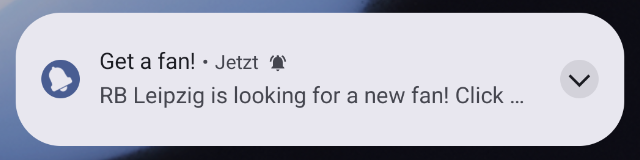
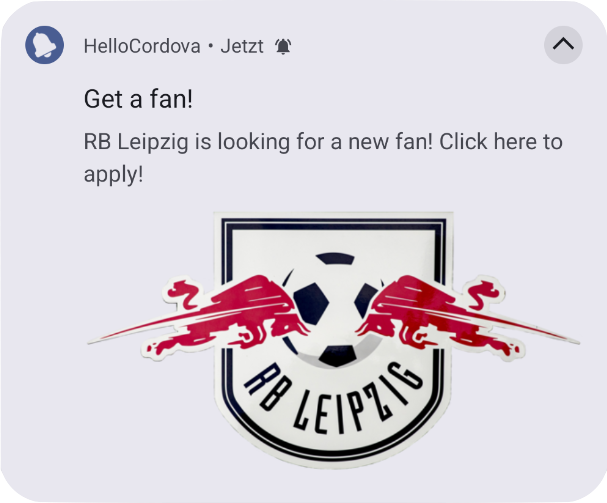 The notification will be automatically unfolded in the notification center if your app presents only one notification. On the lockscreen the notification is always folded.
##### iOS
The visual and audio attachments to display alongside the notification’s main content, see documentation of [UNMutableNotificationContent.attachments](https://developer.apple.com/documentation/usernotifications/unmutablenotificationcontent/attachments).
Support resource patterns:
- `file:///` - Absolute file path
- [res://](#resource-pattern-res) - App resource
- [www](#resource-pattern-www)
- `base64://` - Base64 string
If you attach an image, the image will shown as a small image to the right in the notification and will be expanded when you press long on the notification.
Example folded and unfolded:
The notification will be automatically unfolded in the notification center if your app presents only one notification. On the lockscreen the notification is always folded.
##### iOS
The visual and audio attachments to display alongside the notification’s main content, see documentation of [UNMutableNotificationContent.attachments](https://developer.apple.com/documentation/usernotifications/unmutablenotificationcontent/attachments).
Support resource patterns:
- `file:///` - Absolute file path
- [res://](#resource-pattern-res) - App resource
- [www](#resource-pattern-www)
- `base64://` - Base64 string
If you attach an image, the image will shown as a small image to the right in the notification and will be expanded when you press long on the notification.
Example folded and unfolded:
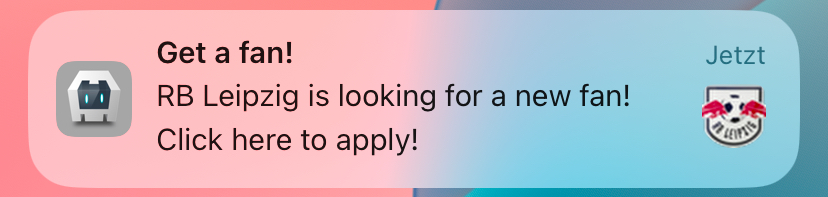
 ##### Code example
```javascript
cordova.plugins.notification.local.schedule({
id: 1,
title: 'Get a fan!',
text: 'RB Leipzig is looking for a new fan! Click here to apply!',
attachments: ['www/img/rb-leipzig.png']
});
```
#### Property `badgeNumber`
Default:
- Android: `1` - Each notification increments the badge count by 1
- iOS: `-1` - Does not set any badge
Set the badge count. The behavior differs on Android and iOS.
##### Android
Sets the number of items a notification represents. If the value is `1`, each notification increments the badge of the application by one. If 3 notifications are posted, the badge count will be `3`.
On newer Android versions, the badge count will be presented as a dot and shows the number, if you long press on the app icon.
For using the badge, see the Android documentation [Modify a notification badge](https://developer.android.com/develop/ui/views/notifications/badges).
Calls [NotificationCompat.Builder#setNumber(int)](https://developer.android.com/reference/androidx/core/app/NotificationCompat.Builder#setNumber(int)).
##### iOS
A notification does not increment the badge, it sets the badge count directly. If 3 notifications are posted with the value of `1`, the badge count will be `1` and not `3`.
Specials of this value:
- `-1`: The badge will not be changed.
- `0`: The badge will be cleared.
Sets [UNMutableNotificationContent#badge](https://developer.apple.com/documentation/usernotifications/unmutablenotificationcontent/badge).
###### Clearing the badge
You can clear the badge with the function [iOSClearBadge](#iosclearbadge).
The badge will also be cleared, if you call `clearAll` or `cancelAll`.
#### Property `id`
Default: `1`
ID of a notification as number. This has to be unique for every notification. If you do not set an ID, it will default to 1. If you use an ID of a previous scheduled notification again, the previous one will be canceled.
#### Property `iOSForeground`
Default: `true`
Displays a notification banner when the app is in foreground, otherwise the notification would only make a noise (sound and vibrate), change the badge, but is not shown as a banner. Since iOS 14, the notification is always displayed in the Notification Center, no matter how this option is set to be consistent with Android. Renamed from `foreground` to `iOSForeground` and changed to `true` by default in Version `1.1.0`.
#### Property `priority`
Default: `0` (=PRIORITY_DEFAULT)
Deprecated since Android 8.
Replaced by [androidChannelImportance](#property-androidchannelimportance), which sets also the [priority](https://developer.android.com/reference/android/app/Notification#priority) value for notifications on Android 7.
This property had aditional functionality for the plugin, which is replaced by [androidAlarmType](#property-androidalarmtype) and [androidAllowWhileIdle](#property-androidallowwhileidle).
##### Old use case
When the value was [PRIORITY_MIN](https://developer.android.com/reference/android/app/Notification#PRIORITY_MIN)(=-2), the alarm was scheduled with [RTC](https://developer.android.com/reference/android/app/AlarmManager#RTC).
This can now be achieved by setting [androidAlarmType](#property-androidalarmtype) to `RTC` and [androidAllowWhileIdle](#property-androidallowwhileidle) to false.
When the value was [PRIORITY_DEFAULT](https://developer.android.com/reference/android/app/Notification#PRIORITY_DEFAULT)(=0), which was set as the default for this plugin, the alarm was scheduled with [RTC_WAKEUP](https://developer.android.com/reference/android/app/AlarmManager#RTC_WAKEUP). This can now be set by [androidAlarmType](#property-androidalarmtype).
When the value was [PRIORITY_MAX](https://developer.android.com/reference/android/app/Notification#PRIORITY_MAX)(=2), the alarm was scheduled by [AlarmManager.setAndAllowWhileIdle](https://developer.android.com/reference/android/app/AlarmManager#setAndAllowWhileIdle(int,%20long,%20android.app.PendingIntent)) or [AlarmManager.setExactAndAllowWhileIdle](https://developer.android.com/reference/android/app/AlarmManager#setExactAndAllowWhileIdle(int,%20long,%20android.app.PendingIntent)). This can now be set by [androidAllowWhileIdle](#property-androidallowwhileidle).
#### Property `sound`
Default: `default`
The value `default` sets the system default sound for a notification. The value `null` will disable the sound.
On Android it sets the sound of a notification channel. On iOS it enables/disables also the vibration.
Example:
- `res://mySound.wav` - Resource from the app bundle, see [documentation](#resource-pattern-res)
- `shared://mySound.wav` - Shared folder, see [documentation](#resource-pattern-shared), Android only
- `www/mySound.wav` - [Documentation](#resource-pattern-file)
##### Android
Before Android 8 it sets the sound of a notification. Since Android 8 it sets the sound of a [notification channel](#notification-channels).
##### iOS
Enables/disables also the vibration. If no sound is set, no vibration will occur.
You can package the audio data in an `aiff`, `wav`, or `caf` file. Sound files must be less than 30 seconds in length.
If the sound file is longer than 30 seconds, the system plays the default sound instead. See [UNNotificationSound - Prepare Sound Resources](https://developer.apple.com/documentation/usernotifications/unnotificationsound?language=objc#Prepare-Sound-Resources).
The system looks in the following folders for the file:
- The `/Library/Sounds` directory of the app’s container directory.
- The `/Library/Sounds` directory of one of the app’s shared group container directories.
- The main bundle of the current executable.
See documentation [UNNotificationSound#soundNamed](https://developer.apple.com/documentation/usernotifications/unnotificationsound/init(named:)?language=objc#Discussion).
### Resource resolving
If a property can take a resource, the following patterns could be used. Not all patterns are available for every property.
#### Resource pattern `file://`
Example: `file://myImage.png`
Looks for a file in the `www` folder. `file://myImage.png` is equivalent to `www/myImage.png`.
#### Resource pattern `www/`
Example: `www/myImage.png`
Looks for a file in the `www` folder.
#### Resource pattern `res://`
Example: `res://myImage.png`
Defines a resource for Android or iOS. In Android it looks in the app's `res` folder, in iOS it looks for a file in the root of the app package.
##### Android
Gets a resource from the `res` directory of your app or the system resources. Normally, when getting a resource file on Android, the resource name should not contain the file extension like `res://myImage`, but, to be compatible with iOS, you can also include the extension like `res://myImage.png`. An explanation what the `res`directory is, can be read in the Android documentation [Providing Resources](https://developer.android.com/guide/topics/resources/providing-resources).
The property, which you use, defines, in which subfolder of `res` the resource should be:
- For a graphic: `drawable` and `mipmap`
- For a sound: `raw`
The plugin trys first to get the resource from you app package, if it does not find one there, it trys to get it from the [system resources](https://developer.android.com/reference/android/content/res/Resources#getSystem()).
If you want to use a system resource, you have to use a valid resource identifier, which you can look for in [Android Code Search](https://cs.android.com/android/platform/superproject/main/+/main:frameworks/base/core/res/res/). An example would be [ic_popup_reminder](https://cs.android.com/android/platform/superproject/main/+/main:frameworks/base/core/res/res/drawable-mdpi/ic_popup_reminder.png), which you would set with `res://ic_popup_reminder`.
To make files files available in the `res` directory, you can use the [resource-file](https://cordova.apache.org/docs/en/12.x/config_ref/#resource-file) tag in `config.xml` like:
```xml
##### Code example
```javascript
cordova.plugins.notification.local.schedule({
id: 1,
title: 'Get a fan!',
text: 'RB Leipzig is looking for a new fan! Click here to apply!',
attachments: ['www/img/rb-leipzig.png']
});
```
#### Property `badgeNumber`
Default:
- Android: `1` - Each notification increments the badge count by 1
- iOS: `-1` - Does not set any badge
Set the badge count. The behavior differs on Android and iOS.
##### Android
Sets the number of items a notification represents. If the value is `1`, each notification increments the badge of the application by one. If 3 notifications are posted, the badge count will be `3`.
On newer Android versions, the badge count will be presented as a dot and shows the number, if you long press on the app icon.
For using the badge, see the Android documentation [Modify a notification badge](https://developer.android.com/develop/ui/views/notifications/badges).
Calls [NotificationCompat.Builder#setNumber(int)](https://developer.android.com/reference/androidx/core/app/NotificationCompat.Builder#setNumber(int)).
##### iOS
A notification does not increment the badge, it sets the badge count directly. If 3 notifications are posted with the value of `1`, the badge count will be `1` and not `3`.
Specials of this value:
- `-1`: The badge will not be changed.
- `0`: The badge will be cleared.
Sets [UNMutableNotificationContent#badge](https://developer.apple.com/documentation/usernotifications/unmutablenotificationcontent/badge).
###### Clearing the badge
You can clear the badge with the function [iOSClearBadge](#iosclearbadge).
The badge will also be cleared, if you call `clearAll` or `cancelAll`.
#### Property `id`
Default: `1`
ID of a notification as number. This has to be unique for every notification. If you do not set an ID, it will default to 1. If you use an ID of a previous scheduled notification again, the previous one will be canceled.
#### Property `iOSForeground`
Default: `true`
Displays a notification banner when the app is in foreground, otherwise the notification would only make a noise (sound and vibrate), change the badge, but is not shown as a banner. Since iOS 14, the notification is always displayed in the Notification Center, no matter how this option is set to be consistent with Android. Renamed from `foreground` to `iOSForeground` and changed to `true` by default in Version `1.1.0`.
#### Property `priority`
Default: `0` (=PRIORITY_DEFAULT)
Deprecated since Android 8.
Replaced by [androidChannelImportance](#property-androidchannelimportance), which sets also the [priority](https://developer.android.com/reference/android/app/Notification#priority) value for notifications on Android 7.
This property had aditional functionality for the plugin, which is replaced by [androidAlarmType](#property-androidalarmtype) and [androidAllowWhileIdle](#property-androidallowwhileidle).
##### Old use case
When the value was [PRIORITY_MIN](https://developer.android.com/reference/android/app/Notification#PRIORITY_MIN)(=-2), the alarm was scheduled with [RTC](https://developer.android.com/reference/android/app/AlarmManager#RTC).
This can now be achieved by setting [androidAlarmType](#property-androidalarmtype) to `RTC` and [androidAllowWhileIdle](#property-androidallowwhileidle) to false.
When the value was [PRIORITY_DEFAULT](https://developer.android.com/reference/android/app/Notification#PRIORITY_DEFAULT)(=0), which was set as the default for this plugin, the alarm was scheduled with [RTC_WAKEUP](https://developer.android.com/reference/android/app/AlarmManager#RTC_WAKEUP). This can now be set by [androidAlarmType](#property-androidalarmtype).
When the value was [PRIORITY_MAX](https://developer.android.com/reference/android/app/Notification#PRIORITY_MAX)(=2), the alarm was scheduled by [AlarmManager.setAndAllowWhileIdle](https://developer.android.com/reference/android/app/AlarmManager#setAndAllowWhileIdle(int,%20long,%20android.app.PendingIntent)) or [AlarmManager.setExactAndAllowWhileIdle](https://developer.android.com/reference/android/app/AlarmManager#setExactAndAllowWhileIdle(int,%20long,%20android.app.PendingIntent)). This can now be set by [androidAllowWhileIdle](#property-androidallowwhileidle).
#### Property `sound`
Default: `default`
The value `default` sets the system default sound for a notification. The value `null` will disable the sound.
On Android it sets the sound of a notification channel. On iOS it enables/disables also the vibration.
Example:
- `res://mySound.wav` - Resource from the app bundle, see [documentation](#resource-pattern-res)
- `shared://mySound.wav` - Shared folder, see [documentation](#resource-pattern-shared), Android only
- `www/mySound.wav` - [Documentation](#resource-pattern-file)
##### Android
Before Android 8 it sets the sound of a notification. Since Android 8 it sets the sound of a [notification channel](#notification-channels).
##### iOS
Enables/disables also the vibration. If no sound is set, no vibration will occur.
You can package the audio data in an `aiff`, `wav`, or `caf` file. Sound files must be less than 30 seconds in length.
If the sound file is longer than 30 seconds, the system plays the default sound instead. See [UNNotificationSound - Prepare Sound Resources](https://developer.apple.com/documentation/usernotifications/unnotificationsound?language=objc#Prepare-Sound-Resources).
The system looks in the following folders for the file:
- The `/Library/Sounds` directory of the app’s container directory.
- The `/Library/Sounds` directory of one of the app’s shared group container directories.
- The main bundle of the current executable.
See documentation [UNNotificationSound#soundNamed](https://developer.apple.com/documentation/usernotifications/unnotificationsound/init(named:)?language=objc#Discussion).
### Resource resolving
If a property can take a resource, the following patterns could be used. Not all patterns are available for every property.
#### Resource pattern `file://`
Example: `file://myImage.png`
Looks for a file in the `www` folder. `file://myImage.png` is equivalent to `www/myImage.png`.
#### Resource pattern `www/`
Example: `www/myImage.png`
Looks for a file in the `www` folder.
#### Resource pattern `res://`
Example: `res://myImage.png`
Defines a resource for Android or iOS. In Android it looks in the app's `res` folder, in iOS it looks for a file in the root of the app package.
##### Android
Gets a resource from the `res` directory of your app or the system resources. Normally, when getting a resource file on Android, the resource name should not contain the file extension like `res://myImage`, but, to be compatible with iOS, you can also include the extension like `res://myImage.png`. An explanation what the `res`directory is, can be read in the Android documentation [Providing Resources](https://developer.android.com/guide/topics/resources/providing-resources).
The property, which you use, defines, in which subfolder of `res` the resource should be:
- For a graphic: `drawable` and `mipmap`
- For a sound: `raw`
The plugin trys first to get the resource from you app package, if it does not find one there, it trys to get it from the [system resources](https://developer.android.com/reference/android/content/res/Resources#getSystem()).
If you want to use a system resource, you have to use a valid resource identifier, which you can look for in [Android Code Search](https://cs.android.com/android/platform/superproject/main/+/main:frameworks/base/core/res/res/). An example would be [ic_popup_reminder](https://cs.android.com/android/platform/superproject/main/+/main:frameworks/base/core/res/res/drawable-mdpi/ic_popup_reminder.png), which you would set with `res://ic_popup_reminder`.
To make files files available in the `res` directory, you can use the [resource-file](https://cordova.apache.org/docs/en/12.x/config_ref/#resource-file) tag in `config.xml` like:
```xml