# inAppPurchases.purchase(productId)
## Usage:
```js
inAppPurchases.purchase(productId).then(function (purchase) {
if (purchase["pending"]) return; //not paid for yet, complete later
// handle purchase
// complete purchase next
return inAppPurchases.completePurchase(productId);
}).then(function(purchase){
// purchase has been completed
}).catch (function(err){
// view or handle error messages
});
```
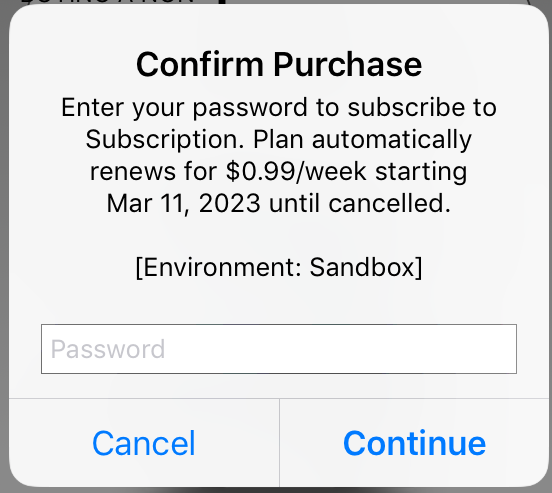
## Description:
- get a list of the products found on the app store for your app
- use on the start up of the device to edit UI and include prices from the app store
- Android now supports pending purchases (user has agreed to pay later outside the app, but hasn't paid yet) and buying multiple consumbles at once (quantity)
## Parameters:
- `product id` (string) to purchase
- `upgrading product id` (string, optional) Android only, current subscription to be replaced when purchasing an upgrade or downgrade, use with the `replacement mode` parameter
- `replacement mode` (int, optional) Android only, subscription replacement mode for upgrades and downgrades, use the `inAppPurchases.subscriptionReplacementMode` object for a list of modes
## Returns:
A purchase object:
```js
purchase["productId"] // string: the product id
purchase["purchaseTime"] // int: timestamp of purchase
purchase["purchaseId"] // string: id assigned by the app store when it was bought, called the Google order ID or Appstore transaction id
purchase["purchaseToken"] // string: Android only, token value for completed purchases, use to handle subscriptions
purchase["quantity"] // int: number of purchased consumables, for non-consumables and subscriptions always returns 1
purchase["verified"] // boolean: receipt signature was verified (stops modded or pirated versions of an app from enabling fake purchases - may error instead when tampered, optional, is done for Android locally)
purchase["receipt"] // string: iOS only a receipt that can be used for verification, which has not been implemented
purchase["pending"] // boolean: Android only, purchase is pending (not paid for yet), wait for user to complete cash payment, then run inAppPurchases.completePurchase(productId) to complete (acknowledge and consume) the purchase
purchase["completed"] // boolean: has been acknowledged or consumed, will be false (in Android), unacknowledged purchases will be returned after a few days in Android. unconsumed purchases will not be available for repurchase until they are completed
```
## Some of the Possible Error Messages
### Android
Some errors can be retried automatically, otherwise could display an error message that the purchase did not go through and let them re-try themselves with another button press
```
- USER_CANCELLED - Transaction was canceled by the user.
- BILLING_UNAVAILABLE - The Google Play Store is not available from this device, or unable to charge with this account.
- ITEM_ALREADY_OWNED - The purchase failed because the item is already owned. (Make sure to consume consumables with completePurchase)
- ITEM_UNAVAILABLE - The requested product is not available for purchase.
- SERVICE_DISCONNECTED - The app is not connected to the Play Store service via the Google Play Billing Library. (Okay to automatically retry purchase a few times)
- SERVICE_TIMEOUT - The request has reached the maximum timeout before Google Play responds. (Okay to automatically retry purchase a few times)
- SERVICE_UNAVAILABLE - The service is currently unavailable. (Okay to automatically retry purchase a few times)
- NETWORK_ERROR - A network error occurred during the operation.
- FEATURE_NOT_SUPPORTED - The requested feature is not supported by the Play Store on the current device.
- BILLING_UNAVAILABLE - A user billing error occurred during processing.
- DEVELOPER_ERROR - Error resulting from incorrect usage of the API. (For example not including the manifest.json Google Play key.)
- ERROR - Fatal error during the API action. (Okay to automatically retry purchase a few times)
```
### iOS
```
- Unknown product identifier - developer: wait up to one hour for products to be added to the appstore billing api when you add them to an app for the first time
- calls to the plugin: wait for the first request to getAllProductInfo to complete before calling buy or restore in iOS
- Cannot connect to iTunes Store - if a buy fails with this message, it could have been cancelled by the user or there could have been some other connection issue
```
**[see more common errors](errors.md#common-errors)**
## Example
```js
function buyRemoveAds(){
inAppPurchases.purchase(ads_remove_id,
inAppPurchases.subscriptionReplacementMode.CHARGE_FULL_PRICE
).then( function(purchase){
if (purchase["pending"]) continue; //not paid for yet
// handle purchase here, or after its been completed:
removeAds();
return inAppPurchases.completePurchase(purchase["productId"]);
}).then(function(purchase){
// purchase is acknowledged and consumed
}).catch (function(err){
alert("problem during purchase: "+ JSON.stringify(err));
});
}
```
## Tips:
- since the API returns a promise, it is asynchronous... call it and continue with other actions, or await for it to finish from within an async function to wait for the call to finish.
## Notes:
(note from previous API: receipts are no longer returned in Android as they are verified internally during this call - an error message will be returned if they are not verified - afterwards purchases can still be completed with the product id)
- subscriptions return the first base offer and phase available
- in-app products returns the first offer available to them
[go to main](../README.md#plugin-usage)