# cordova-plugin-ImagePicker
修改自 https://github.com/giantss/cordova-plugin-ImagePicker
主要是为了修改以及发布npm
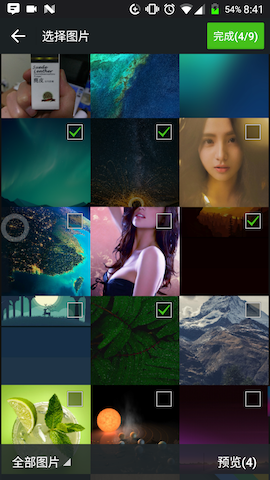
一个支持多选,相册实现了拍照、预览、图片压缩等功能
## 功能
- 相册目录
- 多选图
- 相册内部拍照
- 预览选中的图片
- 图片压缩
## 安装要求
- Cordova Version >= 6.0.0
- Cordova-Android >= 6.0.0
- Cordova-iOS >= 4.0.0
## 安装
- `cordova plugin add https://github.com/adam198824/cordova-plugin-ImagePicker.git --variable CAMERA_USAGE_DESCRIPTION="使用相机用于图片上传" --variable PHOTOLIBRARY_USAGE_DESCRIPTION="图片上传需要访问相册"`
- `cordova plugin add cordova-plugin-adam-imagepicker --variable CAMERA_USAGE_DESCRIPTION="使用相机用于图片上传" --variable PHOTOLIBRARY_USAGE_DESCRIPTION="图片上传需要访问相册"`
注意:Android 项目先不要直接 build ,见 [android注意事项](#android注意事项)。
## 效果图
| Android | iOS |
|:---------------:|:------------:|
|  |
|  |
```javascript
ImagePicker.getPictures(function(result) {
alert(JSON.stringify(result));
}, function(err) {
alert(err);
}, {
maximumImagesCount : 9,
width : 1920,
height : 1440,
quality : 100
});
```
返回结果如下:
```
{
"images": [{
"path": "/data/user/0/com.pushsoft.im2/cache/ImagePicker/152783817455118.jpg",
"width": 720,
"height": 1280,
"size": 104871 // 文件体积(单位:字节)
}, {
"path": "/data/user/0/com.pushsoft.im2/cache/ImagePicker/152783817464525.jpg",
"width": 720,
"height": 1280,
"size": 109873
}],
"isOrigin": false // 是否原图
}
```
ionic 中使用本插件,需要声明: `declare let ImagePicker:any`
## 参数含义
| 配置参数 | 参数含义 |
|:------------------:|:-------------------------:|
| maximumImagesCount | 多选限制数量,默认为9 |
| width | 设置图片的width,默认为1920 |
| height | 设置图片的height,默认为1440 |
| quality | 图片质量 默认80 |
### 注意:
- 参数都是可选的,不传则使用默认值;
- 如果 width > 0 且 height > 0:Android 下压缩的图可能比原图大或者压缩率不高(比如原图4MB,压缩后也有2MB),可以 quality 设置低一些,比如 50;iOS 下会忽略 quality 参数;
- 如果 width < 0 或 height < 0:那么插件返回压缩图,压缩逻辑接近于微信,自动选取合适的分辨率和压缩品质,推荐使用这种方式。压缩库使用的是 [Luban](https://github.com/Curzibn/Luban) 和 [Luban-iOS](https://github.com/GuoZhiQiang/Luban_iOS)。如果遇到压缩不清晰等问题,请到他们的项目上提 issues;
- 运行时,选图界面上有“原图”单选按钮,选上之后,返回的图片是未压缩的原图
## android注意事项
- 先移除安装过的旧版插件
- 如果 build 报下面的错
```
error: resource android:attr/dialogCornerRadius not found
error: resource android:attr/fontVariationSettings not found
error: resource android:attr/ttcIndex not found
```
请使用 [cordova-android-support-gradle-release](https://github.com/dpa99c/cordova-android-support-gradle-release) 这个插件统一项目中的 Android Support 库版本:
```
$ cordova plugin add cordova-android-support-gradle-release --variable ANDROID_SUPPORT_VERSION={required version}
```
其中`{required version}` 值为类似 `25.+`,`26.+`,`27.+` 这种。
- 如果你用的是 低版本 Cordova 和 Gradle,会报错不支持`implementation`
Cordova 7.1.0 及以下版本(对应Cordova-Android@6.3.0及以下版本),请将 `cordova-plugin-ImagePicker\src\android\imagepicker.gradle` 里面的 `implementation` 修改为 `compile`,
因为低版本的 Cordova-Android 使用的是低版本的 Gradle, 不支持 `implementation`。
- 如果还是 build 不成功
```
$ cordova platform rm android
```
或
```
$ cordova platform rm ios
```
移除旧的平台,然后重新 add
## 参考项目
### 多选图片项目
- [nanchen2251/ImagePicker](https://github.com/nanchen2251/ImagePicker) (Android)
- [jeasonlzy/ImagePicker](https://github.com/jeasonlzy/ImagePicker)
- [banchichen/TZImagePickerController](https://github.com/banchichen/TZImagePickerController) (iOS)
### 图片压缩库
- [nanchen2251/CompressHelper](https://github.com/nanchen2251/CompressHelper) (Android)
- [Curzibn/Luban](https://github.com/Curzibn/Luban) (Android)
- [GuoZhiQiang/Luban_iOS](https://github.com/GuoZhiQiang/Luban_iOS) (iOS)
|
```javascript
ImagePicker.getPictures(function(result) {
alert(JSON.stringify(result));
}, function(err) {
alert(err);
}, {
maximumImagesCount : 9,
width : 1920,
height : 1440,
quality : 100
});
```
返回结果如下:
```
{
"images": [{
"path": "/data/user/0/com.pushsoft.im2/cache/ImagePicker/152783817455118.jpg",
"width": 720,
"height": 1280,
"size": 104871 // 文件体积(单位:字节)
}, {
"path": "/data/user/0/com.pushsoft.im2/cache/ImagePicker/152783817464525.jpg",
"width": 720,
"height": 1280,
"size": 109873
}],
"isOrigin": false // 是否原图
}
```
ionic 中使用本插件,需要声明: `declare let ImagePicker:any`
## 参数含义
| 配置参数 | 参数含义 |
|:------------------:|:-------------------------:|
| maximumImagesCount | 多选限制数量,默认为9 |
| width | 设置图片的width,默认为1920 |
| height | 设置图片的height,默认为1440 |
| quality | 图片质量 默认80 |
### 注意:
- 参数都是可选的,不传则使用默认值;
- 如果 width > 0 且 height > 0:Android 下压缩的图可能比原图大或者压缩率不高(比如原图4MB,压缩后也有2MB),可以 quality 设置低一些,比如 50;iOS 下会忽略 quality 参数;
- 如果 width < 0 或 height < 0:那么插件返回压缩图,压缩逻辑接近于微信,自动选取合适的分辨率和压缩品质,推荐使用这种方式。压缩库使用的是 [Luban](https://github.com/Curzibn/Luban) 和 [Luban-iOS](https://github.com/GuoZhiQiang/Luban_iOS)。如果遇到压缩不清晰等问题,请到他们的项目上提 issues;
- 运行时,选图界面上有“原图”单选按钮,选上之后,返回的图片是未压缩的原图
## android注意事项
- 先移除安装过的旧版插件
- 如果 build 报下面的错
```
error: resource android:attr/dialogCornerRadius not found
error: resource android:attr/fontVariationSettings not found
error: resource android:attr/ttcIndex not found
```
请使用 [cordova-android-support-gradle-release](https://github.com/dpa99c/cordova-android-support-gradle-release) 这个插件统一项目中的 Android Support 库版本:
```
$ cordova plugin add cordova-android-support-gradle-release --variable ANDROID_SUPPORT_VERSION={required version}
```
其中`{required version}` 值为类似 `25.+`,`26.+`,`27.+` 这种。
- 如果你用的是 低版本 Cordova 和 Gradle,会报错不支持`implementation`
Cordova 7.1.0 及以下版本(对应Cordova-Android@6.3.0及以下版本),请将 `cordova-plugin-ImagePicker\src\android\imagepicker.gradle` 里面的 `implementation` 修改为 `compile`,
因为低版本的 Cordova-Android 使用的是低版本的 Gradle, 不支持 `implementation`。
- 如果还是 build 不成功
```
$ cordova platform rm android
```
或
```
$ cordova platform rm ios
```
移除旧的平台,然后重新 add
## 参考项目
### 多选图片项目
- [nanchen2251/ImagePicker](https://github.com/nanchen2251/ImagePicker) (Android)
- [jeasonlzy/ImagePicker](https://github.com/jeasonlzy/ImagePicker)
- [banchichen/TZImagePickerController](https://github.com/banchichen/TZImagePickerController) (iOS)
### 图片压缩库
- [nanchen2251/CompressHelper](https://github.com/nanchen2251/CompressHelper) (Android)
- [Curzibn/Luban](https://github.com/Curzibn/Luban) (Android)
- [GuoZhiQiang/Luban_iOS](https://github.com/GuoZhiQiang/Luban_iOS) (iOS)