Cordova Background Geolocation · []() []()
===========================================================================
[](https://www.transistorsoft.com)
-----------------------------------------------------------------
### :new: :stop_sign: *Capacitor* version now available! See [__`capacitor-background-geolocation`__](https://github.com/transistorsoft/capacitor-background-geolocation) :stop_sign:
-------------------------------------------------------------------------------
The *most* sophisticated background **location-tracking & geofencing** module with battery-conscious motion-detection intelligence for **iOS** and **Android**.
The plugin's [Philosophy of Operation](../../wiki/Philosophy-of-Operation) is to use **motion-detection** APIs (using accelerometer, gyroscope and magnetometer) to detect when the device is *moving* and *stationary*.
- When the device is detected to be **moving**, the plugin will *automatically* start recording a location according to the configured `distanceFilter` (meters).
- When the device is detected be **stationary**, the plugin will automatically turn off location-services to conserve energy.
Also available for [Capacitor](https://github.com/transistorsoft/capacitor-background-geolocation), [React Native](https://github.com/transistorsoft/react-native-background-geolocation), [Flutter](https://github.com/transistorsoft/flutter_background_geolocation).
-----------------------------------------------------------------------------
The **[Android plugin](http://www.transistorsoft.com/shop/products/cordova-background-geolocation)** requires [purchasing a license](http://www.transistorsoft.com/shop/products/cordova-background-geolocation). However, it *will* work for **DEBUG** builds. It will **not** work with **RELEASE** builds [without purchasing a license](http://www.transistorsoft.com/shop/products/cordova-background-geolocation).
(2018) This plugin is supported **full-time** and field-tested **daily** since 2013.
-----------------------------------------------------------------------------
# Contents
- ### :books: [API Documentation](https://transistorsoft.github.io/cordova-background-geolocation-lt)
- ### [Installing the Plugin](#large_blue_diamond-installing-the-plugin)
- ### [Configuring the Plugin](#large_blue_diamond-configuring-the-plugin)
- [Android](#android)
- [iOS](#ios)
- ### [Using the plugin](#large_blue_diamond-using-the-plugin)
- [Ionic 2+](#ionic-2-with-typescript)
- [Cordova / Ionic 1](#cordova--ionic-1)
- ### [Debugging](../../wiki/Debugging)
- ### [Sample Application](#large_blue_diamond-advanced-sample-application)
- ### [Testing Server](#large_blue_diamond-simple-testing-server)
## :large_blue_diamond: Installing the plugin ##
:warning: After installing the plugin, you must [Configure the Plugin](#large_blue_diamond-configuring-the-plugin) for both [iOS](#ios) & [Android](#android).
:warning: Cocoapods __`>= 1.10.0`__ is required.
```console
$ pod --version
// if < 1.10.0
$ sudo gem install cocoapods
```
- #### From npm
```bash
$ cordova plugin add cordova-background-geolocation-lt
```
- #### Ionic
```bash
$ ionic cordova plugin add cordova-background-geolocation-lt
```
- #### Capacitor
```bash
npm install cordova-background-geolocation-lt
npx cap sync
```
:information_source: See [Capacitor Setup](./help/INSTALL_CAPACITOR.md)
- #### Phonegap Build
```xml
```
#### From master (latest, greatest.)
```
$ cordova plugin add https://github.com/transistorsoft/cordova-background-geolocation-lt.git
```
## :large_blue_diamond: Configuring the plugin
### Android
- Open `config.xml`: Add the following *namespace* attribute to the top-level `` element:
```diff
```
- Within the `` container, add the `license` key using a `` element:
- :information_source: If you haven't yet [purchased a license](http://www.transistorsoft.com/shop/products/cordova-background-geolocation), you can skip this step — the plugin is **fully functional in *DEBUG* builds without a license** so you can *try before you buy*. You will see a Toast message "*License Validation Failure*" when your app boots — **ignore it**.
```xml
```
#### Polygon Geofencing Add-on
If you've purchased a license for the [Polygon Geofencing add-on](https://shop.transistorsoft.com/products/polygon-geofencing), add the following license key to your __`AndroidManifest`__ (Polygon Geofencing is fully functional in DEBUG builds so you can try before you buy):
```xml
```
#### Huawei Mobile Services (HMS) Support
:warning: Huawei HMS support ended in `v4.18.0` since they failed to release their SDKs with *Android 16KB page size* support.
```xml
```
:warning: It has been announced that *Google Play Store* [has plans to impose greater scrutiny](https://support.google.com/googleplay/android-developer/answer/13161072?sjid=3640341614632608469-NA) over usage of this permission (which is why the plugin does not automatically add it).
#### AndroidX (`cordova-android >= 9.0.0`)
It's *highly* recommended to configure your app for *Android X* when using *Cordova 10* / `cordova-android >= 9.0.0`.
```xml
.
.
.
```
:warning: If you see the following error, you need to configure your app for *Android X*.
```
java.lang.RuntimeException: Unable to get provider com.transistorsoft.locationmanager.util.LogFileProvider: java.lang.ClassNotFoundException
```
------------------------------------------------------------------------------------------
:warning: On older version of Cordova, If you **change your license key** after building android, you might receive an error:
```diff
BUILD FAILED in 1s
-Element meta-data#com.transistorsoft.locationmanager.license at AndroidManifest.xml duplicated
-with element declared at AndroidManifest.xml duplicated with element declared at AndroidManifest.xml
```
Simply remove and re-add the android platform:
```
$ cordova platform remove android
$ cordova platform add android
```
------------------------------------------------------------------------------------------
#### Android Gradle Dependency Configuration.
Quite often, other 3rd-party plugins will require the same dependencies used by background-geolocation, including:
- `play-services:location`
- `com.android.support` libraries
- `okhttp` (Android HTTP library)
If your app requests different versions of these dependencies, it can cause a build-failure (See wiki [Solving Build Failures](./wiki/Solving-Build-Failures)). Background Geolocation exposes the following **Android** CLI configuration `--variable` to help you align the required dependency versions with other plugins:
Cordova CLI `--variable` are used as follows:
:exclamation: To apply changes to these `--variable`, you **must** remove/re-add the cordova platform(s)
```
$ cordova plugin add cordova-background-geolocation-lt --variable FOO=value_foo --variable BAR=value_bar
// After adding --variable, remove and re-add the platform
$ cordova platform remove android
$ cordova platform add android
```
##### `@variable GOOGLE_API_VERSION ["20.+"]`
Sets the desired version of `play-services-location` dependency. Many other plugins require `play-services` dependencies, (eg: `cordova-plugin-googlemaps`, `phonegap-plugin-push`): If the version of `play-services` and/or `firebase` is not aligned to the **same** version for **ALL** plugins, your build **will fail**.
```
$ cordova plugin add cordova-background-geolocation-lt --variable GOOGLE_API_VERSION=20.0.0
```
##### `@variable OKHTTP_VERSION ["3.12.+"]`
Sets the desired version of `okhttp` to import. The Android plugin uses [okhttp](https://square.github.io/okhttp/) for its HTTP service. Some other plugins can also import `okhttp` (eg: `cordova-plugin-advanced-http`). If both plugins don't align themselves to the same version, your Android build will fail.
```
$ cordova plugin add cordova-background-geolocation-lt --variable OKHTTP_VERSION=3.12.+
```
### iOS
iOS requires a number of "Usage Strings" for location and motion-usage authorization. iOS will render these strings upon the dialog used to request permission from the user. Take care to write relevent descriptions of *why* your app requires these authorizations as they can affect whether Apple accepts your app or not.
Paste **all** the following elements into the `` container:
```xml
[CHANGEME] Background location tracking is required for our app so we can...
[CHANGEME pre-iOS11. No longer used with iOS 12] Background location tracking is required for our app so we can...
[CHANGEME] Background location tracking is required for our app so we can...
[CHANGEME] Device motion updates help determine when the device is stationary so the app can save power by turning off location-updates
```
#### Privacy Manifest
Apple now requires apps provide a [Privacy Manifest for "sensitive" APIs](https://developer.apple.com/documentation/bundleresources/privacy_manifest_files/describing_use_of_required_reason_api?language=objc) which could be abused for "fingerprinting" a user for malicious marketing activity.
:warning: You **MUST** upgrade your `cordova-ios` platform to [`>= 7.1.0` for *iOS Privacy Manifest Support*](https://github.com/apache/cordova-ios/blob/master/RELEASENOTES.md#710-apr-01-2024):
- :open_file_folder: __`config.xml`__
- Add the following `` __four__ block within the `NSPrivacyAccessedAPITypes` container:
```xml
NSPrivacyAccessedAPITypes
NSPrivacyAccessedAPIType
NSPrivacyAccessedAPICategoryUserDefaults
NSPrivacyAccessedAPITypeReasons
CA92.1
NSPrivacyAccessedAPIType
NSPrivacyAccessedAPICategoryUserDefaults
NSPrivacyAccessedAPITypeReasons
CA92.1
1C8F.1
NSPrivacyAccessedAPIType
NSPrivacyAccessedAPICategoryFileTimestamp
NSPrivacyAccessedAPITypeReasons
C617.1
0A2A.1
NSPrivacyAccessedAPIType
NSPrivacyAccessedAPICategoryDiskSpace
NSPrivacyAccessedAPITypeReasons
E174.1
```
#### Configuring for `useSignificantChangesOnly`
For those using `useSignificantChangesOnly: true`, possibly because Apple *denied* your use of the background `location` capability, you can disable background `location` by providing the `BACKGROUND_MODE_LOCATION` `--variable` with an empty-string:
```bash
$ cordova plugin add cordova-background-geolocation-lt --variable BACKGROUND_MODE_LOCATION=""
$ cordova platform remove ios
$ cordova platform add ios
```
## :large_blue_diamond: Using the Plugin
There are **three** simple steps to using `BackgroundGeolocation`:
1. [Listen to events](https://transistorsoft.github.io/cordova-background-geolocation-lt/classes/_cordova_background_geolocation_lt_.backgroundgeolocation.html).
2. [`#ready`](https://transistorsoft.github.io/cordova-background-geolocation-lt/classes/_cordova_background_geolocation_lt_.backgroundgeolocation.html#ready) the plugin.
3. [`#start`](https://transistorsoft.github.io/cordova-background-geolocation-lt/classes/_cordova_background_geolocation_lt_.backgroundgeolocation.html#start) the plugin.
### Ionic 2+ with Typescript
The plugin hosts its own Typescript API:
[Sample Implementation](https://gist.github.com/christocracy/0379dd519d77f4215d5de943ed51ade9)
```typescript
// You may import any optional interfaces
import BackgroundGeolocation, {
State,
Config,
Location,
LocationError,
Geofence,
HttpEvent,
MotionActivityEvent,
ProviderChangeEvent,
MotionChangeEvent,
GeofenceEvent,
GeofencesChangeEvent,
HeartbeatEvent,
ConnectivityChangeEvent
} from "cordova-background-geolocation-lt";
class HomeView {
.
.
.
// Like any Cordova plugin, you must wait for Platform.ready() before referencing the plugin.
configureBackgroundGeolocation() {
// 1. Listen to events.
BackgroundGeolocation.onLocation(location => {
console.log('[location] - ', location);
});
BackgroundGeolocation.onMotionChange(event => {
console.log('[motionchange] - ', event.isMoving, event.location);
});
BackgroundGeolocation.onHttp(response => {
console.log('[http] - ', response.success, response.status, response.responseText);
});
BackgroundGeolocation.onProviderChange(event => {
console.log('[providerchange] - ', event.enabled, event.status, event.gps);
});
// 2. Configure the plugin with #ready
BackgroundGeolocation.ready({
reset: true,
debug: true,
logLevel: BackgroundGeolocation.LOG_LEVEL_VERBOSE,
desiredAccuracy: BackgroundGeolocation.DESIRED_ACCURACY_HIGH,
distanceFilter: 10,
url: 'http://my.server.com/locations',
autoSync: true,
stopOnTerminate: false,
startOnBoot: true
}, (state) => {
console.log('[ready] BackgroundGeolocation is ready to use');
if (!state.enabled) {
// 3. Start tracking.
BackgroundGeolocation.start();
}
});
}
}
```
### Cordova / Ionic 1
```javascript
// Like any Cordova plugin, you must wait for deviceready before referencing the plugin.
function onDeviceReady() {
// 1. Listen to events
var bgGeo = window.BackgroundGeolocation;
bgGeo.onLocation(function(location) {
console.log('[location] -', location);
});
bgGeo.onMotionChange(function(event) {
console.log('[motionchange] -', event.isMoving, event.location);
});
bgGeo.onHttp(function(response) {
console.log('[http] - ', response.success, response.status, response.responseText);
});
bgGeo.onProviderChange(function(event) {
console.log('[providerchange] -', event.status, event.enabled, event.gps, event.network);
});
// 2. Execute #ready method:
bgGeo.ready({
reset: true,
debug: true,
logLevel: bgGeo.LOG_LEVEL_VERBOSE,
desiredAccuracy: bgGeo.DESIRED_ACCURACY_HIGH,
distanceFilter: 10,
url: 'http://my.server.com/locations',
autoSync: true,
stopOnTerminate: false,
startOnBoot: true
}, function(state) { // <-- Current state provided to #configure callback
// 3. Start tracking
console.log('BackgroundGeolocation is configured and ready to use');
if (!state.enabled) {
bgGeo.start().then(function() {
console.log('- BackgroundGeolocation tracking started');
});
}
});
// NOTE: Do NOT execute any API methods which will access location-services
// until the callback to #ready executes!
//
// For example, DO NOT do this here:
//
// bgGeo.getCurrentPosition(); // <-- NO!
// bgGeo.start(); // <-- NO!
}
```
:information_source: **NOTE:** The configuration **`{}`** provided to the `#ready` method is applied **only** when your app is **first booted** — for every launch thereafter, the plugin will automatically load the last known configuration from persistant storage. If you wish to **force** the `#ready` method to *always* apply the supplied config `{}`, you can specify **`reset: true`**
```javascript
BackgroundGeolocation.ready({
reset: true, // <-- true to always apply the supplied config
distanceFilter: 10
}, function(state) {
console.log('- BackgroundGeolocation is ready: ', state);
});
```
:warning: Do not execute *any* API method which will require accessing location-services until the callback to **`#ready`** executes (eg: `#getCurrentPosition`, `#watchPosition`, `#start`).
### Promise API
The `BackgroundGeolocation` Javascript API supports [Promises](https://developer.mozilla.org/en-US/docs/Web/JavaScript/Reference/Global_Objects/Promise) for *nearly* every method (the exceptions are **`#watchPosition`** and adding event-listeners (eg: `#onLocation`). For more information, see the [API Documentation](https://transistorsoft.github.io/cordova-background-geolocation-lt)
```javascript
// Traditional API still works:
BackgroundGeolocation.ready({desiredAccuracy: 0, distanceFilter: 50}).then(state => {
console.log('- BackgroundGeolocation is ready: ', state);
}).catch(error => {
console.log('- BackgroundGeolocation error: ', error);
});
```
## :large_blue_diamond: [Advanced Sample Application](https://github.com/christocracy/cordova-background-geolocation-SampleApp)
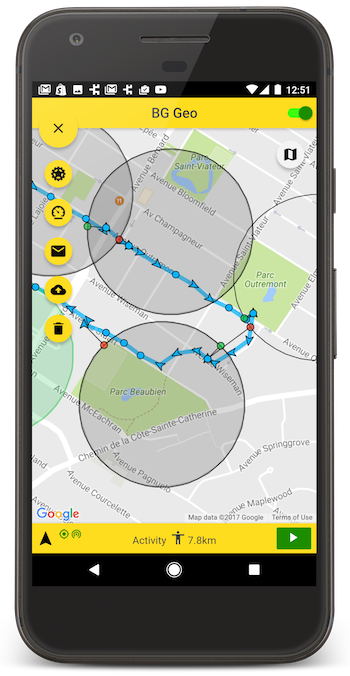
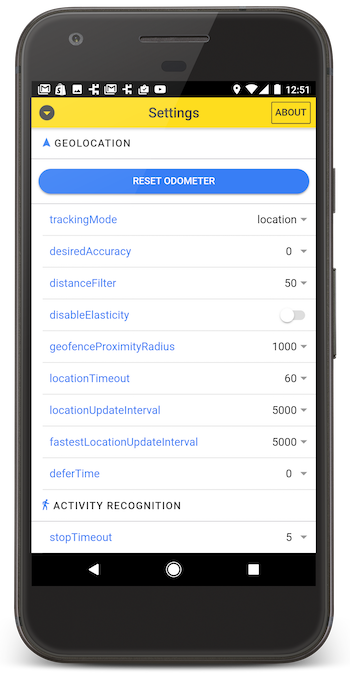
A fully-featured [SampleApp](https://github.com/christocracy/cordova-background-geolocation-SampleApp) is available in its own public repo. After first cloning that repo, follow the installation instructions in the **README** there. This SampleApp includes a settings-screen allowing you to quickly experiment with all the different settings available for each platform.
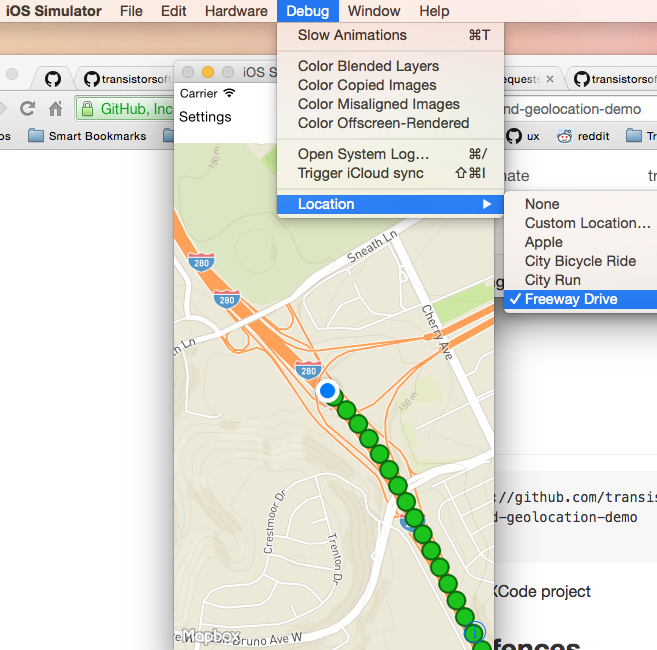
If you're using XCode, boot the SampleApp in the iOS Simulator and enable ```Debug->Location->Freeway Drive```.
## :large_blue_diamond: Simple Testing Server
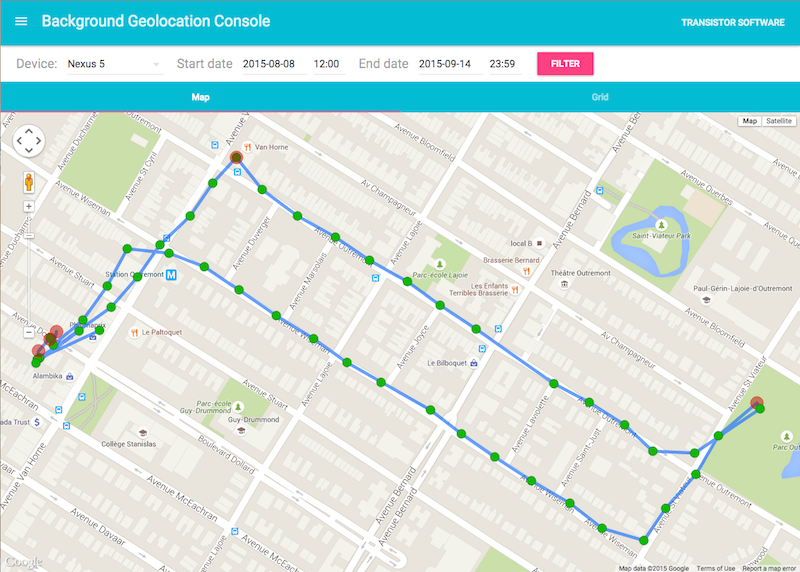
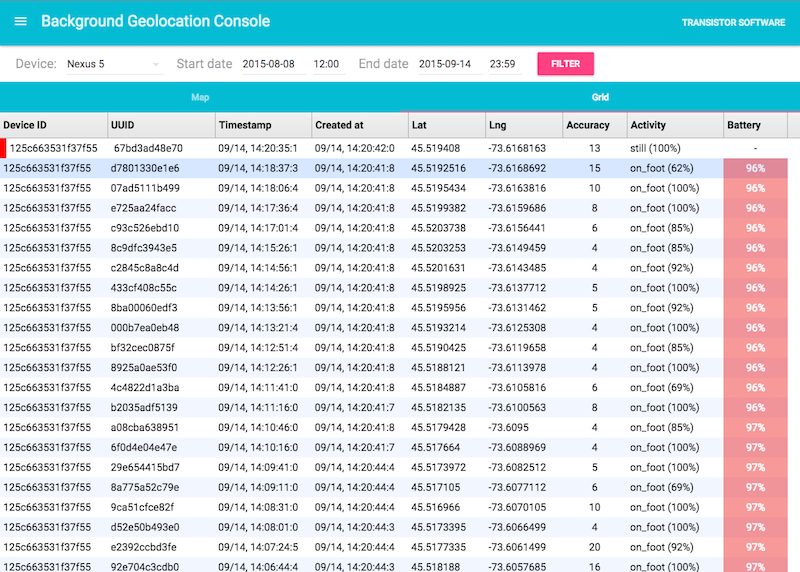
A simple Node-based [web-application](https://github.com/transistorsoft/background-geolocation-console) with SQLite database is available for field-testing and performance analysis. If you're familiar with Node, you can have this server up-and-running in about **one minute**.
# Licence
```
cordova-background-geolocation
Copyright (c) 2018, Transistor Software (9224-2932 Quebec Inc)
All rights reserved.
sales@transistorsoft.com
http://transistorsoft.com
```
1. Preamble: This Agreement governs the relationship between YOU OR THE ORGANIZATION ON WHOSE BEHALF YOU ARE ENTERING INTO THIS AGREEMENT (hereinafter: Licensee) and Transistor Software, a LICENSOR AFFILIATION whose principal place of business is Montreal, Quebec, Canada (Hereinafter: Licensor). This Agreement sets the terms, rights, restrictions and obligations on using [{software}] (hereinafter: The Software) created and owned by Licensor, as detailed herein
2. License Grant: Licensor hereby grants Licensee a Personal, Non-assignable & non-transferable, Commercial, Royalty free, Including the rights to create but not distribute derivative works, Non-exclusive license, all with accordance with the terms set forth and other legal restrictions set forth in 3rd party software used while running Software.
2.1 Limited: Licensee may use Software for the purpose of:
- Running Software on Licensee's Website[s] and Server[s];
- Allowing 3rd Parties to run Software on Licensee's Website[s] and Server[s];
- Publishing Software’s output to Licensee and 3rd Parties;
- Distribute verbatim copies of Software's output (including compiled binaries);
- Modify Software to suit Licensee’s needs and specifications.
2.2 Binary Restricted: Licensee may sublicense Software as a part of a larger work containing more than Software, distributed solely in Object or Binary form under a personal, non-sublicensable, limited license. Such redistribution shall be limited to unlimited codebases.
2.3 Non Assignable & Non-Transferable: Licensee may not assign or transfer his rights and duties under this license.
2.4 Commercial, Royalty Free: Licensee may use Software for any purpose, including paid-services, without any royalties
2.5 Including the Right to Create Derivative Works: Licensee may create derivative works based on Software, including amending Software’s source code, modifying it, integrating it into a larger work or removing portions of Software, as long as no distribution of the derivative works is made.
3. Term & Termination: The Term of this license shall be until terminated. Licensor may terminate this Agreement, including Licensee's license in the case where Licensee :
3.1 became insolvent or otherwise entered into any liquidation process; or
3.2 exported The Software to any jurisdiction where licensor may not enforce his rights under this agreements in; or
3.3 Licensee was in breach of any of this license's terms and conditions and such breach was not cured, immediately upon notification; or
3.4 Licensee in breach of any of the terms of clause 2 to this license; or
3.5 Licensee otherwise entered into any arrangement which caused Licensor to be unable to enforce his rights under this License.
4. Payment: In consideration of the License granted under clause 2, Licensee shall pay Licensor a FEE, via Credit-Card, PayPal or any other mean which Licensor may deem adequate. Failure to perform payment shall construe as material breach of this Agreement.
5. Upgrades, Updates and Fixes: Licensor may provide Licensee, from time to time, with Upgrades, Updates or Fixes, as detailed herein and according to his sole discretion. Licensee hereby warrants to keep The Software up-to-date and install all relevant updates and fixes, and may, at his sole discretion, purchase upgrades, according to the rates set by Licensor. Licensor shall provide any update or Fix free of charge; however, nothing in this Agreement shall require Licensor to provide Updates or Fixes.
5.1 Upgrades: for the purpose of this license, an Upgrade shall be a material amendment in The Software, which contains new features and or major performance improvements and shall be marked as a new version number. For example, should Licensee purchase The Software under version 1.X.X, an upgrade shall commence under number 2.0.0.
5.2 Updates: for the purpose of this license, an update shall be a minor amendment in The Software, which may contain new features or minor improvements and shall be marked as a new sub-version number. For example, should Licensee purchase The Software under version 1.1.X, an upgrade shall commence under number 1.2.0.
5.3 Fix: for the purpose of this license, a fix shall be a minor amendment in The Software, intended to remove bugs or alter minor features which impair the The Software's functionality. A fix shall be marked as a new sub-sub-version number. For example, should Licensee purchase Software under version 1.1.1, an upgrade shall commence under number 1.1.2.
6. Support: Software is provided under an AS-IS basis and without any support, updates or maintenance. Nothing in this Agreement shall require Licensor to provide Licensee with support or fixes to any bug, failure, mis-performance or other defect in The Software.
6.1 Bug Notification: Licensee may provide Licensor of details regarding any bug, defect or failure in The Software promptly and with no delay from such event; Licensee shall comply with Licensor's request for information regarding bugs, defects or failures and furnish him with information, screenshots and try to reproduce such bugs, defects or failures.
6.2 Feature Request: Licensee may request additional features in Software, provided, however, that (i) Licensee shall waive any claim or right in such feature should feature be developed by Licensor; (ii) Licensee shall be prohibited from developing the feature, or disclose such feature request, or feature, to any 3rd party directly competing with Licensor or any 3rd party which may be, following the development of such feature, in direct competition with Licensor; (iii) Licensee warrants that feature does not infringe any 3rd party patent, trademark, trade-secret or any other intellectual property right; and (iv) Licensee developed, envisioned or created the feature solely by himself.
7. Liability: To the extent permitted under Law, The Software is provided under an AS-IS basis. Licensor shall never, and without any limit, be liable for any damage, cost, expense or any other payment incurred by Licensee as a result of Software’s actions, failure, bugs and/or any other interaction between The Software and Licensee’s end-equipment, computers, other software or any 3rd party, end-equipment, computer or services. Moreover, Licensor shall never be liable for any defect in source code written by Licensee when relying on The Software or using The Software’s source code.
8. Warranty:
8.1 Intellectual Property: Licensor hereby warrants that The Software does not violate or infringe any 3rd party claims in regards to intellectual property, patents and/or trademarks and that to the best of its knowledge no legal action has been taken against it for any infringement or violation of any 3rd party intellectual property rights.
8.2 No-Warranty: The Software is provided without any warranty; Licensor hereby disclaims any warranty that The Software shall be error free, without defects or code which may cause damage to Licensee’s computers or to Licensee, and that Software shall be functional. Licensee shall be solely liable to any damage, defect or loss incurred as a result of operating software and undertake the risks contained in running The Software on License’s Server[s] and Website[s].
8.3 Prior Inspection: Licensee hereby states that he inspected The Software thoroughly and found it satisfactory and adequate to his needs, that it does not interfere with his regular operation and that it does meet the standards and scope of his computer systems and architecture. Licensee found that The Software interacts with his development, website and server environment and that it does not infringe any of End User License Agreement of any software Licensee may use in performing his services. Licensee hereby waives any claims regarding The Software's incompatibility, performance, results and features, and warrants that he inspected the The Software.
9. No Refunds: Licensee warrants that he inspected The Software according to clause 7(c) and that it is adequate to his needs. Accordingly, as The Software is intangible goods, Licensee shall not be, ever, entitled to any refund, rebate, compensation or restitution for any reason whatsoever, even if The Software contains material flaws.
10. Indemnification: Licensee hereby warrants to hold Licensor harmless and indemnify Licensor for any lawsuit brought against it in regards to Licensee’s use of The Software in means that violate, breach or otherwise circumvent this license, Licensor's intellectual property rights or Licensor's title in The Software. Licensor shall promptly notify Licensee in case of such legal action and request Licensee's consent prior to any settlement in relation to such lawsuit or claim.
11. Governing Law, Jurisdiction: Licensee hereby agrees not to initiate class-action lawsuits against Licensor in relation to this license and to compensate Licensor for any legal fees, cost or attorney fees should any claim brought by Licensee against Licensor be denied, in part or in full.