# ConfigCat SDK for React applications
[](https://github.com/configcat/react-sdk/actions/workflows/react-ci.yml)
[](https://codecov.io/gh/configcat/react-sdk)
[](https://snyk.io/test/github/configcat/react-sdk?targetFile=package.json)
[](https://sonarcloud.io/dashboard?id=configcat_react-sdk)
[](https://bundlephobia.com/result?p=configcat-react)

[](https://www.jsdelivr.com/package/npm/configcat-react)
[](https://nodei.co/npm/configcat-react/)
ConfigCat SDK for React provides easy integration for your web application to [ConfigCat](https://configcat.com).
## Getting started
The SDK supports the Context API (requires React **16.3** or later) and the Hook API (requires React **16.8** or later) to provide a better integration for your React applications.
### 1. Install package:
#### _via NPM_
Install the [NPM package](https://npmjs.com/package/configcat-react):
```PowerShell
npm i configcat-react
```
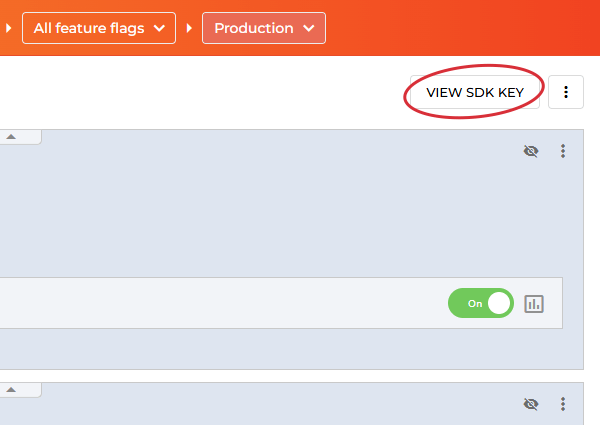
### 2. Go to the ConfigCat Dashboard to get your _SDK Key_:
### 3. Import and initialize ConfigCatProvider:
In most cases, you should wrap your root component with `ConfigCatProvider` to access ConfigCat features in child components with the Context API.
```tsx
import React from "react";
import { ConfigCatProvider } from "configcat-react";
function App() {
return (
{/* your application code */}
);
}
export default App;
```
### 4. Get your setting value:
The React hooks (`useFeatureFlag`) way:
```tsx
function ButtonComponent() {
const { value: isAwesomeFeatureEnabled, loading } = useFeatureFlag("isAwesomeFeatureEnabled", false);
return loading ? (Loading...
) : (
Feature flag value: {isAwesomeFeatureEnabled ? 'ON' : 'OFF'}
);
}
```
The React HOC (`WithConfigCatClientProps`) way:
```tsx
class TestHOCComponent extends React.Component<
WithConfigCatClientProps,
{ isAwesomeFeatureEnabled: string }
> {
constructor(props: WithConfigCatClientProps) {
super(props);
this.state = { isAwesomeFeatureEnabled: false, loading: true };
}
componentDidMount() {
this.evaluateFeatureFlag();
}
componentDidUpdate(prevProps: any) {
// To achieve hot reload on config.json updates.
if (prevProps?.lastUpdated !== this.props.lastUpdated) {
this.evaluateFeatureFlag();
}
}
evaluateFeatureFlag(){
this.props
.getValue("isAwesomeFeatureEnabled", false)
.then((v: boolean) => this.setState({ isAwesomeFeatureEnabled: v, loading: false }));
}
render() {
return loading ? (Loading...
) : (
Feature flag value: {this.state.isAwesomeFeatureEnabled ? 'ON' : 'OFF'}
);
}
}
```
## Sample/demo app
- [React](https://github.com/configcat/react-sdk/tree/main/samples/react-sdk-sample)
## Polling modes
The ConfigCat SDK supports 3 different polling strategies to fetch feature flags and settings from the ConfigCat CDN. Once the latest data is downloaded, it is stored in the cache, then the SDK uses the cached data to evaluate feature flags and settings. Read more about polling modes and how to use them at [ConfigCat Docs](https://configcat.com/docs/sdk-reference/js/overview/#polling-modes).
## Sensitive information handling
Frontend/mobile SDKs run in your users' browsers/devices. They download a [config JSON](https://configcat.com/docs/requests/) file from ConfigCat's CDN servers. Since the SDK Key is included in the URL path of this file, your users can access both the SDK Key and the contents of the config JSON (including feature flag keys, feature flag values, targeting rules, percentage options, etc.)
However, the SDK Key provides read-only access: it only allows downloading your config JSON file, but it cannot be used to modify the corresponding config in your ConfigCat account.
If you want to prevent your users from accessing your SDK Key and the contents of your config JSON file, we recommend using the SDK in your backend services only. You can then provide a secure API endpoint for your frontend/mobile applications to evaluate feature flags and settings for your users.
Also, we suggest using [confidential text comparators](https://configcat.com/docs/targeting/targeting-rule/user-condition/#confidential-text-comparators) in the targeting rules of the feature flags and settings that are used in frontend/mobile SDKs.
## Need help?
https://configcat.com/support
## Contributing
Contributions are welcome. For more info please read the [Contribution Guideline](CONTRIBUTING.md).
## About ConfigCat
ConfigCat is a feature flag and configuration management service that lets you separate releases from deployments. You can turn your features ON/OFF using ConfigCat Dashboard even after they are deployed. ConfigCat lets you target specific groups of users based on region, email or any other custom user attribute.
ConfigCat is a hosted feature flag service. Manage feature toggles across frontend, backend, mobile, desktop apps. Alternative to LaunchDarkly. Management app + feature flag SDKs.
- [Official ConfigCat SDKs for other platforms](https://github.com/configcat#-official-open-source-sdks)
- [Documentation](https://configcat.com/docs)
- [Blog](https://configcat.com/blog)