Unfancy rest apis, automatic documentation generator extension for coffeerest-api

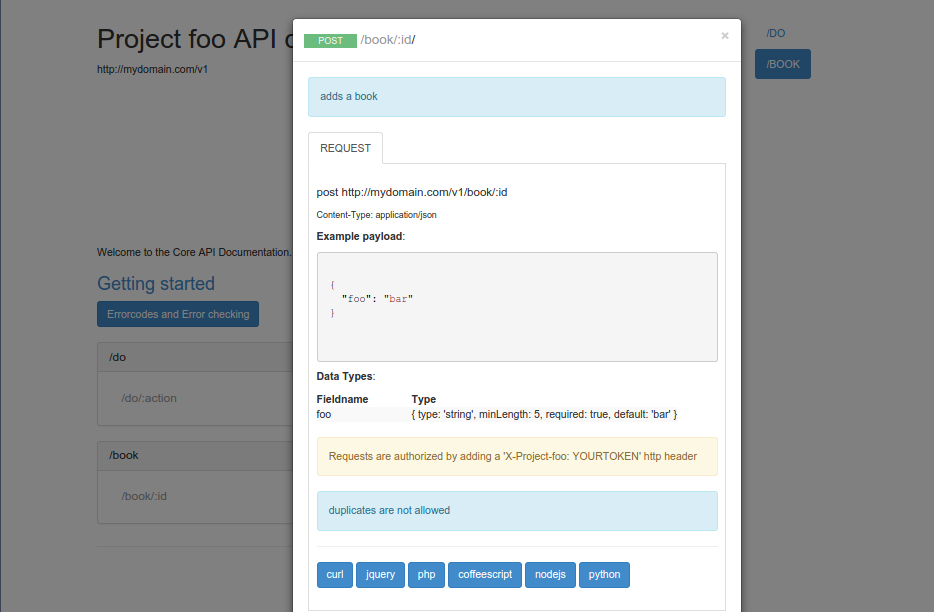 ## Ouch! Is it that simple?
Just add these fields to your coffeerest-api `model.coffee` specification
module.exports =
name: "project foo"
---> doc:
---> version: 1
---> projectname: "Project foo"
---> logo: "https://github.com/coderofsalvation/coffeerest-api/raw/master/coffeerest.png"
---> host: "http://mydomain.com"
---> homepage: "http://mydomain.com/about"
---> security: "Requests are authorized by adding a 'X-Project-foo: YOURTOKEN' http header"
---> description: "Welcome to the Core API Documentation. The Core API is the heart of Project foo and should never be confused with the public api."
---> request:
---> curl: "curl -X {{method}} -H 'Content-Type: application/json' -H 'X-Project-Token: YOURTOKEN' '{{url}}' --data '{{payload}}' "
resources:
'/book/:category':
post:
---> description: 'adds a book'
---> notes: "does not accept duplicates"
payload:
foo:
type: "string",
minLength: 5,
required: true
---> default: "foobar"
## Usage
npm install coffeerest-api
npm install coffeerest-api-doc
for servercode see [coffeerest-api](https://www.npmjs.com/package/coffeerest-api)
## Example output: markdown
$ coffee server.coffee &
$ curl -H 'Content-Type: application/json' http://localhost:8080/v1/doc/markdown > apidoc.md
$ curl -H 'Content-Type: application/json' http://localhost:8080/v1/doc/html > index.html
Voila, you have a wonderful markdown document which explains your API.
As a BONUS you get a beautifull html too, which uses bootstrap css.