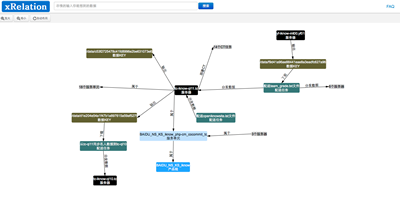
##RGraph2
RGraph是一个基于[Raphaeljs](http://raphaeljs.com/)完整的点->线图的web实现。
online demo :[RGraph2 Demo](http://hafeyang.github.com/rgraph2/)
github地址 :
git clone https://github.com/hafeyang/rgraph2.git
RGraph2已经支持[bower](http://twitter.github.com/bower/)包规范,可以直接使用`bower`安装
bower install rgraph2
由于[Raphaeljs](http://raphaeljs.com/)目前不支持`bower`规范,所以没有引入`Raphaeljs`依赖
RGraph包含特性:
* 点->线图布局算法(2.0新增)
* 基本画布拖拽
* 点拖动,鼠标hover高亮相关点
* 支持放大/缩小/鼠标滚轮事件
* 提供API增/删/改节点
##Quick Demo
##初始化参数
var graph = new RGraph("canvas",opts);
###opts.drawNodeFn
绘制节点的Raphaeljs扩展方法,默认为`rgraphnode`,RGraph2内部默认实现,自定义节点绘制方法为:
(!Raphael.fn.rgraphnode ) && (Raphael.fn.rgraphnode=function(node){
// your implementation
return {
//移动节点时会调用该方法
move:function(dx,dy){},
//高亮节点时会调用该方法
highlight:function(){},
//清除高亮
unhighlight:function(){},
//更新节点文本
update:function(){}
}
});
具体可以参见RGraph2内部实现
###opts.onnodeclick(e,node)
节点节点触发`function`,参数`event,node`
###opts.onnodemouseover(e,node)
节点mouseover触发`function`,参数`event,node`
###opts.onnodemouseout(e,node)
节点mouseout触发`function`,参数`event,node`
###opts.nnodestartdrag(e,node)
节点开始拖拽触发`function`,参数`event,node`
###opts.onnodedragging(e,node)
节点拖拽中触发`function`,参数`event,node`
###opts.onnodeenddrag(e,node)
节点拖拽结束触发`function`,参数`event,node`
###API
调用方法:graphInstance.method()
###instance.removeNode(nodeId)
删除节点以及节点相关的线
###instance.updateNode(nodeId)
更新节点文本
var node = graphInstance.getNode("nodeId");
node.label = "{name} after update";
graphInstance.updateNode(node.nodeId);
###instance.getNode(nodeId)
根据节点ID获取节点对象
###instance.addNode(node)
添加节点,节点必须有`nodeId`,`label`属性,`rectStyle`用于定义节点边框样式,样式格式详见[Raphaeljs Element.attr](http://raphaeljs.com/reference.html#Element.attr) ,`textStyle`定义文字样式。
新增文字节点位置视口内随机。
graphInstance.addNode({nodeId:"nodeId---",label:"{nodename}",nodename:"Name"});
###instance.existEdge(sourceNodeId,targetNodeId)
是否存在sourceNode与targetNode之间的线,如果有返回该Edge对象,否则返回false
###instance.addEdge(edge)
添加一条线,edge必须有`source`,`target`属性箭头由source->target,`label`属性定义箭头上的label文字。arrowStyle定义箭头的颜色样式,格式以及可以设置的属性参见 [Raphaeljs Element.attr](http://raphaeljs.com/reference.html#Element.attr)
###instance.loadData(graphData)
加载图数据,数据格式见demo
###instance.relayout()
重新布局点->线位置
###instance.getNodeEdges(nodeId)
根据nodeId获取节点相关的边
###instane.reset()
方法倍数设置成1。视口还原。
###instance.center(nodeId)
将nodeId节点移至视口中央
##References
[Raphaeljs](http://raphaeljs.com/)
[Graph JavaScript framework](http://snipplr.com/view/1950/graph-javascript-framework-version-001/)
[Graph visualization code in javascript](http://stackoverflow.com/questions/7034/graph-visualization-code-in-javascript)
[JavaScript Graph Library Showcase](http://www.graphdracula.net/showcase/)
##Knows Issues
`Raphaeljs` `Element.getBBox`方法在IE<9下获取值不正确导致IE9下不能兼容
Thanks,any questions ,contact me freely!