# chatbot
A simple chat bot in JavaScript with links to smart conversational APIs such as [WebKnox](https://webknox.com/api) (all purpose question answering), [spoonacular](https://spoonacular.com/food-api) (food related conversations), and [DuckDuckGo Instant Answers](https://duckduckgo.com/api) (mostly entities like movies, people, and places).
## Demo
Take a look at the JavaScript Chat Bot using the Duck Duck Go Engine: [DDG Demo](http://rawgit.com/ddsky/chatbot/master/demo/demo-ddg.html)
This Bot is more advanced using the WebKnox Engine (API key needed): [WebKnox Demo](http://rawgit.com/ddsky/chatbot/master/demo/demo-webknox.html)
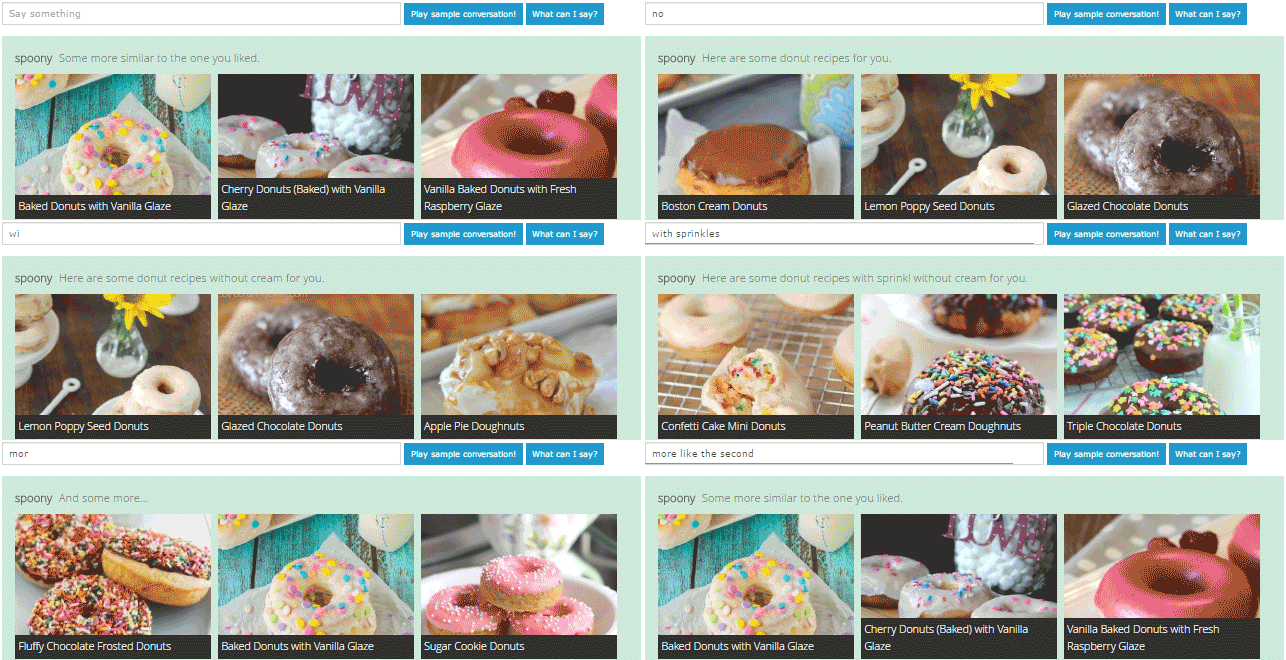
Here a quick demonstration of the chatbot using the spoonacular conversation engine:
## Set up HTML
```html
```
## Sample Usage
Initialize the bot. That is all you need to get a working chatbot.
```javascript
// initialize the bot
var config = {
// what inputs should the bot listen to? this selector should point to at least one input field
inputs: '#humanInput',
// if you want to show the capabilities of the bot under the search input
inputCapabilityListing: true,
// optionally, you can specify which conversation engines the bot should use, e.g. webknox, spoonacular, or duckduckgo
engines: [ChatBot.Engines.duckduckgo()],
// you can specify what should happen to newly added messages
addChatEntryCallback: function(entryDiv, text, origin) {
entryDiv.slideDown();
}
};
ChatBot.init(config);
```
Optionally, give your bot a name.
```javascript
ChatBot.setBotName("bender");
```
You can now also manually define some patterns that the bot should be able to react to.
```javascript
// 1. parameter: the pattern to listen for
// 2. parameter: either "response" to respond or "rewrite" to rewrite the request
// 3. parameter: either the response or the rewrite value, or undefined if nothing should happen
// 4. parameter: a callback function that gets the matches of the pattern
// 5. parameter: a description of that pattern, this is used to tell the user what he can say. Use quotes '' to mark phrases and [] to mark placeholders
ChatBot.addPattern(
"(?:my name is|I'm|I am) (.*)",
"response",
"Hi $1, thanks for talking to me today",
function(matches){
ChatBot.setHumanName(matches[1]);
},
"Say 'My name is [name]' to be called by your name."
);
ChatBot.addPattern("^hi$","response","Howdy my friend", undefined, "Say 'Hi' to be greeted.");
ChatBot.addPattern(
"compute ([0-9]+) plus ([0-9]+)",
"response",
undefined,
function (matches) {
ChatBot.addChatEntry("That would be "+(1*matches[1]+1*matches[2])+".","bot");
},
"Say 'compute [number] plus [number]' to make the bot your math monkey"
);
```
How about you let your bot show its capabilities with a sample conversation?
```javascript
var sampleConversation = [
"Hi",
"My name is Botty McBotface",
"Bye"
];
// play the conversation, second parameter is the pause between the inputs in milliseconds
ChatBot.playConversation(sampleConversation,4000)
```
You can also write your own answer engines, just implement the `react`, `getCapabilities`, and `getSuggestUrl` methods. Here's a template:
```javascript
var myengine = function() {
var capabilities = [
"If you say 'hip hip', the bot says hooray"
]
return {
react: function (query) {
var content = '';
if (query == 'hip hip') {
content = 'hooray';
}
ChatBot.addChatEntry(content, "bot");
ChatBot.thinking(false);
},
getCapabilities: function() {
return capabilities;
},
getSuggestUrl: function() {
return 'https://yourserver/uniboxSuggests?query=';
}
}
}();
```