Customs and Border Protection (CBP) Theme
==========
[](https://travis-ci.org/US-CBP/cbp-theme)
[](https://badge.fury.io/js/cbp-theme)
[](https://david-dm.org/us-cbp/cbp-theme)
[](https://david-dm.org/us-cbp/cbp-theme?type=dev)
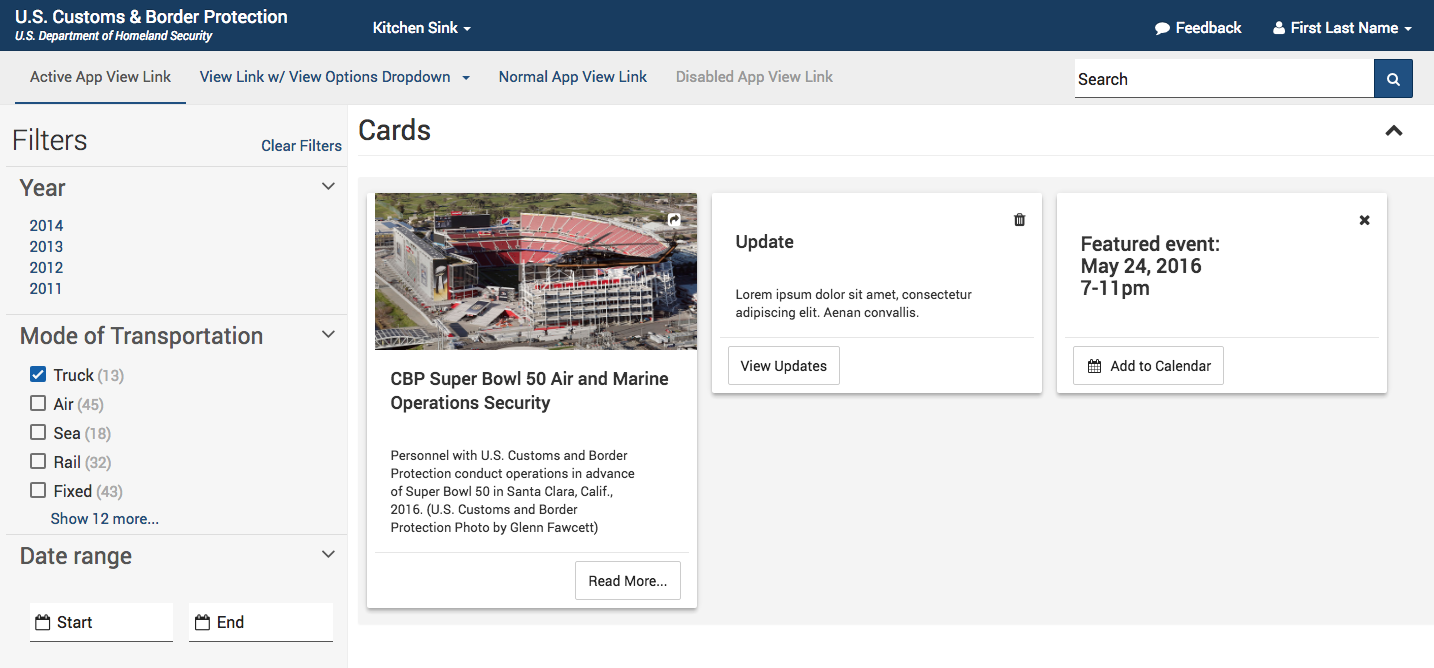
This is the common UI theme for CBP. It is used for internal and external web applications. We encourage the reuse of the theme and welcome contributions. The theme is a set of artifacts (CSS, Javascript, and fonts), and we provide a static html page to demonstrate all the components available called the [Kitchen Sink](https://us-cbp.github.io/cbp-theme). We also provide a [Style Guide](https://us-cbp.github.io/cbp-style-guide) to give guidance on how to use each component or pattern.
This project is based on [Bootstrap 3](http://getbootstrap.com) and [Google's Material Design Lite](https://github.com/google/material-design-lite) open source projects that allows us to easily create and maintain. It is based on SASS.
___
[](https://us-cbp.github.io/cbp-theme/images/sample_screen_shot.png)
___
# Quickstart
## Installation
The recommended way to get the latest CBP theme is by saving as a dependency via [npm](https://docs.npmjs.com/getting-started/what-is-npm).
From your npm project, simply run:
* `npm install cbp-theme --save`
Or if you are using the [yarn](https://yarnpkg.com/) package manager:
* `yarn add cbp-theme`
Note: It is recommended that you use npm to manage your frontend dependencies.
If you are not using npm, see [alternative installations](./alternative-installations.md) for other ways to get cbp-theme.
## What you get
The CBP Theme artifacts are in the
`node_modules/cbp-theme/dist` directory.
The `dist` directory contains:
* `cbp-theme.css` - Full Combined Content
* `cbp-theme.min.css` - For production Use
* `cbp-theme.min.css.map` - Mapped to scss for debugging
* `cbp-theme.browser.bundle.umd.js` This contains everything you need except jQuery for browser consumption.
* `cbp-theme.esm5.js` ESM5 Module are for use in your builds e.g. Angular, React, Webpack
* `cbp-theme.umd.js` UMD Module without any dependencies bundled in in case you have the dependencies added separately.
* `cbp-theme-inputmask.umd.js` jQuery Inputmask bundled with few minimum inputmask plugins required for style. Use this with `cbp-theme.browser.bundle.umd.js` or `cbp-theme.umd.js`.
* `fontawesome*.*` Font Awesome Icons referenced by css
* `Roboto-*.*` - Roboto Fonts referenced by css
* `scss/` - For those who want to import scss files shown below:-
```
dist/
├── scss
│ ├── vendor
│ │ ├── _selectize_mdl_theme.scss
│ │ ├── _select2_mdl_theme.scss
│ │ ├── _roboto.scss
│ │ ├── _nouislider.scss
│ │ ├── _mdl-selectfield.scss
│ │ ├── _material_images.scss
│ │ ├── _material_custom.scss
│ │ ├── _material_cards.scss
│ │ ├── _material.scss
│ │ ├── _fontawesome.scss
│ │ ├── _datepicker.scss
│ │ └── _bootstrap.scss
│ ├── main.scss
│ └── custom
│ ├── _variables.scss
│ ├── _utilities.scss
│ ├── _type.scss
│ ├── _timelines.scss
│ ├── _tags.scss
│ ├── _tabs.scss
│ ├── _tables.scss
│ ├── _steps.scss
│ ├── _sliders.scss
│ ├── _popup.scss
│ ├── _navbar.scss
│ ├── _modals.scss
│ ├── _mixins.scss
│ ├── _load-spinners.scss
│ ├── _labels.scss
│ ├── _hacks.scss
│ ├── _globals.scss
│ ├── _forms.scss
│ ├── _filters.scss
│ ├── _containers.scss
│ ├── _colors.scss
│ ├── _buttons.scss
│ ├── _badges.scss
│ ├── _alerts.scss
│ └── _accordions.scss
```
## Consuming cbp-theme in your ES6/TypeScript project
Whether you are using Webpack or Rullup cbp-theme package is distributed with `cbp-theme.esm5.js` as `module`.
This allows you to import the required functions as below and your build will pickup the correct 3rd party dependencies installed as cbp-theme dependencies:
import {applyCharLimit, applyDatePicker, applyTags, applyThirdPartySelect } from 'cbp-theme';
## Consuming cbp-theme by Including in your html
Using the cbp theme is as easy as including cbp-theme.min.css and `cbp-theme.browser.bundle.umd.js` in your markup.
Optionally `cbp-theme-inputmask.umd.js` can be used for inputmask.
Note: cbp-theme does require `jQuery 3.x` or higher to be included before adding cbp-theme.js.
This option is meant for in browser consumption only as apposed to using in your build.
Refer to `kitchensink/index.html` for markup reference.
### Order of Javascript Dependencies
```
```
# Importing Style Sheets
For more advanced users checkout wiki [Guide to Importing Style Sheets.](https://github.com/US-CBP/cbp-theme/wiki/Guide-to-Importing-Style-Sheets)
## Contributing
We welcome contributions, please see our [Contribution Policy](https://github.com/US-CBP/open-source-policy/blob/master/CONTRIBUTING.md)
To get started developing, see developer readme [here](./developer-guide.md).
## License
Please refer to [CBP Open Source License](https://github.com/US-CBP/open-source-policy/blob/master/LICENSE.md)