
bunqueue dashboard
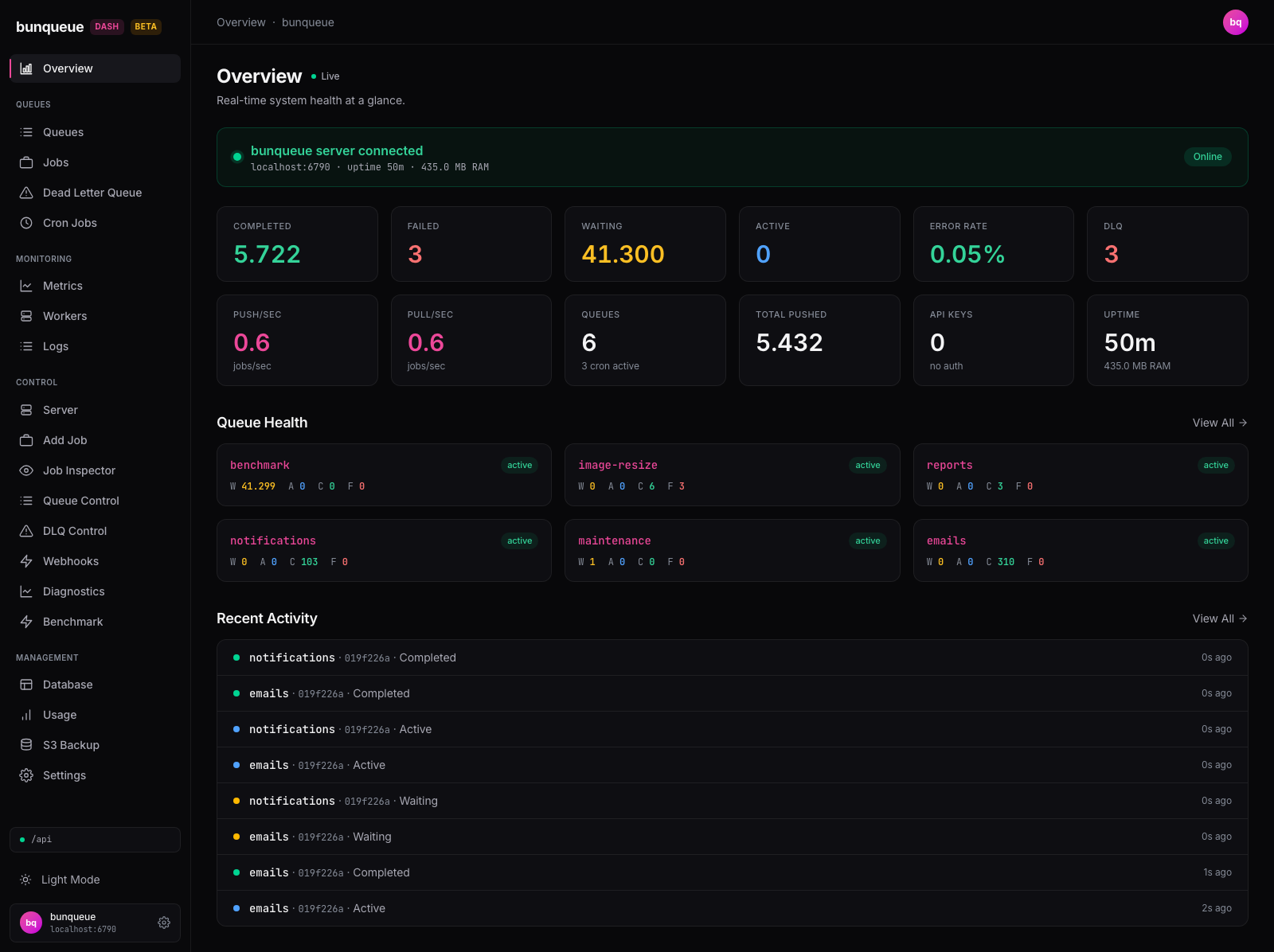
A web console for your Bunqueue jobs, workflows and servers.
Live demo ·
Documentation ·
Downloads ·
Video tour


Monitor and operate [Bunqueue](https://bunqueue.dev/) from your browser: find jobs,
inspect failures, manage schedules, follow durable workflows and control the server
process. Connect to one broker or keep several broker/agent profiles in Settings.
The dashboard targets **Bunqueue 2.9.20**. The live demo uses sample data; the
published package connects to your own server.
## Quick start
Install [Bun 1.4.4](https://bun.com/docs/installation), then run:
```bash
bunx bunqueue-dashboard
```
Open **[http://127.0.0.1:8080](http://127.0.0.1:8080)**.
- To start a local Bunqueue server, open **Server** and select **Start**. The
default command runs the compatible Bunqueue 2.9.20 release.
- To connect an existing server, configure its API URL and token in **Settings**.
For a broker managed by another supervisor, use the command below.
The npm package serves the built UI, proxies API requests and includes the local
control agent. Its default agent address is `http://127.0.0.1:6800`.
## What you can do
| Area | Capabilities |
| --- | --- |
| Jobs | Submit single or bulk jobs, inspect data and results, change eligible jobs, and export the complete filtered inventory to CSV. |
| Discovery and failures | Search configured profiles by job metadata or correlation ID, save local views and compare observed error signatures. |
| Queues and schedules | Browse queue state, pause and resume processing, configure limits and groups, and manage cron or interval schedules. |
| Workflows and flows | Start and inspect durable executions, send signals, recover or compensate workflows, and explore dependency graphs. |
| Monitoring | Follow live events, read retained native queue history, inspect workers and diagnostics, and export Prometheus scrape configuration and alert rules. |
| Fleet | Save multiple broker/agent profiles and inspect shared PostgreSQL topology while keeping each node's lifecycle controls separate. |
| Server control | Start, stop and restart a managed Bunqueue process, edit its launch settings, and read its logs. |
| Data and backups | Browse SQLite tables, run read-only SQL, export rows, and create or restore official S3 snapshots. |
| MCP | Browse Bunqueue's tool catalog and configure external MCP clients. |
SQLite inspection and S3 snapshots apply to SQLite-backed servers. PostgreSQL
profiles use the queue and fleet controls.
Discovery reports scan limits and partial coverage. Metric history requires a
paired managed agent; retention belongs to Bunqueue. Native Webhooks delivers
job events, external Prometheus/Alertmanager evaluates exported alert rules,
and dashboard Alerts runs only while its browser tab is open. See
[native operations](https://egeominotti.github.io/bunqueue-dashboard/docs/guide/native-operations).
Job actions follow Bunqueue's safety contracts. Operations without atomic job
identity or flow-topology safeguards remain disabled, including DLQ retry,
completed-job requeue, cancel, drain and purge. See the
[verified limitations](https://egeominotti.github.io/bunqueue-dashboard/docs/known-issues).
An optional [Copilot](https://egeominotti.github.io/bunqueue-dashboard/docs/guide/copilot)
supports AI-assisted operations in custom builds with `VITE_ENABLE_COPILOT=1`.
It is disabled in the default build.
## Connect an existing server
When Docker, Kubernetes or systemd owns your Bunqueue process, launch the dashboard
in external-server mode:
```bash
BUNQUEUE_MANAGED=0 \
BUNQUEUE_URL=http://127.0.0.1:6790 \
bunx bunqueue-dashboard
```
This mode reports the server's health and keeps process management with its
existing supervisor. Stopped-only backup restore is also unavailable in this mode.
For an authenticated broker, set `BUNQUEUE_TOKEN` in the dashboard launch
environment and enter the matching server token in Settings. The launch value
also authenticates the agent's health probe. Pair an agent with the same broker
for SDK, workflow, database and backup operations. See
[connection and deployment options](https://egeominotti.github.io/bunqueue-dashboard/docs/deploy/).
## Deployment options
| Option | What it runs | Requirements |
| --- | --- | --- |
| `bunx bunqueue-dashboard` | UI, API proxy and control agent | Bun 1.4.4 |
| [Standalone executable](https://github.com/egeominotti/bunqueue-dashboard/releases/latest) | UI, API proxy and control agent in one binary | Linux or macOS x64/arm64, or Windows x64 |
| [Docker image](https://egeominotti.github.io/bunqueue-dashboard/docs/deploy/docker) | Static UI served by Caddy | An existing Bunqueue API and any paired agents |
| [Static hosting](https://egeominotti.github.io/bunqueue-dashboard/docs/deploy/platforms) | Built `dist/` directory | A reachable API or a configured same-origin proxy |
The standalone dashboard executable runs without an installed Bun runtime.
Starting a managed Bunqueue process still requires its launch command to be
available: install Bun for the default `bunx` command, or configure
`BUNQUEUE_START_CMD` to use a Bunqueue executable.
To run the published static image locally:
```bash
docker run --rm \
-p 127.0.0.1:8080:80 \
ghcr.io/egeominotti/bunqueue-dashboard:edge
```
Open `http://127.0.0.1:8080` and set the browser-reachable server URL in Settings.
The `edge` image follows `main`. The
[Docker guide](https://egeominotti.github.io/bunqueue-dashboard/docs/deploy/docker)
explains API proxying, CORS and connecting a separately running agent.
## Configuration
These variables configure the npm package and standalone executable:
| Variable | Purpose | Default |
| --- | --- | --- |
| `PORT` | Dashboard listener | `8080` |
| `BIND_ADDR` | Dashboard bind address | `127.0.0.1` |
| `BUNQUEUE_URL` | Bunqueue HTTP API to proxy | `http://localhost:6790` |
| `BUNQUEUE_MANAGED` | Enable local process management; use `0` for an external server | `1` |
| `AGENT_PORT` | Direct loopback control-agent port | `6800` |
| `BASE_PATH` | URL prefix for the UI, assets and API/agent bridges | `/` |
| `BUNQUEUE_DATA_PATH` | Managed server's SQLite database | `./data/bunq.db` |
| `AGENT_CONFIG_PATH` | Persistent agent configuration | `./.bunqueue-dashboard/config.json` |
For LAN or reverse-proxy access, configure `AGENT_TOKEN` and `BUNQUEUE_TOKEN`
together with an explicit host/origin allowlist through `AGENT_ALLOWED_HOSTS`
and `AGENT_ALLOWED_ORIGINS`. Enter the corresponding tokens in the dashboard's
authentication prompt or Settings. See
[the deployment security setup](https://egeominotti.github.io/bunqueue-dashboard/docs/deploy/pm2#configure-it)
for the complete proxy and token configuration.
Static builds use `VITE_BUNQUEUE_URL` and `VITE_BUNQUEUE_AGENT_URL` as initial
connection defaults; Settings can override them. `VITE_*` values are public bundle
content, so keep credentials out of them. More options, including PostgreSQL and
TLS, are documented in [`.env.example`](.env.example) and the
[agent reference](https://egeominotti.github.io/bunqueue-dashboard/docs/agent).
## Development
Use the Bun version in [`.bun-version`](.bun-version):
```bash
git clone https://github.com/egeominotti/bunqueue-dashboard.git
cd bunqueue-dashboard
bun install --frozen-lockfile
bun start
```
The development dashboard runs at `http://localhost:5273`; the control agent runs
at `http://127.0.0.1:6800`. `Ctrl+C` stops both.
| Command | Purpose |
| --- | --- |
| `bun run build` | Typecheck all projects and build the production UI |
| `bun run check` | Native Bun typechecking, Oxlint and formatting checks |
| `bun run check:fix` | Apply lint fixes and format with native `bun fmt` |
| `bun run test:coverage` | Run unit tests and enforce coverage floors |
| `bun run test:e2e:browser` | Test the production UI in Chromium, Firefox and WebKit |
| `bun run docs:build` | Build the documentation and check its links |
| `bun run quality` | Run the static, unit, real-server, package and resilience gates |
Install browser binaries once with `bun run test:e2e:browser:install`. PostgreSQL
and S3 integration tests require Docker. CI also runs the managed browser suite
and executes native binaries on all five supported platforms.
For setup details and contribution guidance, see
[Development](https://egeominotti.github.io/bunqueue-dashboard/docs/development)
and [Testing](https://egeominotti.github.io/bunqueue-dashboard/docs/testing).
## Documentation
- [Quickstart](https://egeominotti.github.io/bunqueue-dashboard/docs/quickstart) — installation and first connection.
- [User guide](https://egeominotti.github.io/bunqueue-dashboard/docs/user-guide) — every screen and its operations.
- [Deployment](https://egeominotti.github.io/bunqueue-dashboard/docs/deploy/) — Docker, Kubernetes, PM2 and hosting platforms.
- [Architecture](https://egeominotti.github.io/bunqueue-dashboard/docs/architecture) — HTTP, SSE, agents and storage boundaries.
- [API mapping](https://egeominotti.github.io/bunqueue-dashboard/docs/api-mapping) — endpoints, payloads and action contracts.
- [Known limitations](https://egeominotti.github.io/bunqueue-dashboard/docs/known-issues) — verified upstream constraints and current behavior.
- [LLM documentation](https://egeominotti.github.io/bunqueue-dashboard/docs/llms.txt) — documentation index for AI tools, with a [full-text version](https://egeominotti.github.io/bunqueue-dashboard/docs/llms-full.txt).
## License
[MIT](LICENSE) © Egeo Minotti.
The Bunqueue logo is the original asset from
[egeominotti/bunqueue](https://github.com/egeominotti/bunqueue/blob/main/docs/src/assets/logo.svg).