
BugPack
Package bug screenshots into AI-ready fix instructions in 30 seconds




Quick Start · MCP Config · OpenClaw · Features · Integrations
English | 中文
---
---
## What is BugPack?
BugPack is a **local-first** tool that packages bug screenshots into structured, AI-ready fix instructions.
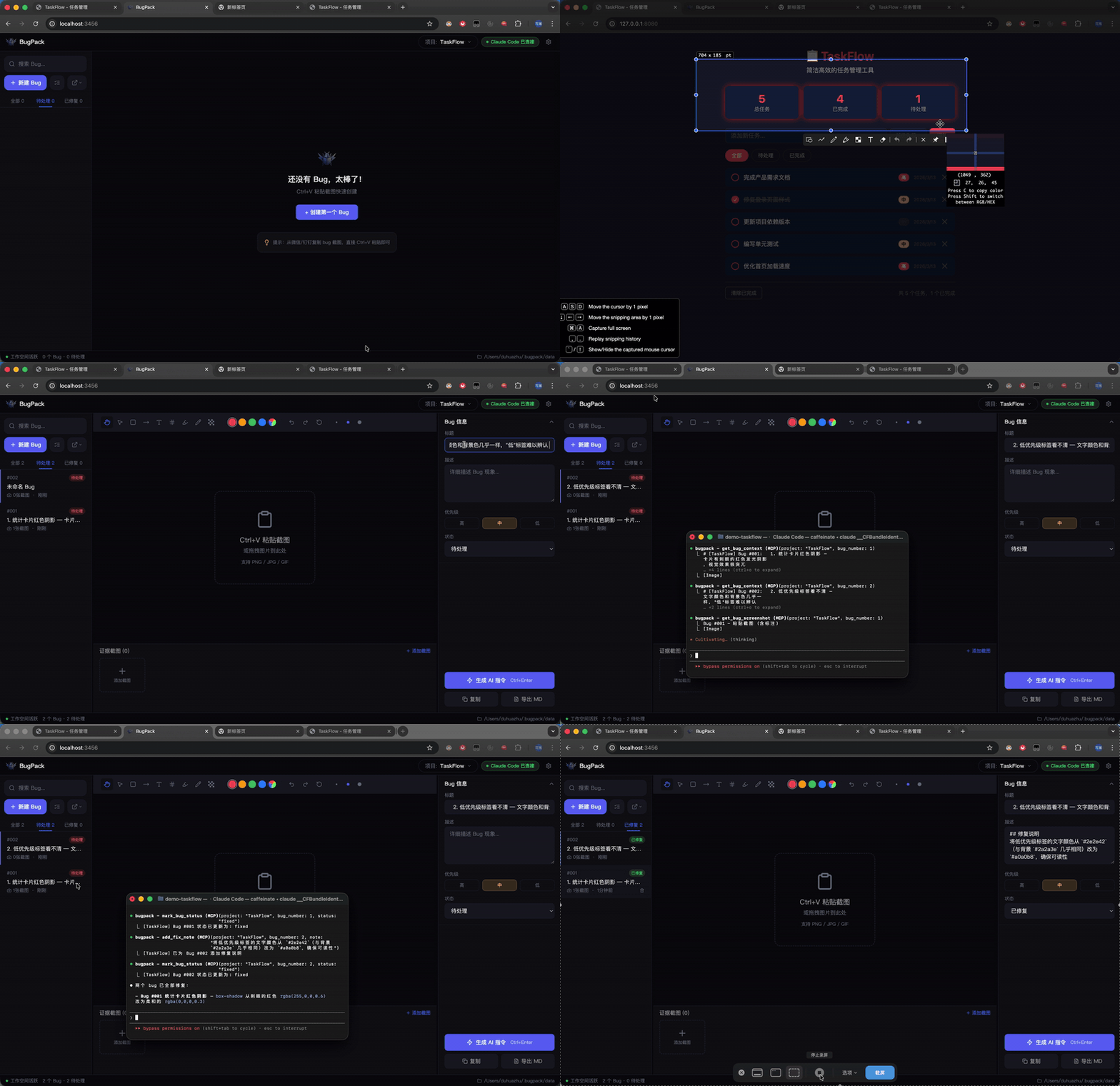
QA drops a screenshot in the chat → you `Ctrl+V` paste it into BugPack → annotate the issue → generate structured instructions → feed them to your AI coding agent.
Or skip the copy-paste entirely: BugPack's built-in **MCP Server** lets any MCP-compatible AI coding tool (Claude Code, Cursor, Windsurf, Cline, etc.) **read bug context and fix code automatically**.
## Why BugPack?
AI coding agents changed how we write code, but not how we **communicate bug context**.
Every bug fix still requires: save screenshot → create file → write paths → describe the issue → paste to AI.
10 bugs a day = **1-2 hours of pure repetition**.
BugPack compresses this to **30 seconds**.
## Requirements
- **Node.js** >= 18
- **OS** — Windows / macOS / Linux
- **Browser** — Chrome / Edge / Firefox (Chrome recommended)
## Quick Start
```bash
npx bugpack-mcp
```
Open `http://localhost:3456` and `Ctrl+V` your first bug screenshot to get started.
## MCP Configuration
BugPack works with **any MCP-compatible AI coding tool**. Here are common examples — configure other tools the same way.
**Claude Code** — add to `~/.claude.json`:
```json
{
"mcpServers": {
"bugpack": {
"type": "stdio",
"command": "npx",
"args": ["bugpack-mcp", "--mcp"]
}
}
}
```
Cursor / Windsurf / VS Code / Cline / Roo Code / Trae / MarsCode / Augment
**Cursor** (`.cursor/mcp.json`):
```json
{
"mcpServers": {
"bugpack": {
"command": "npx",
"args": ["bugpack-mcp", "--mcp"]
}
}
}
```
**Windsurf** (`~/.codeium/windsurf/mcp_config.json`):
```json
{
"mcpServers": {
"bugpack": {
"command": "npx",
"args": ["bugpack-mcp", "--mcp"]
}
}
}
```
**VS Code** (`.vscode/mcp.json`):
```json
{
"servers": {
"bugpack": {
"command": "npx",
"args": ["bugpack-mcp", "--mcp"]
}
}
}
```
**Cline / Roo Code** (VS Code Settings):
```json
{
"cline.mcpServers": {
"bugpack": {
"command": "npx",
"args": ["bugpack-mcp", "--mcp"]
}
}
}
```
**Trae** (`trae/mcp.json`):
```json
{
"mcpServers": {
"bugpack": {
"command": "npx",
"args": ["bugpack-mcp", "--mcp"]
}
}
}
```
**MarsCode** (Settings → MCP):
```json
{
"mcpServers": {
"bugpack": {
"command": "npx",
"args": ["bugpack-mcp", "--mcp"]
}
}
}
```
**Augment** (`augment/mcp.json`):
```json
{
"mcpServers": {
"bugpack": {
"command": "npx",
"args": ["bugpack-mcp", "--mcp"]
}
}
}
```
All other MCP-compatible tools follow the same pattern — just point `command` to `npx` and `args` to `["bugpack-mcp", "--mcp"]`.
Once configured, just tell your AI:
- **"Show me pending bugs"** → AI calls `list_bugs`
- **"Fix bug #3"** → AI calls `get_bug_context`, locates code, and fixes it
- **"Mark bug #3 as fixed"** → AI calls `mark_bug_status`
## OpenClaw Skills
BugPack provides [OpenClaw](https://github.com/openclaw/openclaw) Skills for AI agents that support the OpenClaw protocol.
**Install via CLI:**
```bash
clawhub install bugpack
```
**Or add to `~/.openclaw/openclaw.json`:**
```json
{
"skills": {
"entries": {
"bugpack": {
"enabled": true
}
},
"extraDirs": ["./skills"]
}
}
```
**Or manually**: copy the `skills/` directory from this repo into your workspace or `~/.openclaw/skills/`.
BugPack includes 3 built-in skills:
| Skill | Triggers | Description |
|-------|----------|-------------|
| `bugpack-list-bugs` | "show me bugs" / "list bugs" | List all bugs with status filtering |
| `bugpack-view-bug` | "view bug" / "bug context" | Get full bug details with screenshots and related files |
| `bugpack-fix-bug` | "fix bug" / "repair bug" | Read context → locate code → apply fix → update status |
Once installed, just tell your AI:
- **"Show me bugs"** → AI calls `bugpack-list-bugs`
- **"View bug details"** → AI calls `bugpack-view-bug`, shows screenshots and context
- **"Fix this bug"** → AI calls `bugpack-fix-bug`, locates code, fixes it, and marks as done
> **Note:** OpenClaw Skills require BugPack server running (`npx bugpack-mcp`). Skills communicate with the local server via REST API on `http://localhost:3456`.
## Features
### Screenshots & Annotations
- **Clipboard paste** — `Ctrl+V` to paste screenshots directly from any chat tool
- **Drag & drop** — drop image files onto the canvas
- **9 annotation tools** — drag/pan, select, rectangle, arrow, text, numbering, highlight, pen, mosaic
- **Compare mode** — side-by-side comparison of "current" vs "expected" behavior
- **Undo / Redo** — full operation history
### AI Instruction Generation
- **One-click generation** — produces structured Markdown fix instructions
- **Universal MCP support** — works with any MCP-compatible AI coding tool
### MCP Server
Built-in MCP Server lets AI coding agents **directly access bug context**:
| Tool | Description |
|------|-------------|
| `list_bugs` | List all bugs with status/project filtering |
| `get_bug_context` | Get full bug context (description + screenshots + environment + files) |
| `get_bug_screenshot` | Get a single annotated screenshot (base64) |
| `mark_bug_status` | Update bug status |
| `add_fix_note` | Add fix notes after repair |
### Platform Integrations
Import bugs from project management platforms, sync fix status back:
- **Zentao** · **Jira** · **Linear** · **TAPD**
### More
- **100% local** — data never leaves your machine, SQLite storage
- **Multi-project** — manage bugs independently per project
- **Dark / Light theme** — follow your preference
- **i18n** — Chinese / English
- **Keyboard shortcuts** — efficient workflow
## Workflow
```
Paste screenshot → Describe issue → Generate instructions → AI fixes code
│ │ │
│ ┌──────────────┘ │
▼ ▼ ▼
BugPack Copy Markdown MCP Server
Canvas paste to AI tool AI reads & fixes directly
```
## Data Storage
All data is stored locally:
- **Data directory**: `~/.bugpack/data/`
- **Database**: `bugpack.db` (SQLite)
- **Screenshots**: `uploads/{ProjectName}/{uuid}.{ext}`
## Tech Stack
| Layer | Technology |
|-------|------------|
| Frontend | React 18 · TypeScript · Tailwind CSS · Zustand |
| Annotation | Fabric.js v6 |
| Backend | Node.js · Express |
| Database | SQLite (better-sqlite3, WAL mode) |
| MCP | @modelcontextprotocol/sdk |
## Contributing
See [CONTRIBUTING.md](CONTRIBUTING.md) for guidelines.
## License
[MIT](LICENSE)
---
**If BugPack saves you time, give it a Star!**
[](https://ko-fi.com/W7W51W5EN5)