# browser-file-system-access-helper
### What is the File System Access API?
The File System Access API (formerly known as Native File System API and prior to that it was called Writeable Files API) enables developers to build powerful web apps that interact with files on the user's local device, such as IDEs, photo and video editors, text editors, and more. After a user grants a web app access, this API allows them to read or save changes directly to files and folders on the user's device. Beyond reading and writing files, the File System Access API provides the ability to open a directory and enumerate its contents.()
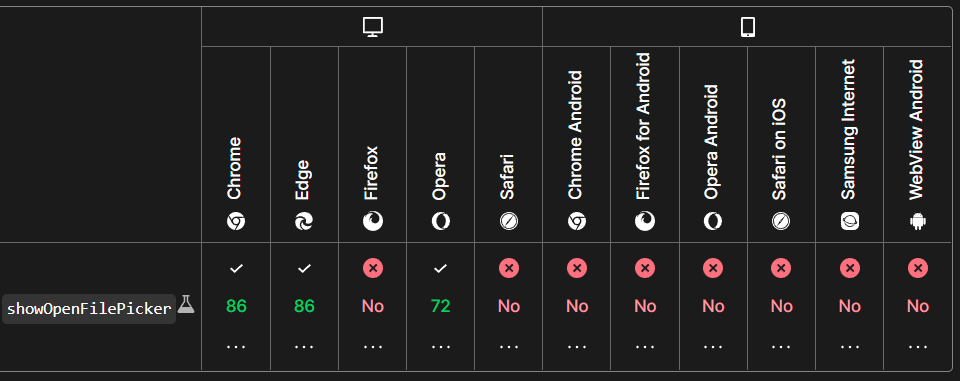 [check out my other project using it to build a web audio player](https://github.com/paakofiaidoo/juki-audio-player)
Prerequisites
- node & npm
- Frontend Code ( 😊since this works with the browser api )
***!! caution : currently tested on only pure vanilla and svelte. In react place it in the useEffect !!***
To install package
npm install browser-file-system-access-helper
Import functions
import { hasFileSystemAccess, getFile, createFile } from "browser-file-system-access-helper";
## To check if browser is compatible
`hasFileSystemAccess` : returns the boolean value if the browser is compatible with the api
if (hasFileSystemAccess()) {
// put all code here
}
// true : browser is compatible
// false : browser is not compatible
## Read a file from the local file system
`getFile(options)` : returns selected file asynchronously
let file = await getFile()
// or
getFile().then((file)=>{
console.log(file.name, "file")
})
/* the response for file is is an object with
{
// data
kind: "file"
lastModified: 1661213059235
lastModifiedDate: Tue Aug 23 2022 00:04:19 GMT+0000 (Greenwich Mean Time) {}
name: "README.md"
size: 2988
}
*/
### Read content of the file
const contents = await file.text()
textArea.value = contents;
file.arrayBuffer(), //returns array buffer of file content asynchronously
file.stream (), //returns steam of file content asynchronously
### Modify to file
Just pass in the data (no options)
await file.write(data);
Writes the data to the stream from the determined position
await file.write({ type: "write", position, data });
Updates the current file cursor offset to the position specified
await file.seek(position);
Resizes the file to be size bytes long
await file.truncate(size);
[check out my other project using it to build a web audio player](https://github.com/paakofiaidoo/juki-audio-player)
Prerequisites
- node & npm
- Frontend Code ( 😊since this works with the browser api )
***!! caution : currently tested on only pure vanilla and svelte. In react place it in the useEffect !!***
To install package
npm install browser-file-system-access-helper
Import functions
import { hasFileSystemAccess, getFile, createFile } from "browser-file-system-access-helper";
## To check if browser is compatible
`hasFileSystemAccess` : returns the boolean value if the browser is compatible with the api
if (hasFileSystemAccess()) {
// put all code here
}
// true : browser is compatible
// false : browser is not compatible
## Read a file from the local file system
`getFile(options)` : returns selected file asynchronously
let file = await getFile()
// or
getFile().then((file)=>{
console.log(file.name, "file")
})
/* the response for file is is an object with
{
// data
kind: "file"
lastModified: 1661213059235
lastModifiedDate: Tue Aug 23 2022 00:04:19 GMT+0000 (Greenwich Mean Time) {}
name: "README.md"
size: 2988
}
*/
### Read content of the file
const contents = await file.text()
textArea.value = contents;
file.arrayBuffer(), //returns array buffer of file content asynchronously
file.stream (), //returns steam of file content asynchronously
### Modify to file
Just pass in the data (no options)
await file.write(data);
Writes the data to the stream from the determined position
await file.write({ type: "write", position, data });
Updates the current file cursor offset to the position specified
await file.seek(position);
Resizes the file to be size bytes long
await file.truncate(size);