# BrickyEditor jQuery plugin
### BrickyEditor is the simple WYSIWYG editor, based on block templates system.
Usually, editors without any frontend background makes a lot of mistakes in html code.
On the other side - there is a lot of WYSIWYG editors, that brings them too much freedom, which leads to different appearence of publications.
**BrickyEditor** solve this problems: editors can use only prepared blocks of content and don't need to write any code.
Your longrids and articles will be in one clean style.
Since **BrickyEditor** can save blocks as JSON, not only in rendered HTML, you can easily deliver your content to mobile platforms
and render it natively, without
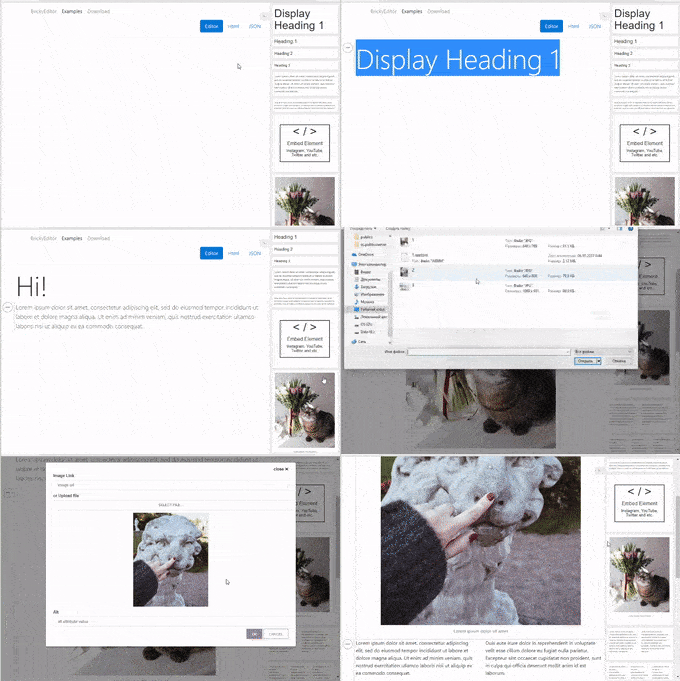
## Demo page
**[see demo for details](http://brickyeditor.info/examples.html)**
## Installation
### Bower
`bower install brickyeditor`
### NPM
`npm istall brickyeditor`
### Yarn
`yarn add brickyeditor`
important: jquery is not included as dependency in npm and yarn packages. Add it by yourself, if you don't use it in global scope.
## CDNs
### jsDelivr
``
``
Basic templates url: https://cdn.jsdelivr.net/npm/brickyeditor/dist/templates/bootstrap4.html
### unpkg
``
``
Basic templates url: https://unpkg.com/brickyeditor/dist/templates/bootstrap4.html
## Basic usage
1. If you don't want to use CDN or package manager, just copy files from brickyeditor\dist to your site folder.
2. Add script to your page: ``.
3. Add css to your page: ``.
4. If you don't have link to fontawesome, add it too ([http://fontawesome.io/](http://fontawesome.io/))
5. Call init code, when document is loaded
```js
$(function(){
$("#editor").brickyeditor({
templatesUrl: "path/to/base/templates/template.html" // by default it's "/templates/bootstrap4.html";
});
});
```
### Options
There is a list of options, you could pass to init: $("#editor").brickyeditor(options);
| Option | Description |
| --- | --- |
| templatesUrl | Url to templates file. Default is "templates/bootstrap4.html". |
| blocks | Initial blocks json data. |
| blocksUrl | Url to fetch initial blocks json, overrides initial blocks property. |
| ignoreHtml | Ignore blocks html field, if you need only json with block data. Default is false. |
| compactTools | Show blocks selector in compact mode. Default is false. |
| compactToolsWidth | Max screen width to show tools in compact mode. By default it will show tools in compact mode for devices with screen width less than 768. |
| htmlToolsButtons | Custom buttons for inline html editing. |
| formSelector | Form selector to bind form submit event. Use it in pair with inputSelector. Editor will put blocks data to field with inputSelector on form submit. |
| inputSelector | Input selector to put json to on form submit. |
| *Callbacks:* |
| onLoad(editor) | Callback, which called after brickyeditor initialization. |
| onChange(blocksJson, blocksHtml) | Callback, which called when any change happened with blocks (add/remove/content changed). |
| onBlockAdd(block, idx) | Callback, which called when new block added. |
| onBlockDelete(block, idx) | Callback, which called when block removed. |
| onBlockMove(block, from, to) | Callback, which called when block moved (up/down). |
| onBlockSelect(block) | Callback, which called when block selected. |
| onBlockDeselect(block) | Callback, which called when block desected. |
| onBlockUpdate(block, property, oldValue, newValue) | Callback, which called when block updated. |
### Template system
There are 4 base types of fields you can use inside your templates:
- **Html Field** - *Any html tag with possibility to edit content with base formatting (bold, italic, links, lists).*
- **Image Field** - *Div or img tag, that allows to upload image in base64 format.*
- **Embed Field** - *Embed field for instagram, youtube, twitter and other providers. Based on [https://noembed.com](https://noembed.com) service.*
- **Container Field** - *Container tag, that allows to put other templates inside. It's useful if you want to use layout templates.*
Fields tags should be marked with attribute `data-bre-field="{ 'name' : 'caption', 'type' : 'html'}"`, with field settings inside it.
All templates should be placed inside ``.
If you want custom preview for your template, you could wrap preview html inside block ``. BrickyEditor will render block with default values as preview if you don't add this block.
##Sample template
```html
Lorem ipsum dolor sit amet
```
In this sample two editable fields - img (field type - image) and figcaption (field type = html).
Editor will get _templates/image-with-caption.jpg_ image as preview to render block inside tools panel.
You could find more examples in `build/templates folder`.
##Template groups
You could use template grouping inside your template file for better semantics. Put templates inside div with class='bre-template-group' and set 'title' attribute to name the group.
```html
