# bootstrap-ios-modal
A Bootstrap modal that mimics the look and feel of an iOS dialog
---
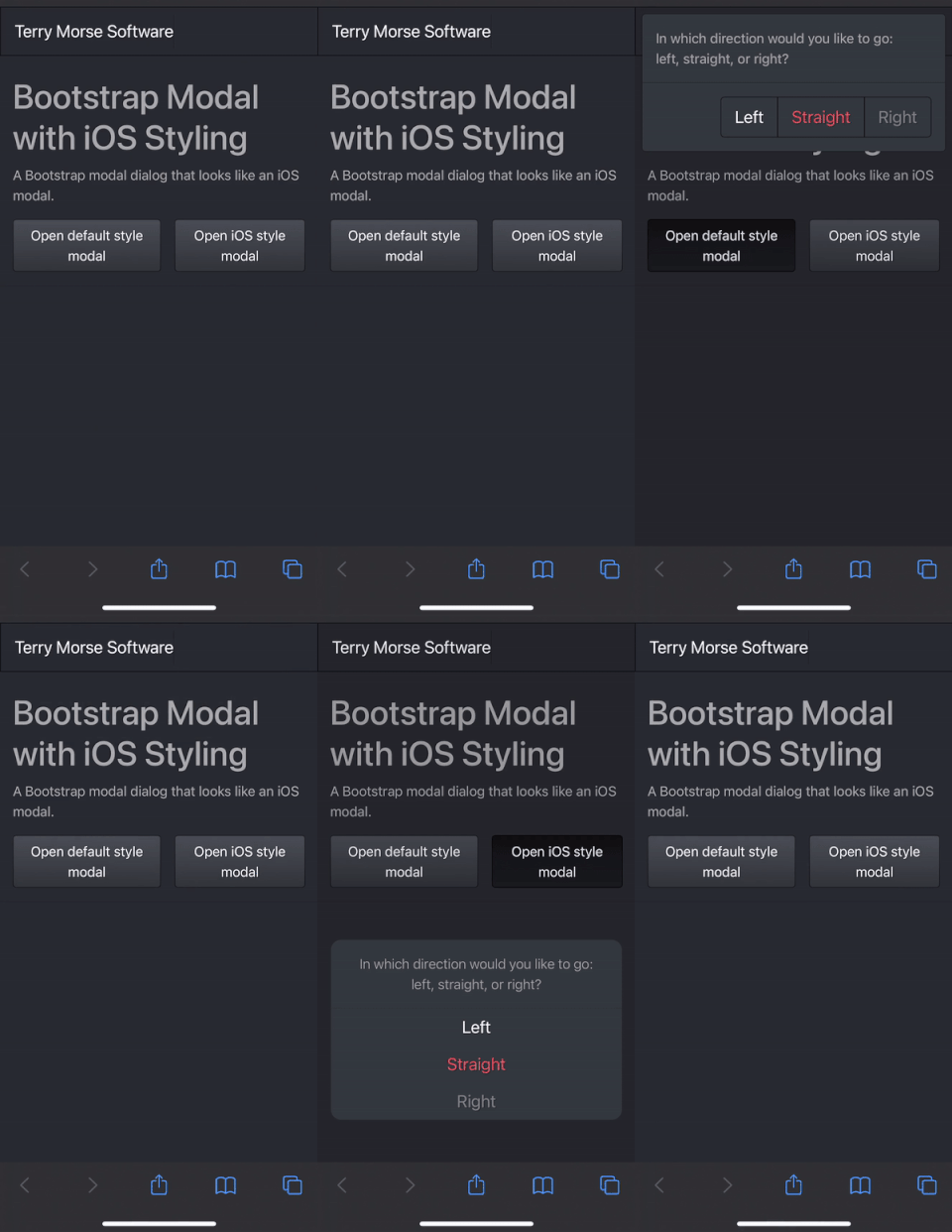
**bootstrap-ios-modal** is a responsive Bootstrap modal that looks and
acts like an iOS dialog.
On extra small screens, the modal mimics an iPhone:
* vertically stacks buttons
* scrolls up from the bottom of the screen
On larger screens, the modal mimics an iPad:
* horizontally stacks buttons
* fades in to the center of the screen
On all screens, the modal responds to light/dark mode preference.
## Example
Large screen, dark mode:

Extra small screen, dark mode:

## Usage
```html
```
JavaScript:
```js
const bodyContent = "In which direction would you like to go
" +
"left, straight, or right?";
const buttons = [
{
class: "btn btn-lg btn-outline-primary",
innerHTML: "Left",
onclick: () => { doSomething('left'); }
}, {
class: "btn btn-lg btn-outline-danger",
innerHTML: "Straight",
onclick: () => { doSomething('straight'); }
}, {
class: "btn btn-lg btn-outline-secondary",
innerHTML: "Right",
onclick: () => { doSomething('right'); }
}
];
iOSModal.show(bodyContent, buttons);
```
---
## Functions
## `show()` ##
Display a modal dialog.
#### Syntax ####
````
iOSModal.show(bodyContent, buttons)
````
#### Parameters ####
`bodyContent`
{String | Node} Content displayed in the body portion of the modal.
May be a string of HTML, or a single DOM Node.
`buttons`
{Array} - Array of objects defining buttons to display.
Individual `button` properties:
`class` - Button's class property.
`innerHTML` - Button's displayed text or HTML.
`onclick` - Function to call upon button click.
Any other properties, such as `id`, `name`, etc., will be assigned as-is to the button.
#### Return value ####
None.
---
## `hide()` ##
Hide the modal.
#### Syntax ####
````
iOSModal.hide()
````
#### Return value ####
None.
---
## `customize()` ##
Customize the modal's behavior.
#### Syntax ####
````
iOSModal.customize(options)
````
#### Parameters ####
`options`
{Object} - Specifies options for modal behavior.
Properties of `options`:
`bottom` - {String} Modal's distance from bottom of screen.
Only affects "scroll-from-bottom" modal.
Default value is "50px" (matches iPhone).
#### Return value ####
None.