
Responsive Credit Card Form built with the latest Bootstrap 5. Component to be used in eCommerce projects and checkout pages.

Check out [Bootstrap Credit Card Documentation](https://mdbootstrap.com/docs/standard/extended/credit-card/) for detailed instructions & even more examples.

## Basic example
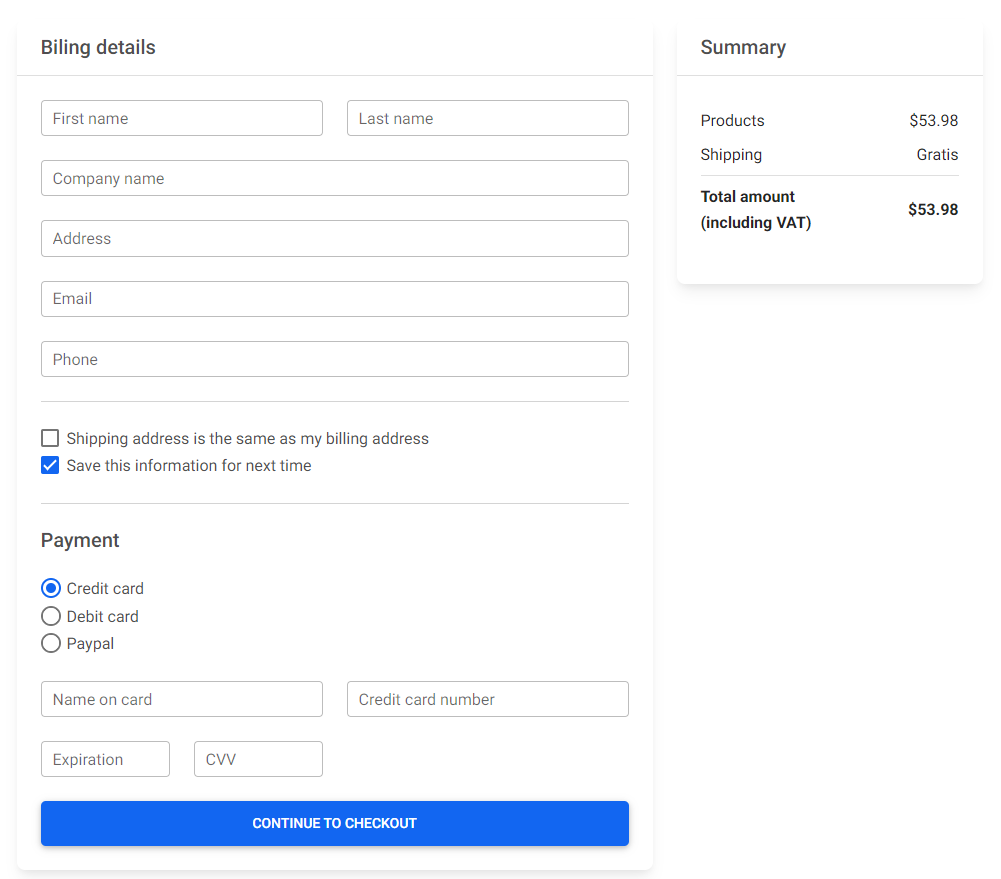
![Bootstrap 5 Credit Card](https://mdbootstrap.com/img/Marketing/github/credit-card/basic.png)

```html
<!-- Credit card form -->
<section>
  <div class="row">
    <div class="col-md-8 mb-4">
      <div class="card mb-4">
        <div class="card-header py-3">
          <h5 class="mb-0">Biling details</h5>
        </div>
        <div class="card-body">
          <form>
            <!-- 2 column grid layout with text inputs for the first and last names -->
            <div class="row mb-4">
              <div class="col">
                <div class="form-outline">
                  <input type="text" id="form6Example1" class="form-control" />
                  <label class="form-label" for="form6Example1">First name</label>
                </div>
              </div>
              <div class="col">
                <div class="form-outline">
                  <input type="text" id="form6Example2" class="form-control" />
                  <label class="form-label" for="form6Example2">Last name</label>
                </div>
              </div>
            </div>

            <!-- Text input -->
            <div class="form-outline mb-4">
              <input type="text" id="form6Example3" class="form-control" />
              <label class="form-label" for="form6Example3">Company name</label>
            </div>

            <!-- Text input -->
            <div class="form-outline mb-4">
              <input type="text" id="form6Example4" class="form-control" />
              <label class="form-label" for="form6Example4">Address</label>
            </div>

            <!-- Email input -->
            <div class="form-outline mb-4">
              <input type="email" id="form6Example5" class="form-control" />
              <label class="form-label" for="form6Example5">Email</label>
            </div>

            <!-- Number input -->
            <div class="form-outline mb-4">
              <input type="number" id="form6Example6" class="form-control" />
              <label class="form-label" for="form6Example6">Phone</label>
            </div>

            <hr class="my-4" />

            <div class="form-check">
              <input
                class="form-check-input"
                type="checkbox"
                value=""
                id="checkoutForm1"
              />
              <label class="form-check-label" for="checkoutForm1">
                Shipping address is the same as my billing address
              </label>
            </div>

            <div class="form-check mb-4">
              <input
                class="form-check-input"
                type="checkbox"
                value=""
                id="checkoutForm2"
                checked
              />
              <label class="form-check-label" for="checkoutForm2">
                Save this information for next time
              </label>
            </div>

            <hr class="my-4" />

            <h5 class="mb-4">Payment</h5>

            <div class="form-check">
              <input
                class="form-check-input"
                type="radio"
                name="flexRadioDefault"
                id="checkoutForm3"
                checked
              />
              <label class="form-check-label" for="checkoutForm3">
                Credit card
              </label>
            </div>

            <div class="form-check">
              <input
                class="form-check-input"
                type="radio"
                name="flexRadioDefault"
                id="checkoutForm4"
              />
              <label class="form-check-label" for="checkoutForm4">
                Debit card
              </label>
            </div>

            <div class="form-check mb-4">
              <input
                class="form-check-input"
                type="radio"
                name="flexRadioDefault"
                id="checkoutForm5"
              />
              <label class="form-check-label" for="checkoutForm5">
                Paypal
              </label>
            </div>

            <div class="row mb-4">
              <div class="col">
                <div class="form-outline">
                  <input type="text" id="formNameOnCard" class="form-control" />
                  <label class="form-label" for="formNameOnCard">Name on card</label>
                </div>
              </div>
              <div class="col">
                <div class="form-outline">
                  <input type="text" id="formCardNumber" class="form-control" />
                  <label class="form-label" for="formCardNumber"
                    >Credit card number</label
                  >
                </div>
              </div>
            </div>

            <div class="row mb-4">
              <div class="col-3">
                <div class="form-outline">
                  <input type="text" id="formExpiration" class="form-control" />
                  <label class="form-label" for="formExpiration">Expiration</label>
                </div>
              </div>
              <div class="col-3">
                <div class="form-outline">
                  <input type="text" id="formCVV" class="form-control" />
                  <label class="form-label" for="formCVV">CVV</label>
                </div>
              </div>
            </div>

            <button class="btn btn-primary btn-lg btn-block" type="submit">
              Continue to checkout
            </button>
          </form>
        </div>
      </div>
    </div>

    <div class="col-md-4 mb-4">
      <div class="card mb-4">
        <div class="card-header py-3">
          <h5 class="mb-0">Summary</h5>
        </div>
        <div class="card-body">
          <ul class="list-group list-group-flush">
            <li
              class="list-group-item d-flex justify-content-between align-items-center border-0 px-0 pb-0"
            >
              Products
              <span>$53.98</span>
            </li>
            <li
              class="list-group-item d-flex justify-content-between align-items-center px-0"
            >
              Shipping
              <span>Gratis</span>
            </li>
            <li
              class="list-group-item d-flex justify-content-between align-items-center border-0 px-0 mb-3"
            >
              <div>
                <strong>Total amount</strong>
                <strong>
                  <p class="mb-0">(including VAT)</p>
                </strong>
              </div>
              <span><strong>$53.98</strong></span>
            </li>
          </ul>
        </div>
      </div>
    </div>
  </div>
</section>
<!-- Credit card form -->
```

## How to use?

1. Download MDB 5 - free UI KIT

2. Choose your favourite customized component and click on the image

3. Copy & paste the code into your MDB project

[▶️ Subscribe to YouTube channel for web development tutorials & resources](https://www.youtube.com/MDBootstrap?sub_confirmation=1)

___

## More extended Bootstrap documentation

<ul>
<li><a href="https://mdbootstrap.com/docs/standard/extended/bootstrap-address-form/">Bootstrap Address Form</a></li>
<li><a href="https://mdbootstrap.com/docs/standard/extended/avatar/">Bootstrap Avatar</a></li>
<li><a href="https://mdbootstrap.com/docs/standard/extended/back-to-top/">Bootstrap Back To Top Button</a></li>
<li><a href="https://mdbootstrap.com/docs/standard/extended/carousel-with-thumbnails/">Bootstrap Carousel Slider with Thumbnails</a></li>
<li><a href="https://mdbootstrap.com/docs/standard/extended/chat/">Bootstrap Chat</a></li>
<li><a href="https://mdbootstrap.com/docs/standard/extended/code/">Bootstrap Code Blocks</a></li>
<li><a href="https://mdbootstrap.com/docs/standard/extended/comments/">Bootstrap Comments</a></li>
<li><a href="https://mdbootstrap.com/docs/standard/extended/bootstrap-comparison-table/">Bootstrap Comparison Table</a></li>
<li><a href="https://mdbootstrap.com/docs/standard/extended/credit-card/">Bootstrap Credit Card Form</a></li>
<li><a href="https://mdbootstrap.com/docs/standard/extended/drawer/">Bootstrap Drawer</a></li>
<li><a href="https://mdbootstrap.com/docs/standard/extended/dropdown-multilevel/">Bootstrap Nested Dropdown</a></li>
<li><a href="https://mdbootstrap.com/docs/standard/extended/faq/">Bootstrap FAQ component / section</a></li>
<li><a href="https://mdbootstrap.com/docs/standard/extended/gallery/">Bootstrap Gallery</a></li>
<li><a href="https://mdbootstrap.com/docs/standard/extended/hamburger-menu/">Bootstrap Hamburger Menu</a></li>
<li><a href="https://mdbootstrap.com/docs/standard/extended/bootstrap-invoice/">Bootstrap Invoice</a></li>
<li><a href="https://mdbootstrap.com/docs/standard/extended/jumbotron/">Bootstrap Jumbotron</a></li>
<li><a href="https://mdbootstrap.com/docs/standard/extended/login/">Bootstrap Login Form</a></li>
<li><a href="https://mdbootstrap.com/docs/standard/extended/maps/">Bootstrap Maps</a></li>
<li><a href="https://mdbootstrap.com/docs/standard/extended/media-object/">Bootstrap Media Object</a></li>
<li><a href="https://mdbootstrap.com/docs/standard/extended/mega-menu/">Bootstrap Mega Menu</a></li> 
<li><a href="https://mdbootstrap.com/docs/standard/extended/multiselect/">Bootstrap Multiselect</a></li> 
<li><a href="https://mdbootstrap.com/docs/standard/extended/news-feed/">Bootstrap News Feed</a></li> 
<li><a href="https://mdbootstrap.com/docs/standard/extended/offcanvas/">Bootstrap Offcanvas</a></li> 
<li><a href="https://mdbootstrap.com/docs/standard/extended/order-details/">Bootstrap Order Details</a></li> 
<li><a href="https://mdbootstrap.com/docs/standard/extended/page-transitions/">Bootstrap Page Transitions</a></li> 
<li><a href="https://mdbootstrap.com/docs/standard/extended/payment-forms/">Bootstrap Payment Forms</a></li> 
<li><a href="https://mdbootstrap.com/docs/standard/extended/product-cards/">Bootstrap Product Cards</a></li> 
<li><a href="https://mdbootstrap.com/docs/standard/extended/profiles/">Bootstrap Profiles</a></li>  
<li><a href="https://mdbootstrap.com/docs/standard/extended/quotes/">Bootstrap Quotes</a></li> 
<li><a href="https://mdbootstrap.com/docs/standard/extended/registration/">Bootstrap Registration Form</a></li> 
<li><a href="https://mdbootstrap.com/docs/standard/extended/search-expanding/">Bootstrap Expanding Search Bar</a></li> 
<li><a href="https://mdbootstrap.com/docs/standard/extended/shopping-carts/">Bootstrap Shopping Carts</a></li> 
<li><a href="https://mdbootstrap.com/docs/standard/extended/side-navbar/">Bootstrap Side Navbar</a></li>  
<li><a href="https://mdbootstrap.com/docs/standard/extended/sidebar/">Bootstrap Sidebar</a></li>  
<li><a href="https://mdbootstrap.com/docs/standard/extended/social-media/">Bootstrap Social Media Icons & Buttons</a></li>  
<li><a href="https://mdbootstrap.com/docs/standard/extended/square-buttons/">Bootstrap Square Buttons</a></li>  
<li><a href="https://mdbootstrap.com/docs/standard/extended/bootstrap-survey-form/">Bootstrap Survey Form</a></li>  
<li><a href="https://mdbootstrap.com/docs/standard/extended/testimonial-slider/">Bootstrap Testimonial Slider</a></li>  
<li><a href="https://mdbootstrap.com/docs/standard/extended/testimonials/">Bootstrap Testimonials</a></li>  
<li><a href="https://mdbootstrap.com/docs/standard/extended/textarea/">Bootstrap Textarea</a></li>  
<li><a href="https://mdbootstrap.com/docs/standard/extended/timeline/">Bootstrap Timeline</a></li>  
<li><a href="https://mdbootstrap.com/docs/standard/extended/to-do-list/">Bootstrap To Do List</a></li>  
<li><a href="https://mdbootstrap.com/docs/standard/extended/video-carousel/">Bootstrap Video Carousel / Gallery</a></li>  
<li><a href="https://mdbootstrap.com/docs/standard/extended/weather/">Bootstrap Weather</a></li>  
</ul>

