
Responsive Address Form with Bootstrap 5. Templates include basic examples, use of cards, use of photos & more.

Check out [Bootstrap Address Form Documentation](https://mdbootstrap.com/docs/standard/extended/bootstrap-address-form/) for detailed instructions & even more examples.

## Basic example
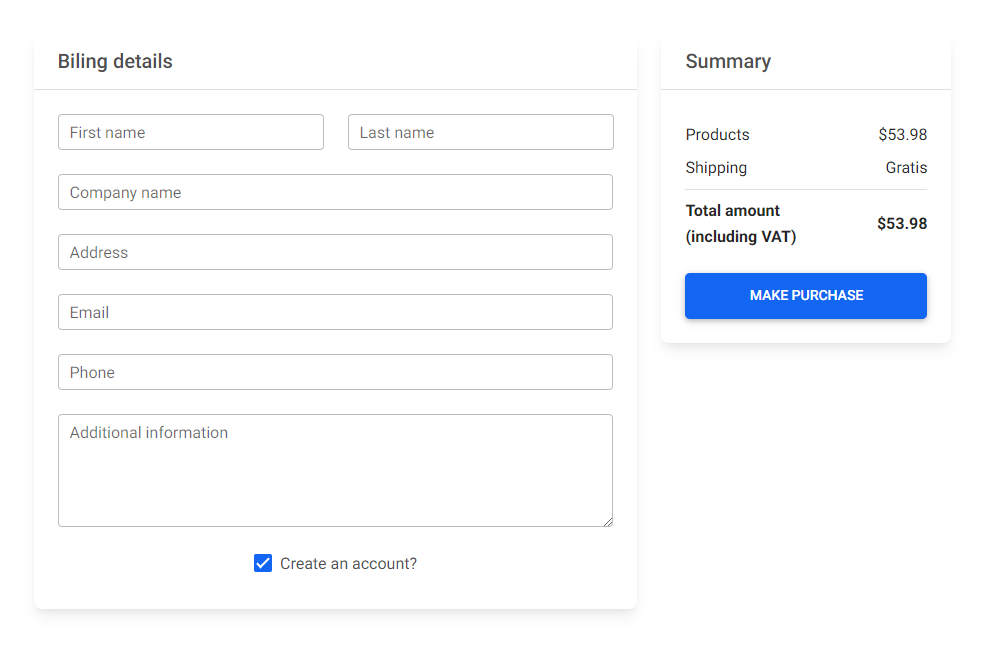
![Bootstrap 5 Address Form](https://mdbootstrap.com/img/Marketing/github/address-form/basic.png)

```html
<div class="row">
  <div class="col-md-8 mb-4">
    <div class="card mb-4">
      <div class="card-header py-3">
        <h5 class="mb-0">Biling details</h5>
      </div>
      <div class="card-body">
        <form>
          <!-- 2 column grid layout with text inputs for the first and last names -->
          <div class="row mb-4">
            <div class="col">
              <div class="form-outline">
                <input type="text" id="form7Example1" class="form-control" />
                <label class="form-label" for="form7Example1">First name</label>
              </div>
            </div>
            <div class="col">
              <div class="form-outline">
                <input type="text" id="form7Example2" class="form-control" />
                <label class="form-label" for="form7Example2">Last name</label>
              </div>
            </div>
          </div>

          <!-- Text input -->
          <div class="form-outline mb-4">
            <input type="text" id="form7Example3" class="form-control" />
            <label class="form-label" for="form7Example3">Company name</label>
          </div>

          <!-- Text input -->
          <div class="form-outline mb-4">
            <input type="text" id="form7Example4" class="form-control" />
            <label class="form-label" for="form7Example4">Address</label>
          </div>

          <!-- Email input -->
          <div class="form-outline mb-4">
            <input type="email" id="form7Example5" class="form-control" />
            <label class="form-label" for="form7Example5">Email</label>
          </div>

          <!-- Number input -->
          <div class="form-outline mb-4">
            <input type="number" id="form7Example6" class="form-control" />
            <label class="form-label" for="form7Example6">Phone</label>
          </div>

          <!-- Message input -->
          <div class="form-outline mb-4">
            <textarea class="form-control" id="form7Example7" rows="4"></textarea>
            <label class="form-label" for="form7Example7">Additional information</label>
          </div>

          <!-- Checkbox -->
          <div class="form-check d-flex justify-content-center mb-2">
            <input class="form-check-input me-2" type="checkbox" value="" id="form7Example8"
              checked />
            <label class="form-check-label" for="form7Example8">
              Create an account?
            </label>
          </div>
        </form>
      </div>
    </div>
  </div>

  <div class="col-md-4 mb-4">
    <div class="card mb-4">
      <div class="card-header py-3">
        <h5 class="mb-0">Summary</h5>
      </div>
      <div class="card-body">
        <ul class="list-group list-group-flush">
          <li
            class="list-group-item d-flex justify-content-between align-items-center border-0 px-0 pb-0">
            Products
            <span>$53.98</span>
          </li>
          <li class="list-group-item d-flex justify-content-between align-items-center px-0">
            Shipping
            <span>Gratis</span>
          </li>
          <li
            class="list-group-item d-flex justify-content-between align-items-center border-0 px-0 mb-3">
            <div>
              <strong>Total amount</strong>
              <strong>
                <p class="mb-0">(including VAT)</p>
              </strong>
            </div>
            <span><strong>$53.98</strong></span>
          </li>
        </ul>

        <button type="button" class="btn btn-primary btn-lg btn-block">
          Make purchase
        </button>
      </div>
    </div>
  </div>
</div>
```

## How to use?

1. Download MDB 5 - free UI KIT

2. Choose your favourite customized component and click on the image

3. Copy & paste the code into your MDB project

[▶️ Subscribe to YouTube channel for web development tutorials & resources](https://www.youtube.com/MDBootstrap?sub_confirmation=1)

## More examples

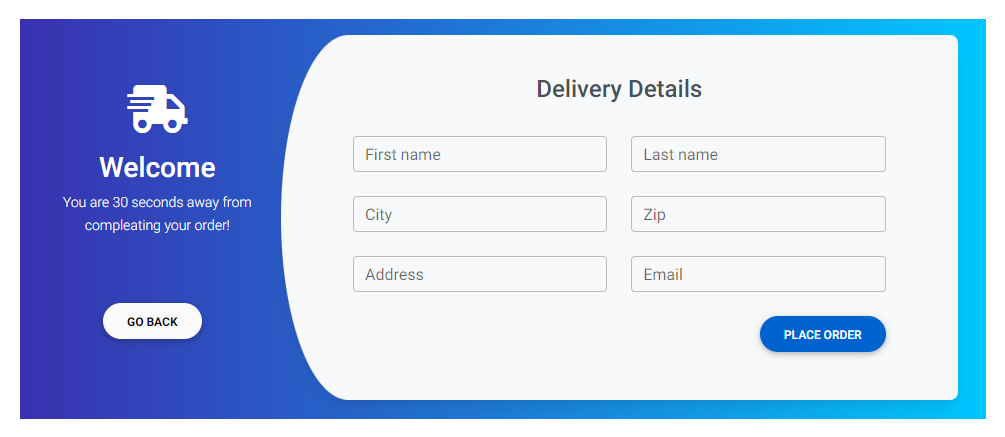
[Bootstrap Delivery address form card:
![Bootstrap 5 Address Form](https://mdbootstrap.com/img/Marketing/github/address-form/section-2.png)](https://mdbootstrap.com/docs/standard/extended/bootstrap-address-form/#address-form-card)

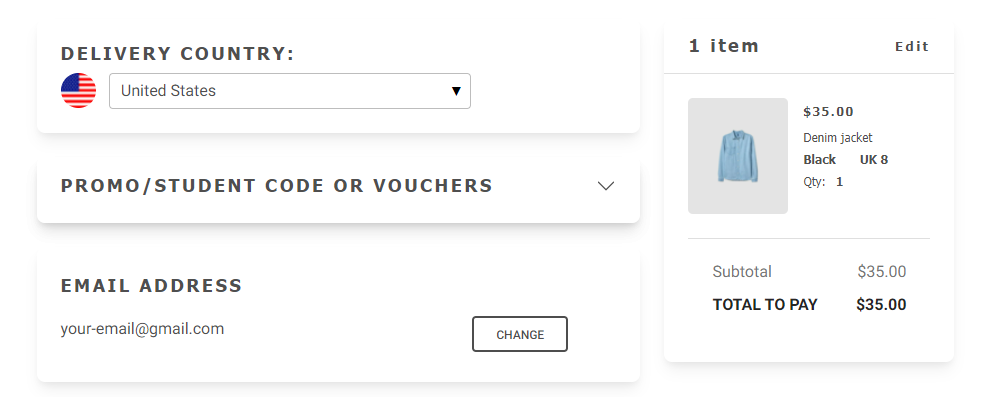
[Bootstrap Advanced address form:
![Bootstrap 5 Address Form](https://mdbootstrap.com/img/Marketing/github/address-form/section-3.png)](https://mdbootstrap.com/docs/standard/extended/bootstrap-address-form/#advanced-address-form)

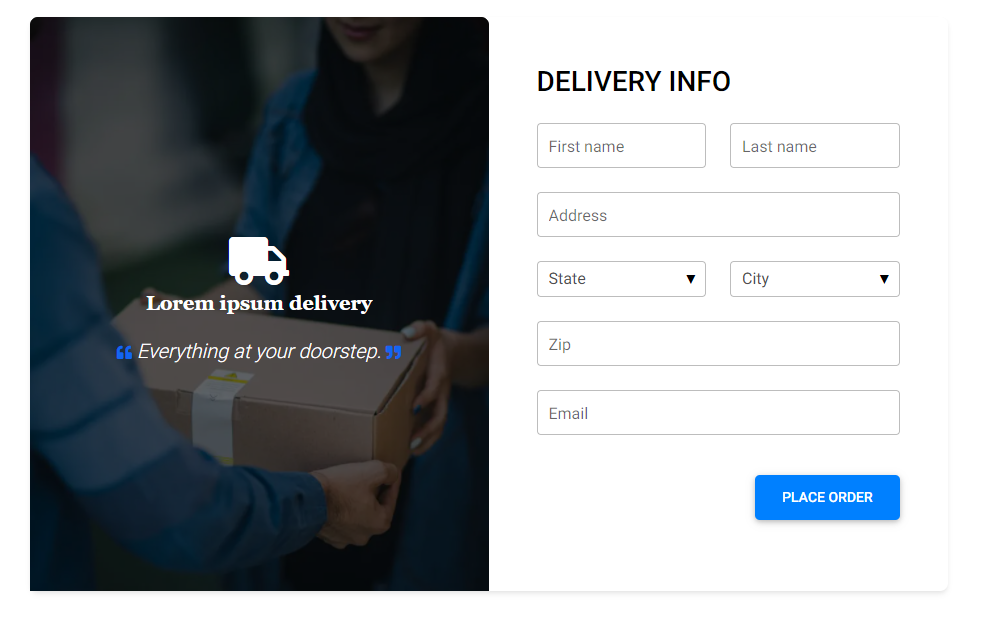
[Bootstrap Address form with image:
![Bootstrap 5 Address Form](https://mdbootstrap.com/img/Marketing/github/address-form/section-4.png)](https://mdbootstrap.com/docs/standard/extended/bootstrap-address-form/#address-form-image)

___

## More extended Bootstrap documentation

<ul>
<li><a href="https://mdbootstrap.com/docs/standard/extended/bootstrap-address-form/">Bootstrap Address Form</a></li>
<li><a href="https://mdbootstrap.com/docs/standard/extended/avatar/">Bootstrap Avatar</a></li>
<li><a href="https://mdbootstrap.com/docs/standard/extended/back-to-top/">Bootstrap Back To Top Button</a></li>
<li><a href="https://mdbootstrap.com/docs/standard/extended/carousel-with-thumbnails/">Bootstrap Carousel Slider with Thumbnails</a></li>
<li><a href="https://mdbootstrap.com/docs/standard/extended/chat/">Bootstrap Chat</a></li>
<li><a href="https://mdbootstrap.com/docs/standard/extended/code/">Bootstrap Code Blocks</a></li>
<li><a href="https://mdbootstrap.com/docs/standard/extended/comments/">Bootstrap Comments</a></li>
<li><a href="https://mdbootstrap.com/docs/standard/extended/bootstrap-comparison-table/">Bootstrap Comparison Table</a></li>
<li><a href="https://mdbootstrap.com/docs/standard/extended/credit-card/">Bootstrap Credit Card Form</a></li>
<li><a href="https://mdbootstrap.com/docs/standard/extended/drawer/">Bootstrap Drawer</a></li>
<li><a href="https://mdbootstrap.com/docs/standard/extended/dropdown-multilevel/">Bootstrap Nested Dropdown</a></li>
<li><a href="https://mdbootstrap.com/docs/standard/extended/faq/">Bootstrap FAQ component / section</a></li>
<li><a href="https://mdbootstrap.com/docs/standard/extended/gallery/">Bootstrap Gallery</a></li>
<li><a href="https://mdbootstrap.com/docs/standard/extended/hamburger-menu/">Bootstrap Hamburger Menu</a></li>
<li><a href="https://mdbootstrap.com/docs/standard/extended/bootstrap-invoice/">Bootstrap Invoice</a></li>
<li><a href="https://mdbootstrap.com/docs/standard/extended/jumbotron/">Bootstrap Jumbotron</a></li>
<li><a href="https://mdbootstrap.com/docs/standard/extended/login/">Bootstrap Login Form</a></li>
<li><a href="https://mdbootstrap.com/docs/standard/extended/maps/">Bootstrap Maps</a></li>
<li><a href="https://mdbootstrap.com/docs/standard/extended/media-object/">Bootstrap Media Object</a></li>
<li><a href="https://mdbootstrap.com/docs/standard/extended/mega-menu/">Bootstrap Mega Menu</a></li> 
<li><a href="https://mdbootstrap.com/docs/standard/extended/multiselect/">Bootstrap Multiselect</a></li> 
<li><a href="https://mdbootstrap.com/docs/standard/extended/news-feed/">Bootstrap News Feed</a></li> 
<li><a href="https://mdbootstrap.com/docs/standard/extended/offcanvas/">Bootstrap Offcanvas</a></li> 
<li><a href="https://mdbootstrap.com/docs/standard/extended/order-details/">Bootstrap Order Details</a></li> 
<li><a href="https://mdbootstrap.com/docs/standard/extended/page-transitions/">Bootstrap Page Transitions</a></li> 
<li><a href="https://mdbootstrap.com/docs/standard/extended/payment-forms/">Bootstrap Payment Forms</a></li> 
<li><a href="https://mdbootstrap.com/docs/standard/extended/product-cards/">Bootstrap Product Cards</a></li> 
<li><a href="https://mdbootstrap.com/docs/standard/extended/profiles/">Bootstrap Profiles</a></li>  
<li><a href="https://mdbootstrap.com/docs/standard/extended/quotes/">Bootstrap Quotes</a></li> 
<li><a href="https://mdbootstrap.com/docs/standard/extended/registration/">Bootstrap Registration Form</a></li> 
<li><a href="https://mdbootstrap.com/docs/standard/extended/search-expanding/">Bootstrap Expanding Search Bar</a></li> 
<li><a href="https://mdbootstrap.com/docs/standard/extended/shopping-carts/">Bootstrap Shopping Carts</a></li> 
<li><a href="https://mdbootstrap.com/docs/standard/extended/side-navbar/">Bootstrap Side Navbar</a></li>  
<li><a href="https://mdbootstrap.com/docs/standard/extended/sidebar/">Bootstrap Sidebar</a></li>  
<li><a href="https://mdbootstrap.com/docs/standard/extended/social-media/">Bootstrap Social Media Icons & Buttons</a></li>  
<li><a href="https://mdbootstrap.com/docs/standard/extended/square-buttons/">Bootstrap Square Buttons</a></li>  
<li><a href="https://mdbootstrap.com/docs/standard/extended/bootstrap-survey-form/">Bootstrap Survey Form</a></li>  
<li><a href="https://mdbootstrap.com/docs/standard/extended/testimonial-slider/">Bootstrap Testimonial Slider</a></li>  
<li><a href="https://mdbootstrap.com/docs/standard/extended/testimonials/">Bootstrap Testimonials</a></li>  
<li><a href="https://mdbootstrap.com/docs/standard/extended/textarea/">Bootstrap Textarea</a></li>  
<li><a href="https://mdbootstrap.com/docs/standard/extended/timeline/">Bootstrap Timeline</a></li>  
<li><a href="https://mdbootstrap.com/docs/standard/extended/to-do-list/">Bootstrap To Do List</a></li>  
<li><a href="https://mdbootstrap.com/docs/standard/extended/video-carousel/">Bootstrap Video Carousel / Gallery</a></li>  
<li><a href="https://mdbootstrap.com/docs/standard/extended/weather/">Bootstrap Weather</a></li>  
</ul>

