# wxc-rich-text 

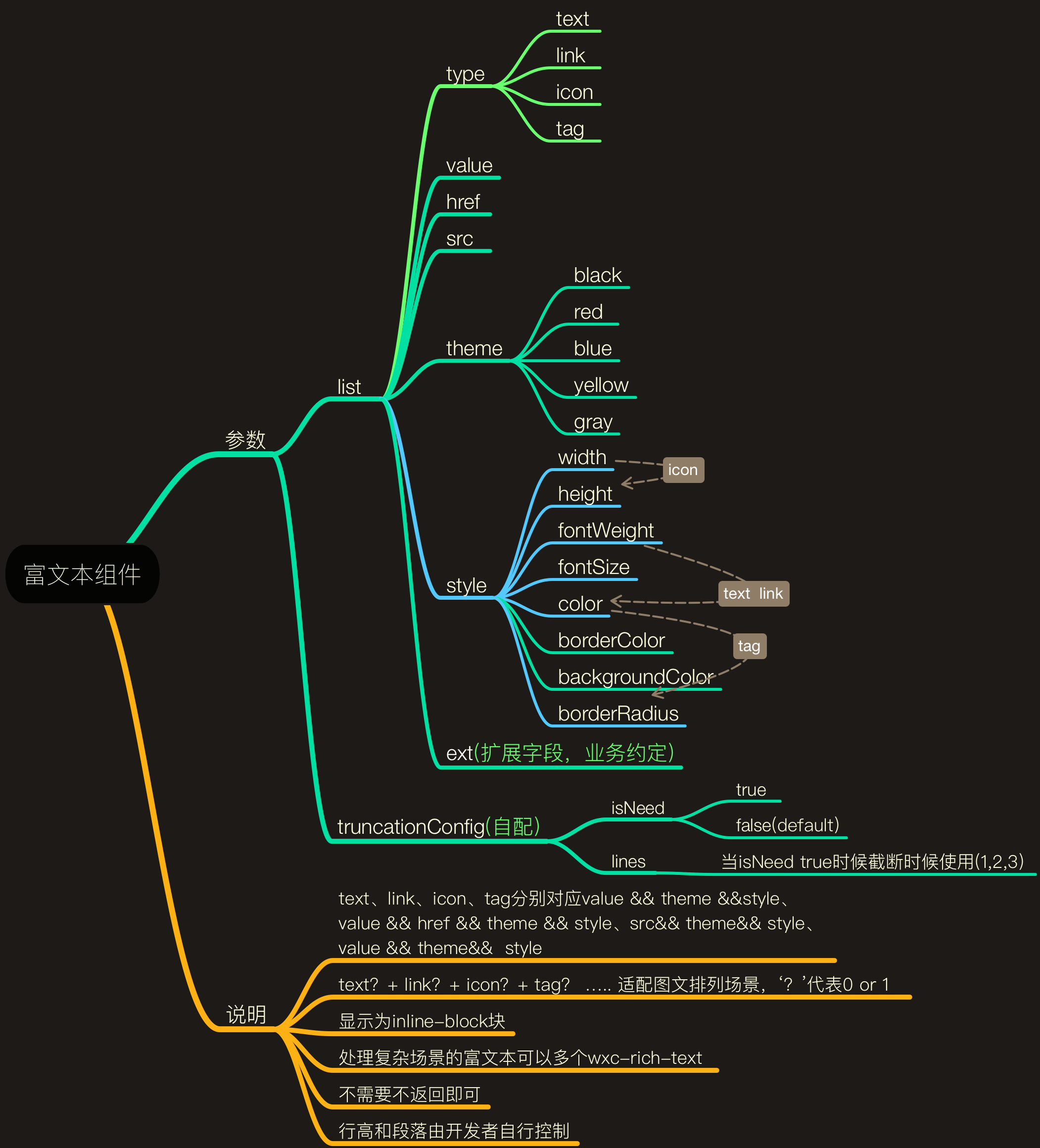
> 一个Weex富文本的通用解决方案，支持text、icon、link、tag四种形式的混排。

- 规则：
  - 使用统一规范，前后端约定相关字段。
  - text默认是`gray`、tag默认是`blue`、link默认是`black`主题。
  - 具体如下：
  
      <img src="http://gtms04.alicdn.com/tfs/TB1kqcoRXXXXXa3XpXXXXXXXXXX-2102-2320.png" width="700"/>
-----

## [Demo预览](https://h5.m.taobao.com/trip/wxc-rich-text/index.html?_wx_tpl=https%3A%2F%2Fh5.m.taobao.com%2Ftrip%2Fwxc-rich-text%2Fdemo%2Findex.native-min.js)
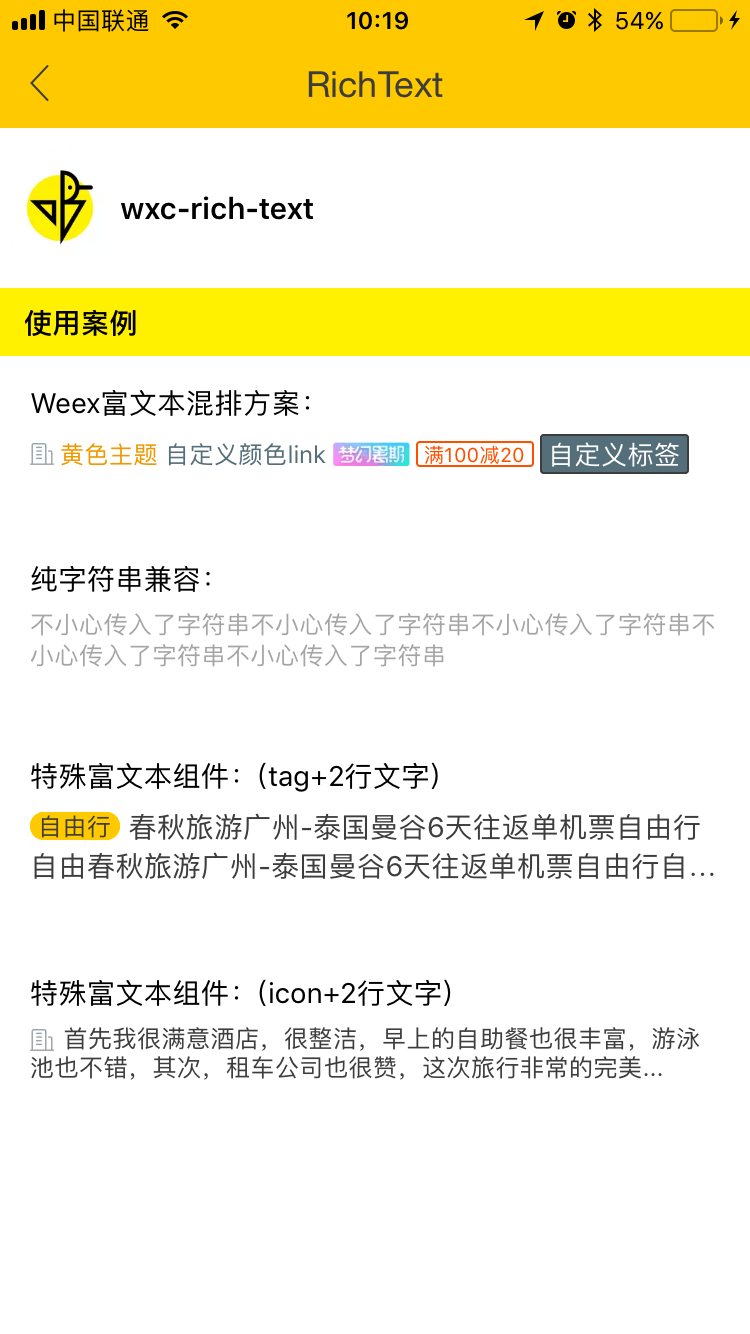
<img src="http://gtms01.alicdn.com/tfs/TB1e4LYSpXXXXXVXpXXXXXXXXXX-750-1334.png" width="240"/>&nbsp;&nbsp;&nbsp;&nbsp;<img src="https://img.alicdn.com/tfs/TB1OXrDSpXXXXcyXVXXXXXXXXXX-200-200.png" width="160"/>

## 安装

```
npm install weex-ui --save
```

## 使用方法

```
<template>
  <div class="container">
    <wxc-rich-text :config-list="configList"
                   v-on:wxcRichTextLinkClick="wxcRichTextLinkClick"></wxc-rich-text>
     <div class="special-rich">
       <wxc-special-rich-text :config-list="specialConfigList"></wxc-special-rich-text>
     </div>
  </div>
  
</template>
<script>
  const icon = require('./icon.base64.js');
  import { WxcRichText,wxcSpecialRichText } from 'weex-ui';

  module.exports = {
    components: { WxcRichText },
    data: () => ({
      configList: [{
        type: 'icon',
        src: '//gw.alicdn.com/tfs/TB1RRVWQXXXXXasXpXXXXXXXXXX-24-22.png',
        style: {
          width: 24,
          height: 22
        }
      }, {
        type: 'text',
        value: '黄色主题',
        theme: 'yellow'
      }, {
        type: 'link',
        value: '自定义颜色link',
        href: '//h5.m.taobao.com',
        style: {
          color: '#546E7A'
        }
      }, {
        type: 'icon',
        src: icon.fliggy,
        style: {
          width: 92,
          height: 24
        }
      }, {
        type: 'tag',
        value: '满100减20',
        theme: 'red'
      }, {
        type: 'tag',
        value: '自定义标签',
        style: {
          fontSize: 26,
          color: '#ffffff',
          borderColor: '#3d3d3d',
          backgroundColor: '#546E7A',
          height: 36
        }
      }],
      specialConfigList: [
        {
          type: 'tag',
          value: '自由行',
          style: {
            width: 84,
            fontSize: 24,
            color: '#3D3D3D',
            borderColor: '#FFC900',
            backgroundColor: '#FFC900',
            height: 28,
            borderRadius: 14,
          }
        },
        {
          type: 'text',
          value: '春秋旅游广州-泰国曼谷6天往返单机票自由行自由春秋旅游广州-泰国曼谷6天往返单机票自由行自由行…',
          theme: 'black',
          style: {
            fontSize: 28
          }
        }
      ],
    }),
    methods: {
      wxcRichTextLinkClick () {  
      }
    }
  };
</script>
```

### 可配置参数

| 名称      | 类型     | 默认值   | 备注  |
|-------------|------------|--------|-----|
| config-list | `Array` | '[]' | 富文本配置数组，详细可以参考**规则图**和[master/demo/index.we#L30]|
| has-text-margin | `Boolean` | 'true' | 文字相互之间是否有margin，默认是有|


### 事件回调

```
请参考demo中的` v-on:wxcRichTextLinkClick`，如不需要，可以不使用。
```