bigp-globals
============
***WARNING**: under construction, use at your own risk!*

> So, you keep forgetting what you need to create a WebApp?
:earth_americas: :earth_africa: :earth_asia: ***Well whadayaknow... me too!*** :earth_asia: :earth_africa: :earth_americas:
:floppy_disk: Install
---------------------
Run: `npm install bigp-globals`
:rabbit2: Quick Start
---------------------
Once `npm` finishes its funky thing, you can start your app with a simple `app.js` file containing something like this:
```javascript
// Example in file "app.js"
const $$$ = require('bigp-globals');
$$$.init() // <-- Yes, this is a promise!
.then(status => trace(`Command returned: ${status}`.yellow))
.catch(err => traceError(err));
```
And then in your CLI:
`node app.js`
Optionally, you can specify a command, like this:
`node app.js -c prod` ***(see options below)***
You should then see some output indicating the Express server started. :clap: Congrats! :clap:
:camera: Screenshots
--------------------
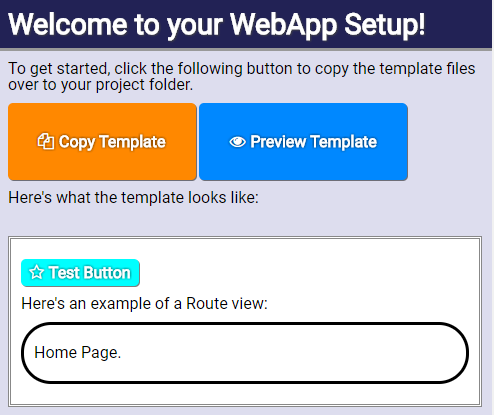
First Time Setup:
:heavy_check_mark: Features
---------------------------
This module basically sits in the background and provides a quick, effortless way to make WebApps.
| Features | Included |
| --- | --- |
| Show a User-Friendly startup guide for first time user experience? | :heavy_check_mark: |
| Automatically open the 'localhost:3333' URL in your default browser when starting?
*(only when it's not already opened)* | :heavy_check_mark: |
| Hot-Reload on server & client code changes?
*(supports SCSS & CSS dynamic reloading)* | :heavy_check_mark: |
| Serve files directly from your `/public/` folder?
*(JS, CSS, media files, you name it!)* | :heavy_check_mark: |
| Compile front-end files with Webpack?
*(creates a `bundle.js` file)* | :heavy_check_mark: |
| Include jQuery, lodash, Vue, socket.io, HowlerJS, and other goodies?
*(if you want to add/remove, edit the `index.html` file)*| :heavy_check_mark::heavy_check_mark::heavy_check_mark:
:heavy_check_mark::heavy_check_mark::heavy_check_mark: |
| **Okay, but will this cause me headaches?** | :x: :sweat_smile: |
:raising_hand: Why?
-------------------
Simply because, overtime, I've noticed when I'm developing Web apps I'm rewriting the same code over and over, slightly differently, but usually behaving the same way in the end.
**Coming from a Flash background**, I've never been a big fan of writing `console.log`, so I generally make an alias to it with a global `trace` variable. You're welcome, fellow AS3 devs :metal:
:question: What's happening exactly?
------------------------------------
A *"Master cluster"* process starts up.
It then loops every few milliseconds to ensure a child-process is running your actual webapp (express, socket.io, etc).
This ensures that whenever the child-process kills itself from a server-side file modification (:running_man::gun: how dark!), the Master process simply relaunches it immediately.
The *File-Watcher* system is also responsible for differentiating between modifications applied to server-side, front-end JS, CSS, media files, and webpacked source files to notify and/or kill the respective event or process.
This way, whenever possible, it attempts to `hot-reload` dynamic resources (ex: CSS stylesheets) without doing a full page-refresh.
:page_with_curl: Options
------------------------
You can configure the module by passing an **options** object to the `init({...})` method.
**Example:**
```javascript
$$$.init({
/////////// Yargs command-line config:
version: '2018.1.0',
defaultCmd: 'auto',
commands: {
auto() {
//Do something automatically...
trace("No CLI command specified, running auto.");
return 'auto';
}
},
/////////// Express/Socket.IO config:
server: {
port: 4444,
delay: 500,
isAutoStart: false,
isHelloWorld: true
},
/////////// Chokidar file-watcher config:
watcher: {
dir: '/folder/to/keep/an/eye/on/'
}
})
```
Here's the list of available options:
- `noConflict` *(Boolean, default=false)* Prevents polluting the global-scope if true (will only write to `$$$.globals`).
- `version`: *(String)* When starting the app from the command-line, using `-v` will display this version string.
- `defaultCmd`: *(String, default=auto)* The default command to call in your list of commands when no command parameter is specified in the CLI `-c` (if no `commands` functions are provided, just uses the `built-in` one).
- `commands`: *(Object of functions)* Provide a list of commands to perform custom startup processes depending on the `-c "command"` specified in the CLI.
- `server`: **Express and Socket.IO config:**
- `port`: *(Number, default=3333)* The port to listen on the Express web server.
- `delay`: *(Number, default=250)* Milliseconds to wait before auto-starting the server.
- `isAutoStart`: *(Boolean, default=true)* Tells the server to start immediately. If you need to configure other server-related parts of your app manually, you can set this to `false` and call `$$$.server.start()` after your setup code.
- `isHelloWorld`: *(Boolean, default=false)* Serves a "Hello World" string on the root `/` URL.
- `watcher`: **Chokidar file-watcher config:**
- `dir`: *(String, default=...)* Path of root-folder to detect file modifications. By default, the root is your web-app's project directory.
> Hmm, I don't like the idea of polluting the global-scope.
(ex: having lodash `_` everywhere)
Easy fix, just set: ``$$$.init({noConflict: true})``
> What about those String, Number, Boolean, Array extensions?
Although `noConflict` takes care of some global conflicts,
there may be some extensions applied to the built-in Javascript types.
All I have to say about that is:
I really hope they won't conflict with your codebase, because they're designed to provide convenience methods used internally AND by the various web-apps created with this module.
**#BuiltInExtensionsLivesMatters**, right? :grinning:
:raised_hands: The Promise of `$$$.init(...)`
---------------------------------------------
Once the module is initialized, it returns a Promise object.
The result passed in the resolved `then((result) => {...})`
callback should be the *command* name passed with the `-c or --command` CLI argument.
You may want to add a `catch` callback as well to pickup any potential internal issues during startup / runtime.
:family: Dependencies
---------------------
What it uses *under-the-hood*:
- `express`: serves files from `/public` folders (the internal one, plus the one you define in your project) and can be used to create other Routers, your own REST API, etc.
- `chokidar`: used to detect file-changes and hot-reload/restart the child-server process automatically.
- `socket.io`: handles the Client-Server communication.
- `yargs`: parses the CLI arguments when launching the server with special parameters.
On the client side, it uses:
- `vue`: For layout, data-binding, client-router page updates, etc.
- `socket.io`: To communicate from/to the server.
- `GSAP TweenMax`: The best Web Animation library, hands down.
- `EaselJS`: A canvas-based drawing library (a-la-Flash).
- `Push`: Dispatches desktop notifications on server-refreshes.
- `Showdown`: To easily convert Markdown text to HTML (add `md` class to automatically parse your HTML tags)
- `jQuery`: Because, of course! :smile: