# Babble
Dynamic communication flows between message based actors.
Babble makes it easy to code communication flows between actors. A conversation
is modeled as a control flow diagram containing blocks `ask`, `tell`, `listen`,
`iif`, `decide`, and `then`. Each block can link to a next block in the
control flow. Conversations are dynamic: a scenario is build programmatically,
and the blocks can dynamically determine the next block in the scenario.
During a conversation, a context is available to store the state of the
conversation.
Babblers communicate with each other via a message bus. Babble comes with
built in support for a local message bus, and [pubnub](http://www.pubnub.com/)
to connect actors distributed over multiple devices. Its easy to add support
for other message buses.
Babble runs in node.js and in the browser.
## Usage
Install babble via npm:
npm install babble
Load in node.js:
```js
var babble = require('babble');
```
Load in the browser:
```html
```
Then, babble can be loaded and used:
```js
var babble = require('babble');
var emma = babble.babbler('emma');
var jack = babble.babbler('jack');
// listen for messages containing either 'age' or 'how old'
emma.listen(/age|how old/)
.tell(function () {
return 25;
});
jack.ask('emma', 'what is your age?', function (age, context) {
console.log(context.from + ' is ' + age + ' years old');
});
```
## Control flow
TODO: describe control flow blocks
## Examples
### Say hi
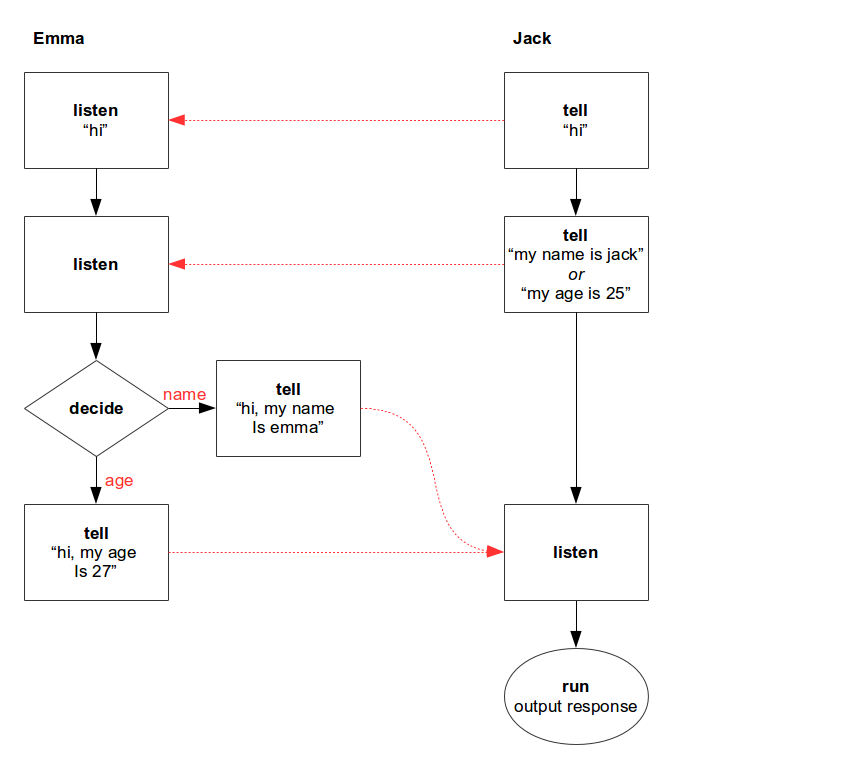
Babble can be used to listen for messages and send a reply. In the following
example, emma listens for a message "hi", then she will listen to the next
message. Depending on the contents of this second message, she determines how
to respond. Jack says hi to emma, then tells his name or age, and awaits a
response from emma.
This scenario can be represented by the following control flow diagram:
The scenario can be programmed as:
```js
var babble = require('babble');
var emma = babble.babbler('emma');
var jack = babble.babbler('jack');
emma.listen('hi')
.listen(function (message, context) {
console.log(context.from + ': ' + message);
return message;
})
.decide(function (message, context) {
return (message.indexOf('age') != -1) ? 'age' : 'name';
}, {
'name': babble.tell('hi, my name is emma'),
'age': babble.tell('hi, my age is 27')
});
jack.tell('emma', 'hi')
.tell(function (message, context) {
if (Math.random() > 0.5) {
return 'my name is jack'
} else {
return 'my age is 25';
}
})
.listen(function (message, context) {
console.log(context.from + ': ' + message);
});
```
### Plan a meeting
The following scenario describes two peers planning a meeting in two steps:
First jack asks whether emma has time for a meeting, and if so, jack will
propose to meet, and await emma's response.
This scenario can be represented by the following control flow diagram:
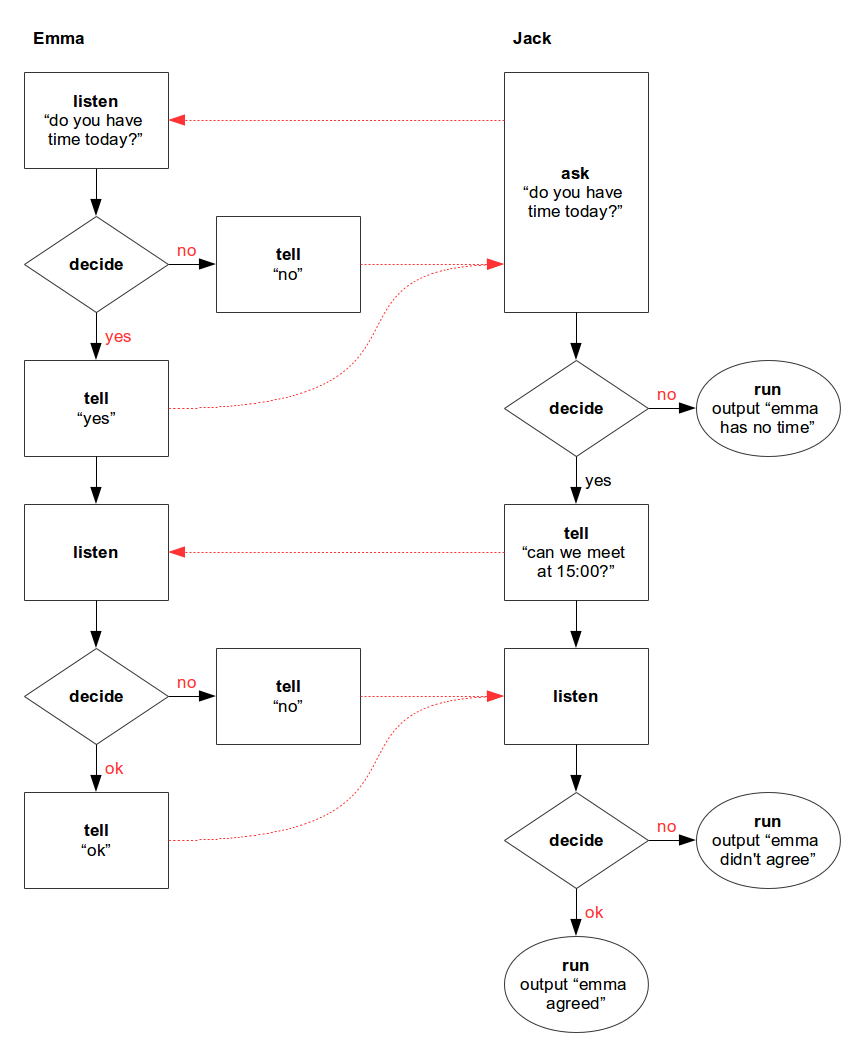
The scenario can be coded as follows. Note that the implementations of the
control flow blocks are separated from the flow itself.
```js
var babble = require('babble');
var emma = babble.babbler('emma');
var jack = babble.babbler('jack');
function decideIfAvailable () {
return (Math.random() > 0.4) ? 'yes' : 'no';
}
function decideToAgree (response) {
if (response == 'can we meet at 15:00?' && Math.random() > 0.5) {
return 'ok';
}
else {
return 'no';
}
}
emma.listen('do you have time today?')
.decide(decideIfAvailable, {
yes: babble.tell('yes')
.listen()
.decide(decideToAgree, {
ok: babble.tell('ok'),
no: babble.tell('no')
}),
no: babble.tell('no')
});
function noTime () {
console.log('emma has no time');
}
function agreesToMeet (response) {
return (response == 'ok') ? 'ok': 'no';
}
function agreement () {
console.log('emma agreed');
}
function noAgreement () {
console.log('emma didn\'t agree');
}
jack.ask('emma', 'do you have time today?')
.decide({
yes: babble.tell('can we meet at 15:00?')
.listen()
.decide(agreesToMeet, {
ok: babble.then(agreement),
no: babble.then(noAgreement)
}),
no: babble.then(noTime)
});
```
## API
Babble has the following factory functions:
- `babble.ask(message: String | Function [, callback: Function]) : Block`
Send a question and listen for a reply.
This is equivalent of doing `tell(message).listen([callback])`.
- `babble.babbler(id: String) : Babbler`
Factory function to create a new Babbler.
- `babble.babblify(actor: Object, params: Object) : Object`
Babblify an actor. The babblified actor will be extended with functions
`ask`, `tell`, `listen`, and `listenOnce`.
Babble expects that messages sent via `actor.send(to, message)` will be
delivered by the recipient on a function `actor.receive(from, message)`.
Babble replaces the original `receive` with a new one, which is used to
listen for all incoming messages. Messages ignored by babble are propagated
to the original `receive` function.
The function accepts the following parameters:
- `actor: Object`
The actor to be babblified. Must be an Object containing functions
`send(to, message)` and `receive(from, message)`.
- `[params: Object]`
Optional parameters. Can contain properties:
- `id: string`
The id for the babbler
- `send: string`
The name of an alternative send function available on the actor.
- `receive: string`
The name of an alternative receive function available on the actor.
The function returns the babblified actor. A babblified actor can be restored
in its original state using `unbabblify(actor)`.
- `babble.decide([decision: Function, ] choices: Object) : Block`
Create a flow starting with a `Decision` block.
When a `decision` function is provided, the function is invoked as
`decision(response, context)`. The function must return the id for the next
block in the control flow, which must be available in the provided `options`.
The function `decision` can also return a Promise resolving with an id for the
next block. When `decision` is not provided, the next block will be mapped
directly from the `response`, which should be a string in that case.
Parameter `choices` is a map with the possible next blocks in the flow.
The next block is selected by the id returned by the `decision` function.
The returned block is used as next block in the control flow.
When there is no matching choice, the choice `'default'` will be selected
when available.
- `babble.iif(condition: function | RegExp | * [, trueBlock : Block] [, falseBlock : Block]) : Block`
Create a control flow starting with an `IIf` block.
When the condition is a function, it can either return a boolean or a Promise
resolving with a boolean value.
When the condition evaluates `true`, `trueBlock` is executed. If no `trueBlock`
is provided, the next block in the chain will be executed.
When the condition evaluates `true`, `falseBlock` is executed.
- `babble.listen([callback: Function])`
Wait for a message. The provided callback function is called as
`callback(response, context)`, where `response` is the just received message.
When the callback returns a promise, babble will wait with execution of the
next block until the promise is resolved. The result returned by the callback
is passed to the next block in the chain.
Providing a callback function is equivalent of doing
`babble.listen().then(callback)`.
- `babble.tell(message: Function | *) : Block`
Create a flow starting with a `Tell` block. Message can be a static value,
or a callback function returning a message dynamically. The callback function
is called as `callback(response, context)`, where `response` is the latest
received message, and must return a result.
The returned result is send to the connected peer.
When the callback returns a Promise, the value returned when the promise
resolves will be send to the connected peer.
- `babble.then(next: Block | function) : Block`
Create a flow starting with given block. When a callback function is provided,
the function is wrapped into a `Then` block. The provided callback function
is called as `callback(response, context)`, where `response` is the latest
received message, and must return a result.
When the callback returns a promise, babble will wait with execution of the
next block until the promise is resolved. The result returned by the callback
is passed to the next block in the chain.
- `babble.unbabblify(actor: Object) : Object`
Unbabblify an actor. Returns the unbabblified actor.
Babble contains the following prototypes. These prototypes are normally
instantiated via the above mentioned factory functions.
- `babble.Babbler`
- `babble.block.Block`
- `babble.block.Decision`
- `babble.block.IIf`
- `babble.block.Listen`
- `babble.block.Tell`
- `babble.block.Then`
### Babbler
A babbler is created via the factory function `babble.babbler(id: String)`.
After creation, a babbler is automatically connected to the default (local)
message bus. The connection can replaced with another message bus using the
function `Babbler.connect(bus)`.
A babbler has the following functions:
- `ask(to: String, message: * | Function [, callback: Function]) : Block`
This is equivalent of doing `tell(to, message).listen([callback])`.
Other blocks can be chained to the returned block.
- `connect([bus: Object]) : Promise.`
Connect to a message bus. Babble comes with interfaces to support various
message buses: `pubnub`, `pubsub-js`, and `default`. These interfaces are
available in the `babble.messagebus` namespace. If parameter `bus` is
not provided, babble uses the `default` message bus, which works locally.
A specific message bus interface can be specified like:
```js
babbler.connect(babble.messagebus['pubnub'])
.then(function (babbler) {
// connected
});
```
The connect function returns a promise which resolves with the babbler itself
when the connection is ready.
See section [Message bus](#message-bus) for documentation on the interface
of a message bus.
- `disconnect()`
Disconnect from the connected message bus.
- `listen([condition: Function | RegExp | * [, callback: Function]]) : Block`
Listen for incoming messages and start the conversation flow.
Other blocks can be chained to the returned block.
Providing a condition will only start the flow when condition is met,
this is equivalent of doing `listen().iif(condition)`.
Providing a callback function is equivalent of doing either
`listen(message).then(callback)` or `listen().iif(message).then(callback)`.
The callback is invoked as `callback(message, context)`, and must return
either a result or a Promise resolving with a result. The result will be
passed to the next block in the chain.
- `listenOnce([condition: Function | RegExp | * [, callback: Function]]) : Block`
Equal to `listen`, except that the listener is removed as soon as a message
is received matching listeners condition, i.e. the listener is executed only
once.
- `send(to: String, message: *)`
Send a message to another peer.
- `tell(to: String, message: Function | *)`
Send a notification to another peer.
`message` can be a static value or a callback function. When `message` is
a function, it is invoked as `callback(message, context)`, and must return
either a result or a Promise resolving with a result. The result will be
sent to the other peer, and will be passed to the next block in the chain.
### Block
Blocks can be created via the factory functions available in `babble`
(`tell`, `iif`, `decide`, `then`, `listen`), or in a Babbler (`listen`, `tell`,
`ask`). Blocks can be chained together, resulting in a control flow. The results
returned by blocks are used as input argument for the next block in the chain.
A `Block` has the following functions:
- `ask(message: * [, callback]) : Block`
Append a `Tell` and `Listen` block to the control flow.
Parameter `message` can be a callback function or an object or value.
- `decide([decision: function, ] choices: Object) : Block`
Append a `Decision` block to the control flow.
- `iif(condition: function | RegExp | * [, trueBlock : Block] [, falseBlock : Block]) : Block`
Append an `IIf` block to the control flow.
When the condition evaluates `true`, `trueBlock` is executed.
If no `trueBlock` is provided, the next block in the chain will be executed.
When the condition evaluates `true`, `falseBlock` is executed.
- `listen([callback: Function]) : Block`
Append a `Listen` block to the control flow. Providing a callback function is
equivalent of doing `listen().then(callback)`.
- `tell(message: * | Function) : Block`
Append a `Tell` block to the control flow. Parameter `message` can be callback
function or an object or value.
- `then(block : Block | function) : Block`
Append an arbitrary block to the control flow. When a callback function is
provided, it is wrapped into a `Then` block and added to the chain.
## Message bus
Babblers talk to each other via a message bus. This can be any message bus
implementation. Babble comes with support for two message buses: a local
message bus and [pubnub](http://www.pubnub.com/).
### Interface
The function `Babbler.connect(bus)` accepts a message bus interface. This
interface must be an Object with the following functions:
- `connect(params: Object) : string`
The function `connect` will be called by the Babbler with an object having
the following parameters:
- `id` the id of the babbler itself.
- `message` the callback function to deliver messages for this babbler.
This function must be invoked as `message(msg : *)`.
- `callback` an optional callback function which is invoked when the
connection is established.
The `connect` function must return a token which can be used to disconnect
again.
- `disconnect(token: string)`
Disconnect from a message bus. `token` is the token returned by the `connect`
function.
- `send(id: string, message: *)`
Send a message to a babbler.
### Protocol
The messages sent between babblers are JSON objects having the following properties:
- `id: string`
A unique identifier for the conversation, typically a uuid.
This id is generated by the initiator of a conversation, and is sent with
every message between the two babblers during the conversation.
- `from: string`
The id of the sender.
- `to: string`
The id of the receiver.
- `message: *`
The message contents. This is a (serializable) JSON object (often a string).
Example:
```json
{
"id": "547d1840-2142-11e4-8c21-0800200c9a66",
"from": "babbler1",
"to": "babbler2",
"message": "Hello babbler!"
}
```
## Build
Babble can be build for use in the browser. This is done using the tools
browserify and uglify. First install all project dependencies:
npm install
To build the library, run:
npm run build
This generates the files `./dist/babble.js`, `./dist/babble.min.js`, and
`./dist/babble.min.map`.
## Test
To execute tests for the library, install the project dependencies once:
npm install
Then, the tests can be executed:
npm test
# Roadmap
- Implement error handling and timeout conditions.
- Store message history in the context.
- Implement conversations with multiple peers at the same time.