_ _ _
(_)(_) | |
__ _ ___ ___ _ _ ______ __ _ _ __ | |_
/ _` |/ __| / __|| || ||______| / _` || '__|| __|
| (_| |\__ \| (__ | || | | (_| || | | |_
\__,_||___/ \___||_||_| \__,_||_| \__|
ascii-art.js
============
[]()
[]()
[]()
[](https://github.com/khrome/ascii-art)
This is the documentation and test data repository for [ascii-art](https://github.com/khrome/ascii-art) ([What is ASCII-Art?](History.md))
Images, fonts, tables, ansi styles and compositing in Node.js & the browser. 100% JS.
In the beginning there was [colors.js](https://github.com/Marak/colors.js) but in the fine tradition of vendors calling out a problem they have the solution to, [chalk](https://github.com/yeoman/yo/issues/68) was introduced. In that same vein, I offer `ascii-art` as an update, expansion and generalization of [MooAsciiArt](http://mootools.net/forge/p/mooasciiart) and at the same time it can replace your existing ansi colors library.
It features support for [Images](https://www.npmjs.com/package/ascii-art-image), [Styles](Styles.md), [Tables](https://www.npmjs.com/package/ascii-art-table) and [Figlet Fonts](https://www.npmjs.com/package/ascii-art-font) as well as handling multi-line joining automatically.
Why would I use this instead of X?
----------------------------------
- **modular** - small set of purpose built modules all interacting through a common ansi library.
- **color profiles** support - other libraries assume you are running x11
- **no prototype manipulation** - No `String.prototype` usage. No `__proto__` usage. No BS.
- handles the ugly [intersection of **multiline text and ansi codes**](Multiline.md) for you.
- runs in the **browser and Node.js** (CommonJS, AMD, globals or webpack)
- **JS + Canvas** Ascii image generation utilities in node don't actually touch any pixels, but usually call out to a binary, we do 100% of our transform in JS, which allows us plug into averaging, distance and other logic dynamically, in powerful ways.
- It **works like a package manager** for figlet fonts.
- The **other libraries** out there **do too little**, focus on logging above other domains and often unaware of ANSI controls(for example: style text, then put it in a table).
- **Supports your existing API** We allow you to use the colors.js/chalk API *or* our own (where we reserve chaining for utility rather than code aesthetics).
- **flexible output** Supports 4bit, 8bit and 32bit output
Installation
------------
npm install ascii-art
If you'd like to use the command-line tool make sure to use `-g`
If you want to use `.image()` or `.Image` you must install [`canvas`](https://www.npmjs.com/package/canvas) and if you want to run the chalk tests... you'll need to to install `require-uncached` as well.
Styles
------
Add ANSI styles to a string and return the result.
| In your code | In the [Terminal](Terminal.md) |
|-------------------------------------------------|---------------------------------------------------|
| `.style(text, style[, close]) > String` | `ascii-art text -s green "some text"` |
Styles are: *italic*, **bold**, underline, |framed|, |encircled|, overline, blink and inverse . And available colors are:
**Colors**
Color defaults to 8 bit (most compatible), to enable other modes set booleans in the options:
- `is256` : compute the color using 256colors, as defined by ansi256. Note that full color output may need to tune the difference method to obtain optimal results.
- `isTrueColor` : do not constrain color and directly output RGB to the console.
Color Tables may be found in the style [documentation](Styles.md)
Fonts
-----
Render a string using a figlet font and add that to the buffer. There is a batch version of this function which does not chain and takes an array( `.strings()`).
| In your code | In the [Terminal](Terminal.md) |
|-------------------------------------------------|---------------------------------------------------|
| `.font(text, font[, style][, callback])` | `ascii-art text -F "Demo!"` |
Outputs
______ _
| _ \ | |
| | | | ___ _ __ ___ ___ | |
| | | | / _ \| '_ ` _ \ / _ \ | |
| |/ / | __/| | | | | || (_) ||_|
|___/ \___||_| |_| |_| \___/ (_)
Check out the [documentation](https://www.npmjs.com/package/ascii-art-font) for more examples!
Images
------
Create an image from the passed image and append that to the buffer
| In your code | In the [Terminal](Terminal.md) |
|-------------------------------------------------|---------------------------------------------------|
| `.image(options[, callback])` | `ascii-art image path/to/my/file.jpg` |
Because of the resolution downsampling, some finer details may be lost. Plan accordingly. Here's an example in 256 color (primarily greyscale):
```bash
ascii-art image -B 8 -C rankedChannel -a blocks node_modules/ascii-art/Images/grendel.jpg
```
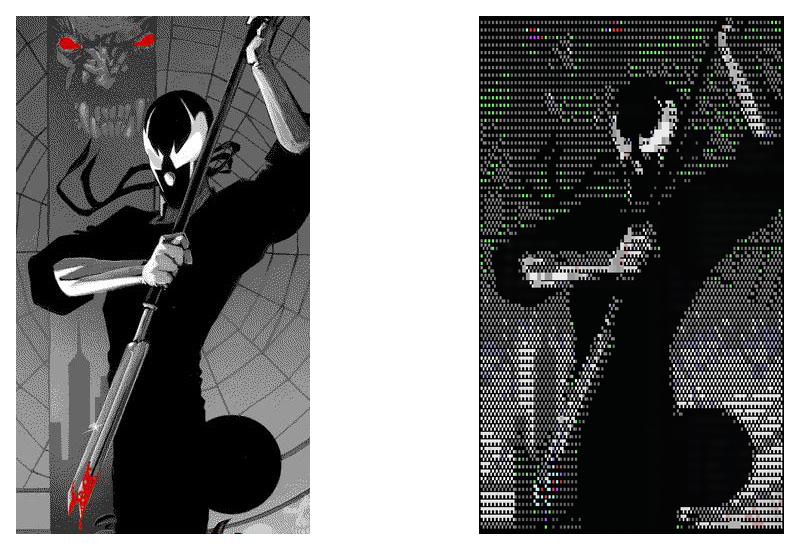
Here's a comparison of various output modes:
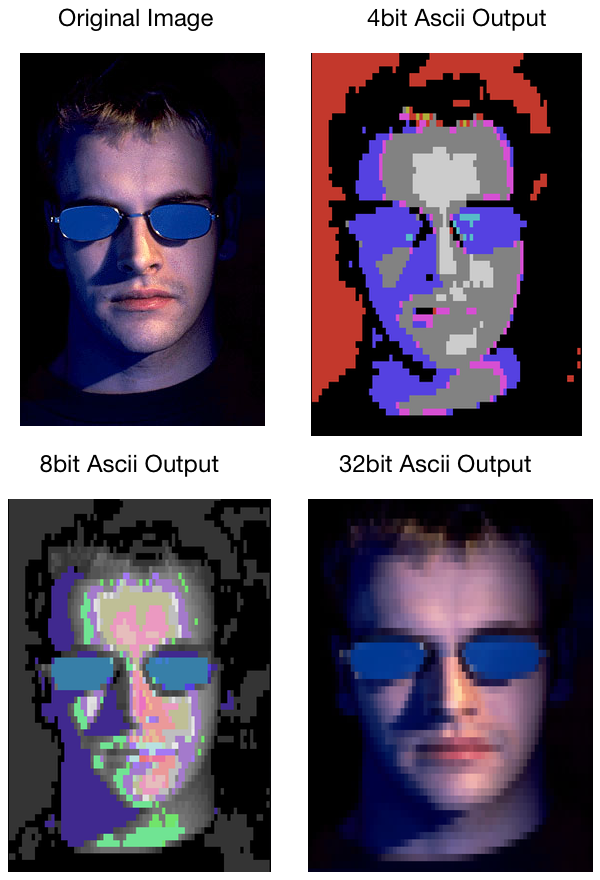
```bash
#4bit
ascii-art image -B 4 -a solid node_modules/ascii-art/Images/zero-cool.jpg
#8bit
ascii-art image -B 8 -C closestByIntensity -a solid node_modules/ascii-art/Images/zero-cool.jpg
#32bit (on supported terminals)
ascii-art image -B 32 -a solid node_modules/ascii-art/Images/zero-cool.jpg
```
Check out the [documentation](https://www.npmjs.com/package/ascii-art-image) for more examples!
Tables
------
Generate a table from the passed data, with support for many styles and append that to the buffer
| In your code | In the Terminal |
|-------------------------------------------------|---------------------------------------------------|
| `.table(options[, callback])` | N/A |
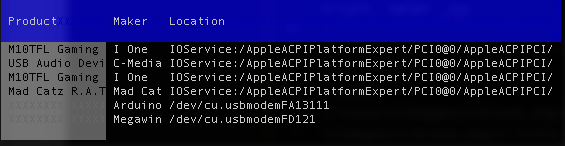
Check out the [documentation](https://www.npmjs.com/package/ascii-art-table) for more examples!
Artwork
-------
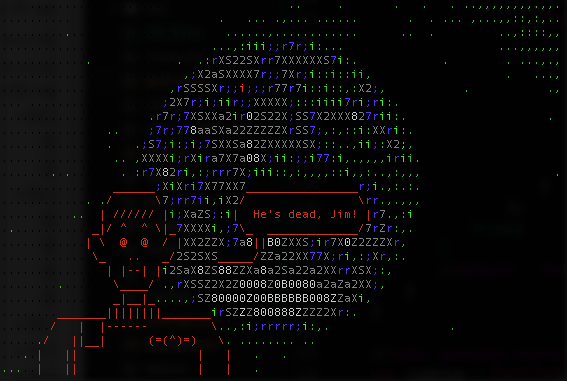
fetch a graphic from a remote source and append it to the current buffer.
| In your code | In the [Terminal](Terminal.md) |
|-------------------------------------------------|---------------------------------------------------|
| `.artwork(options[, callback])` | ascii-art art [source][/path] |
Often I use this in conjunction with an image backdrop, for example to superimpose bones on the earth:
Compositing
-----------
We also support combining all these nifty elements you've made into a single composition, via a few functions available on the chains (`.lines()`, `.overlay()` and `.join()`). Maybe I've got A BBS wall I want to have some dynamic info on.. I could make that with [this](test/scripts/bbs.js)

Check out the [documentation](Compositing.md) for detailed examples!
Promises
--------
Instead of providing a callback, you can also get a promise instead ( `.toPromise()`).
| In your code |
|---------------------------------------------|
| `.font(text, font[, style]).toPromise()` |
Compatibility
-------------
If you're a [chalk](https://www.npmjs.com/package/chalk) user, just use `var chalk = require('ascii-art/kaolin');` in place of your existing `chalk` references (Much of color.js, too... since chalk is a subset of colors.js). No migration needed, keep using the wacky syntax you are used to(In this mode, refer to their docs, not mine).
Users of [ascii-table](https://www.npmjs.com/package/ascii-table) will also note that interface is supported via `require('ascii-art').Table`, though our solution is ansi-aware, lazy rendering and better at sizing columns.
I may support the other [colors](https://www.npmjs.com/package/colors) stuff (extras & themes) eventually, but it's currently a low priority.
Roadmap
-------
#### Goals
- Better Docs
- value reversal (light vs dark)
- HTML output
- piping support on the command line
- [ANSI art](https://en.wikipedia.org/wiki/ANSI_art) support
- [PETSCII art](https://en.wikipedia.org/wiki/PETSCII) support
- 2 colors per char with multisampling
- REPL
#### Non Goals
- realtime: videos, curses, etc.:
- logging integration
Testing
-------
In the root directory run:
npm run test
which runs the test suite directly. In order to test it in Chrome try:
npm run browser-test
In order to run the chalk test, use:
npm run chalk-test
Please make sure to run the tests before submitting a patch and report any rough edges. Thanks!
Enjoy,
-Abbey Hawk Sparrow