<div align="center">

# ANTRI Code (`antri_cli`)

**An intelligent, terminal-first AI coding chatbot, autonomous meta-agent, desktop control plane, and mobile ecosystem inspired by OpenCode.**

[![npm version](https://img.shields.io/npm/v/antri_cli.svg?style=flat-square&color=8b5cf6)](https://www.npmjs.com/package/antri_cli)
[![License: MIT](https://img.shields.io/badge/License-MIT-blue.svg?style=flat-square)](LICENSE)
[![Node: >=18](https://img.shields.io/badge/node-%3E%3D18.0.0-emerald.svg?style=flat-square)](https://nodejs.org)

<br />

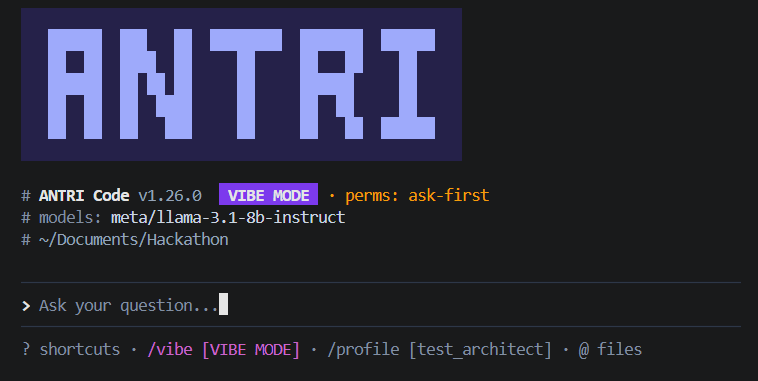
<img src="./assets/banner.png" alt="ANTRI Code Banner" width="850" />

</div>

---

## Why ANTRI Code?

ANTRI Code turns your developer workspace into an integrated, autonomous coding ecosystem across the **Terminal CLI**, **Desktop Control Plane**, and **Mobile App**. It doesn't just wait for prompts — it breaks tasks down step-by-step, asks clarifying questions on architecture trade-offs, runs multi-iteration self-improvement loops, debates solutions against itself to hunt edge cases, and writes its own custom dynamic tools.

---

## Visual Interfaces & Multi-Surface Ecosystem

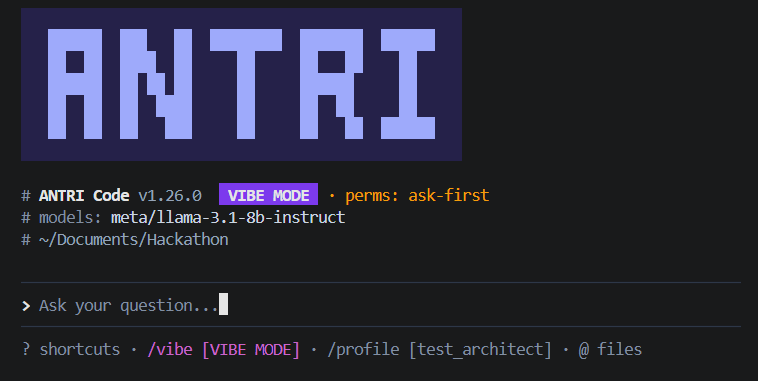
### 1. Terminal CLI Interface
The lightning-fast, keyboard-driven terminal REPL with interactive `@` file attachment picking, mode badges, and instant response streaming.

<div align="center">
  <img src="./assets/home.png" alt="ANTRI Code Terminal Home Interface" width="850" />
</div>

<br />

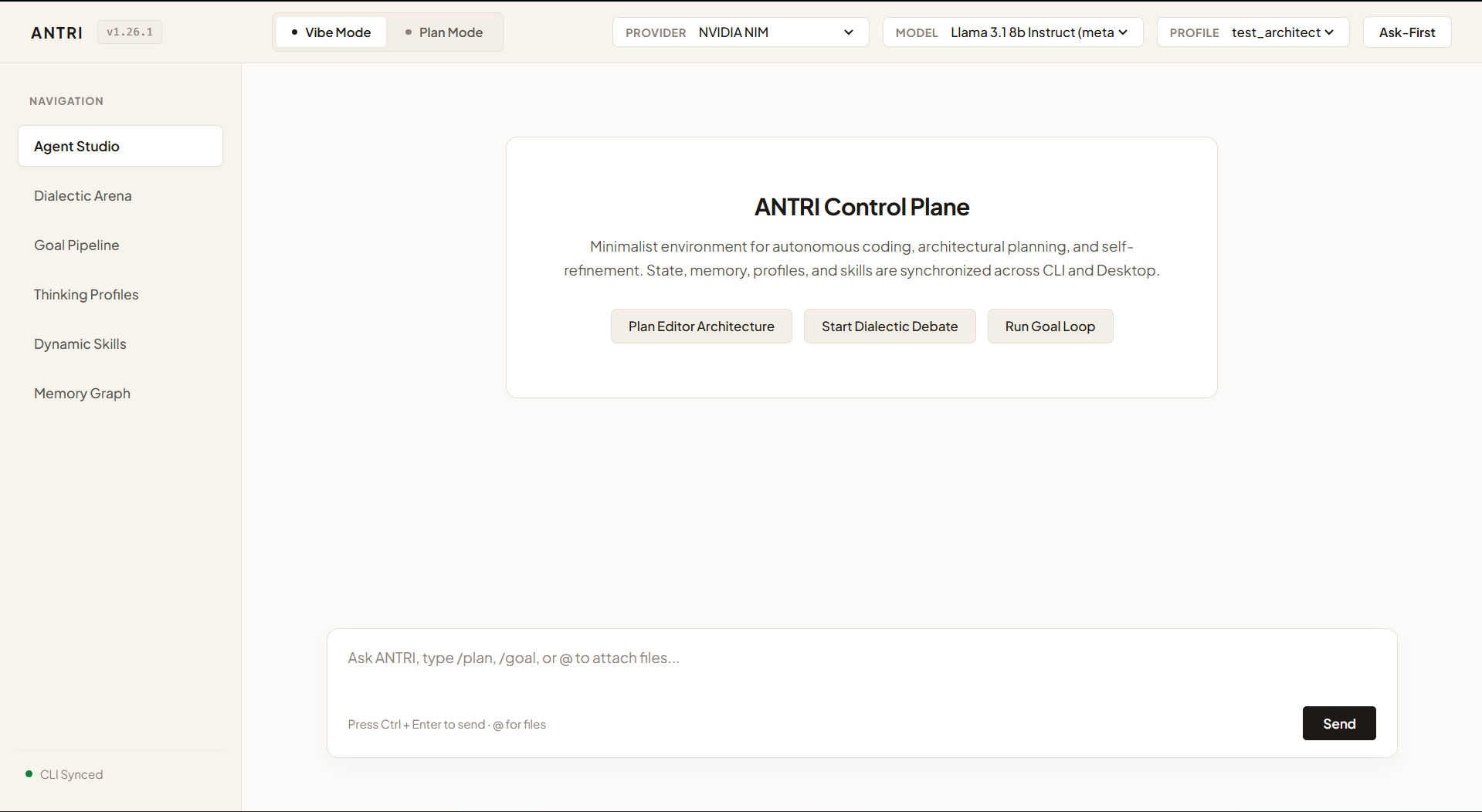
### 2. Desktop Control Plane
A minimalist cream-white desktop control center with visual agent studio, live dialectic debate cards, iterative goal pipelines, thinking profile editors, memory graph inspectors, **`+` file/image uploader**, and **interactive prompt toolkit autocomplete menu**.

<div align="center">
  <img src="./assets/desktop_panel.png" alt="ANTRI Desktop Control Plane" width="850" />
</div>

<br />

### 3. Mobile App & PWA
A standalone, touch-optimized mobile control center designed for iOS and Android. Features a modern **Gemini-style sliding side menu (Drawer)** with a `+ New chat` pill button, active session highlighting, **click-and-hold (long-press) chat options** to delete or rename sessions, standalone thinking profiles, camera/gallery `+` upload button, silent dialectic debates, and local memory.

---

## Quick Start & One-Shot Setup

### Global Installation
Install globally from npm with a single command:

```bash
npm install -g antri_cli
```

### Launch Interactive CLI
Run `antri` anywhere in your terminal:

```bash
antri
```

### Launch Desktop Control Plane
Open the lightweight desktop control plane in app mode:

```bash
antri desktop
```
*(or type `/desktop` from inside the CLI)*

### Launch Mobile App Server
Start the standalone mobile app server accessible on phone or local network:

```bash
antri mobile
```
*(or type `/mobile` from inside the CLI)*

### Zero-Lockfile Self-Updating
Update globally to the latest version anytime:

```bash
antri update
```

---

## Key Highlights & Core Architecture

### 1. Plan Mode vs. Vibe Mode
- **Plan Mode (`/plan` or `antri --mode plan`)**: The agent enters an interactive blueprinting session. It analyzes architecture, drafts roadmaps, specifies file changes, and asks clarifying questions before making code edits.
- **Vibe Mode (`/vibe` or `antri --mode vibe`)**: Continuous conversational coding. The agent immediately writes code, creates files, executes tools, and builds solutions in real time.

### 2. Multi-File & Multimodal Uploads (`+` Button & `@` Mentions)
- **Desktop & Mobile `+` Attachment Button**: Upload screenshots, code files, architecture diagrams, or take live camera photos directly in chat.
- **Interactive `@` File Attachment Picker**: Type `@` in the prompt box to trigger an interactive folder & file explorer. Navigate with arrow keys, hit Enter, and inject full file contexts directly into your conversation.
- **Interactive `/` Prompt Toolkit Palette**: Type `/` in the Desktop and Terminal prompt box for live command autocomplete with full keyboard navigation.

### 3. Comprehensive Workspace & Coding Tools (CLI & Desktop)
ANTRI includes surgical code manipulation and repository tools built directly into the agent:
- `edit_file`: Precise search-and-replace block editing preserving indentation, comments, and structure without full rewrites.
- `create_directory` & `delete_file`: File and folder scaffolding and cleanup.
- `find_files`: Glob and extension file discovery (e.g. `*.ts`, `src/**/*.tsx`), filtering out noise.
- `grep_search`: Codebase-wide regex and literal pattern search with file paths, line numbers, and matching snippets.
- `file_info` & `git_diff`: File metadata inspection and uncommitted git diff analysis.
- `read_file`, `write_file`, `list_dir`, `search_files`, `run_command`, `execute_python`.

### 4. Autonomous Silent Debate & Goal Engines (Background Synthesis)
When asked for deep research, architectural tradeoffs, or multi-step goal execution, ANTRI runs reasoning engines **secretly in the background** without polluting your terminal or chat logs with intermediate chatter:
- **Silent Dialectic Debate (`/silent-debate [query]`, `/sdebate`, `run_silent_debate`)**: The agent secretly pits a *Proposer (Thesis)*, *Adversary (Antithesis)*, and *Researcher (Verification)* against each other before delivering the final consensus under a badge:
  ```markdown
  > ⚔️ [Dialectic Debate Synthesized]
  
  [Authoritative conclusion and hardened recommendations]
  ```
- **Silent Goal Loop (`/silent-goal [task]`, `/sgoal`, `run_silent_goal`)**: The agent runs a 3-stage optimization loop (Draft -> Adversarial Critique & Score -> Hardened Synthesis) and returns:
  ```markdown
  > 🎯 [Goal Loop Plan Synthesized]
  
  [Production-ready implementation and architecture plan]
  ```

### 5. Claude-Style Interactive Artifacts, Visual Graphs & Mind Maps (`/imagine`, `/mindmap`, `/view`, Artifacts Hub)
ANTRI allows you to generate, preview, and interact with rich visual applications, plans, diagrams, and hierarchical concept mind maps directly inside the interface:
- **`🧠 /mindmap [topic/concept]`**: Automatically generates rich, interactive, and beautifully styled hierarchical **Visual Mind Maps** (rendered with Mermaid 10 and dark cyber neon styling) complete with Zoom In/Out, Reset, Pan gestures, and code export on both Desktop and Mobile!
- **`📊 /imagine [topic/code]`**: Automatically crafts an interactive visual code architecture diagram and flowchart graph (rendered with Mermaid/SVG nodes).
- **`🌐 /view [plan/app]`**: Generates a complete, self-contained interactive HTML/CSS/JS application or plan (e.g. *"generate me a 7-day workout plan"*, interactive habit tracker, dashboard, or calculator).
- **"👁️ View Artifact" In-Chat Action**: Every generated artifact in chat displays a sleek interactive card. Tapping **"View Artifact"** launches the live, interactive app/diagram directly inside the app interface without exposing raw code!
- **Dedicated "Artifacts" Hub (Side Drawer)**: Located directly **above the `+ New chat` button** in the sliding navigation drawer. Displays all generated artifacts neatly separated and grouped by **Chat Title / Session** (e.g. `Chat - 1` with its 2 artifacts) with one-click interactive viewing and management.

### 6. Tasteful Emojis Directive (Max 2 Emojis)
ANTRI strictly adheres to a clean, professional communication standard with a hard limit of **maximum 2 emojis per response**, ensuring readability without clutter.

### 7. 100% Silent & Nuanced Philosophy Note Capture
ANTRI continuously listens and adapts to your thinking style without interruptive banners or snackbars:
- **Completely Silent**: Note capture happens 100% in the background.
- **Minute Nuance & Philosophy Extraction**: Automatically recognizes philosophical worldviews (*stoicism, pragmatism, existentialism, ethics, first principles, epistemic humility*), core values, thinking habits, and subtle personal preferences, compounding them into your active thinking profile (`~/.antri/profiles/profile_1.md`).
- View captured insights anytime with `/notes`.

### 8. Multi-Profile Thinking System (`/profile`, `/notes`)
- Maintains distinct Markdown thinking profiles (`~/.antri/profiles/profile_1.md`, `profile_2.md` on Desktop/CLI, and on-device profiles on Mobile).
- **Interactive Profile Selector**: Switch profiles on the fly with `/profile`.
- **RAG Active Context**: Profile rules and notes are seamlessly recalled into conversations.

### 9. Multi-Tiered Persistent Memory (Lifelong Learning)
- **Episodic Store**: Session transcripts and debate histories.
- **Semantic Memory**: Dense 128-dimensional vector store with cosine similarity.
- **Workspace Conventions**: Remembers repository-specific patterns (`.antri/conventions.md`).
- **Autonomous Self-Recall**: Queries past solutions before answering new prompts.
- `/memory` (inspect store) · `/consolidate` (run reflection) · `/learn <text>` (save rule).

### 10. The Meta-Agent (Autonomous Self-Evolution)
- **Sandboxed Python Runtime (`execute_python`)**: Safe execution of code snippets.
- **Autonomous Self-Debugging**: Intercepts stack traces, analyzes root causes, creates patches, and retries automatically.
- **Dynamic Skill Synthesis (`synthesize_skill`)**: The agent writes its own Python/JS tools, verifies them via dry-run, and persists them in `~/.agent-cli/skills/`.
- **Meta-Optimization (`/meta`)**: Tracks tool latency, success rates, and refines prompt heuristics.

---

## Supported AI Providers & Model Suites

ANTRI defaults to **Google Gemini 3.7** via the official **Google GenAI SDK (`@google/genai`)**, while also supporting multi-provider fallback:

| Provider | Description | Notable Models |
|---|---|---|
| **Google Gemini** *(Default Flagship)* | Next-gen hybrid reasoning, coding & 1M context via `@google/genai` | `gemini-3.7-flash`, `gemini-3.7-pro`, `gemini-3.5-pro`, `gemini-2.5-flash` |
| **OpenAI** | Frontier reasoning & omni models | `gpt-4o`, `gpt-4o-mini`, `o1`, `o3-mini`, `gpt-4.5-preview` |
| **Anthropic** | Industry standard coding models | `claude-3-7-sonnet`, `claude-3-5-sonnet`, `claude-3-5-haiku` |
| **DeepSeek** | Frontier open-weights & reasoning | `deepseek-chat` (V3), `deepseek-reasoner` (R1), `deepseek-v4-flash` |
| **Cerebras** | Ultra-fast ~2,000 tok/sec CS-3 inference | `llama-3.3-70b`, `llama3.1-70b`, `llama3.1-8b`, `qwen-2.5-coder-32b` |
| **Cohere** | Enterprise reasoning & citations | `command-r-plus-08-2024`, `command-r-08-2024`, `command-r7b-12-2024` |
| **Vortex API** | High-throughput GPU cluster | `vortex-llama-3.3-70b`, `vortex-deepseek-r1-full`, `vortex-deepseek-v3` |
| **OpenCode** | Dedicated coding & architecture | `opencode/deepseek-coder-v2.5`, `opencode/qwen2.5-coder-32b-instruct` |
| **NVIDIA NIM** | 100+ Live NIM API cloud functions | `meta/llama-3.2-11b-vision-instruct`, `stepfun-ai/step-3.7-flash` |
| **Ollama** | Local offline GPU inference | `llama3.3:70b`, `qwen2.5-coder:32b`, `deepseek-r1:latest` |
| **Custom** | Custom endpoints | Any OpenAI-compatible server (`vLLM`, `LocalAI`, `LM Studio`) |

---

## CLI Commands & Slash Shortcuts

### Terminal CLI Options
```bash
antri                                # Launch interactive session
antri desktop                        # Launch desktop control plane
antri mobile                         # Launch standalone mobile PWA server
antri --mode plan                    # Launch in Plan Mode (collaborative architecture)
antri --mode vibe                    # Launch in Vibe Mode (direct coding flow)
antri -alwaysallow                   # Launch with tool permission prompts bypassed
antri update                         # Self-update to latest release without lockfile churn
antri -g, --goal "<task>"            # Run autonomous multi-iteration refinement loop
antri -d, --debate "<topic>"         # Run Dialectic multi-persona self-debate
antri --depth <quick|deep|rigorous>  # Set debate depth
antri -p, --prompt "<text>"          # Run one-shot query
antri -m, --model <name>             # Specify model
antri --provider <name>              # Specify provider
```

### Interactive REPL Slash Commands
| Command | Description |
|---|---|
| `/plan` | Switch to **Plan Mode** (collaborative architecture before coding) |
| `/vibe` | Switch to **Vibe Mode** (direct fast coding flow) |
| `/desktop` | Launch the **Desktop Control Plane** in standalone window |
| `/imagine [code]` | Create **Visual Code Architecture Diagram & Graph** artifact |
| `/mindmap [topic]` | Create **Interactive Hierarchical Visual Mind Map** artifact |
| `/view [plan]` | Generate **Interactive HTML/JS Application & Plan** artifact |
| `/artifacts` | List all generated interactive HTML, graph, and mind map artifacts |
| `/mobile` | Launch the **Mobile App PWA server** |
| `/alwaysallow` | Toggle permission prompts for sensitive tools |
| `/goal [task]` | Run autonomous goal execution & refinement loop with live stages |
| `/silent-goal [task]` | Run goal loop optimization **silently in background** with final plan |
| `/loop [task]` | Alias for `/goal` loop |
| `/debate [query]` | Launch Dialectic multi-persona self-debate with live argument streams |
| `/silent-debate [q]` | Run Dialectic debate **silently in background** with final consensus |
| `/depth <level>` | Set debate depth (`quick`, `deep`, `rigorous`) |
| `/profile [name]` | Open interactive profile switcher or switch thinking profile |
| `/notes` | View active profile notes & recorded style insights |
| `/update` | Self-update ANTRI Code CLI |
| `/connect` | Open interactive AI Provider selector |
| `/models` | Search and select from available models |
| `/tools` / `Ctrl+O` | Inspect recently executed workspace tools |
| `/skills` | List built-in and dynamically synthesized custom skills |
| `/meta` | View meta-optimization metrics and self-healing statistics |
| `/memory` | View persistent memory status across all tiers |
| `/consolidate` | Run reflection & knowledge compounding loop |
| `/learn <text>` | Manually record a rule or persistent insight |
| `/history` | View session conversation history |
| `/export [file]` | Export conversation transcript to Markdown |
| `/clear` | Start a clean new session |
| `/help` | Show command reference manual |
| `/exit` | Exit ANTRI Code |

---

## ⚙️ Google Cloud & Gemini Configuration

ANTRI is built natively around **Google Gemini 3.7** and the **Google GenAI SDK (`@google/genai`)**, with backend deployment ready for **Google Cloud Run**.

### 1. Free Gemini API Key (Default Engine)
Get a free API key from [Google AI Studio](https://aistudio.google.com/):

```bash
# In the interactive CLI:
antri
> /key gemini AIzaSy...

# Or set as an environment variable:
export GEMINI_API_KEY=AIzaSy...
```

### 2. Google Cloud Run Backend Deployment
The ANTRI backend runs on **Google Cloud Run** (`*.run.app`) with built-in health probes (`/api/health`), Cloud Firestore state persistence, and zero-config browser access for judges:

```bash
# Deploy ANTRI backend to Google Cloud Run in 1 command:
gcloud run deploy antri-backend \
  --source . \
  --region us-central1 \
  --allow-unauthenticated \
  --set-env-vars GEMINI_API_KEY=AIzaSy...
```

---

## 🧪 Reproducible Testing & Evaluation Guide (For Hackathon Judges)

Follow these step-by-step instructions to reproduce and evaluate all core agentic features deterministically:

### 1. Run the Full Automated Test Suite (100% Offline & Isolated)
ANTRI includes **47 comprehensive automated unit tests** covering configuration, vector memory, goal loops, dialectic pipelines, file manipulation tools, artifact parsers, mobile servers, and echo interceptors:

```bash
npm test
```
*Expected Result: `47 passing tests (0 failures)` completing in ~2–4 seconds.*

---

### 2. Test Autonomous Dialectic Debate (`/debate`)
Observe multi-persona background debate (Thesis $\rightarrow$ Antithesis $\rightarrow$ Empirical Verification $\rightarrow$ Consensus):

```bash
# In the interactive CLI:
antri
> /debate "Should we use PostgreSQL or Redis for high-throughput session caching?"
```
*Expected Result: Live streaming personas clash and synthesize into a final consensus.*

---

### 3. Test Claude-Style Live Interactive Multi-Page SPA Artifacts (`/view`)
Test on-the-fly generation of rich, runnable web applications rendered natively with zero raw code exposure:

```bash
> /view "7-day football conditioning and stretching routine with interactive timers and progress checklist"
```
*Expected Result: Renders an interactive **"👁️ View Artifact"** card. Opening it launches a multi-tab web application with working countdown stopwatch, dynamic progress percentage checklists, and bottom stepper navigation.*

---

### 4. Test Reference-Style Collapsible Mind Maps (`/mindmap`)
Test the Markmap hierarchical tree visualization engine:

```bash
> /mindmap "Distributed Systems Architecture and Consensus Protocols"
```
*Expected Result: Renders a collapsible horizontal mind map tree. Click the `<` / `>` circular handles to fold/unfold subtrees, pan/drag the canvas, and toggle light/poster-dark themes.*

---

### 5. Test Persistent Thinking Profiles & Silent Note Capture (`/profile`, `/notes`)
Test lifelong cognitive memory and persona extraction:

```bash
> /profile
# Navigate and switch between thinking profiles with arrow keys
> /notes
# View automatically extracted coding conventions and philosophy rules
```

---

### 6. Test Native Flutter Mobile Client (`antri_flutter`)
Run the cross-platform mobile client with floating Prompt Toolkit and Gemini-style navigation drawer:

```bash
cd antri_flutter
flutter test     # Run mobile widget tests
flutter run      # Launch mobile client on device/emulator
```

---

## Local Development & Setup

```bash
# 1. Clone the repository
git clone https://github.com/ashu90-prog/antri_cli.git
cd antri_cli

# 2. Install dependencies
npm install

# 3. Build TypeScript & assets
npm run build

# 4. Run automated test suite (47 unit tests)
npm test

# 5. Run in dev mode
npm run dev
```

---

## License

Distributed under the **MIT License**. See `LICENSE` for more information.