# angular-pdf [](https://travis-ci.org/sayanee/angularjs-pdf) [](https://gemnasium.com/sayanee/angularjs-pdf) [](https://codecov.io/gh/sayanee/angularjs-pdf)
>An [AngularJS](http://angularjs.org/) [directive](http://docs.angularjs.org/guide/directive) `ng-pdf` to display PDF files with [PDFJS](http://mozilla.github.io/pdf.js/).
## Overview [[demo](http://sayan.ee/angularjs-pdf/)]
Integrate PDF files right into web pages.
## Requirements
Check [`package.json` file](https://github.com/sayanee/angularjs-pdf/blob/master/package.json) for dependencies and their versions:
1. [AngularJS](http://angularjs.org/) - get the latest [angular.min.js](https://developers.google.com/speed/libraries/devguide#angularjs)
- [PDFJS](http://mozilla.github.io/pdf.js/) - build the files [`pdf.js` and `pdf.worker.js`](https://github.com/mozilla/pdf.js#building-pdfjs)
- [Evergreen browsers](https://github.com/mozilla/pdf.js/wiki/Frequently-Asked-Questions#what-browsers-are-supported)
## Features
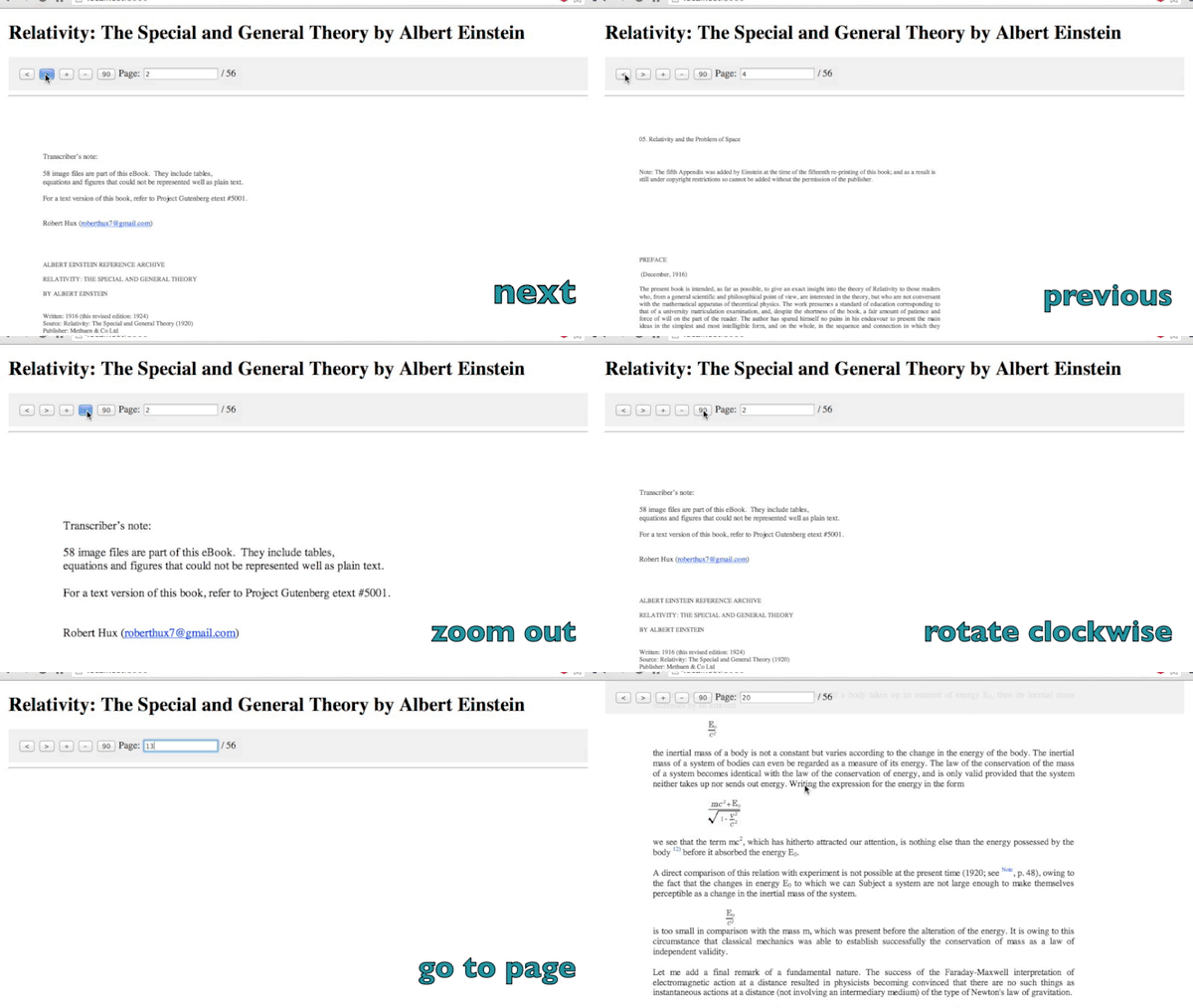
1. next / previous page
- zoom in / out / fit 100%
- rotate clockwise
- jump to a page number
- when scrolling, the pdf controls will get fixed position at the top
- define the view template
- define the path to pdf with scope variable
- handles error
- show loading of pdf
- show progress percentage of loading pdf
- insert password for protected PDFs
- dynamically change the pdf url
- support retina canvas
- set authorization or http headers
## Getting Started
1. Install or copy over the file `dist/angular-pdf.min.js` or `dist/angular-pdf.js`
```shell
npm install angular-pdf --save
```
or
```shell
bower install angular-pdf --save
```
- Include the path to the directive file in `index.html`
```html
```
- Include the directive as a dependency when defining the angular app:
```js
var app = angular.module('App', ['pdf']);
```
- Include the directive with the attribute path to the partial under a controller
```html
```
- `scale` as an option
```html
```
`scale` attribute can also be `page-fit`
```html
```
- `page` as an option for initial page number
```html
```
- `usecredentials` as an option to add credentials / authorization
```html
```
- `debug` to enable debugging console output (optional, disabled by default)
```html
```
- Include the `canvas` element to display the pdf in the template-url file
```html
```
- Include the path to the pdf file in the controller
```js
app.controller('DocCtrl', function($scope) {
$scope.pdfUrl = '/pdf/relativity.pdf';
});
```
- Set custom headers, e.g. authorization headers with `$scope.httpHeaders` option
```js
app.controller('DocCtrl', function($scope) {
$scope.pdfUrl = '/pdf/relativity.pdf';
$scope.httpHeaders = { Authorization: 'Bearer some-aleatory-token' };
});
```
### Options
1. **Next / Previous page**: Include the controls in the view file as defined in the attribute `template-url`
```
```
- **Zoom in / out / fit 100%**: Include the controls in the view file as defined in the attribute `template-url`
```
```
- **Rotate clockwise**: Include the controls in the view file as defined in the attribute `template-url` and the initial class `rotate0`
```html
...
```
include the css styles:
```css
.rotate0 {-webkit-transform: rotate(0deg); transform: rotate(0deg); }
.rotate90 {-webkit-transform: rotate(90deg); transform: rotate(90deg); }
.rotate180 {-webkit-transform: rotate(180deg); transform: rotate(180deg); }
.rotate270 {-webkit-transform: rotate(270deg); transform: rotate(270deg); }
```
- **Jump to page number**: Include the controls in the view file as defined in the attribute `template-url`
```html
Page: / {{pageCount}}
```
- **Fixed pdf controls upon scrolling**: Wrap the controls in the view file as defined in the attribute `template-url` with a tag `nav` with an `ng-class`. Amend the scroll amount as required.
```html
```
And include the relevant css styles as required:
```css
.pdf-controls { width: 100%; display: block; background: #eee; padding: 1em;}
.fixed { position: fixed; top: 0; left: calc(50% - 480px); z-index: 100; width: 100%; padding: 1em; background: rgba(238, 238, 238,.9); width: 960px; }
```
- open the file `index.html` with a web server
### When url is base64 or Uint8Array
Create a Blob:
```js
currentBlob = new Blob([result], {type: 'application/pdf'});
$scope.pdfUrl = URL.createObjectURL(currentBlob);
```
### Handle error
In the controller, you can call the function `$scope.onError`:
```js
$scope.onError = function(error) {
// handle the error
// console.log(error);
}
```
### Show loading
In the controller, you can call the function `$scope.onLoad` when the pdf succesfully loaded:
```js
$scope.loading = 'loading';
$scope.onLoad = function() {
// do something when pdf is fully loaded
// $scope.loading = '';
}
```
### Show progress percentage
In the controller, you can call the function `$scope.onProgress`
```js
$scope.onProgress = function(progress) {
// handle a progress bar
// progress% = progress.loaded / progress.total
// console.log(progress);
}
```
### Managing password requests
In the controller, you can use the function `scope.onPassword`. This function is called when the PDF require an opening password.
```js
$scope.onPassword = function (updatePasswordFn, passwordResponse) {
// if passwordResponse === PDFJS.PasswordResponses.NEED_PASSWORD
// you can provide the password calling updatePasswordFn('THE_PASSWORD')
// else if passwordResponse === PDFJS.PasswordResponses.INCORRECT_PASSWORD
// provided password is not correct
};
```
## Variations
1. If using with [Angular UI modal](http://angular-ui.github.io/bootstrap/#/modal), `pageNum` attribute is no longer required. [Checkout the implementation](https://github.com/sayanee/angularjs-pdf/issues/12)
## Similar projects
1. [angular-pdf-viewer](https://github.com/winkerVSbecks/angular-pdf-viewer) - a more self-contained directive
- [ng-pdfviewer](https://github.com/akrennmair/ng-pdfviewer)
## Credit
PDF example used is [Relativity: The Special and General Theory by Albert Einstein](http://www.gutenberg.org/ebooks/30155) as kindly organized and made available free by [Project Gutenberg](http://www.gutenberg.org/wiki/Main_Page).
## Contribute
This project is an [OPEN Open Source Project](http://openopensource.org/). This means that:
> Individuals making significant and valuable contributions are given commit-access to the project to contribute as they see fit. This project is more like an open wiki than a standard guarded open source project.
Please see [`CONTRIBUTING.md`](CONTRIBUTING.md) for details.
## Versioning
This repository follows the [Semantic Versioning](http://semver.org/) guidelines:
1. For **patches**, run the command:
```
npm run release patch
```
- For **minor release**, run the command:
```
npm run release minor
```
- For **major release**, run the command:
```
npm run release major
```
## License
[MIT license](/LICENSE)