# Angular Lib for OpenID Connect & OAuth2
 [](https://www.npmjs.com/package/angular-auth-oidc-client) [](https://www.npmjs.com/package/angular-auth-oidc-client) [](https://www.npmjs.com/package/angular-auth-oidc-client) [](https://github.com/prettier/prettier) [](https://coveralls.io/github/damienbod/angular-auth-oidc-client?branch=main)

Secure your Angular app using the latest standards for OpenID Connect & OAuth2. Provides support for token refresh, all modern OIDC Identity Providers and more.
## Acknowledgements
This library is certified by OpenID Foundation. (RP Implicit and Config RP)

## Features
- [Code samples](https://angular-auth-oidc-client.com/docs/samples/) for most of the common use cases
- Supports schematics via `ng add` support
- Supports all modern OIDC identity providers
- Supports OpenID Connect Code Flow with PKCE
- Supports Code Flow PKCE with Refresh tokens
- [Supports OpenID Connect Implicit Flow](http://openid.net/specs/openid-connect-implicit-1_0.html)
- [Supports OpenID Connect Session Management 1.0](http://openid.net/specs/openid-connect-session-1_0.html)
- [Supports RFC7009 - OAuth 2.0 Token Revocation](https://tools.ietf.org/html/rfc7009)
- [Supports RFC7636 - Proof Key for Code Exchange (PKCE)](https://tools.ietf.org/html/rfc7636)
- [Supports OAuth 2.0 Pushed authorisation requests (PAR) draft](https://tools.ietf.org/html/draft-ietf-oauth-par-06)
- Semantic releases
- Github actions
- Modern coding guidelines with prettier, husky
- Up to date documentation
- Implements OIDC validation as specified, complete client side validation for REQUIRED features
- Supports authentication using redirect or popup
## Installation
### Ng Add
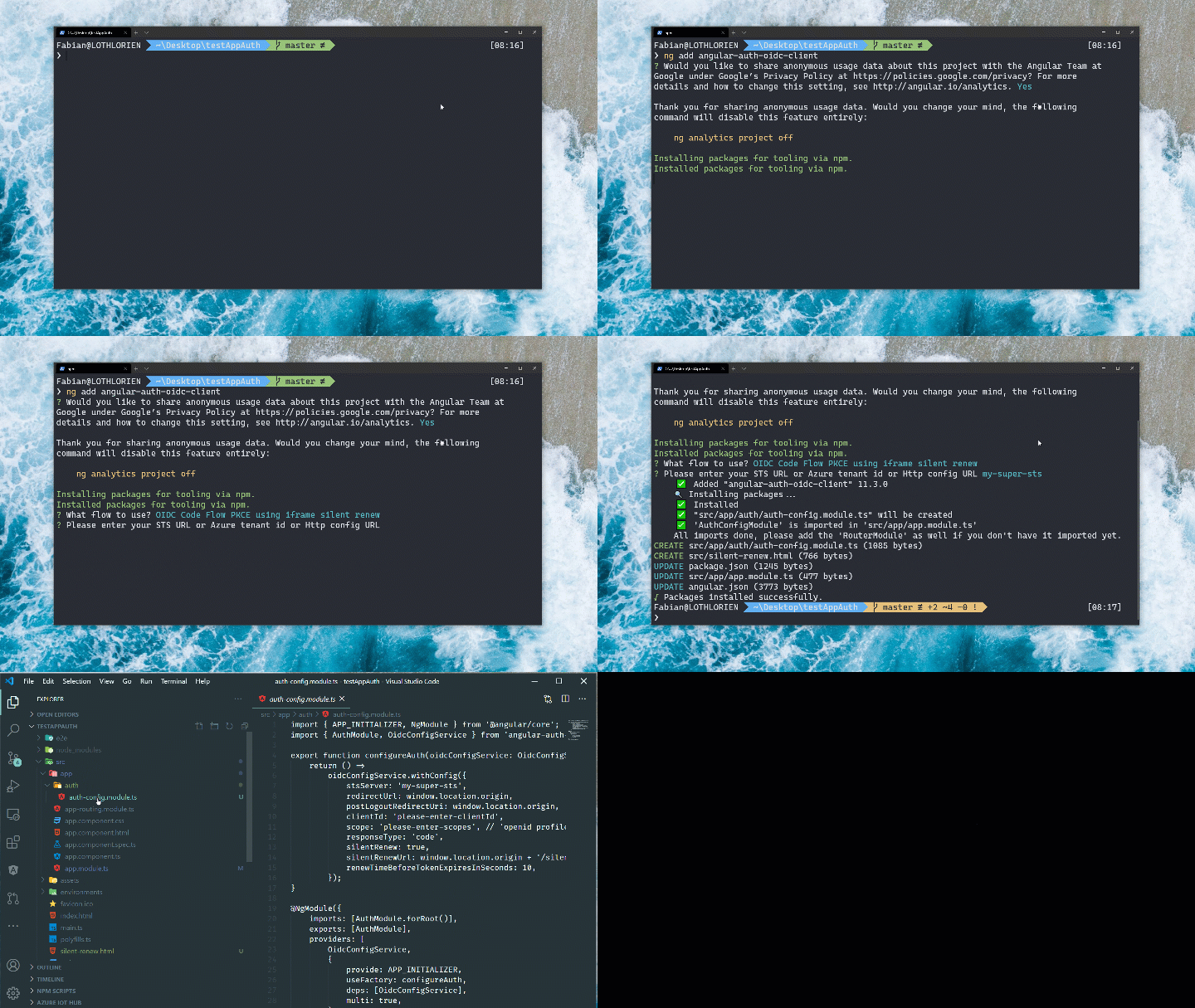
You can use the schematics and `ng add` the library.
```shell
ng add angular-auth-oidc-client
```
And answer the questions. A module will be created which encapsulates your configuration.
### Npm / Yarn
Navigate to the level of your `package.json` and type
```shell
npm install angular-auth-oidc-client
```
or with yarn
```shell
yarn add angular-auth-oidc-client
```
## Documentation
[Read the docs here](https://angular-auth-oidc-client.com/)
## Samples
[Explore the Samples here](https://angular-auth-oidc-client.com/docs/samples/)
## Quickstart
For the example of the Code Flow. For further examples please check the [Samples](https://angular-auth-oidc-client.com/docs/samples/) Section.
> If you have done the installation with the schematics, these modules and files should be available already!
### Configuration
Import the `AuthModule` in your module.
```ts
import { NgModule } from '@angular/core';
import { AuthModule, LogLevel } from 'angular-auth-oidc-client';
// ...
@NgModule({
// ...
imports: [
// ...
AuthModule.forRoot({
config: {
authority: '',
redirectUrl: window.location.origin,
postLogoutRedirectUri: window.location.origin,
clientId: '',
scope: 'openid profile email offline_access',
responseType: 'code',
silentRenew: true,
useRefreshToken: true,
logLevel: LogLevel.Debug,
},
}),
],
// ...
})
export class AppModule {}
```
And call the method `checkAuth()` from your `app.component.ts`. The method `checkAuth()` is needed to process the redirect from your Security Token Service and set the correct states. This method must be used to ensure the correct functioning of the library.
```ts
import { Component, OnInit, inject } from '@angular/core';
import { OidcSecurityService } from 'angular-auth-oidc-client';
@Component({
/*...*/
})
export class AppComponent implements OnInit {
private readonly oidcSecurityService = inject(OidcSecurityService);
ngOnInit() {
this.oidcSecurityService.checkAuth().subscribe((loginResponse: LoginResponse) => {
const { isAuthenticated, userData, accessToken, idToken, configId } = loginResponse;
/*...*/
});
}
login() {
this.oidcSecurityService.authorize();
}
logout() {
this.oidcSecurityService.logoff().subscribe((result) => console.log(result));
}
}
```
### Using the access token
You can get the access token by calling the method `getAccessToken()` on the `OidcSecurityService`
```ts
const token = this.oidcSecurityService.getAccessToken().subscribe(...);
```
And then you can use it in the HttpHeaders
```ts
import { HttpHeaders } from '@angular/common/http';
const token = this.oidcSecurityServices.getAccessToken().subscribe((token) => {
const httpOptions = {
headers: new HttpHeaders({
Authorization: 'Bearer ' + token,
}),
};
});
```
You can use the built in interceptor to add the accesstokens to your request
```ts
AuthModule.forRoot({
config: {
// ...
secureRoutes: ['https://my-secure-url.com/', 'https://my-second-secure-url.com/'],
},
}),
```
```ts
providers: [
{ provide: HTTP_INTERCEPTORS, useClass: AuthInterceptor, multi: true },
],
```
## Versions
Current Version is Version 21.x
- [Info about Version 20](https://github.com/damienbod/angular-auth-oidc-client/tree/version-20)
- [Info about Version 19](https://github.com/damienbod/angular-auth-oidc-client/tree/version-19)
- [Info about Version 18](https://github.com/damienbod/angular-auth-oidc-client/tree/version-18)
- [Info about Version 17](https://github.com/damienbod/angular-auth-oidc-client/tree/version-17)
- [Info about Version 16](https://github.com/damienbod/angular-auth-oidc-client/tree/version-16)
- [Info about Version 15](https://github.com/damienbod/angular-auth-oidc-client/tree/version-15)
- [Info about Version 14](https://github.com/damienbod/angular-auth-oidc-client/tree/version-14)
- [Info about Version 13](https://github.com/damienbod/angular-auth-oidc-client/tree/version-13)
- [Info about Version 12](https://github.com/damienbod/angular-auth-oidc-client/tree/version-12)
- [Info about Version 11](https://github.com/damienbod/angular-auth-oidc-client/tree/version-11)
- [Info about Version 10](https://github.com/damienbod/angular-auth-oidc-client/tree/version-10)
## License
[MIT](https://choosealicense.com/licenses/mit/)
## Authors
- [@DamienBod](https://www.github.com/damienbod)
- [@FabianGosebrink](https://www.github.com/FabianGosebrink)