Amexio Angular EXtensions v5.20.0
Amexio (Angular MetaMagic EXtensions for Inputs and Outputs) is a rich set of 160+ Angular (4/5/6/7/8)
UI Components powered by HTML5 & CSS3 for Responsive Web Design & 80+ built-in Material Design Themes. Components includes Form components, charts, maps, dashboards, Tabs, Grids, Trees, Layouts etc with Accessibility support, Animation effect and Directives. We added D3 Charts support with Amexio Drillable Charts option. We augmented the Amexio Layouts with more layout options and brought CSS3 Grid Layout to Amexio with Responsive Design Pattern. Amexio comes in three flavours - Standard Edition, Enterprise Edition and Creative Edition, All the ediitions are open source and free.
## Browsers support made by godban
| [ ](http://godban.github.io/browsers-support-badges/) Edge | [
 ](http://godban.github.io/browsers-support-badges/)Firefox | [
 ](http://godban.github.io/browsers-support-badges/)Chrome | [
 ](http://godban.github.io/browsers-support-badges/)Safari | [
 ](http://godban.github.io/browsers-support-badges/)Opera | [
 ](http://godban.github.io/browsers-support-badges/)iOS Safari | [
 ](http://godban.github.io/browsers-support-badges/)Chrome for Android |
| --------- | --------- | --------- | --------- | --------- | --------- | --------- |
| Edge last 5 versions| last 5 versions| last 5 versions| last 3 versions| last 4 versions| last 3 versions| last 3 versions
## Table of Content
- [Features](#features)
- [Overview](#overview)
- [Getting Started](#getting-started)
- [Installation](#amexio-angular-extension---installation)
- [Amexio Modules](#amexio-modules)
- [Amexio Themes](#amexio-themes-material--bootstrap)
- [License](#license)
## Features
- __Pure TypeScript:__ Amexio is a pure Typescript library with 0 Dependencies & Angular 4/5/6/7/8 Support.
- __160+ High Grade Components:__ We make sure you're nothing short of while building your app.
- __Forms:__ Amexio API supports both Template Driven Forms and Reactive Forms.
- __Layouts:__ With v5.4 release More than half a dozen layout options are supported including CSS3 Grids.
- __Responsive Web Design:__ Out of the box Responsive Web Design with 50+ Material Design based Themes.
- __Charts, Dashboads, D3:__ Powerful Charting library including D3 Charts with Drillable & Zoomable capabilities.
- __Server Rending Support:__ Components support & optimized for server side rendering.
- __Highly Customizable Styling:__ Lot of customization can be done easily using the Amexio SCSS files.
- __Accessibility Support:__ ARIA 1.1 Support, WCAG 2.1 and Section 508 Compliance. Checkout [Roadmap](https://amexio.tech/roadmap)
- __Security & Quality:__ Every Amexio build goes thru Security Scanning using Sonar to ensure very High Quality Standards.
- __Modular Support:__ Load Only what you want, amexio is Modular.
- __FOSS:__ Amexio API is Free and Open Source Software based on Apache 2 License
## Amexio References
- [Home Page](http://www.amexio.tech): Amexio Suite of Products
- [Showcase](http://showcase.amexio.org): Amexio Demo Apps for Standard, Enterprise and Creative Editions
- [API Docs](http://api.amexio.org): Amexio API Documentation
- [Brochure](https://api.amexio.org/AmexioBrochure.pdf): Amexio API Brochure
- [Video Tutorials](https://www.youtube.com/watch?v=zpfpfnOV6Y0&list=PLi505KVOMPrGRUgJF4C3QoXbrhFGEOI4j): 2+ Hours of Tutorials
- [Beta Version](http://beta.amexio.org): Amexio Beta version API Docs
- [Amexio Support](https://amexio.tech/support): Basic support is free. Paid Support - Bronze, Silver, Gold Packages
- [Quality Assurance](https://amexio.tech/quality-assurance): Quality Assurance Details and Dashboard
- [Roadmap](https://amexio.tech/roadmap): All the release details and future releases,
## Angular CLI - Installation
### Overview
The Angular CLI is a tool to initialize, develop, scaffold and maintain Angular applications
### Getting Started
To install the Angular CLI:
```bash
npm install -g @angular/cli
```
Generating and serving an Angular project via a development server Create and run a new project:
```bash
ng new my-project
cd my-project
ng serve
```
Navigate to http://localhost:4200/. The app will automatically reload if you change any of the source files.
For More on Angular CLI [commands](https://github.com/angular/angular-cli/wiki) click on the link.
## Amexio D3 Charts - Installation
To install this library, follow the steps given below:
```bash
$ cd your-angular-project
```
```bash
$ npm install amexio-chart-d3 --save
```
and then from your Angular `AppModule`:
```typescript
import { BrowserModule } from '@angular/platform-browser';
import { NgModule } from '@angular/core';
import {FormsModule} from "@angular/forms";
import { AppComponent } from './app.component';
// To import D3-Chart :-
import { AmexioChartD3Module } from 'amexio-chart-d3';
@NgModule({
declarations: [
AppComponent
],
imports: [
BrowserModule,
FormsModule,
AmexioChartD3Module,
],
providers: [],
bootstrap: [AppComponent]
})
export class AppModule { }
```
## Amexio Angular Extension - Installation
To install this library, follow the steps given below:
```bash
$ cd your-angular-project
```
```bash
$ npm install amexio-ng-extensions@latest --save
```
and then from your Angular `AppModule`:
```typescript
import { BrowserModule } from '@angular/platform-browser';
import { NgModule } from '@angular/core';
import {FormsModule} from "@angular/forms";
import { AppComponent } from './app.component';
// Import your library
import { AmexioWidgetModule,CommonDataService } from 'amexio-ng-extensions';
// To import Charts
import { AmexioChartsModule } from 'amexio-ng-extensions';
//To import Maps
import { AmexioMapsModule } from 'amexio-ng-extensions';
// To import Dashboard
import { AmexioDashboardModule } from 'amexio-ng-extensions';
// To import Enterprise
import { AmexioEnterpriseModule } from 'amexio-ng-extensions';
@NgModule({
declarations: [
AppComponent
],
imports: [
BrowserModule,
FormsModule,
AmexioWidgetModule,
AmexioChartsModule,
AmexioMapsModule,
AmexioDashboardModule,
AmexioEnterpriseModule
],
providers: [CommonDataService],
bootstrap: [AppComponent]
})
export class AppModule { }
```
# Amexio Modules
](http://godban.github.io/browsers-support-badges/)Chrome for Android |
| --------- | --------- | --------- | --------- | --------- | --------- | --------- |
| Edge last 5 versions| last 5 versions| last 5 versions| last 3 versions| last 4 versions| last 3 versions| last 3 versions
## Table of Content
- [Features](#features)
- [Overview](#overview)
- [Getting Started](#getting-started)
- [Installation](#amexio-angular-extension---installation)
- [Amexio Modules](#amexio-modules)
- [Amexio Themes](#amexio-themes-material--bootstrap)
- [License](#license)
## Features
- __Pure TypeScript:__ Amexio is a pure Typescript library with 0 Dependencies & Angular 4/5/6/7/8 Support.
- __160+ High Grade Components:__ We make sure you're nothing short of while building your app.
- __Forms:__ Amexio API supports both Template Driven Forms and Reactive Forms.
- __Layouts:__ With v5.4 release More than half a dozen layout options are supported including CSS3 Grids.
- __Responsive Web Design:__ Out of the box Responsive Web Design with 50+ Material Design based Themes.
- __Charts, Dashboads, D3:__ Powerful Charting library including D3 Charts with Drillable & Zoomable capabilities.
- __Server Rending Support:__ Components support & optimized for server side rendering.
- __Highly Customizable Styling:__ Lot of customization can be done easily using the Amexio SCSS files.
- __Accessibility Support:__ ARIA 1.1 Support, WCAG 2.1 and Section 508 Compliance. Checkout [Roadmap](https://amexio.tech/roadmap)
- __Security & Quality:__ Every Amexio build goes thru Security Scanning using Sonar to ensure very High Quality Standards.
- __Modular Support:__ Load Only what you want, amexio is Modular.
- __FOSS:__ Amexio API is Free and Open Source Software based on Apache 2 License
## Amexio References
- [Home Page](http://www.amexio.tech): Amexio Suite of Products
- [Showcase](http://showcase.amexio.org): Amexio Demo Apps for Standard, Enterprise and Creative Editions
- [API Docs](http://api.amexio.org): Amexio API Documentation
- [Brochure](https://api.amexio.org/AmexioBrochure.pdf): Amexio API Brochure
- [Video Tutorials](https://www.youtube.com/watch?v=zpfpfnOV6Y0&list=PLi505KVOMPrGRUgJF4C3QoXbrhFGEOI4j): 2+ Hours of Tutorials
- [Beta Version](http://beta.amexio.org): Amexio Beta version API Docs
- [Amexio Support](https://amexio.tech/support): Basic support is free. Paid Support - Bronze, Silver, Gold Packages
- [Quality Assurance](https://amexio.tech/quality-assurance): Quality Assurance Details and Dashboard
- [Roadmap](https://amexio.tech/roadmap): All the release details and future releases,
## Angular CLI - Installation
### Overview
The Angular CLI is a tool to initialize, develop, scaffold and maintain Angular applications
### Getting Started
To install the Angular CLI:
```bash
npm install -g @angular/cli
```
Generating and serving an Angular project via a development server Create and run a new project:
```bash
ng new my-project
cd my-project
ng serve
```
Navigate to http://localhost:4200/. The app will automatically reload if you change any of the source files.
For More on Angular CLI [commands](https://github.com/angular/angular-cli/wiki) click on the link.
## Amexio D3 Charts - Installation
To install this library, follow the steps given below:
```bash
$ cd your-angular-project
```
```bash
$ npm install amexio-chart-d3 --save
```
and then from your Angular `AppModule`:
```typescript
import { BrowserModule } from '@angular/platform-browser';
import { NgModule } from '@angular/core';
import {FormsModule} from "@angular/forms";
import { AppComponent } from './app.component';
// To import D3-Chart :-
import { AmexioChartD3Module } from 'amexio-chart-d3';
@NgModule({
declarations: [
AppComponent
],
imports: [
BrowserModule,
FormsModule,
AmexioChartD3Module,
],
providers: [],
bootstrap: [AppComponent]
})
export class AppModule { }
```
## Amexio Angular Extension - Installation
To install this library, follow the steps given below:
```bash
$ cd your-angular-project
```
```bash
$ npm install amexio-ng-extensions@latest --save
```
and then from your Angular `AppModule`:
```typescript
import { BrowserModule } from '@angular/platform-browser';
import { NgModule } from '@angular/core';
import {FormsModule} from "@angular/forms";
import { AppComponent } from './app.component';
// Import your library
import { AmexioWidgetModule,CommonDataService } from 'amexio-ng-extensions';
// To import Charts
import { AmexioChartsModule } from 'amexio-ng-extensions';
//To import Maps
import { AmexioMapsModule } from 'amexio-ng-extensions';
// To import Dashboard
import { AmexioDashboardModule } from 'amexio-ng-extensions';
// To import Enterprise
import { AmexioEnterpriseModule } from 'amexio-ng-extensions';
@NgModule({
declarations: [
AppComponent
],
imports: [
BrowserModule,
FormsModule,
AmexioWidgetModule,
AmexioChartsModule,
AmexioMapsModule,
AmexioDashboardModule,
AmexioEnterpriseModule
],
providers: [CommonDataService],
bootstrap: [AppComponent]
})
export class AppModule { }
```
# Amexio Modules
| Amexio Modules |
| AmexioWidgetModule |
| AmexioFormsModule |
| AmexioDataModule |
| AmexioLayoutModule |
| AmexioPaneModule |
| AmexioNavModule |
| AmexioMediaModule |
| AmexioMapsModule |
| AmexioChartsModule |
| AmexioDashBoardModule |
| AmexioEnterpriseModule |
# Amexio Themes (Amexio / Amexio Material)
To use the default theme import the
`../node_modules/amexio-ng-extensions/styles/mda/at-md-blue.scss`
in your app styles.scss
Or refer the below table for other themes provided.
| Amexio Material Themes |
Amexio Themes |
| AT-MD-Gold-Amber |
AT-AM-Ocean-Blue |
| AT-MD-Army-Olive |
AT-AM-Tiger |
| AT-MD-Ash Stone Black |
AT-AM-Lime Green |
| AT-MD-Black |
AT-AM-Matrix |
| AT-MD-Blue |
AT-AM-Spicy-Apricot |
| AT-MD-Blue-Grey |
AT-AM-Byzantine-Crystal |
| AT-MD-Ginger-Bread |
AT-AM-Honey-Prussian |
| AT-MD-Cerise Magneta |
AT-AM-Persian-Laguna |
| AT-MD-Charcoal Russet |
AT-AM-Burgandy-Magenta |
| AT-MD-Fern-Lime |
AT-AM-Navy-Grape |
| AT-MD-Frenchrose-mulberry |
AT-AM-Matrix-Amber |
| AT-MD-Grape-Voliet |
AT-AM-Matrix-Cream |
| AT-MD-Hot-Pink-Fuchsia |
AT-AM-Matrix-Maya |
| AT-MD-Saphire |
AT-AM-Matrix-Ultra |
| AT-MD-Jungle-Mint |
AT-AM-Royal-Kelly |
| AT-MD-Maya-Light-Blue |
AT-AM-Royal-Pineapple |
| AT-MD-Mahogany Barny Red |
|
| AT-MD-Navy Egyptian |
|
| AT-MD-Raspberry Sangria |
|
| AT-MD-Red Maroon |
|
| AT-MD-Sacremento Jado |
|
| AT-MD-Yale Azure |
|
| At-MD-Tronbone Royal |
|
| AT-MD-Pineapple-Flaxen |
|
| AT-MD-Pumpkin-Fire |
|
| AT-MD-Mauve-Orchid |
|
| AT-MD-Honey-Mustard |
|
| AT-MD-Bruntor-Tangerine |
|
# Amexio Microsoft Visual Studio Code Extensions
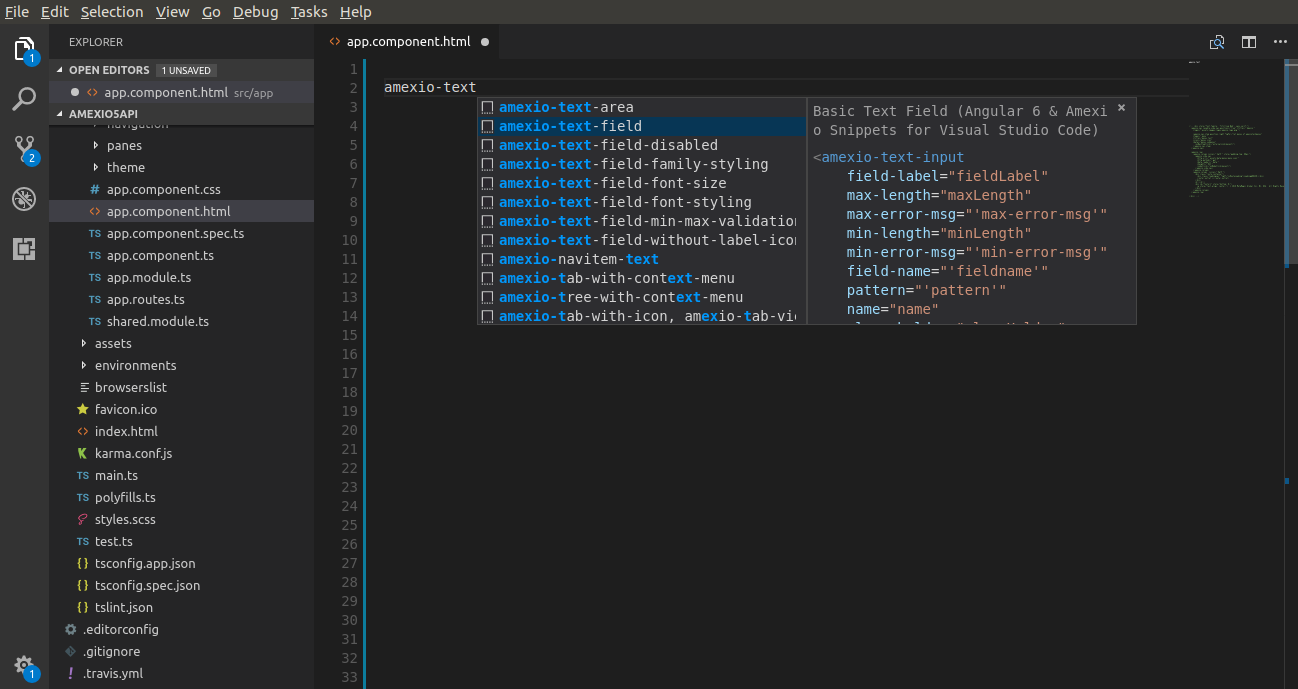
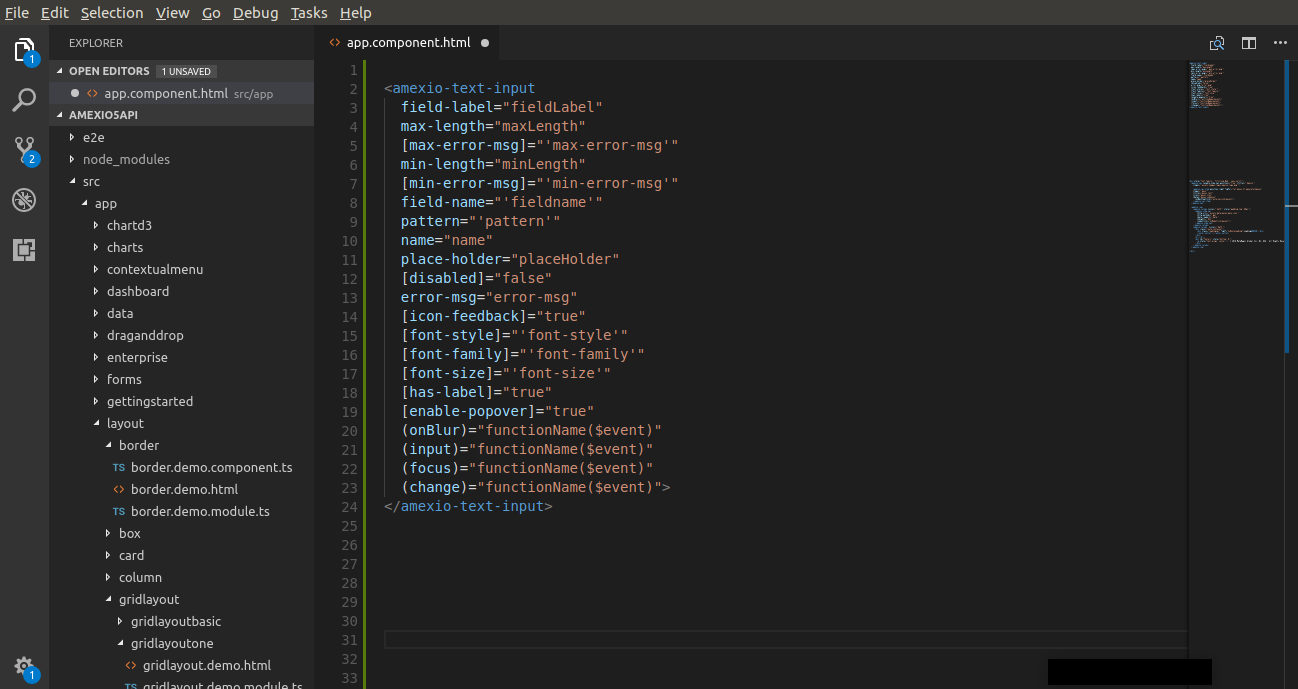
This extension will help the developers of Visual Studio Code with quick code snippet for the Amexio Markup as well as Amexio TypeScript for the Angular Extensions.
- Available for v3.x series
- Plugin for v4.0 will be available in the first week of Feb 2018.
## Usage
Select the Amexio Ui Component
 Fill up the required Component Params
 ## License
Copyright © [MetaMagic Global Inc](http://www.metamagicglobal.com/), 2017-19. NJ, USA. [Amexio Angular EXtensions](http://www.amexio.tech). All rights reserved.
## License
Copyright © [MetaMagic Global Inc](http://www.metamagicglobal.com/), 2017-19. NJ, USA. [Amexio Angular EXtensions](http://www.amexio.tech). All rights reserved.
BetaMagic Global Pvt Ltd, Pune, Maharashtra, India is a wholly owned subsidiary of MetaMagic Global Inc, NJ, USA.
Licensed under the [Apache 2.0](http://www.amexio.org/metamagic-showcase/license.html) License. [Amexio API Docs](http://api.amexio.org) by [CC By 4.0](https://creativecommons.org/licenses/by/4.0/legalcode)
**Enjoy!**