<p align="center">
    <img src="https://static.permafrost.dev/images/alpinejs-ray/alpinejs-ray-logo-600x300-transparent.png" alt="alpinejs-ray" height="200" 
        style="display: block; height: 200px;">
</p>

<p align="center">
    <img src="https://shields.io/npm/v/alpinejs-ray" alt="npm version">
    <img src="https://shields.io/github/license/permafrost-dev/alpinejs-ray" alt="license">
    <img src="https://github.com/permafrost-dev/alpinejs-ray/workflows/Run%20Tests/badge.svg?branch=main" alt="test status">
    <img src="https://codecov.io/gh/permafrost-dev/alpinejs-ray/branch/main/graph/badge.svg?token=YW2BTKSNEO"/>
    <br>
    <img src="https://shields.io/npm/dt/alpinejs-ray" alt="npm downloads">
    <img src="https://data.jsdelivr.com/v1/package/npm/alpinejs-ray/badge?style=rounded" alt="jsdelivr downloads">
</p>

# alpinejs-ray

## Debug Alpine.js code with Ray to fix problems faster

Install this package into any project using [Alpine.js](https://github.com/alpinejs/alpine) to send messages to
the [Ray app](https://myray.app).

> Note: use version `^1.4` of this package for Alpine v2 and `^2.0` for Alpine v3.

<!-- ![screenshot](https://static.permafrost.dev/images/alpinejs-ray/screenshot-01.png) -->

## Installation

### Installation via CDN (recommended)

The preferred way to use this package is to load it via CDN, which must be done _before_ loading Alpine.

The `axios` library must be loaded prior to loading `alpinejs-ray` and `Alpine`:

```html

<script src="https://cdn.jsdelivr.net/npm/axios@latest/dist/axios.min.js"></script>
<script src="https://cdn.jsdelivr.net/npm/alpinejs-ray@2/dist/standalone.min.js"></script>
<script src="https://cdn.jsdelivr.net/npm/alpinejs@3/dist/cdn.min.js" defer>
```

### Installation via Module Import

First, install `alpinejs-ray` with npm _(or your preferred package manager)_:

```bash
npm install alpinejs-ray
```

Although not the recommended way, the package can be imported as an ESM module along with `alpinejs` and `axios`:

```js 
import Alpine from 'alpinejs';
import AlpineRayPlugin from 'alpinejs-ray';

window.axios = require('axios');
window.axios.defaults.headers.common['X-Requested-With'] = 'XMLHttpRequest';

window.Alpine = Alpine;

Alpine.plugin(AlpineRayPlugin);
Alpine.start();
```

## Configuration

To configure `alpinejs-ray`, you must create an `alpineRayConfig` property on the `window` object before
loading `alpinejs-ray`:

```html

<script>
    window.alpineRayConfig = {
        interceptErrors: true,
        logComponentsInit: true,
        logCustomEvents: true,
        logEvents: ['abc'],
    };
</script>

<!-- load axios and alpinejs-ray -->
```

| Name                | Type(s)          | Default | Description                                                |
|---------------------|------------------|---------|------------------------------------------------------------|
| `logComponentsInit` | `boolean`        | `false` | Send info on component initializations to Ray              |
| `logErrors`         | `boolean`        | `false` | Send javascript errors to Ray instead of the console       |
| `logEvents`         | `boolean, array` | `false` | Send specified custom events to Ray, or `false` to disable |

## Usage

After installing the plugin, access the `$ray()` magic method within your components:

```html

<button @click="$ray().text('hello world')">Say Hello</button>
```

See the [node-ray reference](https://github.com/permafrost-dev/node-ray#reference) for a complete list of available
methods.

### Directives

Use the `x-ray` directive within your HTML markup to easily send data to Ray. The value of the directive must be a valid
javascript expression.

```html

<div x-data>
    <!-- sends 'hello world' and the value of the 'mystore.somevalue' Alpine store to Ray -->
    <div x-ray="'hello world'"></div>
    <div x-ray="$store.mystore.somevalue"></div>
</div>
```

The `x-ray` directive values are reactive; if the value changes, the new data will be sent to and displayed in Ray
in-place.
The changed value will be momentarily highlighted in Ray to indicate that it was updated.

## Example Components

```html

<button @click="$ray('hello from alpine')">Send to Ray</button>
```

```html

<div x-data="onClickData()">
    <div x-show="show">Hi There Ray!</div>

    <button x-on:click="toggle()">Show/Hide (Ray)</button>
</div>

<script>
    function onClickData() {
        return {
            init() {
                this.$ray().html('<strong>init on-click-ray data</strong>');
            },
            toggle() {
                this.show = !this.show;
                this.$ray('toggled show value to ' + (this.show ? 'true' : 'false'));
            },
            show: false,
        };
    }
</script>
```

## Displaying errors

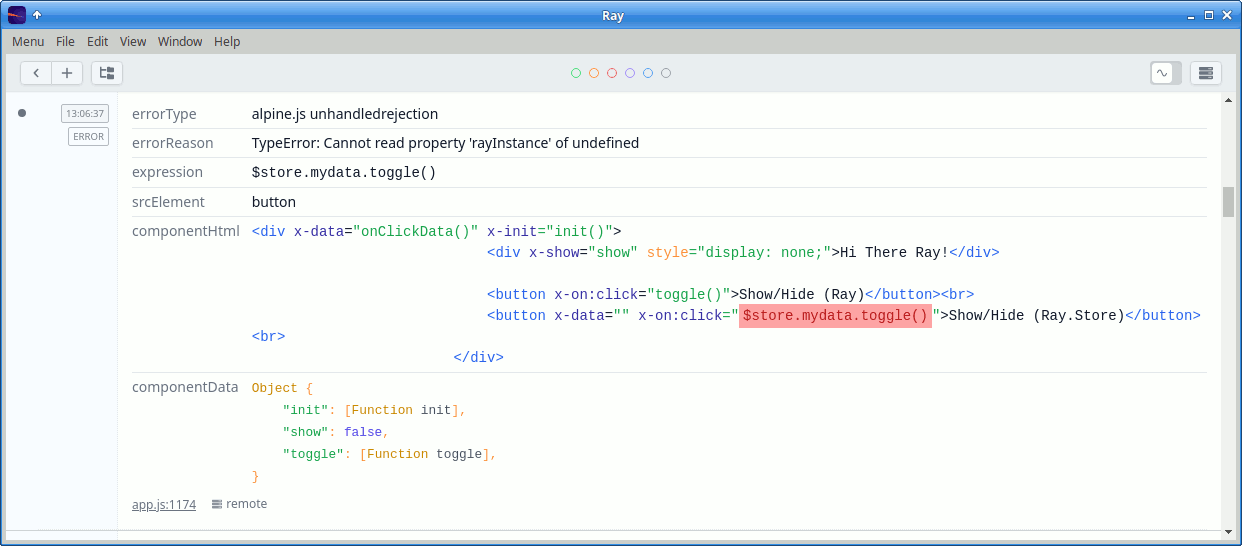
Errors can be displayed in Ray automatically, with the portion of the code that caused the error highlighted.
![screenshot](https://static.permafrost.dev/images/alpinejs-ray/error-display.png)

## Tracking Data Stores

Alpine stores can be automatically sent to Ray whenever the store data is mutated. Consider the following:

```js
window.Alpine.store('mydata', {
    showing: false,
});

setInterval(() => {
    window.Alpine.store('mydata').showing = !window.Alpine.store('mydata').showing;
}, 3000);
```

To watch the store and display changes in Ray, use the `$ray().watchStore('name')` method:

```html

<div x-data="componentData()">
    <div x-show="$store.mydata.showing">Hi There Ray!</div>
    <button x-on:click="toggle()">Show/Hide (Ray)</button>
</div>

<script>
    window.Alpine.store('mydata', {
        showing: false,
    });

    function componentData() {
        return {
            init() {
                this.$ray().watchStore('mydata');
            },
            toggle() {
                this.$store.mydata.showing = !this.$store.mydata.showing;
            },
        };
    }
</script>
```

## Development Setup

For the development of `alpinejs-ray`, clone the repository and install dependencies via npm:

```bash
npm install
```

Finally, build all library files; they will be output to the `dist` directory.

```bash
npm run build:all
```

## Testing

`alpinejs-ray` uses Jest for unit tests. To run the test suite:

```bash
npm run test
```

## Changelog

Please see [CHANGELOG](CHANGELOG.md) for more information on what has changed recently.

## Contributing

Please see [CONTRIBUTING](.github/CONTRIBUTING.md) for details.

## Security Vulnerabilities

Please review [our security policy](../../security/policy) on how to report security vulnerabilities.

## Credits

- [Patrick Organ](https://github.com/patinthehat)
- [All Contributors](../../contributors)

## License

The MIT License (MIT). Please see [License File](LICENSE) for more information.