# 🎙️ AgentVibes
### Finally — your AI agents can talk back.
**AgentVibes gives your AI coding agents a real spoken voice.** When an agent starts a task, you hear it. When it finishes, you hear that too — out loud, in a genuinely human voice, while you keep working on something else.
[](https://www.npmjs.com/package/agentvibes)
[](https://github.com/paulpreibisch/AgentVibes/actions/workflows/test.yml)
[](https://github.com/paulpreibisch/AgentVibes/actions/workflows/publish.yml)
[](https://opensource.org/licenses/Apache-2.0)
[**Website**](https://agentvibes.org) · [**Quick Start**](docs/quick-start.md) · [**Voice Library**](docs/voice-library.md) · [**Commands**](docs/commands.md) · [**Providers**](docs/providers.md)
---
## 🎯 The pitch
> **Your AI agents get a voice — they actually speak.** Even when you're developing on a remote server, the **receiver** pipes that voice straight to your **local** speakers. With the latest neural voices — **Kokoro** and **ElevenLabs** — your agent team becomes a hands-free partner for your flow: perfect when you're running **multiple agents** and don't want to be glued to one screen. If you're a multitasker, this is your tool. And it's always under your control — **mute it, or toggle it on and off, whenever you want.**
---
## Why you'll want this
You're in flow. You've got three agents running across three terminals. The old way? You babysit one window, alt-tab to the next, and hope you didn't miss the one that finished four minutes ago and has been sitting idle ever since.
**AgentVibes speaks each agent's task start and completion aloud.** You stop staring at a silent terminal and start *hearing* your agents work — glance away, write some notes, grab a coffee, and the moment an agent wraps a task or needs you, its voice tells you. It's built for the way you actually work: many agents, in parallel, all talking back.
And here's the part that feels like magic: **working on a remote server with no audio device?** The AgentVibes **Remote Receiver** pipes your agent's voice straight through *your laptop's speakers*. The work happens on the box. The voice arrives at your desk.
---
## ⚡ Quick start (30 seconds)
```bash
# Install — interactive TUI installer, no git clone required
npx agentvibes install
```
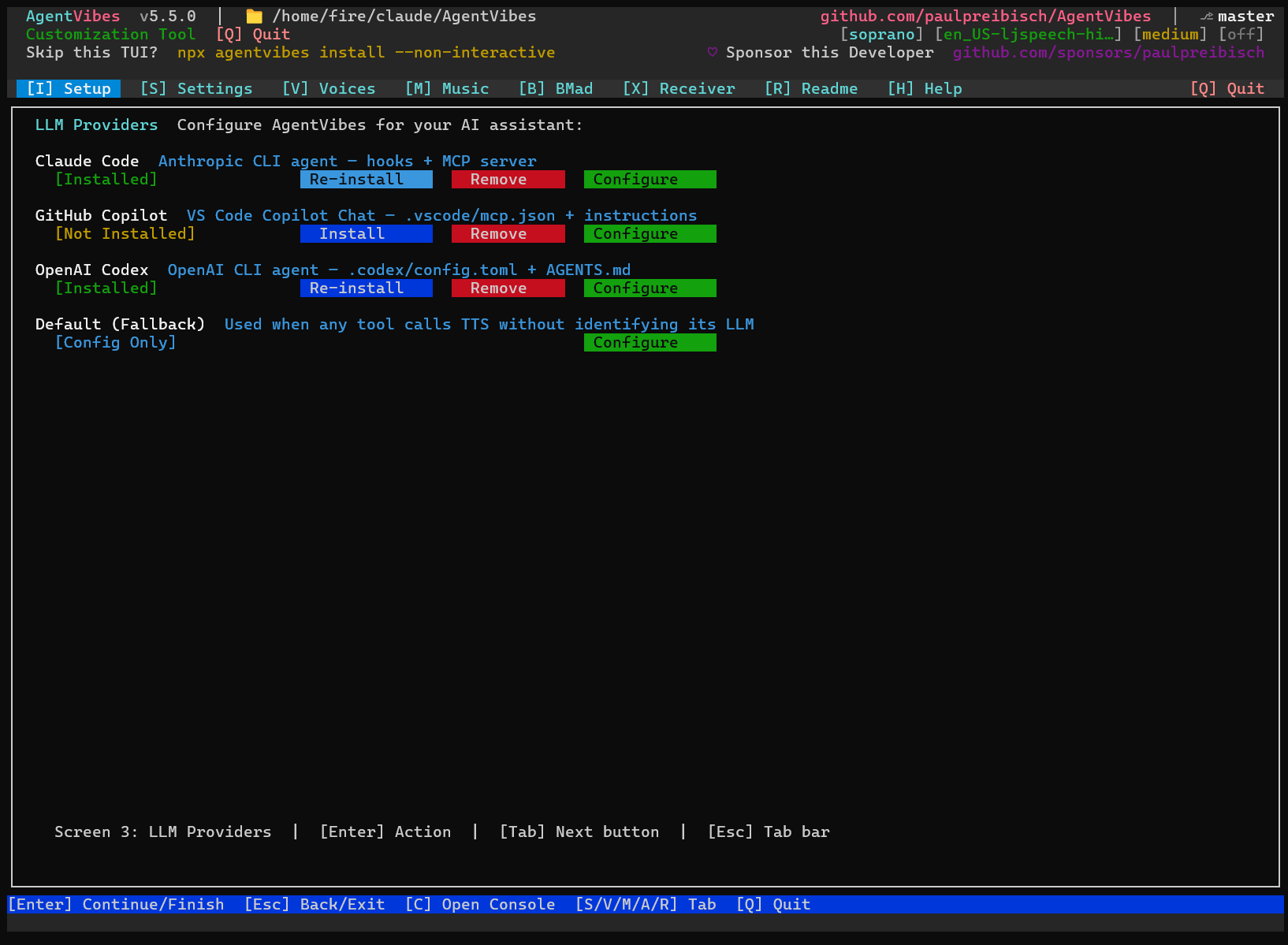
That's it. The installer wires up the Claude Code hooks and walks you through choosing a voice. Then **just code** — AgentVibes speaks automatically as your agents acknowledge and complete tasks.
```bash
npx agentvibes # open the TUI any time
```
> **macOS only, one time:** `brew install bash` — macOS ships bash 3.2; AgentVibes needs 5.x.
New here? The [**Quick Start guide**](docs/quick-start.md) walks you through your first voiced session.
---
## 🆕 Fixes for the preview indicators (v5.15.2)
- **Fixed a TUI crash** — filtering/favoriting a track while a preview was playing could rebuild the list under the indicator and crash; it can't now.
- **Honest per-agent badge** — the voice picker shows **(remotely via SSH)** vs **(locally)** from your real routing, not a partial guess.
- **BMAD agents show their real names** (Mary, Winston…) even when a skill file lacks the `Name — Title` heading; plus small preview/onboarding polish.
### v5.15.1 — Know where your preview plays
- **Every preview shows where it plays** — voice and music previews now display **(locally)** or **(remotely via SSH)** right on the row you're auditioning, so you're never guessing (or hearing silence on a headless box).
- **Preview standardized across the app** — the voice pickers (Kokoro, Piper, ElevenLabs, per-agent BMAD) and the Music page all show the same indicator; music previews now follow a project's remote receiver too.
- **Cleaner Agents tab** — it lists your real BMAD agents (not a skill's internal helpers) and re-checks itself on focus; **Reset** moved off `X` (which jumped to the Receiver tab) to **`Del`**.
### v5.15.0 — Multi-session control on Windows
- **Sessions stay quiet unless you enable them** — a session speaks only in a project you've turned on; others add no instructions and no token cost.
- **`/agent-vibes:mute` now works on Windows** — it previously had no effect there. Both project and global mute are honoured on every platform.
- **Sessions can introduce themselves on Windows** — `{{session}}` announces "Claude on my-app in Windows Terminal", once per session.
- **Self-introductions now reach global installs** — the script behind them was never delivered by the updater on any platform.
- **Note for global Windows installs:** sessions are off by default after this update — enable with `/agent-vibes:unmute`.
### v5.14.0 — Reliable setup and complete audio previews
Includes all changes from 5.13.2, which was not published to npm.
- **Setup completes on macOS and Linux** — installing Piper and downloading voices now runs correctly on a fresh machine, resolving a long-standing first-install issue.
- **Preview plays your complete mix** — voice, reverb/effects and background music together, so previews reflect how your agent will actually sound.
- **Updates preserve your customisations** — edited hook scripts are backed up with a timestamp before any file is replaced.
- **Clearer audio destination** — Settings shows **Local** in green and **Remote** in red.
- **Correct preview engine** — previews use the selected voice's own engine and identify it; Windows and macOS voices work over remote previews.
### v5.13.0 — Your voices everywhere
Pick the voices built into **Windows** or **Mac** and hear them wherever you're listening — even when your agents run on another computer. Plus a friendly heads-up chime so you always know sound is coming.
- **🖥️ Your computer's own voices, from anywhere** — choose Windows or Mac voices and hear them on your machine; every voice is shown, with unavailable ones clearly marked.
- **🗂️ All voices in one list** — Piper, Kokoro, ElevenLabs, Windows, Mac, and Soprano in one place, so what you see is what you can use.
- **🔔 Heads-up chime** — a short sound plays just before a voice or music preview, so you know audio is on the way.
- **🆔 Agents that introduce themselves** — optional self-introductions so you know who's talking in a team.
### v5.12.0 — A stronger core
During a week of early access to Anthropic's new **Fable** model, we rebuilt the heart of AgentVibes into **one shared core**. The voice / engine / routing / volume / mute logic now lives in a single place — simpler, more consistent, and steadier.
- **🔊 Previews play in the right place** — with SSH remote configured, voice and **music previews** play on your receiver; otherwise they play locally.
- **🧠 One shared core** — Kokoro-on-Linux silence and per-voice drift fixed at the source, with a safe fallback if needed.
- **🧹 Removed the redundant Voices tab** — pick a voice for any provider in Setup.
### v5.11.0 — Neural voices
- **🧠 Kokoro** — local neural TTS on your **CPU, no GPU required** (Chinese, Japanese, Korean built in).
- **☁️ ElevenLabs** — premium cloud neural voices.
- Combinable audio effects: stack **reverb**, **echo**, and **chorus** on any voice.
---
## ✨ Features
**🗣️ Automatic spoken narration.**
AgentVibes installs Claude Code hooks that fire on their own — when your agent acknowledges a task and when it completes one, you hear it spoken. No manual calls, no extra commands; you just code and listen.
**📡 Remote Receiver — voice from anywhere, on your speakers.**
SSH'd into a server with no sound card? The receiver routes the synthesized audio back to your local machine and plays it through *your* speakers. The work runs remotely; the voice lands at your desk.
**🧠 Neural and free voices — 900+ to choose from.**
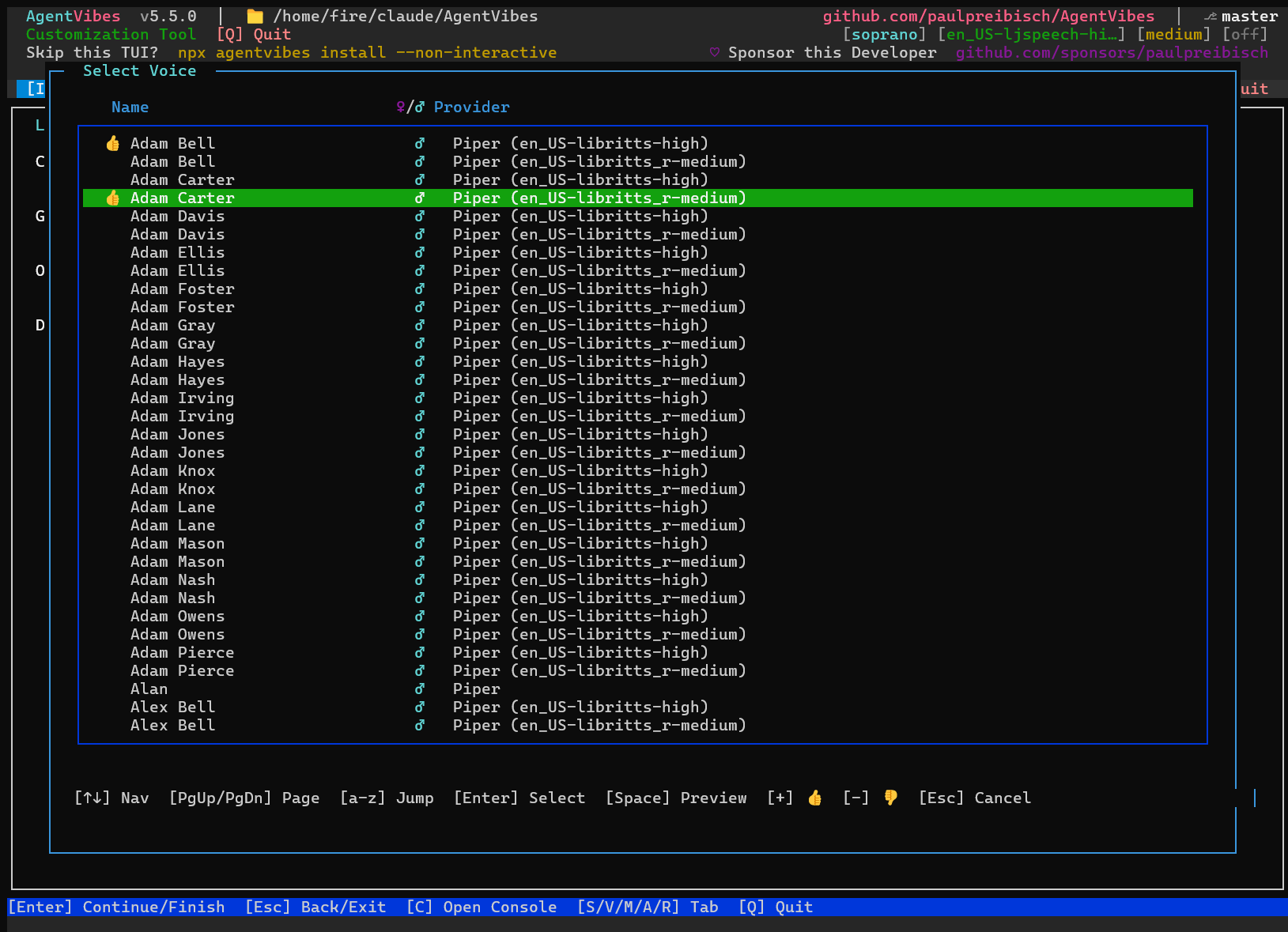
Run fully free and offline with **Piper** (900+ voices, incl. the LibriTTS library) or your OS's built-in **macOS Say** / **Windows SAPI**. Want human-grade quality? Switch to neural: **Kokoro** (local, CPU-only, with Chinese/Japanese/Korean) or **ElevenLabs** (premium cloud). Browse and preview them all in the Voices tab.
**👥 A distinct voice per agent (BMAD).**
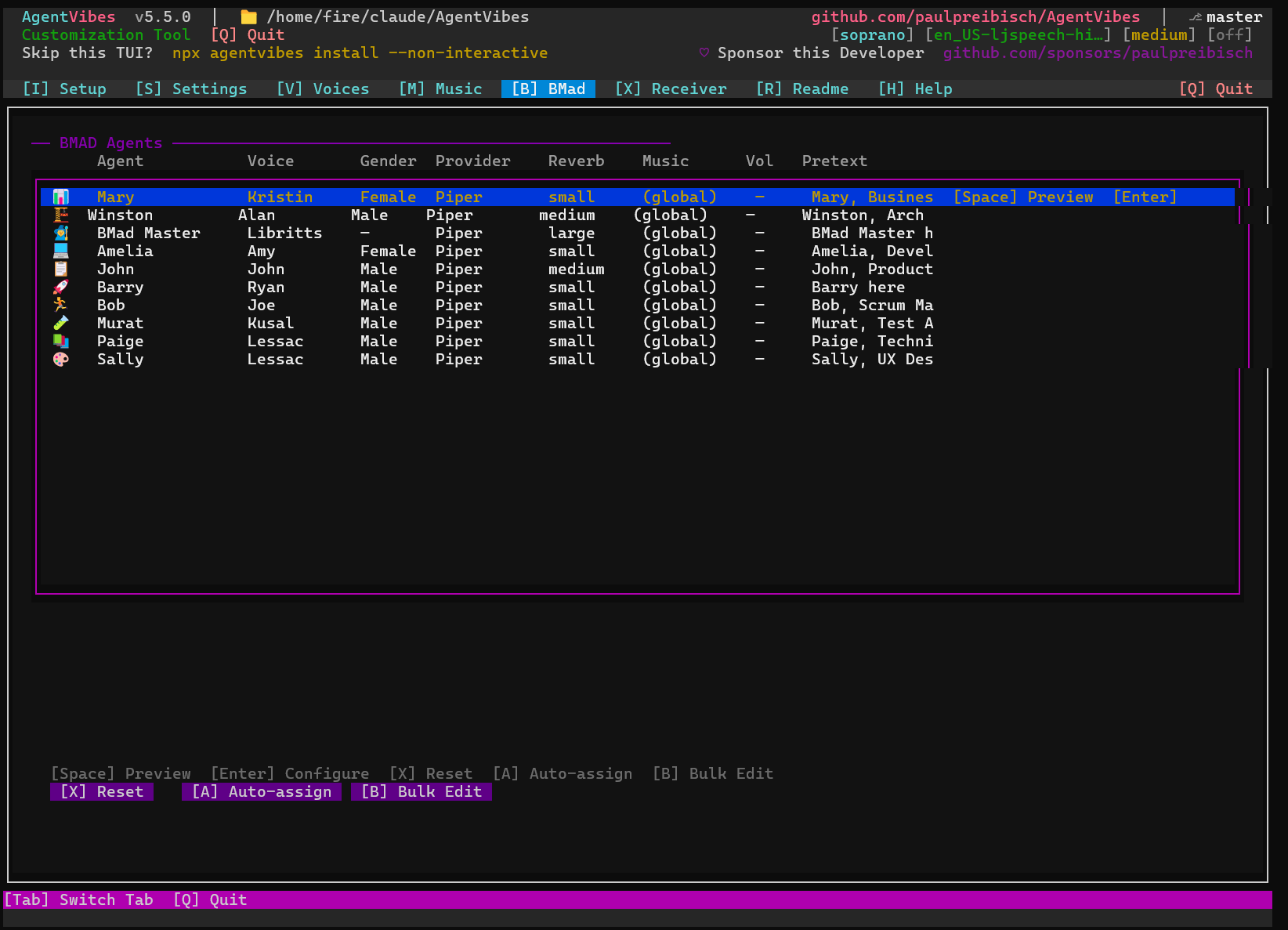
Give every agent on a multi-agent BMAD team its own voice and auto-assign them from your active provider. When the analyst, architect, dev, and QA each sound different, you know who's talking without looking.
**🎚️ Per-LLM routing.**
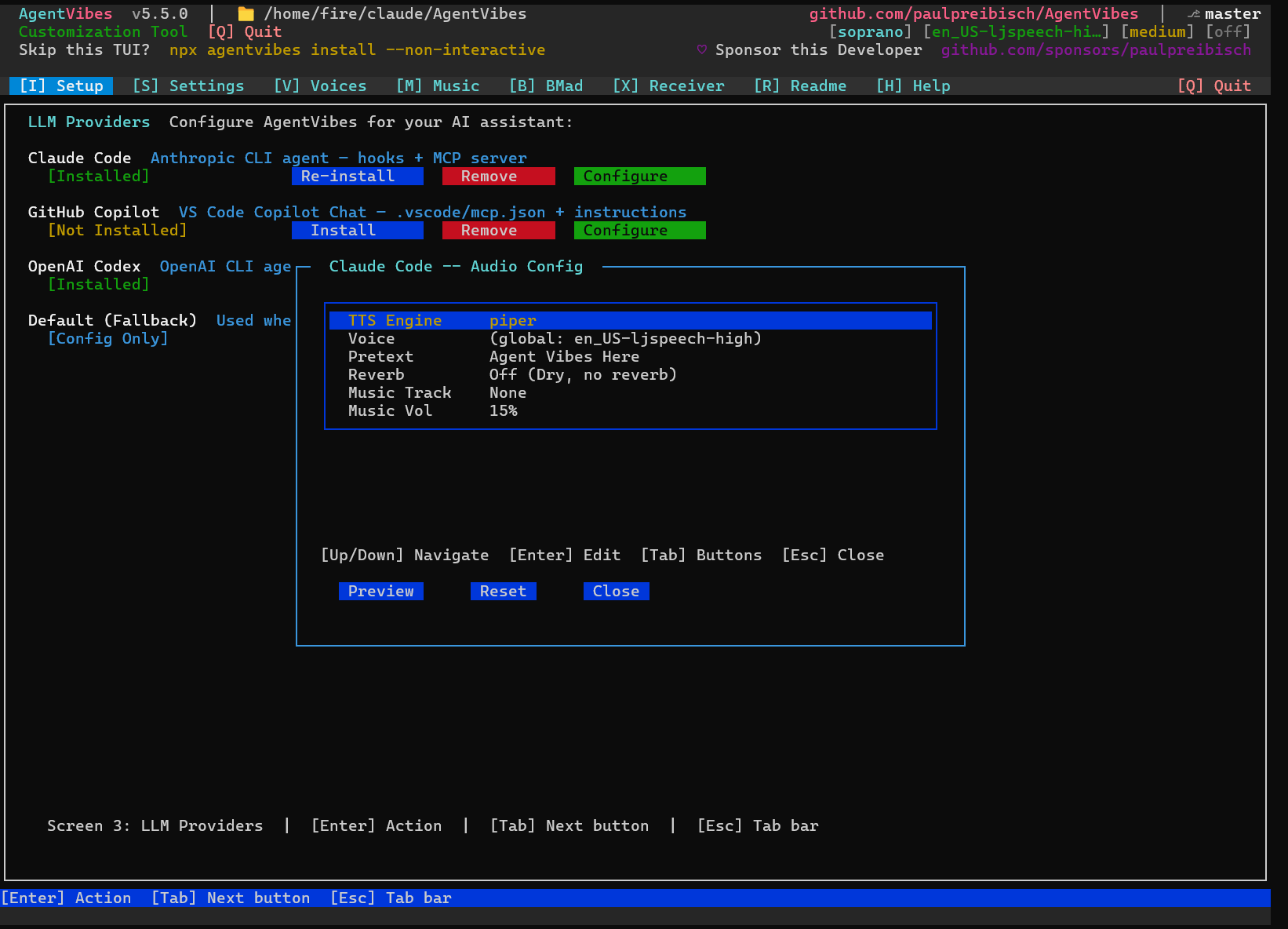
Claude Code, Claude Desktop, Warp, OpenClaw — each LLM can have its own voice, effects, background music, and intro phrase, so every assistant sounds distinct.
**🎛️ Combinable audio effects.**
Stack **reverb**, **echo**, and **chorus** on any voice and preview live — from a subtle room to a cathedral with a cave echo.
**🎭 Personalities & sentiment.**
Apply speaking styles (pirate, sarcastic, and more) to give the narration character.
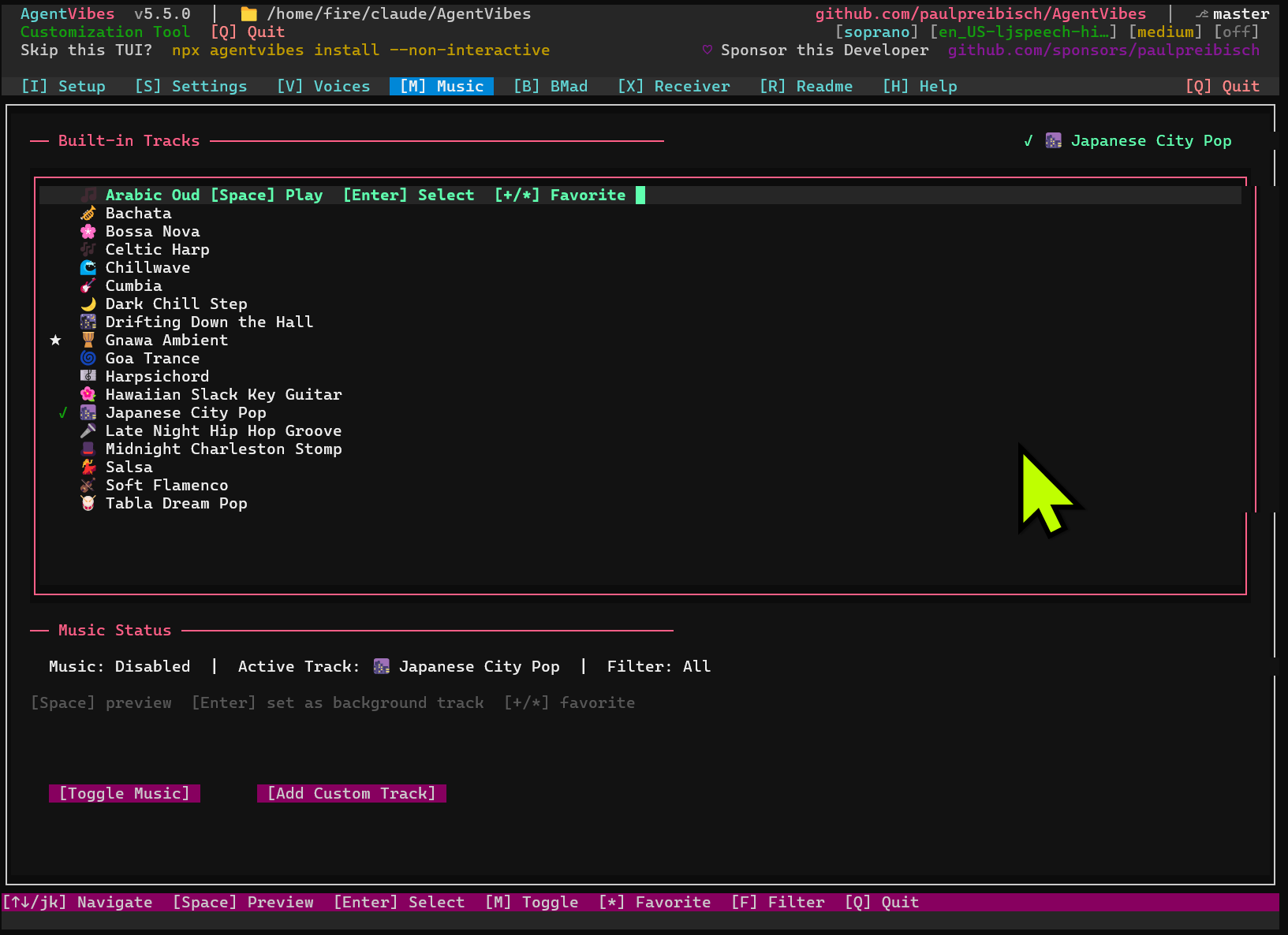
**🎵 Background music.**
Play ambient soundtracks underneath the narration, with per-track volume control.
**🌍 Languages & translation.**
Narrate in the language you choose — e.g. `/agent-vibes:set-language spanish`.
**💬 Natural-language control (MCP).**
Every one of the 50+ slash commands has a plain-English equivalent through the MCP integration — type the command, or just *ask*.
**🤐 Always under your control.**
Mute and unmute instantly, and toggle narration on or off per LLM — quiet when you need to focus, loud when you want the play-by-play.
**🖥️ Runs everywhere.**
Claude Code, Claude Desktop, Warp Terminal, OpenClaw, and even Android/Termux (Claude Code on your phone).
---
## 🎚️ The TUI
Run `npx agentvibes` to configure everything visually:
| Tab | What it does |
|-----|--------------|
| **Setup** | Pick per-LLM provider, voice, and audio effects |
| **Voices** (press V) | Browse and preview 900+ voices |
| **Music** | Manage background music |
| **BMAD** | Give each agent in a multi-agent team its own voice + auto-assign |
---
## 🎙️ Voice providers — pick your tradeoff
Mix and match per LLM. Start free with a built-in engine, level up to neural when you want it. The free providers need **no paid API** — ElevenLabs is the only one that requires a key, and it's optional.
| Provider | Type | Cost | Notes |
|----------|------|------|-------|
| **macOS Say** | Built-in | Free | Zero config on Mac |
| **Piper** | Local, offline | Free | Linux/WSL/Windows · 900+ voices incl. LibriTTS |
| **Windows SAPI** | Built-in | Free | Zero setup on Windows |
| **Soprano** | Neural | Free | `pip install soprano-tts` |
| 🆕 **Kokoro** | Local neural | Free | Runs on CPU (no GPU) · Chinese/Japanese/Korean |
| 🆕 **ElevenLabs** | Cloud neural | Paid (API key) | Premium, most human-sounding |
See the [**Providers guide**](docs/providers.md) and the [**Voice Library**](docs/voice-library.md) for samples and setup.
---
## 🤖 Works with your stack
**Claude Code** (automatic voiced hooks) · **Claude Desktop** (natural-language control via [MCP](docs/mcp-setup.md)) · **Warp Terminal** · **OpenClaw** · **Android / Termux** (Claude Code on your phone)
---
## 💬 50+ commands — slash or natural language
Every slash command has a natural-language MCP equivalent — type the command, or just ask in plain English.
| Slash command | Just say… |
|---------------|-----------|
| `/agent-vibes:switch Aria` | "Switch to Aria voice" |
| `/agent-vibes:list` | "List the available voices" |
| `/agent-vibes:personality pirate` | "Set the personality to pirate" |
| `/agent-vibes:set-language spanish` | "Set the language to Spanish" |
| `/agent-vibes:mute` | "Mute AgentVibes" |
Full reference: [**Commands**](docs/commands.md) · enable natural language: [**MCP Setup**](docs/mcp-setup.md)
---
## 👥 Built for multi-agent (BMAD)
Running a full BMAD agent team? **Every agent gets its own distinct voice**, auto-assigned from your active provider. You don't just *see* who's talking — you *hear* it. The analyst, the architect, the dev, the QA — each one recognizable the instant they speak.
---
## 📋 Prerequisites
- **Node.js** — required, for `npx`.
- **bash 5.x** — required on macOS (`brew install bash`).
- **Audio tools** — optional but recommended for effects and music.
- **Piper voices** — downloaded automatically on first use; nothing to install manually.
- **No paid API** is needed for the free providers; ElevenLabs is optional and cloud-based.
---
## 🔬 Reserved for future enhancements
You may notice a few dormant hooks in `.claude/hooks/` (`forward-to-avatar.sh`) and small
gated blocks inside `play-tts.sh` / `play-tts.ps1` referencing a "TalkingHead avatar" and a
`config/talking-head-enabled.txt` flag. These are **not an active feature** — there's no
avatar UI shipped in this package. They're scaffolding for an in-development, browser-based
avatar receiver that isn't merged yet, checked in early so that project has a stable
client-side delivery contract to build against.
Everything about this is inert by default: the enable-flag file doesn't exist until you
create it yourself, and every code path is short-circuited behind that check before it does
anything (no new network calls, no behavior change) for every current install.
---
## 📚 Documentation
| Guide | |
|-------|--|
| [Quick Start](docs/quick-start.md) | Get voiced in minutes |
| [MCP Setup](docs/mcp-setup.md) | Natural-language control |
| [Commands](docs/commands.md) | Every slash command |
| [Providers](docs/providers.md) | Engine setup & samples |
| [Voice Library](docs/voice-library.md) | All 900+ voices |
| [Windows Setup](WINDOWS-SETUP.md) | Windows-specific steps |
| [Troubleshooting](docs/troubleshooting.md) | Common fixes |
| [Security Hardening](docs/security-hardening-guide.md) | Locking down remote setups |
| [Release Notes](RELEASE_NOTES.md) | What's new · [all releases →](https://github.com/paulpreibisch/AgentVibes/releases) |
---
## About
**AgentVibes** · v5.15.2 · Licensed under [Apache-2.0](LICENSE)
Built by **Paul Preibisch** — [@997Fire on X](https://x.com/997Fire) · [agentvibes.org](https://agentvibes.org) · [github.com/paulpreibisch/AgentVibes](https://github.com/paulpreibisch/AgentVibes)
*Stop watching silent terminals. Start hearing your agents work.*
**If AgentVibes gives your agents a voice you enjoy, ⭐ star the repo!**
```bash
npx agentvibes install
```