# Adaptive Cards
Adaptive Cards are a new way for developers to exchange card content in a common and consistent way.
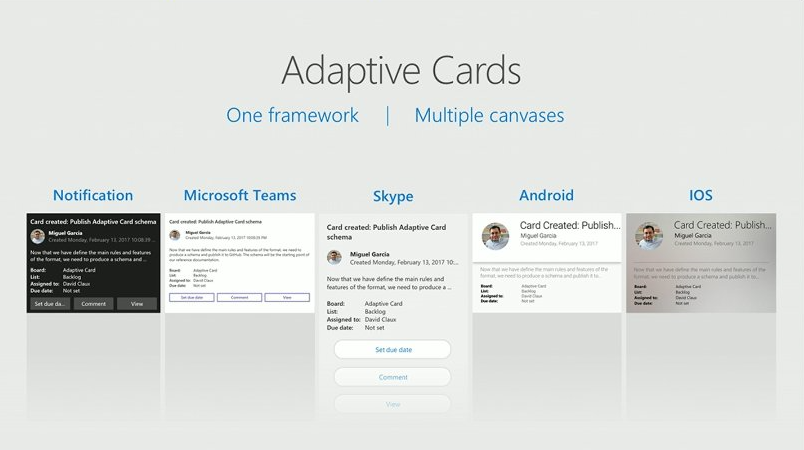
## Expressive cards, open framework, multiple platforms
Break outside the box of templated cards. Adaptive Cards let you describe your content as you see fit and deliver it beautifully wherever your customers are.
The simple open card format enables an ecosystem of shared tooling, seamless integration between producers and consumers, and native cross-platform performance on any device.
## Get Started
Check out the [full documentation](https://docs.microsoft.com/en-us/adaptive-cards/display/libraries/htmlclient) for more
## FYI: New policy on versioning
In previous releases of this SDK (`1.x`), the package version would match an official [Adaptive Card Schema](https://adaptivecards.io/explorer/) version; the library would be able to parse and render cards expressed in the latest Adaptive Card schema version and all previous versions, but it would only ever serialize to the latest version of the Adaptive Card schema. With the `2.x` release we've introduced a new compability layer, allowing developers to (de)serialize cards to and from any version of the Adaptive Card schema using a single library. The below table summarizes this new versioning capability:
| SDK Version | Can parse from schema versions | Can serialize to schema versions |
| --- | --- | --- |
| `2.10` | `1.0` ... `1.5` | `1.0` ... `1.5` |
| `2.9` | `1.0` ... `1.4` | `1.0` ... `1.4` |
| `2.4` ... `2.8` | `1.0` ... `1.3` | `1.0` ... `1.3` |
| `2.0` ... `2.3` | `1.0` ... `1.2` | `1.0` ... `1.2` |
| `1.2` | `1.0` ... `1.2` | `1.2` |
| `1.1` | `1.0` ... `1.1` | `1.1` |
| `1.0` | `1.0` | `1.0` |
## Notable changes
The following lists the most notable changes in each version of the SDK, including **breaking changes**. Please refer to this list when upgrading to a new version of the SDK.
| In version | Change description |
|---|---|
| **3.0** | Added new `Carousel` element type |
|| **BREAKING CHANGE**: New `Carousel` element requires CSS to function properly. Hosts of this package are required to load CSS if they want to support displaying the `Carousel` element. Minimal `Carousel` CSS is available in this package as `adaptivecards-carousel.css` in the `lib` and `dist` directories. |
|| Added Sass files for `adaptivecards` styles to package. |
| **2.10** | TextBlock has a new `style` property that maps to predefined `fontType`, `size`, `color`, `weight` and `isSubtle` values defined in the new `textStyles` section of HostConfig. When `style` isn't set, the "default" text style is used. |
|| **BREAKING CHANGE**: The `fontType`, `size`, `weight`, `color` and `isSubtle` properties on TextBlock and TextRun can now be `undefined`. When one of those properties is set to `undefined`, its effective value is determined as per defaults set in HostConfig. When these properties are set to explicit values, they override the defaults.
To obtain the effective values applied at render time for those properties, application code can use the `effectiveFontType`, `effectiveSize`, `effectiveWeight`, `effectiveColor` and `effectiveIsSubtle` properties. |
|| **BREAKING CHANGE**: The `horizontalAlignment` property on any card element can now be `undefined`. When it is undefined, its effective value is inherited from its parent element, up to the AdaptiveCard element (which doesn't have a parent). If none of the parents explicitly set `horizontalAlignment`, it defaults to `HorizontalAlignment.Left`.
To obtain the effective horizontal alignment value applied at render time, application code can use the `getEffectiveHorizontalAlignment` method. |
|| **BREAKING CHANGE**: The `verticalContentAlignment` property on Container can now be `undefined`. When it is undefined, its effective value is inherited from its parent container, up to the AdaptiveCard element (which doesn't have a parent). If none of the parent containers explicitly set `verticalContentAlignment`, it defaults to `VerticalAlignment.Top`.
To obtain the effective vertical content alignment value applied at render time, application code can use the `getEffectiveVerticalContentAlignment` method. |
|| `Action.updateActionButtonCssStyles(buttonElement: HTMLElement, buttonState: ActionButtonState)` has been **REMOVED**. A new `Action.updateCssClasses()` method has been introduced in its place. While this is technically a **breaking change**, it is extremely unlikely to affect any application. |
|| `Action.addCssClasses(element: HTMLElement)` has been **REMOVED**. A new `Action.updateCssClasses()` method has been introduced in its place. While this is technically a **breaking change**, it is extremely unlikely to affect any application. |
|| `Action.expanded?: boolean` has been **REMOVED**. A new `Action.state` property has been introduced in its place. While this is technically a **breaking change**, it is extremely unlikely to affect any application. |
| **2.6** | A new `static SerializableObject.defaultMaxVersion` property is introduced to allow applications to constrain de-serialization to a specific Adaptive Card schema version globally. This new property complements the existing `SerializableObject.maxVersion` member property that does the same on a per-serializable object basis. |
| **2.5** | The non-standard `ignoreInputValidation` property on `Action.Submit` has been **REMOVED**. Use the new `associatedInputs` property instead. |
| **2.4** | When a card element is rendered, its `id` property is used as the `id` of the resulting HTML element. |
| **2.0** | `ColumnSet.getCount()` has been **REMOVED**. Use `ColumnSet.getItemCount()` instead. |
|| The `isNullOrEmpty(value: string): boolean` function has been **REMOVED**. Use `if (!stringValue)` instead. |
|| The library is now compiled with the `noImplicitAny` flag. As a result, anything that can be undefined/not set now has the `undefined` value. All uses of `null` have been removed. |
|| The following global setting statics have been moved from the AdaptiveCard class to the new GlobalSettings class: `useAdvancedTextBlockTruncation`, `useAdvancedCardBottomTruncation`, `useMarkdownInRadioButtonAndCheckbox`, `allowMarkForTextHighlighting`, `alwaysBleedSeparators`, `enableFullJsonRoundTrip`, `useBuiltInInputValidation`, `displayInputValidationErrors` |
|| `CardElement.getForbiddenElementTypes()` has been **REMOVED** |
|| The signature of **CardElement.getForbiddenActionTypes()** has changed to `getForbiddenActionTypes(): CardObjectType[]` with **CardObjectType** defined as `type CardObjectType = { new(): T }` |
|| The `AdaptiveCard.onParseError` event has been **REMOVED**. Parse errors can now be accessed via `SerializationContext.getEventCount()` and `SerializationContext.getEventAt()`. ||
|| The `AdaptiveCard.onParseElement` and `AdaptiveCard.onParseAction` events (both static and instance versions) have been **REMOVED**. Use `SerializationContext.onParseElement` and `SerializationContext.onParseAction` instead. |
|| The `createActionInstance` and `createElementInstance` global functions have been **REMOVED** and replaced with the `parseAction` and `parseElement` methods of the `SerializationContext` class. |
|| A new base class, `SerializableObject`, has been introduced. It implements core serialization and deserialization behaviors and pretty much all objects handled by the library (including `Action` and `CardElement` extend it. |
|| **Serialization** and **deserialization** are now done using a "schema" model, where each property of a serializable object is defined as a `PropertyDefinition` instance. Class members that expose those properties are identified via the use of the `@property` decorator. The PropertyDefinition model makes it possible to associate version information with pretty much eveything, which allows the library to (de)serialize to/from any version of the Adaptive Card schema. |
|| The signature of the `CardObject.parse` method has changed to `parse(source: any, context?: SerializationContext)`. The context object includes a `targetVersion` property, which tells the API which version of the Adaptive Card schema to honor when deserializing the source object. |
|| A new protected `internalParse` method has been introduced on **SerializableObject**. When implementing custom actions or elements, have your class override `internalParse` rather than `parse`. |
|| `SerializableObject.toJSON` now accepts a **targetVersion** parameter. When a targetVersion value is specified, the object is serialized to that particular version of the Adaptive Card schema. If no targetVersion is specified, the object is serialized to the latest version of the Adaptive Card schema supported by the library. |
|| A new protected `internalToJSON` method has been introduced on **SerializableObject**. When implementing custom actions or elements, have your class override `internalToJSON` rather than `toJSON`. |
|| `AdaptiveCard.elementTypeRegistry` and `AdaptiveCard.actionTypeRegistry` have been **REMOVED**. They are replaced with `GlobalRegistry.elements` and `GlobalRegistry.actions`. |
|| The `TypeRegistry`, `ElementTypeRegistry` and `ActionTypeRegistry` classes have been **REMOVED**, replaced with the single `CardObjectRegistry` class. |
|| The global `setProperty`, `setNumberProperty`, `setEnumProperty` and `setArrayProperty` functions have been **REMOVED**. They are replaced by `SerializationContext` instance methods `serializeValue`, `serializeNumber`, `serializeEnum` and `serializeArray`. |
|| The global `getStringValue`, `getNumberValue`, `getBoolValue` and `getEnumValue` functions have been renamed into `parseString`, `parseNumber`, `parseBool` and `parseEnum`. |
|| The global `parseHostConfigEnum` function is no longer exported. |
|| The `ValidationError` enum has been renamed into `ValidationEvent`. |
|| The `IValidationError` interface has been renamed into `IValidationEvent`. It has a new required `phase` field of type `ValidationPhase` and its `error` field has been renamed into `event`. |
| **1.2** | The default `value` of an Input.Time **no longer accepts seconds**. 08:25:32 will now be treated as an invalid value and ignored; it should be replaced with 08:25. This behavior is consistent with other Adaptive Card renderers.|
|| The `ICardObject` interface has been **REMOVED**, replaced with the `CardObject` class that both `CardElement` and `Action` extend. This change should have little to no impact on any application.|
|| The `CardElement.validate()` and `Action.validate()` methods have been **REMOVED**, replaced with `CardObject.validateProperties()` and `CardObject.internalValidateProperties(context: ValidationContext)`. Custom elements and actions now must override `internalValidateProperties` and add validation failures as appropriate to the `context` object passed as a parameter using its `addFailure` method. Be sure to always call `super.internalValidateProperties(context)` in your override.|
| **1.1** | Due to a security concern, the `processMarkdown` event handler has been **REMOVED**. Setting it will throw an exception that will halt your code. Please change your code to set the `onProcessMarkdown(text, result)` event handler instead (see example below.) |
| **1.0** | The standalone `renderCard()` helper function was removed as it was redundant with the class methods. Please use `adaptiveCard.render()` as described below. |
## Install
### Node
```console
npm install adaptivecards --save
```
### CDN
The unpkg.com CDN makes it easy to load the script in an browser.
The latest release will keep you up to date with features and fixes, but may have breaking changes over time. For maximum stability you should use a specific version.
* `adaptivecards.js` - non-minified, useful for dev
* `adaptivecards.min.js` - minified version, best for production
```html
```
## Usage
### Import the module
```js
// Import the module:
import * as AdaptiveCards from "adaptivecards";
// OR require it:
var AdaptiveCards = require("adaptivecards");
// OR if you loaded via CDN, the global "AdaptiveCards" variable
// is already defined and can be used directly
```
### Render a card
```js
// Author a card
// In practice you'll probably get this from a service
// see http://adaptivecards.io/samples/ for inspiration
var card = {
"type": "AdaptiveCard",
"version": "1.0",
"body": [
{
"type": "Image",
"url": "https://adaptivecards.io/content/adaptive-card-50.png"
},
{
"type": "TextBlock",
"text": "Hello **Adaptive Cards!**"
}
],
"actions": [
{
"type": "Action.OpenUrl",
"title": "Learn more",
"url": "https://adaptivecards.io"
},
{
"type": "Action.OpenUrl",
"title": "GitHub",
"url": "https://github.com/Microsoft/AdaptiveCards"
}
]
};
// Create an AdaptiveCard instance
var adaptiveCard = new AdaptiveCards.AdaptiveCard();
// Set its hostConfig property unless you want to use the default Host Config
// Host Config defines the style and behavior of a card
adaptiveCard.hostConfig = new AdaptiveCards.HostConfig({
fontFamily: "Segoe UI, Helvetica Neue, sans-serif"
// More host config options
});
// Set the adaptive card's event handlers. onExecuteAction is invoked
// whenever an action is clicked in the card
adaptiveCard.onExecuteAction = function(action) { alert("Ow!"); }
// Parse the card payload
adaptiveCard.parse(card);
// Render the card to an HTML element:
var renderedCard = adaptiveCard.render();
// And finally insert it somewhere in your page:
document.body.appendChild(renderedCard);
```
## Supporting Markdown
Markdown is a [standard feature of Adaptive Cards](https://docs.microsoft.com/en-us/adaptive-cards/authoring-cards/text-features), but to give users flexibility we don't bundle a particular implementation with the library.
#### Option 1: Markdown-It
The easiest way to get markdown support is by adding [markdown-it](https://github.com/markdown-it/markdown-it) to your document.
```html
```
#### Option 2: Any other 3rd party library
If you want to use another library or handle markdown yourself, use the `AdaptiveCards.onProcessMarkdown` event.
**IMPORTANT SECURITY NOTE: When you process Markdown (yourself or using a library) you are responsible for making sure the output HTML is safe.**
For example, you must remove `