# Abe attributes
> abe tags can have many attributes.
For example the type text, some are required and other are optional:
```json
{{abe type='text' key='text_key'}}
```
`type` and `key` are always required for all content type.
## Type of abe content
- [text](types/abe-text.md)
- [image](types/abe-image.md)
- [textarea](types/abe-textarea.md)
- [translate](types/abe-translate.md)
- [import](types/abe-import.md)
- [file](types/abe-file.md)
- [rich](types/abe-rich.md)
- [link](types/abe-link.md)
- [data](types/abe-data.md)
- [slug](types/abe-slug.md)
## Other attributes
- [tab](#tab)
- [key](#key)
- [type](#type)
- [autocomplete](#autocomplete)
- [desc](#desc)
- [display](#display)
- [editable](#editable)
- [max-length](#max-length)
- [min-length](#min-length)
- [source](#source)
- [duplicate](#duplicate)
- [reload](#reload)
- [required](#required)
- [visible](#visible)
- [order](#order)
- [filetype](#filetype)
- [file](#file)
- [locale](#locale)
- [prefill](#prefill)
- [prefill-quantity](#prefill-quantity)
- [value](#value)
## tab (String)
Default: "default"
```html
tab="NameOfTheTab"
```
Html input will be displayed into the tab `NameOfTheTab`.
Allowed:
- CamelCase
- Underscore
- Spaces
- Special charactères
## key (String)
Default: ""
```html
key="keyData"
```
The key used into json file.
Allowed:
- CamelCase
- Underscore
- Dot
Examples:
```html
{{abe type='text' key='title'}}
```
```json
{
"title": "value"
}
```
```html
{{abe type='text' key='blog.title'}}
```
```json
{
"blog": {
"title": "value"
}
}
```
> You can use dot json for keys the result will create json value when the data is saved
>
> `mypage.content.title.value` as key will output
>
> `{"mypage": {"content": {"title": {"value": ""}}}}`
## type (String)
Default: "text"
```html
type="text"
```
Result:

Look at all abe type [here](#abe-type)
## autocomplete (Boolean)
Default: null
```html
autocomplete="true"
```
JSON example for autocomplete:
```json
[
{
"id": 1,
"name": "test 1",
"lang": "de"
},
{
"id": 2,
"name": "test 2",
"lang": "fr"
},
{
"id": 3,
"name": "test 3",
"lang": "es"
}
]
```
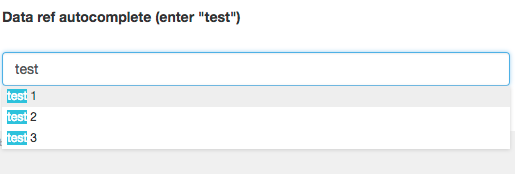
For Abe type data, display input form autocomplete into admin.
## desc (String)
Default: ""
```html
desc="some description for the contributor"
```
The admin description above the input field.
Allowed:
- CamelCase
- Underscore
- Spaces
- Special characters
## display (String)
Default: null
```html
display="variable"
```
For Abe type data (autocomplete true or false).
Example:
```html
display="{{name}}"
```
JSON:
```json
[
{
"id": 1,
"name": "test 1",
"lang": "de"
},
{
"id": 2,
"name": "test 2",
"lang": "fr"
},
{
"id": 3,
"name": "test 3",
"lang": "es"
}
]
```
The autocomplete value visible under the input will use `name` from JSON:
- test 1
- test 2
- test 3

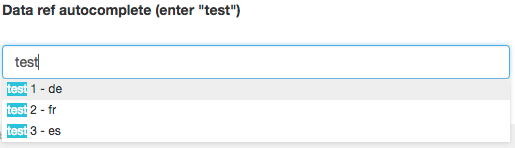
Multiple variables are allowed for example with our JSON:
```html
display="{{name}} - {{lang}}"
```
- test 1 - de
- test 2 - fr
- test 3 - es
## editable (Boolean)
Default: true
```html
editable="true"
```
If editable true user can change the value, if not abe will set the values.
## max-length (Int)
Default: null
```html
max-length="3"
```
For Abe type data, array max selection.
## min-length (Int)
Default: 0
```html
min-length="1"
```
For Abe type data, array min selection (if required).
## source (String | variables)
Default: null
```html
source="[ source type ]"
```
See abe type [data](abe-data.md).
## duplicate (Boolean)
Default: true
```html
duplicate="true"
```
If set to false, when a user duplicates a post. The value will not be duplicated into the new post.
Example:
```html
{{abe type='text' key='title' duplicate="false"}}
```
JSON before duplicate:
```json
{
"abe_meta": {
"template": "autocomplete",
"link": "/test.html",
"date": "2016-12-15T16:46:22.946Z",
},
"title": "test"
}
```
JSON after duplicate:
Value of title is not filled after duplicate the post with name `test-2.html`.
```json
{
"abe_meta": {
"template": "autocomplete",
"link": "/test-2.html",
"date": "2016-12-15T16:46:22.946Z",
},
"title": ""
}
```
## reload (Boolean)
Default: false
```html
reload="true"
```
If reload true, on blur event on the input field the post preview will be reloaded.
## required (Boolean)
Default: false
```html
required="true"
```
If set to true user cannot publish the post without required field.
Example:
```html
{{abe type="text" key="title" required="true"}}
```
> if submited but empty.

## visible (Boolean)
Default: true
```html
visible="true"
```
If visible set to false, the value will not be set into post page (but will be visible on the admin and set into the JSON file).
## order (Int)
Default: 0
```html
order="1"
```
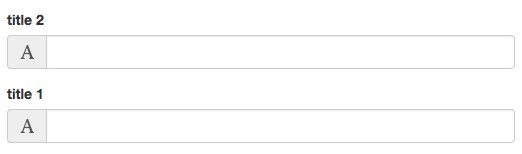
To order the input in the admin:
```html
{{abe type='text' key='title1' desc='title 1' order="2"}}
{{abe type='text' key='title2' desc='title 2' order="1"}}
```
`title1` is added before on the template but without order the result on the admin is inversed.
## filetype (String)
Default: ""
```html
filetype="image"
```
## file (String)
Default: ""
```html
file="partial.html"
```
See abe [import](abe-import.md).
## locale (String | variable)
Default: ""
```html
locale="fr"
```
## prefill (Boolean)
Default: false
```html
prefill="true"
```
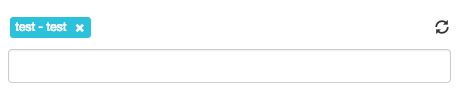
For abe type data, if set to true will add default values.
On the admin side prefill add a `reload` button on the right.
## prefill-quantity (Int)
Default: null
```html
prefill-quantity="3"
```
How many default values to prefill.
## value (String)
Default: none
```html
value="default text value"
```
Add a default value inside the input, if the input value changes the default value won't be used anymore unless the value of the input become an empty string.