# Md2md [](https://github.com/zilliztech/md2md) [](https://github.com/zilliztech/md2md)
## Why
Auto generater target markdowns with use of easy template and variable. Good to use with [Gatsby](https://www.gatsbyjs.org/) or other markdown to html generater.
## Recommended For
- Product Documentation Engineer;
- Font-end developers who needs markdown transformer
## Features
- Target file auto generate when origin file change;
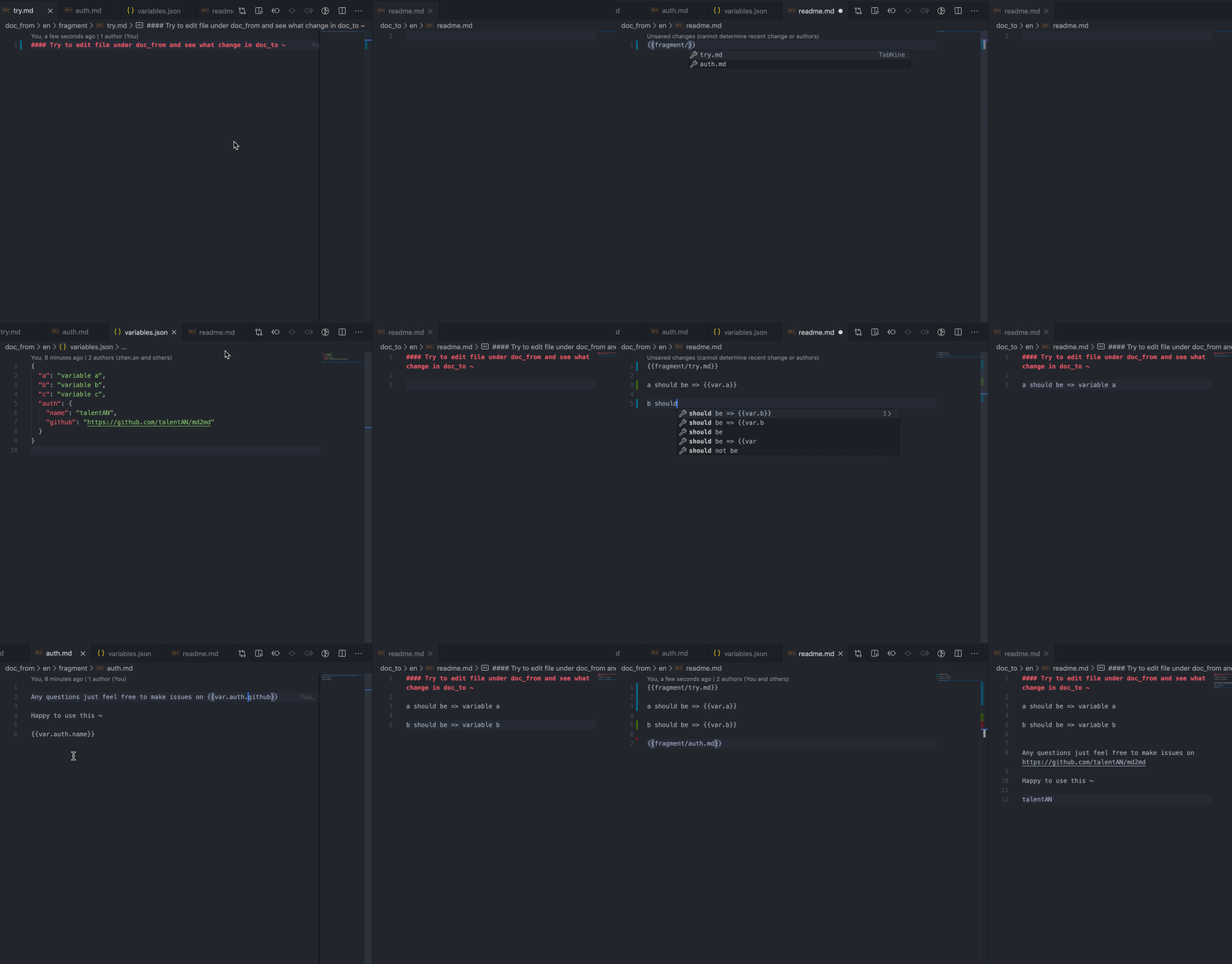
- Varible, custom fragments and templates are supported;
- Path of origin and target is configurable;
- Files or directories to ignore is configurable;
- Add custom transform rule is supported;
- Easy to use for Non-technical User
## 5min Quick Start
try [Demo Repo](https://github.com/talentAN/md2md-demo) directely
## Main Concepts
### Variable
Defined in Variables.json or on the top of markdown, can be used in markdownfile, fragments and templates.
```javascript
// variabeFile (doc_from/en/Variables.json)
{"name":"md2md"}
// origin docFile (doc_from/en/test.md):
---
link: https://github.com/talentAN/md2md
---
### This is {{var.name}};
### Visit {{var.link}} for more details;
// turn to target(doc_to/en/test.md)
---
link: https://github.com/talentAN/md2md
---
### This is md2md;
### Visit https://github.com/talentAN/md2md for more details;
```
### Fragment
Defined in fragments directory. Fragment let you split the markdown into independent, reusable pieces, and think about each piece in isolation. you can use fragment in fragment.
```javascript
// root variableFile (doc_from/en/Variables.json)
{
"auth":{
"name":"talentAN",
"email":"adam_an02@163.com"
}
}
// fragment file (doc_from/en/fragments/repo_info.md)
RepoName: {{var.name}}
github: {{var.github}}
Auth: {{var.auth.name}}
Email: {{var.auth.email}}
// child variableFile (doc_from/en/md2md/Variables.json)
{
"name":"md2md",
"github":"https://github.com/talentAN/md2md"
}
// origin docFile (doc_from/en/md2md/index.md)
{{fragments/repo_info.md}}
## belows are custom info
## !@#$%^&*()......
// turn to target (doc_to/en/md2md/index.md)
RepoName: md2md
github: https://github.com/talentAN/md2md
Auth: talentAN
Email: adam_an02@163.com
]
## belows are custom info
## !@#$%^&*()......
```
### Template
Defined in templates directory. Template is used to generate markdown file from json file directely;
```javascript
// templateFile (doc_from/en/templates/introduce.md)
the name is : {{var.name}};
the keyWords is : {{var.keyWords}}
num of weeklyDownoad : {{var.weeklyDownoad}}
// origin jsonFile (doc_from/en/md2md/introduction.json)
{
"useTemplate":true,
"path":"templates/introduce.md",
"var":{
"name":"md2md",
"keyWords":["markdown", "converter", "easy use"],
"weeklyDownoad":500
}}
// turn to target (doc_to/en/md2md/introduction.md)
the name is : md2md;
the keyWords is : ["markdown", "converter", "easy use"]
num of weeklyDownoad : 500
```
## Tab
Defined in normal markdown file, turn to special HTML element later;
```javascript
// tabFile1 (doc_from/en/tabs/tab1.md)
---
label: centOS
order: 0
group: system
---
label: tab处理后展示的文字
order: tab展示顺序
group: tab分组, 如果没有分组会展示当前文件同级目录下所有tab, 如果有分组,只展示当前文件同级目录下相同分组的tab
{{tab}}
// tabFile1 (doc_from/en/tabs/tab2.md)
---
label: ubuntu
order: 1
group: system
icon: tab-cpu
---
{{tab}}
// turn to target (doc_to/en/tabs/tab1.md)
label: tab处理后展示的文字
order: tab展示顺序
group: tab分组, 如果没有分组会展示当前文件同级目录下所有tab, 如果有分组,只展示当前文件同级目录下相同分组的tab
icon: tab icon
// turn to target (doc_to/en/tabs/tab2.md)
```
## Glossary
Defined in normal markdown file, turn to special HTML element later;
```javascript
// tabFile1 (doc_from/en/test-glossary.md)
this is normal markdownfile. {{milvus::glossary.milvus.introduce}}
// turn to target (doc_to/en/test-glossary.md)
this is normal markdownfile. milvus
```
## Image Path Solution
write:

will transfer to:

Assets/images/about-1.jpg is where you store your image.
And this plugin will help to find path.relative(doc_path,image_path) and replace the target.
````
## Catalog
```bash
├── root_dir
│ ├── doc_from
│ │ ├── en
│ │ ├── zh-CN
│ │ │── ......
│ ├── doc_to
│ ├── m2m.config.js
````
- doc_from: where you edit your origin doc files in. it's First-level subdirectory must be language;
- doc_to: the final doc file you need will be here; the level of subdirectory will be same as doc_from. you don't need to edit this directory.
- m2m.config.js : config to set for markdown transfer. use the default is just fine ~
```bash
├── en
│ ├── fragments
│ │ ├── fragment1.md
│ │ ├── fragment2.md
│ │ ├── ...
│ ├── templates
│ │ ├── template1.md
│ │ ├── template2.md
│ │ ├── ...
│ ├── Variables.json
│ ├── Glossary.json
│ ├── [doc directories]
│ ├── ...
│ ├── [doc files]
│ ├── ...
```
## API for F2E Developers
```javascript
const {
setDirWatcher,
setFileWatcher,
clearWatcher,
markdownToString,
templateToString,
register,
} = require("md2md");
// watch directory configed in m2m.config.js.
const watcher_dir = setDirWatcher();
// watch special file
const watcher_file = setFileWatcher(absolute_path);
// clearWatcher
clearWatcher(watcher_file);
// get transfered markdownFile from markdown
const target_md = markdownToString(path_from);
// get transfered markdownFile from json file use template
const target_json = templateToString(path_from);
// register your own rule like var and fragment
register(key, fn);
/**
* key is the mark you use as {{key}} to mark the position in markdown file
* fn: (content, path_from)=> target
* @param {String} content: the content converted by default rules
* @param {String} path_from: the absolute path of original file, offen used to get variables and fragments
* @return {string} target: the final content converted by custom rules
*/
```
## FAQ
##### Q: Why don't let all language use one fragments, one templates folder?
A: We've tried about that. But the gramma of each language might be different, which can lead to the postions of variables to be a total mess. Consider that, we think each language has its own fragments folder and template folder is better.
## Forward
## Change Log
### 20200629 v0.5.7
- refactor tabs => support show special tabs by different group
### 20200604 v0.5.6
- support move other files
### 20200604 v0.5.5
- Support both Linux and Windows file path
- fix error when watch file
### 20200601 v0.5.0
- rename Tips.json => Glosssary.json
### 20200529 v0.4.0
- support tip in markdown
- rename
- fragment => fragments
- template => templates
- variable.json => Variables.json
### 20200528 v0.3.4
- support config name_dir_from in process.env
```javascript
// before require md2md, run:
process.env.name_dir_from = "your name of origin dir";
```
### 20200527 v0.3.4
- add bin goover and md2md
### 20200526 v0.3.1
- support register custom rule
- bugfix
- filter Variables.json
- invalid type when convert template
### 20200525 v0.2.11
- Add api templateToString
- Support parse variables in markdown file. You should use variables in key-value format.
```javascript
// origin docFile (doc_from/en/test.md):
---
name: Tom
age: 11
---
### This is {{var.name}}, his age is {{var.age}};
// target docFile (doc_from/en/test.md)
---
name: Tom
age: 11
---
### This is Tom, his age is 11;
```