# Build Setup for iOS
## 1. Add the following libraries to your "Link Binary with Libraries" in Targets > Build Phases :
- [x] `WebKit.framework`
- [x] `SystemConfiguration.framework`
- [x] `CoreTelephony.framework`
- [x] `libsqlite3.0`
- [x] `libc++`
- [x] `libz`
Add "URL Schema" as your app id for "URL type" in Targets > info, See
the following screenshot for the view on your XCode:
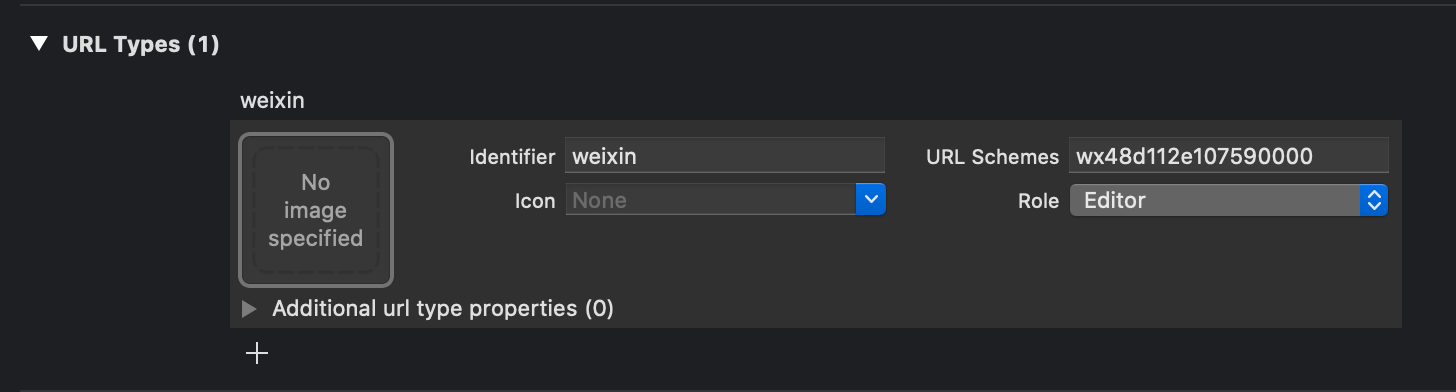
Cannot go back to APP from WeChat without configuration.
如果不配置,就无法从微信重新回到APP。
On iOS 9+, add `wechat` and `weixin` into `LSApplicationQueriesSchemes` in
`Targets` > `info` > `Custom iOS Target Properties`. Or edit `Info.plist`
then add:
```xml
LSApplicationQueriesSchemes
weixin
wechat
weixinULAPI
```
If not configured, apple will prevent you from jumping to WeChat due to security permissions.
如果不配置,因为安全权限问题,苹果会阻止你跳转到微信。
## 2. Then copy the following in `AppDelegate.m`:
wechat callback function, If not configured, When sharing is called, it appears "connecting" and then bounces back.
微信回调方法,如果不配置,分享的时候微信会出现"正在连接",然后直接弹回APP。
```objc
- (BOOL)application:(UIApplication *)application handleOpenURL:(NSURL *)url {
return [WXApi handleOpenURL:url delegate:self];
}
- (BOOL)application:(UIApplication *)application
continueUserActivity:(NSUserActivity *)userActivity
restorationHandler:(void(^)(NSArray> * __nullable
restorableObjects))restorationHandler {
// 触发回调方法
[RCTLinkingManager application:application continueUserActivity:userActivity restorationHandler:restorationHandler];
return [WXApi handleOpenUniversalLink:userActivity
delegate:self];
}
```
Universal Links config, If not used, please ignore.
Universal Links 配置文件, 没使用的话可以忽略。
```objc
#import
// ios 8.x or older 不建议再使用这段配置,所以注释掉
// - (BOOL)application:(UIApplication *)application openURL:(NSURL *)url
// sourceApplication:(NSString *)sourceApplication annotation:(id)annotation
// {
// [RCTLinkingManager application:application openURL:url options:options];
// return [WXApi handleOpenURL:url delegate:self];
// }
// ios 9.0+
- (BOOL)application:(UIApplication *)application openURL:(NSURL *)url
options:(NSDictionary *)options
{
// Triggers a callback event.
// 触发回调事件
[RCTLinkingManager application:application openURL:url options:options];
return [WXApi handleOpenURL:url delegate:self];
}
```
**注意:不使用 Universal Links 会导致调用微信支付成功后无法获取回调事件。**
## 3. Then copy the following in `AppDelegate.h`:
```
#import
#import
#import "WXApi.h"
@interface AppDelegate : UIResponder
@property (nonatomic, strong) UIWindow *window;
@end
```
Mainly need to add '#import "WXApi.h"' and 'wxapidelegate'.
主要是需要加上 '#import "WXApi.h"' 和 'WXApiDelegate' 。