<div align="center">
  <img src="https://files.catbox.moe/gw41eq.png" alt="WhatsApp Baileys" width="450"/>  

  <h1>WhatsApp Baileys</h1>
  <p><strong>Lightweight, Full-Featured WhatsApp Web for Node.js</strong></p>
  
  <p>
    <a href="https://npmjs.com/package/@whiskeysockets/baileys">
      <img src="https://img.shields.io/npm/v/@whiskeysockets/baileys?color=blue&logo=npm" alt="npm version">
    </a>
    <a href="https://github.com/whiskeysockets/baileys/blob/main/LICENSE">
      <img src="https://img.shields.io/github/license/whiskeysockets/baileys?color=green" alt="License">
    </a>
    <a href="https://github.com/whiskeysockets/baileys/stargazers">
      <img src="https://img.shields.io/github/stars/whiskeysockets/baileys?color=yellow&logo=github" alt="GitHub stars">
    </a>
  </p>
</div>

<br>

## 📚 Table of Contents  
- [Features](#-features)  
- [Installation](#-installation)  
- [Quick Start](#-quick-start)  
- [Documentation](#-documentation)  
  - [Connecting Account](#-connecting-account)  
  - [Handling Events](#-handling-events)  
  - [Sending Messages](#-sending-messages)  
  - [Groups](#-groups)  
  - [Privacy](#-privacy)  
  - [Advanced](#-advanced)  
- [Disclaimer](#-disclaimer)  

<br>

## 🌟 Features
- ✅ **Multi-Device Support**  
- 🔄 **Real-Time Messaging** (text, media, polls, buttons)  
- 🛠️ **Group & Channel Management** (create, modify, invite)  
- 🔒 **End-to-End Encryption**  
- 📦 **Session Persistence**  

<br>

## 🔥 Updated New (08 Oktober 2025)
- 🍟 Convert LID Mentions to JID
- 🤖 Convert Sender LID to JID
- 👥 Convert Group ID LID to JID
- 🩸 Fixed All Bug LID (participant - mentionedJid - sender - admins group)

<br>

## 🌱 Owner’s Notice  

Proyek ini bersifat **publik**, sehingga siapa pun dapat menggunakan atau melakukan *rename* untuk keperluan pribadi. Namun, penggunaan untuk tujuan **komersial** atau sekadar pencarian nama **tidak diperkenankan**.  

Proyek ini dikembangkan berdasarkan libary **Whiskeysocket**, dengan perbaikan dan peningkatan yang dilakukan oleh administrator.  
Tujuan utama dari proyek ini adalah untuk **memudahkan pengguna serta memperbaiki kesalahan bot yang sebelumnya sering dialami**.  

Saat ini proyek masih dalam tahap **Beta**, sehingga kemungkinan masih terdapat bug atau kendala tak terduga saat proses instalasi maupun eksekusi.  
Jika Anda mengalami masalah yang berlanjut, silakan hubungi kami melalui kontak yang telah tersedia.  

Terimakasih, salam hangat, zass!
<br>

## ⚡ Contact Admin
- [Site](https://zass.cloud)
- [Channel](https://zass.cloud/wa/channel/info)
- [Script Gratis](https://neolabsofficial.my.id)
- [Pterodactyl Murah](https://pteroku-desu.zass.cloud)

<br>

## 📜 License
- This project is licensed for **personal and non-commercial use only**.  
- Redistribution, modification, or renaming for personal purposes is allowed.  
- **Commercial use, resale, or name-hunting is strictly prohibited.**

<br>

## 🤝 Contribution Guidelines
We welcome contributions to improve this project. To contribute:  
1. Fork the repository  
2. Create a new branch for your feature or fix  
3. Submit a pull request with a clear explanation of the changes  

All contributions will be reviewed before merging.  

<br>

## 📥 Installation
```bash
npm install @zassxd/baileys
# or
yarn add @zassxd/baileys
```

<br>

## 🚀 Quick Start
```javascript
const {
  default: makeWASocket,
  useMultiFileAuthState,
} = require('@zassxd/baileys');

const {
  state,
  saveCreds
} = await useMultiFileAuthState("./path/to/sessions/folder")

/*
 * const sock = makeWASocket({ printQRInTerminal: true });
 * code to get WhatsApp web connection
 * QR code or pairing code type available
 */

sock.ev.on('messages.upsert', ({ messages }) => {
  console.log('New message:', messages[0].message);
});
```

<br>

## 📖 Documentation

### 🔌 Connecting Account
<details>
<summary><strong>🔗 Connect with QR Code</strong></summary>

```javascript
const sock = makeWASocket({
  printQRInTerminal: true, // true to display QR Code
  auth: state
})
```
</details>

<details>
<summary><strong>🔢 Connect with Pairing Code</strong></summary>

```javascript
const sock = makeWASocket({
  printQRInTerminal: false, // false so that the pairing code is not disturbed
  auth: state
})

if (!sock.authState.creds.registered) {
  const number = "62xxxx"

  // use default pairing code (default 1-8)
  const code = await sock.requestPairingCode(number)

  // use customer code pairing (8 digit)
  const customCode = "ABCD4321"
  const code = await sock.requestPairingCode(number, customCode)
  console.log(code)
}
```
</details>

<br>

### 📡 Handling Events
<details>
<summary><strong>📌 Example to Start</strong></summary>

```javascript
sock.ev.on('messages.upsert', ({ messages }) => {
  console.log('New message:', messages[0].message);
});
```
</details>

<details>
<summary><strong>🗳️ Decrypt Poll Votes</strong></summary>

```javascript
sock.ev.on('messages.update', (m) => {
  if (m.pollUpdates) console.log('Poll vote:', m.pollUpdates);
});
```
</details>

<br>

### 📨 Sending Messages

```javascript
/**
 * Sends a message using the WhatsApp socket connection.
 * 
 * @param {string} jid - The JID (Jabber ID) of the recipient/user.
 *                       This is the unique identifier for the WhatsApp user/group.
 * @param {Object} content - The message content to be sent. Can be any valid message type
 *                           (text, image, video, document, etc.) with required parameters.
 * @param {Object} [options] - Optional parameters for message generation and sending.
 *                             Can include properties like:
 *                             - quoted: Message to reply to
 *                             - ephemeral: If message should disappear after viewing
 *                             - mediaUpload: Media upload options
 *                             - etc.
 * @returns {Promise<Object>} A promise that resolves with the sent message info or
 *                            rejects with an error if sending fails.
 */
const jid = '';        // Recipient's JID (WhatsApp ID) or LID
const content = {};     // Message content object
const options = {};     // Optional message options

// Send the message using the WhatsApp socket connection
sock.sendMessage(jid, content, options)
```

<details>
<summary><strong>📝 Text Message</strong></summary>

```javascript
// Simple Text
await sock.sendMessage(jid, { text: 'Hello!' });
```

```javascript
// Text with link preview
await sock.sendMessage(jid, {
  text: 'Visit https://example.com',
  linkPreview: {
    'canonical-url': 'https://example.com',
    title: 'Example Domain',
    description: 'A demo website',
    jpegThumbnail: fs.readFileSync('preview.jpg')
  }
});
```

```javascript
// With Quoted Reply
await sock.sendMessage(jid, { text: 'Hello Shiroko!' }, { quoted: message });
```
</details>


<details>
<summary><strong>🖼️ Image Message</strong></summary>

```javascript
// With local file buffer
await sock.sendMessage(jid, { 
  image: fs.readFileSync('shiroko.jpg'),
  caption: 'My wife!',
  mentions: ['1234567890@s.whatsapp.net'] // Tag users
});
```

```javascript
// With URL
await sock.sendMessage(jid, { 
  image: { url: 'https://example.com/shiroko.jpg' },
  caption: 'Emh ayang nya zass'
});
```
</details>

<details>
<summary><strong>🎥 Video Message</strong></summary>

```javascript
// With Local File
await sock.sendMessage(jid, { 
  video: fs.readFileSync('video.mp4'),
  caption: 'Funny clip!'
});
```

```javascript
// With URL File
await sock.sendMessage(jid, { 
  video: { url: 'https://example.com/video.mp4' },
  caption: 'Streamed video'
});
```

```javascript
// View Once Message
await sock.sendMessage(jid, {
  video: fs.readFileSync('secret.mp4'),
  viewOnce: true // Disappears after viewing
});
```
</details>

<details>
<summary><strong>🎵 Audio/PTT Message</strong></summary>

```javascript
// Regular audio
await sock.sendMessage(jid, { 
  audio: fs.readFileSync('audio.mp3'),
  ptt: false // For music
});
```

```javascript
// Push-to-talk (PTT)
await sock.sendMessage(jid, { 
  audio: fs.readFileSync('voice.ogg'),
  ptt: true, // WhatsApp voice note
  waveform: [0, 1, 0, 1, 0] // Optional waveform
});
```
</details>

<details>
<summary><strong>👤 Contact Message</strong></summary>

```javascript
const vcard = 'BEGIN:VCARD\n' // metadata of the contact card
  + 'VERSION:3.0\n' 
  + 'FN:Jeff Singh\n' // full name
  + 'ORG:Ashoka Uni\n' // the organization of the contact
  + 'TELtype=CELLtype=VOICEwaid=911234567890:+91 12345 67890\n' // WhatsApp ID + phone number
  + 'END:VCARD'

await sock.sendMessage(jid, { 
  contacts: { 
    displayName: 'Your Name', 
    contacts: [{ vcard }] 
  }
})
```
</details>

<details>
<summary><strong>💥 React Message</strong></summary>

```javascript
await sock.sendMessage(jid, {
  react: {
    text: '👍', // use an empty string to remove the reaction
    key: message.key
  }
})
```
</details>

<details>
<summary><strong>📌 Pin & Keep Message</strong></summary>

| Time  | Seconds        |
|-------|----------------|
| 24h    | 86.400        |
| 7d     | 604.800       |
| 30d    | 2.592.000     |

```javascript
// Pin Message
await sock.sendMessage(jid, {
  pin: {
    type: 1, // 2 to remove
    time: 86400,
    key: message.key
  }
})
```

```javascript
// Keep message
await sock.sendMessage(jid, {
  keep: {
    key: message.key,
    type: 1 // or 2 to remove
  }
})
```
</details>

<details>
<summary><strong>📍 Location Message</strong></summary>

```javascript
// Static location
await sock.sendMessage(jid, {
  location: {
    degreesLatitude: 37.422,
    degreesLongitude: -122.084,
    name: 'Google HQ'
  }
});
```

```javascript
// Thumbnail location
await sock.sendMessage(jid, {
  location: {
    degreesLatitude: 37.422,
    degreesLongitude: -122.084,
    name: 'Google HQ',
    jpegThumbnail: fs.readFileSync('preview.jpg')
  }
});
```

```javascript
// Live location (updates in real-time)
await sock.sendMessage(jid, {
  location: {
    degreesLatitude: 37.422,
    degreesLongitude: -122.084,
    accuracyInMeters: 10
  },
  live: true, // Enable live tracking
  caption: 'I’m here!'
});
```
</details>

<details>
<summary><strong>📞 Call Message</strong></summary>

```javascript
await sock.sendMessage(jid, {
  call: {
    name: 'Here is call message',
    type: 1 // 2 for video
  }
})
```
</details>

<details>
<summary><strong>🗓️ Event Message</strong></summary>

```javascript
await sock.sendMessage(jid, {
  event: {
    isCanceled: false, // or true
    name: 'Here is name event',
    description: 'Short description here',
    location: {
      degreesLatitude: 0,
      degreesLongitude: 0,
      name: 'Gedung Tikus Kantor'
    },
    startTime: 17..., // timestamp date
    endTime: 17..., // timestamp date
    extraGuestsAllowed: true // or false
  }
})
```
</details>

<details>
<summary><strong>🛒 Order Message</strong></summary>

```javascript
await sock.sendMessage(jid, {
  order: {
    orderId: '123xxx',
    thumbnail: fs.readFileSync('preview.jpg'),
    itemCount: '123',
    status: 'INQUIRY', // INQUIRY || ACCEPTED || DECLINED
    surface: 'CATALOG',
    message: 'Here is order message',
    orderTitle: 'Here is title order',
    sellerJid: '628xxx@s.whatsapp.net'',
    token: 'token_here',
    totalAmount1000: '300000',
    totalCurrencyCode: 'IDR'
  }
})
```
</details>

<details>
<summary><strong>📊 Poll Message</strong></summary>

```javascript
// Create a poll
await sock.sendMessage(jid, {
  poll: {
    name: 'Favorite color?',
    values: ['Red', 'Blue', 'Green'],
    selectableCount: 1 // Single-choice
  }
});
```

```javascript
// Poll results (snapshot)
await sock.sendMessage(jid, {
  pollResult: {
    name: 'Favorite color?',
    values: [['Red', 10], ['Blue', 20]] // [option, votes]
  }
});
```
</details>

<details>
<summary><strong>🛍️ Product Message</strong></summary>

```javascript
await sock.sendMessage(jid, {
  product: {
    productId: '123',
    title: 'Cool T-Shirt',
    description: '100% cotton',
    price: 1999, // In cents (e.g., $19.99)
    currencyCode: 'USD',
    productImage: fs.readFileSync('shirt.jpg')
  }
});
```
</details>


<details>
<summary><strong>💳 Payment Message</strong></summary>

```javascript
await sock.sendMessage(jid, {
  payment: {
    note: 'Here is payment message',
    currency: 'USD', // optional 
    offset: 0, // optional
    amount: '100000', // optional
    expiry: 0, // optional
    from: '628xxx@s.whatsapp.net', // optional
    image: { // optional
      placeholderArgb: "your_background", // optional
      textArgb: "your_text",  // optional
      subtextArgb: "your_subtext" // optional
    }
  }
})
```
</details>


<details>
<summary><strong>📜 Payment Invite Message</strong></summary>

```javascript
await sock.sendMessage(jid, { 
  paymentInvite: {
    type: 1, // 1 || 2 || 3
    expiry: 0 
  }   
})
```
</details>


<details>
<summary><strong>👤 Channel Admin Invite</strong></summary>

```javascript
await sock.sendMessage(jid, {
  adminInvite: {
    jid: '172xxx@newsletter',
    name: 'Newsletter Title', 
    caption: 'Undangan admin channel saya',
    expiration: 86400,
    jpegThumbnail: fs.readFileSync('preview.jpg') // optional
  }
})
```
</details>


<details>
<summary><strong>👥 Group Invite Message</strong></summary>

```javascript
await sock.sendMessage(jid, {
  groupInvite: {
    jid: '123xxx@g.us',
    name: 'Group Name!', 
    caption: 'Invitation To Join My Whatsapp Group',
    code: 'xYz3yAtf...', // code invite link
    expiration: 86400,
    jpegThumbnail: fs.readFileSync('preview.jpg') // optional            
  }
})
```
</details>

<details>
<summary><strong>🔢 Phone Number Message</strong></summary>

```javascript
// Request phone number
await sock.sendMessage(jid, {
  requestPhoneNumber: {}
})
```
```javascript
// Share phone number
await sock.sendMessage(jid, {
  sharePhoneNumber: {}
})
```
</details>

<details>
<summary><strong>↪️  Reply Button Message</strong></summary>

```javascript
// Reply List Message
await sock.sendMessage(jid, {
  buttonReply: {
    name: 'Hii',
    description: 'description', 
    rowId: 'ID'
  }, 
  type: 'list'
})
```

```javascript
// Reply Button Message
await sock.sendMessage(jid, {
  buttonReply: {
    displayText: 'Hii', 
    id: 'ID'
  }, 
  type: 'plain'
})
```

```javascript
// Reply Template Message
await sock.sendMessage(jid, {
  buttonReply: {
    displayText: 'Hii',
    id: 'ID',
    index: 1 // number id button reply
  }, 
  type: 'template'
})
```

```javascript
// Reply Interactive Message
await sock.sendMessage(jid, {
  buttonReply: {
    body: 'Hii', 
    nativeFlows: {
      name: 'menu_options', 
      paramsJson: JSON.stringify({ id: 'ID', description: 'description' }) 
      version: 1 // 2 | 3
    }
  }, 
  type: 'interactive'
})
```
</details>

<details>
<summary><strong>#️⃣ Status Mentions Message</strong></summary>

```javascript
await sock.sendStatusMentions({
  image: {
    url: 'https://example.com/image.jpg'
  }, 
  caption: 'Nice day!'
}, ["123@s.whatsapp.net", "123@s.whatsapp.net"])
```
</details>

<details>
<summary><strong>📸 Album Message</strong></summary>

```javascript
await sock.sendAlbumMessage(jid,
  [{
    image: { url: 'https://example.com/image.jpg' },
    caption: 'Hello World'
  },
  {
    image: fs.readFileSync('image.jpg'), 
    caption: 'Hello World'
  },
  {
    video: { url: 'https://example.com/video.mp4' },
    caption: 'Hello World'
  },
  {
    video: fs.readFileSync('video.mp4'),
    caption: 'Hello World'
  }],
{ quoted: message, delay: 3000 })
```
</details>

<details>
<summary><strong>👨‍💻 Interactive Message</strong></summary>

> This is an interactive chat created based on Proto WhatsApp business data, if the message does not work then there may be a change in the buttonParamsJson structure.

<details>
<summary><strong>Shop Flow Message</strong></summary>

<div align="center">
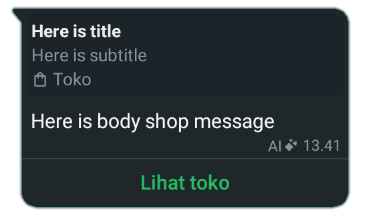
  <img src="https://files.catbox.moe/pdeeq8.png" alt="Example Shop Message" width="450"/>
  <p>Preview the shop message display, usually used to direct customers to the Facebook page or account.</td>
</div>

```javascript
// Headers Text
await sock.sendMessage(jid, {      
  text: 'Here is body message',
  title: 'Here is title', 
  subtitle: 'Here is subtitle', 
  footer: '© WhatsApp Baileys',
  viewOnce: true,
  shop: {
    surface: 1, // 2 | 3 | 4
    id: 'facebook_store_name'
  }
})
```

```javascript
// Headers Image
await sock.sendMessage(jid, { 
  image: {
    url: 'https://www.example.com/image.jpg'
  },    
  caption: 'Here is body message',
  title: 'Here is title', 
  subtitle: 'Here is subtitle', 
  footer: '© WhatsApp Baileys',
  shop: {
    surface: 1, // 2 | 3 | 4
    id: 'facebook_store_name'
  }, 
  hasMediaAttachment: true, // or false
  viewOnce: true
})
```

```javascript
// Headers Video
await sock.sendMessage(jid, { 
  video: {
    url: 'https://www.example.com/video.mp4'
  },    
  caption: 'Here is body message',
  title: 'Here is title', 
  subtitle: 'Here is subtitle', 
  footer: '© WhatsApp Baileys',
  shop: {
    surface: 1, // 2 | 3 | 4
    id: 'facebook_store_name'
  }, 
  hasMediaAttachment: true, // or false
  viewOnce: true
})
```

```javascript
// Headers Document
await sock.sendMessage(jid, {
  document: { 
    url: 'https://www.example.com/document.pdf' 
  }, 
  mimetype: 'application/pdf', 
  jpegThumbnail: await sock.resize('https://www.example.com/thumbnail.jpg', 320, 320), 
  caption: 'Here is body message',
  title: 'Here is title',
  subtitle: 'Here is subtitle', 
  footer: '© WhatsApp Baileys',
  shop: {
    surface: 1, // 2 | 3 | 4
    id: 'facebook_store_name'
  }, 
  hasMediaAttachment: false, // or true, 
  viewOnce: true
})
```

```javascript
// Headers Location
await sock.sendMessage(jid, { 
  location: {
    degressLatitude: -0, 
    degressLongitude: 0,
    name: 'Example Location'
  },    
  caption: 'Here is body message',
  title: 'Here is title', 
  subtitle: 'Here is subtitle', 
  footer: '© WhatsApp Baileys',
  shop: {
    surface: 1, // 2 | 3 | 4
    id: 'facebook_store_name'
  }, 
  hasMediaAttachment: false, // or true
  viewOnce: true
})
```
```javascript
// Headers Product
await sock.sendMessage(jid, {
  product: {
    productImage: { 
      url: 'https://www.example.com/product.jpg'
    },
    productId: '23942543532047956', // catalog business ID
    title: 'Example Product',
    description: 'Example Product Description',
    currencyCode: 'IDR',
    priceAmount1000: '2000000',
    retailerId: 'ExampleRetailer',
    url: 'https://www.example.com/product',
    productImageCount: 1
  },
  businessOwnerJid: '628xxx@s.whatsapp.net',
  caption: 'Here is body message',
  title: 'Here is title',
  subtitle: 'Here is subtitle',
  footer: '© WhatsApp Baileys',
  shop: {
    surface: 1, // 2 | 3 | 4
    id: 'facebook_store_name'
  }, 
  hasMediaAttachment: false, // or true
  viewOnce: true
})
```
</details>

<details>
<summary><strong>Carosell Message</strong></summary>

<div align="center">
  <img src="https://files.catbox.moe/cf3hxd.png" alt="Example Carosell Message" width="450"/>
  <p>Preview the carosel message display, a scrollable message card that displays various items.</td>
</div>

```javascript
await sock.sendMessage(jid, {
  text: 'Here is body message',
  title: 'Here is title', 
  subtile: 'Here is subtitle', 
  footer: '© WhatsApp baileys',
  cards: [{
    image: { url: 'https://www.example.com/image.jpg' }, // or buffer
    title: 'The title cards',
    body: 'The body cards',
    footer: '© WhatsApp',
    buttons: [{
      name: 'quick_reply',
      buttonParamsJson: JSON.stringify({
        display_text: 'Display Text',
        id: '123'
      })
    },
    {
      name: 'cta_url',
      buttonParamsJson: JSON.stringify({
        display_text: 'Display Text',
        url: 'https://www.example.com'
      })
    }]
  },
  {
    video: { url: 'https://www.example.com/video.mp4' }, // or buffer
    title: 'The title cards 2',
    body: 'The body cards 2',
    footer: '© WhatsApp',
    buttons: [{
      name: 'quick_reply',
      buttonParamsJson: JSON.stringify({
        display_text: 'Display Text',
        id: 'ID'
      })
    },
    {
      name: 'cta_url',
      buttonParamsJson: JSON.stringify({
        display_text: 'Display Text',
        url: 'https://www.example.com'
      })
    }]
  }]
})
```
</details>

<details>
<summary><strong>Native Flow Message</strong></summary>

> Native flow messages are used to display various types of button messages, even for flow dialogs. These buttons are easy to use and are often able to accommodate many parameters.

<details>
<summary><strong>header_type</strong></summary>

```javascript
// Headers text
await sock.sendMessage(jid, {
  text: 'This is body message!',
  title: 'This is title',
  subtitle: 'This is subtitle',
  footer: '© WhatsApp Baileys',
  interactive: native_flow_button
})
```

```javascript
// Headers image
await sock.sendMessage(jid, {
  image: { url: 'https://www.example.com/image.jpg' },
  caption: 'This is body message!',
  title: 'This is title',
  subtitle: 'This is subtitle',
  footer: '© WhatsApp Baileys',
  hasMediaAttachment: true,
  interactive: native_flow_button
})
```

```javascript
// Headers Video
await sock.sendMessage(jid, {
  video: { url: 'https://www.example.com/video.mp4' },
  caption: 'This is body message!',
  title: 'This is title',
  subtitle: 'This is subtitle',
  footer: '© WhatsApp Baileys',
  hasMediaAttachment: true,
  interactive: native_flow_button
})
```

```javascript
// Headers Document
await sock.sendMessage(jid, {
  document: { url: 'https://www.example.com/document.pdf' },
  jpegThumbnail: fs.readFileSync('preview.jpg'),
  mimetype: 'application/pdf',
  caption: 'This is body message!',
  title: 'This is title',
  subtitle: 'This is subtitle',
  footer: '© WhatsApp Baileys',
  hasMediaAttachment: true,
  interactive: native_flow_button
})
```

```javascript
// Headers Location
await sock.sendMessage(jid, {
  location: { 
    degressLatitude: -0,
    degressLongitude: 0,
    name: 'Here is name location'
  },
  caption: 'This is body message!',
  title: 'This is title',
  subtitle: 'This is subtitle',
  footer: '© WhatsApp Baileys',
  hasMediaAttachment: true,
  interactive: native_flow_button
})
```

```javascript
// Headers Product
await sock.sendMessage(jid, {
  product: {
    productImage: { 
      url: 'https://www.example.com/product.jpg'
    },
    productId: '23942543532047956', // catalog business ID
    title: 'Example Product',
    description: 'Example Product Description',
    currencyCode: 'IDR',
    priceAmount1000: '2000000',
    retailerId: 'ExampleRetailer',
    url: 'https://www.example.com/product',
    productImageCount: 1
  },
  businessOwnerJid: '628xxx@s.whatsapp.net',
  caption: 'This is body message!',
  title: 'This is title',
  subtitle: 'This is subtitle',
  footer: '© WhatsApp Baileys',
  hasMediaAttachment: true,
  interactive: native_flow_button
})
```
</details>

<details>
<summary><strong>native_flow_button</strong></summary>

<table border="1">
  <thead>
    <tr>
      <th>display_flow_thumb</th>
      <th>native_flow</th>
    </tr>
  </thead>
  <tbody>
    <tr>
      <td>
        <img src="https://files.catbox.moe/n3wqck.png" alt="Shiroko Quick Reply" width="300">
      </td>
      <td>
        quick_reply
      </td>
    </tr>
  </tbody>
</table>

```javascript
const native_flow_button = [{
  name: 'quick_reply',
  buttonParamsJson: JSON.stringify({
    display_text: 'Quick Reply',
    id: '123'
  })
}]
```
---

<table border="1">
  <thead>
    <tr>
      <th>display_flow_thumb</th>
      <th>native_flow</th>
    </tr>
  </thead>
  <tbody>
    <tr>
      <td>
        <img src="https://files.catbox.moe/0bbxj0.png" alt="Shiroko CTA URL" width="300">
      </td>
      <td>
        cta_url
      </td>
    </tr>
  </tbody>
</table>

```javascript
const native_flow_button = [{
  name: 'cta_url',
  buttonParamsJson: JSON.stringify({
    display_text: 'Action URL',
    url: 'https://www.example.com',
    merchant_url: 'https://www.example.com'
  })
}]
```
---

<table border="1">
  <thead>
    <tr>
      <th>display_flow_thumb</th>
      <th>native_flow</th>
    </tr>
  </thead>
  <tbody>
    <tr>
      <td>
        <img src="https://files.catbox.moe/8vgfcw.png" alt="Shiroko CTA Copy" width="300">
      </td>
      <td>
        cta_copy
      </td>
    </tr>
  </tbody>
</table>

```javascript
const native_flow_button = [{
  name: 'cta_copy',
  buttonParamsJson: JSON.stringify({
    display_text: 'Action Copy',
    copy_code: '12345678'
  })
}]
```
---

<table border="1">
  <thead>
    <tr>
      <th>display_flow_thumb</th>
      <th>native_flow</th>
    </tr>
  </thead>
  <tbody>
    <tr>
      <td>
        <img src="https://files.catbox.moe/ftvx6v.png" alt="Shiroko CTA Call" width="300">
      </td>
      <td>
        cta_call
      </td>
    </tr>
  </tbody>
</table>

```javascript
const native_flow_button = [{
  name: 'cta_call',
  buttonParamsJson: JSON.stringify({
    display_text: 'Action Call',
    phone_number: '628xxx'
  })
}]
```
---

<table border="1">
  <thead>
    <tr>
      <th>display_flow_thumb</th>
      <th>native_flow</th>
    </tr>
  </thead>
  <tbody>
    <tr>
      <td>
        <img src="https://files.catbox.moe/hpswwj.png" alt="Shiroko CTA Catalog" width="300">
      </td>
      <td>
        cta_catalog
      </td>
    </tr>
  </tbody>
</table>

```javascript
const native_flow_button = [{
  name: 'cta_catalog',
  buttonParamsJson: JSON.stringify({
    business_phone_number: '628xxx'
  })
}]
```
---

<table border="1">
  <thead>
    <tr>
      <th>display_flow_thumb</th>
      <th>native_flow</th>
    </tr>
  </thead>
  <tbody>
    <tr>
      <td>
        <img src="https://files.catbox.moe/buia02.png" alt="Shiroko CTA Reminder" width="300">
      </td>
      <td>
        cta_reminder
      </td>
    </tr>
  </tbody>
</table>

```javascript
const native_flow_button = [{
  name: 'cta_reminder',
  buttonParamsJson: JSON.stringify({
    display_text: 'Action Reminder'
  })
}]
```
---

<table border="1">
  <thead>
    <tr>
      <th>display_flow_thumb</th>
      <th>native_flow</th>
    </tr>
  </thead>
  <tbody>
    <tr>
      <td>
        <img src="https://files.catbox.moe/mhhqrc.png" alt="Shiroko CTA Reminder" width="300">
      </td>
      <td>
        cta_cancel_reminder
      </td>
    </tr>
  </tbody>
</table>

```javascript
const native_flow_button = [{
  name: 'cta_cancel_reminder',
  buttonParamsJson: JSON.stringify({
    display_text: 'Action Unreminder'
  })
}]
```
---

<table border="1">
  <thead>
    <tr>
      <th>display_flow_thumb</th>
      <th>native_flow</th>
    </tr>
  </thead>
  <tbody>
    <tr>
      <td>
        <img src="https://files.catbox.moe/gktote.png" alt="Shiroko Address Message" width="300">
      </td>
      <td>
        address_message
      </td>
    </tr>
  </tbody>
</table>

```javascript
const native_flow_button = [{
  name: 'address_message',
  buttonParamsJson: JSON.stringify({
    display_text: 'Form Location'
  })
}]
```
---

<table border="1">
  <thead>
    <tr>
      <th>display_flow_thumb</th>
      <th>native_flow</th>
    </tr>
  </thead>
  <tbody>
    <tr>
      <td>
        <img src="https://files.catbox.moe/amzsvv.png" alt="Shiroko Send Location" width="300">
      </td>
      <td>
        send_location
      </td>
    </tr>
  </tbody>
</table>

```javascript
const native_flow_button = [{
  name: 'send_location',
  buttonParamsJson: JSON.stringify({
    display_text: 'Send Location'
  })
}]
```
---

<table border="1">
  <thead>
    <tr>
      <th>display_flow_thumb</th>
      <th>native_flow</th>
    </tr>
  </thead>
  <tbody>
    <tr>
      <td>
        <img src="https://files.catbox.moe/hpswwj.png" alt="Shiroko Open Web Views" width="300">
      </td>
      <td>
        open_webview
      </td>
    </tr>
  </tbody>
</table>

```javascript
const native_flow_button = [{
  name: 'open_webview',
  buttonParamsJson: JSON.stringify({
    title: 'URL Web View',
    link: {
      in_app_webview: true, // or false
      url: 'https://www.example.com'
    }
  })
}]
```
---

<table border="1">
  <thead>
    <tr>
      <th>display_flow_thumb</th>
      <th>native_flow</th>
    </tr>
  </thead>
  <tbody>
    <tr>
      <td>
        <img src="https://files.catbox.moe/1zv71s.png" alt="Shiroko Multi Product Message" width="300">
      </td>
      <td>
        mpm
      </td>
    </tr>
  </tbody>
</table>

```javascript
const native_flow_button = [{
  name: 'mpm',
  buttonParamsJson: JSON.stringify({
    product_id: '23942543532047956'
  })
}]
```
---

<table border="1">
  <thead>
    <tr>
      <th>display_flow_thumb</th>
      <th>native_flow</th>
    </tr>
  </thead>
  <tbody>
    <tr>
      <td>
        <img src="https://files.catbox.moe/b41mfc.png" alt="Shiroko Transaction Details" width="300">
      </td>
      <td>
        wa_payment_transaction_details
      </td>
    </tr>
  </tbody>
</table>

```javascript
const native_flow_button = [{
  name: 'wa_payment_transaction_details',
  buttonParamsJson: JSON.stringify({
    transaction_id: '12345848'
  })
}]
```
---

<table border="1">
  <thead>
    <tr>
      <th>display_flow_thumb</th>
      <th>native_flow</th>
    </tr>
  </thead>
  <tbody>
    <tr>
      <td>
        <img src="https://files.catbox.moe/krp9fv.png" alt="Shiroko Greeting Message" width="300">
      </td>
      <td>
        automated_greeting_message_view_catalog
      </td>
    </tr>
  </tbody>
</table>

```javascript
const native_flow_button = [{
  name: 'automated_greeting_message_view_catalog',
  buttonParamsJson: JSON.stringify({
    business_phone_number: '628xxx',
    catalog_product_id: '23942543532047956'
  })
}]
```
---

<table border="1">
  <thead>
    <tr>
      <th>display_flow_thumb</th>
      <th>native_flow</th>
    </tr>
  </thead>
  <tbody>
    <tr>
      <td>
        <img src="https://files.catbox.moe/vuqvmx.png" alt="Shiroko Form Message" width="300">
      </td>
      <td>
        galaxy_message
      </td>
    </tr>
  </tbody>
</table>

```javascript
const native_flow_button = [{
  name: 'galaxy_message',
  buttonParamsJson: JSON.stringify({
    mode: 'published',
    flow_message_version: '3',
    flow_token: '1:1307913409923914:293680f87029f5a13d1ec5e35e718af3',
    flow_id: '1307913409923914',
    flow_cta: 'Here is button form',
    flow_action: 'navigate',
    flow_action_payload: {
      screen: 'QUESTION_ONE',
      params: {
        user_id: '123456789',
        referral: 'campaign_xyz'
      }
    },
    flow_metadata: {
      flow_json_version: '201',
      data_api_protocol: 'v2',
      flow_name: 'Lead Qualification [en]',
      data_api_version: 'v2',
      categories: ['Lead Generation', 'Sales']
    }
  })
}]
```
---

<table border="1">
  <thead>
    <tr>
      <th>display_flow_thumb</th>
      <th>native_flow</th>
    </tr>
  </thead>
  <tbody>
    <tr>
      <td>
        <img src="https://files.catbox.moe/zg4vs9.png" alt="Shiroko Single Select" width="300">
      </td>
      <td>
        single_select
      </td>
    </tr>
  </tbody>
</table>

```javascript
const native_flow_button = [{
  name: 'single_select',
  buttonParamsJson: JSON.stringify({
    title: 'Selection Button',
    sections: [{
      title: 'Title 1',
      highlight_label: 'Highlight label 1',
      rows: [{
          header: 'Header 1',
          title: 'Title 1',
          description: 'Description 1',
          id: 'Id 1'
        },
        {
          header: 'Header 2',
          title: 'Title 2',
          description: 'Description 2',
          id: 'Id 2'
        }
      ]
    }]
  })
}]
```
</details>
</details>
</details>

<details>
<summary><strong>🛍️ Product Message</strong></summary>

```javascript
await sock.sendMessage(jid, {
  product: {
    productId: '123',
    title: 'Cool T-Shirt',
    description: '100% cotton',
    price: 1999, // In cents (e.g., $19.99)
    currencyCode: 'USD',
    productImage: fs.readFileSync('shirt.jpg')
  }
});
```
</details>

<details>
<summary><strong>🎭 Buttons Messages</strong></summary>

<br>

> This message button may not work if WhatsApp prohibits the free and open use of the message button. Use a WhatsApp partner if you still want to use the message button.

<details>
<summary><strong>header_type</strong></summary>

```javascript
// Button Headers Text
await sock.sendMessage(jid, {
  text: 'Choose an option:',
  buttons: button_params,
  footer: '© WhatsApp Baileys'
});
```

```javascript
// Button Headers Image
await sock.sendMessage(jid, {
  image: fs.readFileSync('image.jpg'),
  caption: 'Choose an option:',
  buttons: button_params,
  footer: '© WhatsApp Baileys'
});
```

```javascript
// Button Headers Video
await sock.sendMessage(jid, {
  video: fs.readFileSync('video.mp4'),
  caption: 'Choose an option:',
  buttons: button_params,
  footer: '© WhatsApp Baileys'
});
```

```javascript
// Button Headers Location
await sock.sendMessage(jid, {
  location: {
    degreesLatitude: 37.422,
    degreesLongitude: -122.084
  },
  caption: 'Choose an option:',
  buttons: button_params,
  footer: '© WhatsApp Baileys'
});
```
</details>

<details>
<summary><strong>button_params</strong></summary>

```javascript
// Button Params Default
const button_params = [{
  buttonId: 'id1',
  buttonText: {
    displayText: 'Option 1'
  },
  type: 1
},{
  buttonId: 'id2',
  buttonText: {
    displayText: 'Option 2'
  },
  type: 1
}]
```

```javascript
// Button Params NativeFlow
const button_params = [{
  buttonId: 'id1',
  buttonText: {
    displayText: 'Option 1'
  },
  type: 1
},{
  buttonId: 'flow',
  buttonText: {
    displayText: 'flow'
  },
  nativeFlowInfo: {
    name: 'cta_url',
    buttonParamsJson: JSON.stringify({
      display_text: 'Visit URL',
      url: 'https://web.whatsapp.com',
      merchant_url: 'https://web.whatsapp.com'
    })
  },
  type: 2
}]
```
</details>
</details>

<details>
<summary><strong>🎭 List Messages </strong></summary>

```javascript
// Single Select
await sock.sendMessage(jid, {
  text: 'Menu:',
  sections: [
    { title: 'Food', rows: [
      { title: 'Pizza', rowId: 'pizza' },
      { title: 'Burger', rowId: 'burger' }
    ]}
  ],
  buttonText: 'Browse'
});
```

```javascript
// Product List
await sock.sendMessage(jid, {
  title: 'Here is title product',
  text: 'Text message',
  footer: '© WhatsApp Baileys',
  buttonText: 'Select Menu', 
  productList: [{
    title: 'Product Collection', 
    products: [{
      productId: '23942543532047956' // catalog business ID
    }]
  }], 
  businessOwnerJid: '6285643115199@s.whatsapp.net',
  thumbnail: { url: 'https://www.example.com/file' }
})
```
</details>

<br>

### 📣 Newsletter
<details>
<summary><strong>📋 Newsletter Metadata</strong></summary>

```javascript
// code can't have "https://whatsapp.com/channel/", only code
const newsletter = await sock.newsletterMetadata("invite", "0029Vb6w7eO9sBIEUYRgeC30")
console.log("Newsletter metadata:", newsletter)
```

```javascript
// from jid newsletter
const newsletter = await sock.newsletterMetadata("jid", "120363421570647022@newsletter")
console.log("Newsletter metadata:", newsletter)
```
</details>

<details>
<summary><strong>👥 Newsletter Follow</strong></summary>

```javascript
await sock.newsletterFollow("120363421570647022@newsletter")
```
</details>

<details>
<summary><strong>👥 Newsletter Unfollow</strong></summary>

```javascript
await sock.newsletterUnfollow("120363421570647022@newsletter")
```
</details>

<details>
<summary><strong>🔈 Newsletter Mute</strong></summary>

```javascript
await sock.newsletterMute("120363421570647022@newsletter")
```
</details>

<details>
<summary><strong>🔊 Newsletter Unmute</strong></summary>

```javascript
await sock.newsletterUnmute("120363421570647022@newsletter")
```
</details>

<details>
<summary><strong>❤️ Newsletter Reaction Mode</strong></summary>

```javascript
// Allow all emoji
await sock.newsletterReactionMode("120363421570647022@newsletter", "ALL")
```

```javascript
// Allow special emoji (👍, ❤️, 😯, 😢, 🙏)
await sock.newsletterReactionMode("120363421570647022@newsletter", "BASIC")
```

```javascript
// No reaction allowed
await sock.newsletterReactionMode("120363421570647022@newsletter", "NONE")
```
</details>

<details>
<summary><strong>📋 Update Description</strong></summary>

```javascript
await sock.newsletterUpdateDescription("120363421570647022@newsletter", "News description here!")
```
</details>

<details>
<summary><strong>👤 Update Name Newsletter</strong></summary>

```javascript
await sock.newsletterUpdateName("120363421570647022@newsletter", "New newsletter name!")
```
</details>

<details>
<summary><strong>🖼️ Change Profile Newsletter</strong></summary>

```javascript
// Change
await sock.newsletterUpdatePicture("120363421570647022@newsletter", { url: 'https://example.com/image.jpg' })
```

```javascript
// Remove
await sock.newsletterRemovePicture("120363421570647022@newsletter")
```
</details>

<details>
<summary><strong>📣 Newsletter Create</strong></summary>

```javascript
const newsletter = await sock.newsletterCreate("Here is name newsletter!", "Here is description!", { url: 'https://example.com/image.jpg' })
console.log("Here is data new created newsletter:", newsletter)
```
</details>

<details>
<summary><strong>🔥 List Newsletter Join</strong></summary>

```javascript
const list_newsletter = await sock.newsletterFetchAllParticipating()
console.log("Your list newsletter join:", list_newsletter)
```
</details>

<details>
<summary><strong>😎 Newsletter Change Owner</strong></summary>

```javascript
await sock.newsletterChangeOwner("120363421570647022@newsletter", "123@lid")
```
</details>

<details>
<summary><strong>😂 Newsletter Demote</strong></summary>

```javascript
await sock.newsletterDemote("120363421570647022@newsletter", "123@lid")
```
</details>

<details>
<summary><strong>🌟 Newsletter Reaction Message</strong></summary>

```javascript
await sock.newsletterReactMessage("120363421570647022@newsletter", "12", "🦖")
```
</details>

<br>

### 🛠️ Groups
<details>
<summary><strong>🔄 Create Group</strong></summary>

```javascript
const group = await sock.groupCreate("New Group Title", ["123@s.whatsapp.net", "456@s.whatsapp.net"]);
console.log("New group create data:", group)
```
</details>

<details>
<summary><strong>⚙️ Change Group Settings</strong></summary>

```javascript
// only allow admins to send messages
await sock.groupSettingUpdate(jid, 'announcement')
```

```javascript
// allow everyone to send messages
await sock.groupSettingUpdate(jid, 'not_announcement')
```

```javascript
// allow everyone to modify the group's settings -- like display picture etc.
await sock.groupSettingUpdate(jid, 'unlocked')
```

```javascript
// only allow admins to modify the group's settings
await sock.groupSettingUpdate(jid, 'locked')
```
</details>

<details>
<summary><strong>💯 Add, Remove, Promote, Demote</strong></summary>

```javascript
// add member
await sock.groupParticipantsUpdate(jid, ['123@s.whatsapp.net', '456@s.whatsapp.net'], 'add')

// remove member
await sock.groupParticipantsUpdate(jid, ['123@s.whatsapp.net', '456@s.whatsapp.net'], 'remove')

// promote member (admins)
await sock.groupParticipantsUpdate(jid, ['123@s.whatsapp.net', '456@s.whatsapp.net'], 'promote')

// demote member (unadmins)
await sock.groupParticipantsUpdate(jid, ['123@s.whatsapp.net', '456@s.whatsapp.net'], 'demote')
```
</details>

<details>
<summary><strong>👥 Change Subject Title</strong></summary>

```javascript
await sock.groupUpdateSubject(jid, 'New Subject Title!')
```
</details>

<details>
<summary><strong>📋 Change Description</strong></summary>

```javascript
await sock.groupUpdateDescription(jid, 'New Description!')
```
</details>

<details>
<summary><strong>⛔ Leave Group</strong></summary>

```javascript
await sock.groupLeave(jid)
```
</details>

<details>
<summary><strong>🔗 Invite Code</strong></summary>

```javascript
// to create link with code use "https://chat.whatsapp.com/" + code
const code = await sock.groupInviteCode(jid)
console.log('group code: ' + code)
```
</details>

<details>
<summary><strong>🔁 Revoke/Reset Invite Code</strong></summary>

```javascript
const code = await sock.groupRevokeInvite(jid)
console.log('New group code: ' + code)
```
</details>

<details>
<summary><strong>🟢 Join By Invite Code</strong></summary>

```javascript
// code can't have "https://chat.whatsapp.com/", only code
const response = await sock.groupAcceptInvite(code)
console.log('joined to: ' + response)
```
</details>

<details>
<summary><strong>📋 Group Metadata By Code</strong></summary>

```javascript
const response = await sock.groupGetInviteInfo(code)
console.log('group information: ' + response)
```
</details>

<details>
<summary><strong>📋 Group Metadata</strong></summary>

```javascript
const metadata = await sock.groupMetadata(jid) 
console.log(metadata.id + ', title: ' + metadata.subject + ', description: ' + metadata.desc)
```
</details>

<details>
<summary><strong>🟢 Join using `groupInviteMessage`</strong></summary>

```javascript
const response = await sock.groupAcceptInviteV4(jid, groupInviteMessage)
console.log('joined to: ' + response)
```
</details>

<details>
<summary><strong>👥 Join Request List</strong></summary>

```javascript
const response = await sock.groupRequestParticipantsList(jid)
console.log(response)
```
</details>

<details>
<summary><strong>👥 Join Approve/Reject</strong></summary>

```javascript
// Approve
const response = await sock.groupRequestParticipantsUpdate(jid, ['123@s.whatsapp.net', '456@s.whatsapp.net'], 'approve')
```

```javascript
// Reject
const response = await sock.groupRequestParticipantsUpdate(jid, ['123@s.whatsapp.net', '456@s.whatsapp.net'], 'reject')
```
</details>

<details>
<summary><strong>👥 Group Member List</strong></summary>

```javascript
const response = await sock.groupFetchAllParticipating()
console.log(response)
```
</details>

<details>
<summary><strong>🕑 Ephemeral Toggle</strong></summary>

- Ephemeral can be:

| Time  | Seconds        |
|-------|----------------|
| Remove | 0          |
| 24h    | 86.400     |
| 7d     | 604.800    |
| 90d    | 7.776.000  |

```javascript
await sock.groupToggleEphemeral(jid, 86400)
```
</details>

<details>
<summary><strong>👥 Member Add Mode</strong></summary>

```javascript
// Everyone Member
await sock.groupMemberAddMode(jid, 'all_member_add')
```

```javascript
// Only Admin
await sock.groupMemberAddMode(jid, 'admin_add')
```
</details>

<br>

### 🔒 Privacy
<details>
<summary><strong>🖼️ Change Profile User or Group</strong></summary>

```javascript
// Change
await sock.updateProfilePicture(jid, { url: 'https://example.com/image.jpg' })
```

```javascript
// Remove
await sock.removeProfilePicture(jid)
```
</details>

<details>
<summary><strong>🚫 Block/Unblock User</strong></summary>

```javascript
// Block
await sock.updateBlockStatus(jid, 'block');
```

```javascript
// Unblock
await sock.updateBlockStatus(jid, 'unblock');
```
</details>

<details>
<summary><strong>👤 Metadata Privacy</strong></summary>

```javascript
const privacySettings = await sock.fetchPrivacySettings(true)
console.log('privacy settings: ' + privacySettings)
```
</details>

<details>
<summary><strong>⛔ Metadata Blocklist</strong></summary>

```javascript
const response = await sock.fetchBlocklist()
console.log(response)
```
</details>

<details>
<summary><strong>👀 Last Seen</strong></summary>

```javascript
// Everyone
await sock.updateLastSeenPrivacy("all")
```

```javascript
// Contacts
await sock.updateLastSeenPrivacy("contacts")
```

```javascript
// Contacts Blacklist
await sock.updateLastSeenPrivacy("contact_blacklist")
```

```javascript
// Hide
await sock.updateLastSeenPrivacy("none")
```
</details>

<details>
<summary><strong>👀 Online Status</strong></summary>

```javascript
// Everyone
await sock.updateOnlinePrivacy("all")
```

```javascript
// Match last seen
await sock.updateOnlinePrivacy("match_last_seen")
```
</details>

<details>
<summary><strong>🖼️ Profile Picture</strong></summary>

```javascript
// Everyone
await sock.updateProfilePicturePrivacy("all")
```

```javascript
// Contacts
await sock.updateProfilePicturePrivacy("contacts")
```

```javascript
// Contacts Blacklist
await sock.updateProfilePicturePrivacy("contact_blacklist")
```

```javascript
// Hide
await sock.updateProfilePicturePrivacy("none")
```
</details>

<details>
<summary><strong>✨ Status WhatsApp</strong></summary>

```javascript
// Everyone
await sock.updateStatusPrivacy("all")
```

```javascript
// Contacts
await sock.updateStatusPrivacy("contacts")
```

```javascript
// Contacts Blacklist
await sock.updateStatusPrivacy("contact_blacklist")
```

```javascript
// Hide
await sock.updateStatusPrivacy("none")
```
</details>

<details>
<summary><strong>👁️ Blue Tiks Read</strong></summary>

```javascript
// Show
await sock.updateReadReceiptsPrivacy("all")
```

```javascript
// Hide
await sock.updateReadReceiptsPrivacy("none")
```
</details>

<details>
<summary><strong>👥 Group Add</strong></summary>

```javascript
// Everyone
await sock.updateGroupsAddPrivacy("all")
```

```javascript
// Contacts
await sock.updateGroupsAddPrivacy("contacts")
```

```javascript
// Contacts Blacklist
await sock.updateGroupsAddPrivacy("contact_blacklist")
```
</details>

<details>
<summary><strong>🕑 Default Disappearing Mode</strong></summary>

| Time  | Seconds        |
|-------|----------------|
| Remove | 0          |
| 24h    | 86.400     |
| 7d     | 604.800    |
| 90d    | 7.776.000  |

```javascript
await sock.updateDefaultDisappearingMode(86400)
```
</details>

<br>

### ⚙️ Advanced
<details>
<summary><strong>🔧 Debug Logs</strong></summary>

```javascript
const sock = makeWASocket({ logger: { level: 'debug' } });
```
</details>

<details>
<summary><strong>📡 Raw WebSocket Events</strong></summary>

```javascript
sock.ws.on('CB:presence', (json) => console.log('Sockets update:', json));

// for any message with tag 'edge_routing'
sock.ws.on('CB:edge_routing', (node) => console.log('Sockets update:', node));

// for any message with tag 'edge_routing' and id attribute = abcd
sock.ws.on('CB:edge_routing,id:abcd', (node) => console.log('Sockets update:', node));

// for any message with tag 'edge_routing', id attribute = abcd & first content node routing_info
sock.ws.on('CB:edge_routing,id:abcd,routing_info', (node) => console.log('Sockets update:', node));
```
</details>

<br>

## ⚠️ Disclaimer
This project is **not affiliated** with WhatsApp/Meta. Use at your own risk.  
Refer to [WhatsApp's Terms](https://www.whatsapp.com/legal) for compliance.

<br>

### 🔗 Full Documentation
Explore all features in the **[Baileys GitHub Wiki](https://github.com/whiskeysockets/baileys/wiki)**