
# Xerxes
### A Bun-native coding agent and multi-agent runtime
[](https://www.npmjs.com/package/@xsimurgh/xerxes-agents)
[](https://www.npmjs.com/package/@xsimurgh/xerxes-agents)
[](https://github.com/erfanzar/Xerxes-Agents/actions/workflows/bun-ci.yml)
[](https://bun.sh/)
[](https://www.typescriptlang.org/)
[](https://github.com/sst/opentui)
[](LICENSE)
**One terminal for streaming coding work, policy-controlled tools, persistent sessions,
sub-agents, skills, MCP, channels, and scheduled jobs.**
[Install](#quick-start) · [Features](#what-you-actually-get) · [Providers](#configure-a-provider) · [Documentation](#documentation)
Xerxes is an open-source terminal agent built with Bun, TypeScript, React 19, and
OpenTUI. The interface is backed by OpenTUI's native renderer; there is no legacy UI
engine or renderer switch. A project-scoped Bun daemon owns model calls, tools,
permissions, sessions, and persistence so the terminal remains responsive while work
continues.
Xerxes keeps its own identity: an animated Derafsh Kaviani Braille mark, `XERXES`
branding, neutral charcoal surfaces, an amber signal color, and mode accents for code,
research, planning, and objectives.
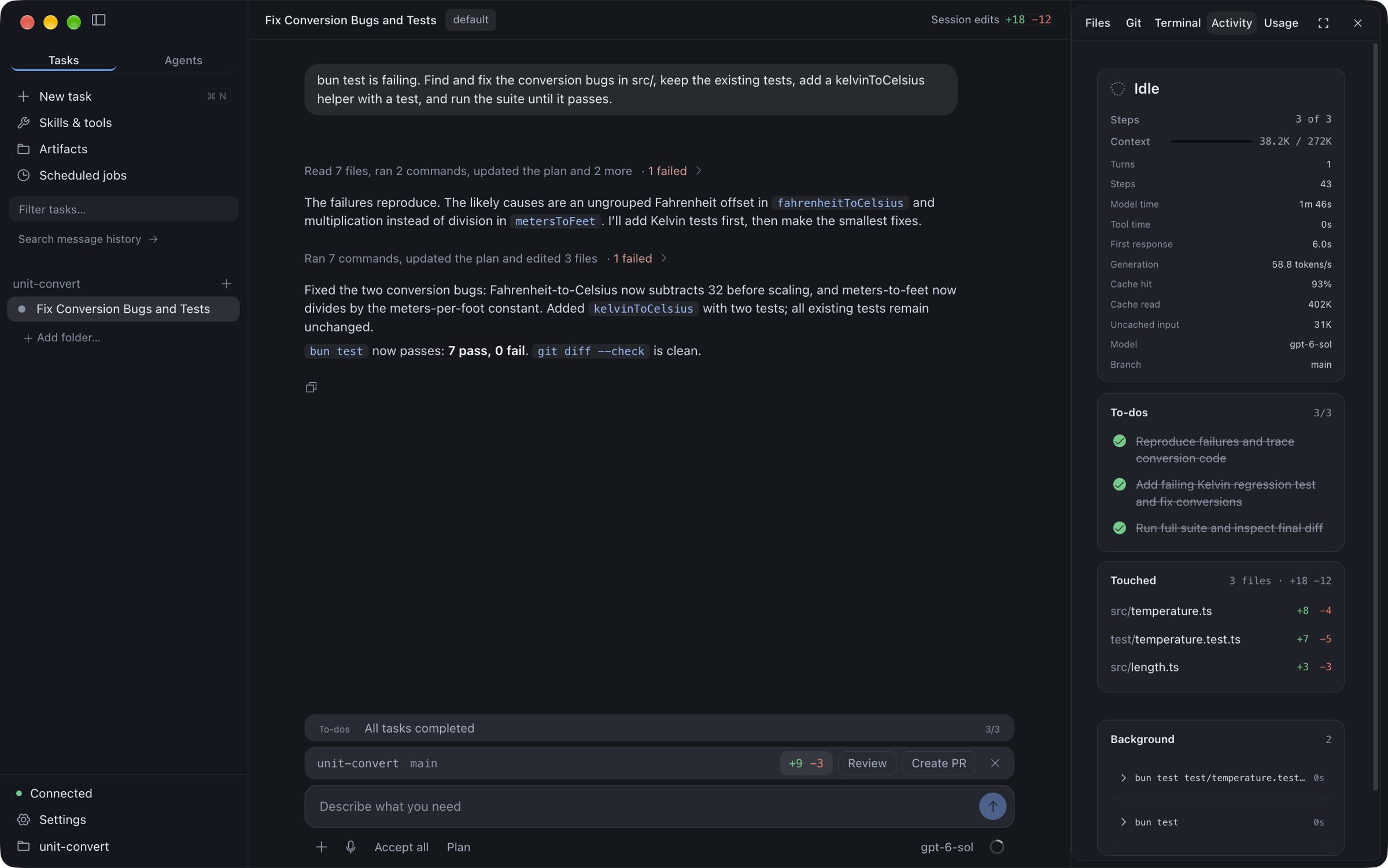
The desktop app after a real task: grouped tool activity, the plan's to-dos, touched files with their diffs, and the repository bar with Review and Create PR.
## Quick start
You need [Bun 1.3.12 or newer](https://bun.sh/). Git is required only for a source
checkout. For live turns, provide provider credentials or configure a local backend.
Install the published [`@xsimurgh/xerxes-agents`](https://www.npmjs.com/package/@xsimurgh/xerxes-agents)
package globally with Bun or npm:
```bash
bun add --global @xsimurgh/xerxes-agents
# or
npm install --global @xsimurgh/xerxes-agents
xerxes
```
The package installs three executable names: `xerxes` for normal use,
`xerxes-acp` for Agent Client Protocol hosts, and `xerxes-agents` as a package-name
alias. The runtime still requires Bun even when npm performs the installation.
Run the same published CLI without a global install:
```bash
bunx @xsimurgh/xerxes-agents
# or
npx --yes @xsimurgh/xerxes-agents
```
> **Package-name note:** install `@xsimurgh/xerxes-agents`, not `xerxes`. The unscoped npm
> package named `xerxes` is unrelated to this project.
To install the current `main` checkout and local launchers instead:
```bash
curl -fsSL https://raw.githubusercontent.com/erfanzar/Xerxes-Agents/main/scripts/install.sh | sh
# Open a new terminal after installation, then:
xerxes
```
The installer uses the locked workspace, builds the runtime and TUI, and writes
`xerxes` and `xerxes-acp` to `${XERXES_BIN_DIRECTORY:-$HOME/.local/bin}`. Repeat
the same curl command to safely fast-forward and rebuild a managed install. It
persists the launcher directory for zsh, bash, POSIX login shells, and fish;
because a piped installer cannot change its parent shell, open a new terminal
afterward.
An installer update cannot replace code already loaded by a running TUI or
daemon. If the installer reports an existing Xerxes process, finish or stop
that session and launch `xerxes` again. The installer deliberately never kills
active sessions.
Set `XERXES_INSTALL_DIRECTORY` to choose the managed checkout location; the
updater refuses dirty, unrelated, or diverged checkouts instead of overwriting
them. To choose another launcher directory, pass the variable to the piped shell:
```bash
curl -fsSL https://raw.githubusercontent.com/erfanzar/Xerxes-Agents/main/scripts/install.sh \
| XERXES_BIN_DIRECTORY="$HOME/bin" sh
```
On Windows, use the PowerShell installer instead — `install.sh` needs a POSIX
shell, and Windows PATH entries must carry an extension, so the launchers it
writes are `xerxes.cmd` and `xerxes-acp.cmd` under `%LOCALAPPDATA%\Xerxes\bin`:
```powershell
git clone https://github.com/erfanzar/Xerxes-Agents.git
cd Xerxes-Agents
./scripts/install.ps1
```
Native Windows uses a named pipe for the daemon control channel. Interactive
PTY support depends on the installed Bun runtime; Bun 1.3.12 on Windows reports
it unavailable. Use non-interactive commands or WSL2 for terminal sessions. See
[docs/deployment-guide.md](docs/deployment-guide.md#windows-hosts) for the
platform differences that are worth knowing (PTY shell, MCP `.cmd` shims).
Or run from source:
```bash
git clone https://github.com/erfanzar/Xerxes-Agents.git
cd Xerxes-Agents
bun install --frozen-lockfile
bun run build
bun run xerxes
```
## Run it
```bash
# Interactive OpenTUI session
xerxes
# One-shot request
xerxes "explain this repository"
# Resume a persistent session
xerxes --resume
# Read a one-shot request from standard input
printf 'summarize the current project' | xerxes
# Check the installation and provider setup
xerxes doctor
```
On first launch, enter `/provider` to create or select a provider profile and choose
a model. The live `/help` catalogue is authoritative because installed plugins and
project skills can extend it.
### VS Code
The **Xerxes Agents** extension is a Xerxes chat in the VS Code sidebar: tasks with
their agents, goals, approvals and questions. Files, diffs and Git open in VS Code's
own editor, diff view and Source Control. It works on the open folder, ships its own Bun runtime, and shares tasks
and providers with the desktop app and `xerxes` on the same machine. Install the
`.vsix` for your platform from a GitHub release with **Extensions → … → Install from
VSIX…**, then click the Xerxes icon in the activity bar. **Send Selection to Xerxes**
(`⌘⌥X` / `Ctrl+Alt+X`) adds the selected code to the message box. For another
machine, open its folder with VS Code Remote-SSH; the extension runs there.
## What you actually get
| Capability | What it does |
| ---------------------- | ----------------------------------------------------------------------------------------------------------------------- |
| Native OpenTUI | React 19 interface with streaming Markdown, thinking, compact tool activity, queues, overlays, and keyboard-first input |
| Bring your provider | Provider profiles for hosted APIs, local backends, and custom OpenAI-compatible endpoints |
| Permission modes | YOLO by default, plus automatic, manual, plan, and explicit allow/deny workflows |
| Persistent sessions | Resume, branch, compact, search, replay, snapshot, and roll back project-scoped work |
| Sub-agents | YAML-defined specialists with inheritance, scoped tools, delegation, and live progress |
| Skills and MCP | Recursive `SKILL.md` discovery plus explicit MCP server integration |
| One runtime | Interactive TUI, one-shot CLI, daemon, ACP, channel gateways, and embeddable TypeScript APIs |
| Scheduled work | Native cron commands and daemon-owned jobs using the same policy and tool boundaries |
| Bun-native development | Locked workspace, strict TypeScript, Bun tests, Bun builds, and no alternate runtime path |
### Terminal workflow
The home screen centers the animated Derafsh and a 75-column composer. During a
session, Xerxes switches to a compact mode/title header, a sticky transcript, and one
integrated prompt surface for queued input, completions, model/context metadata, and
keyboard hints. Once agent work exists, wide terminals add a live Agents rail on the
right, where each row reports what an agent cost — tokens, elapsed time, tool count —
alongside its task. On a narrow terminal, press `F6` or run `/agents` for the same
scrollable panel.
Press `Enter` on a row (or click it) to inspect one agent: what it is doing right now,
every tool call it made with how long each took, the files it touched, and the policy it
runs under. `Esc` returns to the list, and `Esc` again to the main agent.
Press `Left` from an empty composer, or run `/background`, to detach the current chat
into the full-screen Agent View without stopping its turn. Independent chats are grouped
by whether they need input, are working, or are ready to review. Type a prompt at the
bottom to dispatch another chat, press `Space` to peek/reply without attaching, and use
`Right` or `Enter` to attach the selected chat. Sub-agents remain inside their parent
chat rather than becoming duplicate top-level rows. New chats show `Untitled chat` until
the daemon generates a short model-written title after the first completed exchange.
`F8` or `/terminals` shows every shell Xerxes is driving — background commands,
foreground runs, and interactive sessions — with a live output tail per terminal.
Watching is non-destructive: the panel reads a mirror of the output, never the buffer the
agent itself polls. From the detail view you can send input to an interactive session
(`i`), interrupt it (`c`), or kill a process (`k`, or `K` to force).
Useful commands:
```text
/help show commands and shortcuts
/provider create or switch provider profiles
/model choose a provider model
/new start a fresh session
/resume resume saved work
/background [prompt] optionally instruct, then detach into Agent View
/agents inspect sub-agents
/terminals inspect the shells Xerxes is running
/skills inspect discovered skills
/tools inspect the active tool registry
/permissions inspect or change permission policy
/yolo toggle accept-all tool execution
/delegate agents and workflows: off, auto (default) or eager
/cron manage scheduled work
/remove-memory wipe all Xerxes memory after confirmation
/remove-history wipe saved chats and snapshots after confirmation
/status show runtime and session status
/quit exit
```
Press `Tab` with no completion menu open to cycle interaction modes. Mode changes
only change the interface palette visually: code is neutral gray, researcher is blue,
plan is gold, and objective is purple. They do not add transcript messages or spend a
model turn. On the next request, a hidden mode overlay gives the model the matching
behavior: normal implementation, evidence-first research, plan-only design, or an
iterative objective loop with verification gates. Researcher and plan modes also
enforce read-only tool ceilings and a non-YOLO permission policy; changing the palette
cannot silently retain write or command execution access.
When delegation tools are available, every non-trivial request makes the main agent
proactively decide whether independent work should be delegated. It keeps the critical path and final integration, while
bounded coder, researcher, planner, reviewer, tester, or objective agents handle
parallel side work with explicit ownership and return distilled results. Greetings,
simple questions, one-step changes, and tightly coupled edits stay in the main agent.
The same native delegation surface is available in the TUI, one-shot CLI, daemon, and
ACP server.
YOLO mode (`accept-all`) is the default permission mode and is shown beside the
active model while enabled. Use `/yolo` to switch between YOLO and automatic
approval routing, or `/permissions` to select `accept-all`, `auto`, `manual`, or
`plan` explicitly. Static tool-policy denials still take precedence.
## Configure a provider
The recommended path is interactive:
```text
/provider
```
Profiles can hold a provider, model, credential reference, and optional compatible
base URL. Common environment-based setups also work:
```bash
export ANTHROPIC_API_KEY='…'
# or OPENAI_API_KEY, GEMINI_API_KEY, and provider-specific variables
xerxes
```
Local Ollama, LM Studio, Claude Code, and custom OpenAI-compatible connections are
supported when their host service is available. Credentials remain outside the
repository. See the [configuration guide](docs/configuration-guide.md) for daemon and
embedding options.
`XERXES_HOME` controls where Xerxes stores profiles, credentials, sessions, daemon
state, and memory. The default is below the current user's home directory.
## Sessions, agents, and extensions
Sessions are durable and project-scoped. Use `/resume`, `/branch`, `/compact`,
`/snapshot`, and `/rollback` to move through long-running work without flattening its
history.
Project agent definitions live in `.agents/`. They are Bun-loaded YAML documents with
inheritance, tool policy, sub-agent references, and prompt-file support. Skills are
`SKILL.md` bundles discovered recursively from project, user, and bundled locations.
```text
/agents show active and available agents
/skills list discovered skills
/skill invoke a skill
/plugins inspect loaded plugins
/reload-mcp refresh configured MCP servers
```
Channel adapters and scheduled jobs run through the same daemon turn loop as the TUI.
Telegram has a direct launcher:
```bash
xerxes telegram --token "$TELEGRAM_BOT_TOKEN"
```
## Permissions and security
Xerxes keeps high-impact actions observable:
- Workspace paths are resolved against the active project and unsafe traversal is
rejected.
- Writes, commands, network actions, and other privileged tools follow the active
permission policy.
- Sandbox execution uses an explicit local or host-provided backend; unavailable
integrations return actionable errors.
- Browser automation attaches only to an explicitly supplied, already-running
Chromium-compatible CDP endpoint. Xerxes does not launch or own a browser process.
- Provider credentials and live external calls remain opt-in and outside source
control.
## Other runtime surfaces
```bash
# Project-scoped JSON-RPC daemon
xerxes daemon --project-dir .
# Agent Client Protocol over stdio
xerxes acp --project-dir .
# Show subscription quota windows (Claude, Codex, Kimi Code, Z.ai)
xerxes usage [provider]
# Export a session
xerxes export [session]
# Invoke a skill without opening the TUI
xerxes skill [arguments]
```
The OpenAI-compatible HTTP server is an embeddable Bun handler rather than an implicit
background command. Hosts inject their model client, model catalogue, authentication,
CORS, and rate-limit policy before listening. See the
[API reference](docs/api-reference.md).
## How it fits together
```text
React 19 + OpenTUI
│
│ v35 NDJSON JSON-RPC over a project-scoped socket
▼
Bun daemon
├── provider streaming, retries, and budgets
├── tool registry, permissions, and sandbox routing
├── sessions, replay, compaction, snapshots, and memory
├── agents, skills, MCP, channels, and scheduling
└── audit events, ACP, and embedded HTTP surfaces
```
The TUI consumes serializable daemon events; it does not own model calls, persistence,
or workspace execution. The daemon guarantees a terminal event for every turn and
shares the same event vocabulary across its external surfaces.
## Troubleshooting
Start with:
```bash
xerxes doctor
```
| Problem | Fix |
| ------------------------------- | ------------------------------------------------------------------------------------------------------------- |
| `xerxes: command not found` | Reinstall `@xsimurgh/xerxes-agents` globally, use `bunx @xsimurgh/xerxes-agents`, or add the source installer's bin directory to `PATH` |
| No model is configured | Open `/provider`, select or create a profile, then choose a model |
| Local backend will not connect | Confirm the backend is already running and its configured base URL is reachable |
| Terminal colors are wrong | Use a modern Unicode terminal; set `XERXES_TUI_THEME=dark` or `light` when automatic detection is wrong |
| Animation is unwanted | Set `XERXES_TUI_ANIMATIONS=0` |
| A source UI edit is not visible | Run `bun run build:ui`; `xerxes` launches the generated TUI bundle |
| A project daemon is stale | Exit the TUI, stop the project daemon, then relaunch so the current runtime is loaded |
Apple Terminal is directly exercised during visual development. Other terminals must
support Unicode and normal interactive TTY input; report renderer-specific issues with
the terminal name and `$TERM` value.
## Development
```bash
bun install --frozen-lockfile
# Full repository gate
bun run verify
# Useful focused commands
bun run repo:check
bun run typecheck
bun run test:runtime
bun run test:ui
bun run build:runtime
bun run build:ui
bun run smoke
bun run docs:build
git diff --check
```
`bun run xerxes` launches the generated `xerxes/dist/ui/entry.js`. OpenTUI is
the only renderer; after editing `xerxes/src/ui`, rebuild only its bundle with:
```bash
bun run --cwd xerxes build:ui
bun run xerxes
```
Release staging validates the built runtime, TUI, bundled skills, metadata, and
installed package:
```bash
bun run verify
RELEASE_ROOT="$(mktemp -d)"
PACKAGE_DIR="$RELEASE_ROOT/package"
ARCHIVE="$RELEASE_ROOT/xerxes-agents-$(bun -p 'require("./package.json").version').tgz"
bun run release:prepare -- --output "$PACKAGE_DIR"
(
cd "$PACKAGE_DIR"
bun pm pack --filename "$ARCHIVE" --ignore-scripts
)
bun run release:check -- --package "$PACKAGE_DIR" --archive "$ARCHIVE"
bun run release:smoke -- "$ARCHIVE"
```
Container deployment is documented in the
[deployment guide](docs/deployment-guide.md). Contributors should also read
[AGENTS.md](AGENTS.md) and the [contributing guide](docs/contributing.md).
## Documentation
- [Desktop workspace](docs/desktop-workspace.md)
- [Configuration](docs/configuration-guide.md)
- [Deployment](docs/deployment-guide.md)
- [API reference](docs/api-reference.md)
- [System architecture](docs/system-architecture.md)
- [Testing](docs/testing-guide.md)
- [Contributing](docs/contributing.md)
## Acknowledgements
Xerxes' OpenTUI presentation was informed by
[superagent-ai/grok-cli](https://github.com/superagent-ai/grok-cli), available under
the MIT License. Xerxes keeps separate branding and is not affiliated with Grok or
xAI.
## License
Xerxes is licensed under the [Apache License 2.0](LICENSE).
Created by [Erfan Zare Chavoshi](https://github.com/erfanzar).