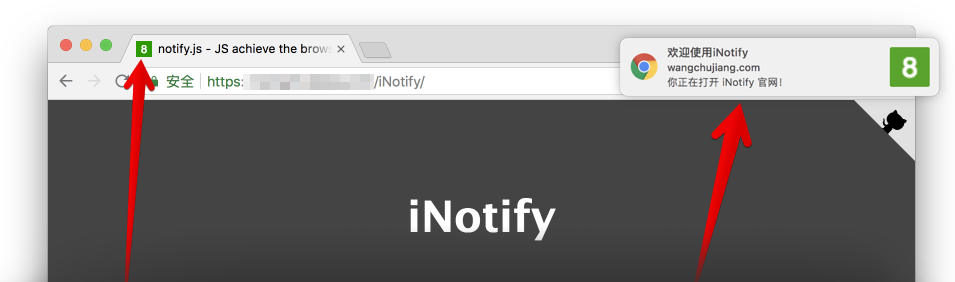

<p align="right">
<a href="./README.md">English</a>
</p>

<div markdown="1">
  <sup>使用<a href="https://wangchujiang.com/#/app" target="_blank">我的应用</a>，也是对我的<a href="https://wangchujiang.com/#/sponsor" target="_blank">支持</a>：</sup>
  <br>
  <a target="_blank" href="https://github.com/jaywcjlove/vidwall-hub" title="Vidwall Hub for macOS"><img alt="Vidwall Hub" height="52" width="52" src="https://wangchujiang.com/appicon/vidwall-hub.png"></a>
  <a target="_blank" href="https://apps.apple.com/app/VidCrop/6752624705" title="VidCrop for macOS"><img alt="VidCrop" height="52" width="52" src="https://wangchujiang.com/appicon/vidcrop.png"></a>
  <a target="_blank" href="https://apps.apple.com/app/Vidwall/6747587746" title="Vidwall for macOS"><img alt="Vidwall" height="52" width="52" src="https://wangchujiang.com/appicon/vidwall.png"></a>
  <a target="_blank" href="https://wangchujiang.com/mousio-hint/" title="Mousio Hint for macOS"><img alt="Mousio Hint" height="52" width="52" src="https://wangchujiang.com/appicon/mousio-hint.png"></a>
  <a target="_blank" href="https://apps.apple.com/app/6746747327" title="Mousio for macOS"><img alt="Mousio" height="52" width="52" src="https://wangchujiang.com/appicon/mousio.png"></a>
  <a target="_blank" href="https://apps.apple.com/app/6745227444" title="Musicer for macOS"><img alt="Musicer" height="52" width="52" src="https://wangchujiang.com/appicon/musicer.png"></a>
  <a target="_blank" href="https://apps.apple.com/app/6743841447" title="Audioer for macOS"><img alt="Audioer" height="52" width="52" src="https://wangchujiang.com/appicon/audioer.png"></a>
  <a target="_blank" href="https://apps.apple.com/app/6744690194" title="FileSentinel for macOS"><img alt="FileSentinel" height="52" width="52" src="https://wangchujiang.com/appicon/file-sentinel.png"></a>
  <a target="_blank" href="https://apps.apple.com/app/6743495172" title="FocusCursor for macOS"><img alt="FocusCursor" height="52" width="52" src="https://wangchujiang.com/appicon/focus-cursor.png"></a>
  <a target="_blank" href="https://apps.apple.com/app/6742680573" title="Videoer for macOS"><img alt="Videoer" height="52" width="52" src="https://wangchujiang.com/appicon/videoer.png"></a>
  <a target="_blank" href="https://apps.apple.com/app/6740425504" title="KeyClicker for macOS"><img alt="KeyClicker" height="52" width="52" src="https://wangchujiang.com/appicon/key-clicker.png"></a>
  <a target="_blank" href="https://apps.apple.com/app/6739052447" title="DayBar for macOS"><img alt="DayBar" height="52" width="52" src="https://wangchujiang.com/appicon/daybar.png"></a>
  <a target="_blank" href="https://apps.apple.com/app/6739444407" title="Iconed for macOS"><img alt="Iconed" height="52" width="52" src="https://wangchujiang.com/appicon/iconed.png"></a>
  <a target="_blank" href="https://apps.apple.com/app/6737160756" title="Mousio for macOS"><img alt="Mousio" height="52" width="52" src="https://wangchujiang.com/appicon/rightmenu-master.png"></a>
  <a target="_blank" href="https://apps.apple.com/app/6723903021" title="Paste Quick for macOS"><img alt="Quick RSS" height="52" width="52" src="https://wangchujiang.com/appicon/paste-quick.png"></a>
  <a target="_blank" href="https://apps.apple.com/app/6670696072" title="Quick RSS for macOS/iOS"><img alt="Quick RSS" height="52" width="52" src="https://wangchujiang.com/appicon/quick-rss.png"></a>
  <a target="_blank" href="https://apps.apple.com/app/6670167443" title="Web Serve for macOS"><img alt="Web Serve" height="52" width="52" src="https://wangchujiang.com/appicon/web-serve.png"></a>
  <a target="_blank" href="https://apps.apple.com/app/6503953628" title="Copybook Generator for macOS/iOS"><img alt="Copybook Generator" height="52" width="52" src="https://wangchujiang.com/appicon/copybook-generator.png"></a>
  <a target="_blank" href="https://apps.apple.com/app/6471227008" title="DevTutor for macOS/iOS"><img alt="DevTutor for SwiftUI" height="52" width="52" src="https://wangchujiang.com/appicon/devtutor.png"></a>
  <a target="_blank" href="https://apps.apple.com/app/6479819388" title="RegexMate for macOS/iOS"><img alt="RegexMate" height="52" width="52" src="https://wangchujiang.com/appicon/regex-mate.png"></a>
  <a target="_blank" href="https://apps.apple.com/app/6479194014" title="Time Passage for macOS/iOS"><img alt="Time Passage" height="52" width="52" src="https://wangchujiang.com/appicon/time-passage.png"></a>
  <a target="_blank" href="https://apps.apple.com/app/6478772538" title="IconizeFolder for macOS"><img alt="Iconize Folder" height="52" width="52" src="https://wangchujiang.com/appicon/iconize-folder.png"></a>
  <a target="_blank" href="https://apps.apple.com/app/6478511402" title="Textsound Saver for macOS/iOS"><img alt="Textsound Saver" height="52" width="52" src="https://wangchujiang.com/appicon/textsound-saver.png"></a>
  <a target="_blank" href="https://apps.apple.com/app/6476924627" title="Create Custom Symbols for macOS"><img alt="Create Custom Symbols" height="52" width="52" src="https://wangchujiang.com/appicon/create-custom-symbols.png"></a>
  <a target="_blank" href="https://apps.apple.com/app/6476452351" title="DevHub for macOS"><img alt="DevHub" height="52" width="52" src="https://wangchujiang.com/appicon/devhub.png"></a>
  <a target="_blank" href="https://apps.apple.com/app/6476400184" title="Resume Revise for macOS"><img alt="Resume Revise" height="52" width="52" src="https://wangchujiang.com/appicon/resume-revise.png"></a>
  <a target="_blank" href="https://apps.apple.com/app/6472593276" title="Palette Genius for macOS"><img alt="Palette Genius" height="52" width="52" src="https://wangchujiang.com/appicon/palette-genius.png"></a>
  <a target="_blank" href="https://apps.apple.com/app/6470879005" title="Symbol Scribe for macOS"><img alt="Symbol Scribe" height="52" width="52" src="https://wangchujiang.com/appicon/symbol-scribe.png"></a>
</div>
<hr>


<p align="center">
  <a href="https://jaywcjlove.github.io/iNotify">
    <img alt="iNotify 实例预览" src="https://github.com/jaywcjlove/iNotify/blob/master/website/assets/iNotify.png?raw=true">
  </a>
</p>

<p align="center">
  <a href="https://jaywcjlove.github.io/#/sponsor">
    <img src="https://img.shields.io/badge/Buy%20me%20a%20coffee-048754?logo=buymeacoffee">
  </a>
  <a href="https://github.com/jaywcjlove/iNotify/issues">
    <img src="https://img.shields.io/github/issues/jaywcjlove/iNotify.svg">
  </a>
  <a href="https://github.com/jaywcjlove/iNotify/network">
    <img src="https://img.shields.io/github/forks/jaywcjlove/iNotify.svg">
  </a>
  <a href="https://github.com/jaywcjlove/iNotify/stargazers">
    <img src="https://img.shields.io/github/stars/jaywcjlove/iNotify.svg">
  </a>
  <a href="https://github.com/jaywcjlove/iNotify/releases">
    <img src="https://img.shields.io/github/release/jaywcjlove/iNotify.svg">
  </a>
  <a href="https://www.npmjs.com/package/@wcjiang/notify">
    <img src="https://img.shields.io/npm/v/@wcjiang/notify.svg">
  </a>
</p>

JS 实现浏览器的 title 闪烁、滚动、声音提示、通知，没有依赖. 它不会干扰任何 JavaScript 库或框架。有合理的体积 5.05kb (gzipped: 1.75kb)，官方文档[实例预览](https://jaywcjlove.github.io/iNotify)。

## 下载

```bash
# v2.x
$ npm install @wcjiang/notify --save
# v1.x
$ npm install title-notify --save
```

## 使用

```js
import Notify from "@wcjiang/notify";

const notify = new Notify({
  message: "有消息了。", // 标题
  effect: "flash", // flash | scroll 闪烁还是滚动
  openurl: "https://github.com/jaywcjlove/iNotify", // 点击弹窗打开连接地址
  onclick: () => {
    // 点击弹出的窗之行事件
    console.log("---");
  },
  // 可选播放声音
  audio: {
    // 可以使用数组传多种格式的声音文件
    file: ["msg.mp4", "msg.mp3", "msg.wav"],
    // 下面也是可以的哦
    // file: 'msg.mp4'
  },
  // 标题闪烁，或者滚动速度
  interval: 1000,
  disableFavicon: false, // 可选，默认不禁用。如果为true则不覆盖原有favicon
  // 可选，默认绿底白字的  Favicon
  updateFavicon: {
    // favicon 字体颜色
    textColor: "#fff",
    // 背景颜色，设置背景颜色透明，将值设置为“transparent”
    backgroundColor: "#2F9A00",
  },
  // 可选chrome浏览器通知，默认不填写就是下面的内容
  notification: {
    title: "通知！", // 设置标题
    icon: "", // 设置图标 icon 默认为 Favicon
    body: "您来了一条新消息", // 设置消息内容
  },
});

notify.player();
```

在您的 HTML 中手动下载并引入 **notify.js**，你也可以通过 [UNPKG](https://unpkg.com/@wcjiang/notify/dist/) 进行下载：

```html
<script src="https://unpkg.com/@wcjiang/notify/dist/notify.min.js"></script>
<script type="text/javascript">
  var notify = new Notify({
    effect: "flash",
    interval: 500,
  });
  notify.setFavicon("1");
</script>
```

## option

- **message**: String 标题
- **effect**: String, flash | scroll | favicon 闪烁还是滚动
- **audio**: 可选播放声音
  - **file**: String/Array 可以使用数组传多种格式的声音文件
- **interval**: Number 标题闪烁，或者滚动速度
- **openurl**: String 点击弹窗打开连接地址
- **onclick**: Function 弹窗点击事件
- **updateFavicon**: 设置 Favicon 图标颜色
  - **textColor**: 设置 favicon 字体颜色
  - **backgroundColor**: 背景颜色，设置背景颜色透明，将值设置为 `transparent`
- **notification**: 可选 chrome 浏览器通知，默认不填写就是下面的内容
  - **title**: 默认值 `通知！`
  - **icon**: 设置图标 icon 默认为 Favicon
  - **body**: 设置消息内容

## isPermission

判断浏览器弹框通知是否被阻止。

```js
iNotify.isPermission();
```

## 声音设置

### player

播放声音

```js
iNotify.player();
```

### loopPlay

自动播放声音

```js
iNotify.loopPlay();
```

### stopPlay

停止播放声音

```js
iNotify.stopPlay();
```

### setURL

设置播放声音 URL

```js
iNotify.setURL("msg.mp3"); // 设置一个
iNotify.setURL(["msg.mp3", "msg.ogg", "msg.mp4"]); // 设置多个
```

## title

最新的版本默认不播放标题闪烁动画，初始化之后需要调用 `setTitle(true)` 方法才播放标题动画。

### setTitle

设置标题，

```js
iNotify.setTitle(true); // 播放动画
iNotify.setTitle("新标题"); // 闪烁新标题
iNotify.setTitle(); // 清除闪烁 显示原来的标题
```

### setInterval

设置时间间隔

```js
iNotify.setInterval(2000);
```

### addTimer

添加计数器

```js
iNotify.addTimer();
```

### clearTimer

清除计数器

```js
iNotify.clearTimer();
```

## favicon 通知

### setFavicon

设置 icon 显示数字或者文本

```js
iNotify.setFavicon(10);
```

### setFaviconColor

设置 icon 显示文本颜色

```js
iNotify.setFaviconColor("#0043ff");
```

### setFaviconBackgroundColor

设置 icon 显示文本颜色

```js
iNotify.setFaviconBackgroundColor("#0043ff");
// 设置字体和背景颜色
iNotify.setFaviconColor("#f5ff00").setFaviconBackgroundColor("red");
```

### faviconClear

清除数字显示原来的 icon

```js
iNotify.faviconClear();
```

## chrome 通知

### notify

弹出 chrome 通知，不传参数为预设值...

```js
iNotify.notify();
iNotify.notify({
  title: "新通知",
  body: "打雷啦，下雨啦...",
  openurl: "http://www.bing.com",
  onclick: function () {
    console.log("on click");
  },
  onshow: function () {
    console.log("on show");
  },
});
```

- title 一定会被显示的通知标题。
- dir 文字的方向；它的值可以是 auto（自动）, ltr（从左到右）, or rtl（从右到左）。
- icon 一个图片的 URL，将被用于显示通知的图标。
- body 通知中额外显示的字符串。
- openurl 点击打开指定 URL。
- onclick 每当用户点击通知时被触发。
- onshow 当通知显示的时候被触发。
- onerror 每当通知遇到错误时被触发。
- onclose 当用户关闭通知时被触发。

## 其它

`iNotify.init().title;` 获取标题

## 例子

### 实例一

```js
function iconNotify(num) {
  if (!notify) {
    var notify = new Notify({
      effect: "flash",
      interval: 500,
    });
  }
  if (num === 0) {
    notify.faviconClear();
    notify.setTitle();
  } else if (num < 100) {
    notify.setFavicon(num);
    notify.setTitle("有新消息！");
  } else if (num > 99) {
    notify.setFavicon("..");
    notify.setTitle("有新消息！");
  }
}
```

### 实例二

```js
var notify = new Notify({
  effect: "flash",
  interval: 500,
});
notify.setFavicon("1");
```

### 实例三

```js
var iN = new Notify({
  effect: "flash",
  interval: 500,
  message: "有消息拉！",
  updateFavicon: {
    // 可选，默认绿底白字
    textColor: "#fff", // favicon 字体颜色
    backgroundColor: "#2F9A00", // 背景颜色
  },
}).setFavicon(10);
```

### 实例四

```js
var iN = new Notify().setFavicon(5);
```

### 实例五

```js
var iN = new Notify({
  effect: "flash",
  interval: 500,
  message: "有消息拉！",
  audio: {
    file: "msg.mp4",
  },
})
  .setFavicon(10)
  .player();
```

### 实例五

```js
var iN = new Notify({
  effect: "flash",
  interval: 500,
  message: "有消息拉！",
  audio: {
    file: "msg.mp4", //可以使用数组传多种格式的声音文件
  },
  notification: {
    title: "通知！",
    icon: "",
    body: "您来了一条新消息",
  },
})
  .setFavicon(10)
  .player();

//弹出chrome通知，不传参数为预设值...
iN.notify();

iN.notify({
  title: "新通知",
  body: "打雷啦，下雨啦...",
});
```

### 实例六

```js
var iN = new Notify({
  effect: "flash",
  interval: 500,
  message: "有消息拉！",
  audio: {
    file: ["msg.mp4", "msg.mp3", "msg.wav"],
  },
  notification: {
    title: "通知！",
    body: "您来了一条新消息",
  },
});

iN.setFavicon(10).player();

var n = new Notify();
n.init({
  effect: "flash",
  interval: 500,
  message: "有消息拉！",
  audio: {
    file: ["openSub.mp4", "openSub.mp3", "openSub.wav"],
  },
  notification: {
    title: "通知！",
    icon: "",
    body: "您来了一个客户",
  },
});

n.setFavicon(10).player();
```

## 贡献者

一如既往，感谢我们出色的贡献者！

<a href="https://github.com/jaywcjlove/iNotify/graphs/contributors">
  <img src="https://jaywcjlove.github.io/iNotify/CONTRIBUTORS.svg" />
</a>

由 [contributors](https://github.com/jaywcjlove/github-action-contributors) 制作。

## License

[MIT © Kenny Wong](./MIT-LICENSE)




























