[](https://github.com/sponsors/vladmandic)





# Human Library
**AI-powered 3D Face Detection & Rotation Tracking, Face Description & Recognition,**
**Body Pose Tracking, 3D Hand & Finger Tracking, Iris Analysis,**
**Age & Gender & Emotion Prediction, Gaze Tracking, Gesture Recognition, Body Segmentation**
## Highlights
- Compatible with most server-side and client-side environments and frameworks
- Combines multiple machine learning models which can be switched on-demand depending on the use-case
- Related models are executed in an attention pipeline to provide details when needed
- Optimized input pre-processing that can enhance image quality of any type of inputs
- Detection of frame changes to trigger only required models for improved performance
- Intelligent temporal interpolation to provide smooth results regardless of processing performance
- Simple unified API
- Built-in Image, Video and WebCam handling
[*Jump to Quick Start*](#quick-start)
## Compatibility
**Browser**:
- Compatible with both desktop and mobile platforms
- Compatible with *WebGPU*, *WebGL*, *WASM*, *CPU* backends
- Compatible with *WebWorker* execution
- Compatible with *WebView*
- Primary platform: *Chromium*-based browsers
- Secondary platform: *Firefox*, *Safari*
**NodeJS**:
- Compatibile with *WASM* backend for executions on architectures where *tensorflow* binaries are not available
- Compatible with *tfjs-node* using software execution via *tensorflow* shared libraries
- Compatible with *tfjs-node* using GPU-accelerated execution via *tensorflow* shared libraries and nVidia CUDA
- Supported versions are from **14.x** to **22.x**
- NodeJS version **23.x** is not supported due to breaking changes and issues with `@tensorflow/tfjs`
## Releases
- [Release Notes](https://github.com/vladmandic/human/releases)
- [NPM Link](https://www.npmjs.com/package/@vladmandic/human)
## Demos
*Check out [**Simple Live Demo**](https://vladmandic.github.io/human/demo/typescript/index.html) fully annotated app as a good start starting point ([html](https://github.com/vladmandic/human/blob/main/demo/typescript/index.html))([code](https://github.com/vladmandic/human/blob/main/demo/typescript/index.ts))*
*Check out [**Main Live Demo**](https://vladmandic.github.io/human/demo/index.html) app for advanced processing of of webcam, video stream or images static images with all possible tunable options*
- To start video detection, simply press *Play*
- To process images, simply drag & drop in your Browser window
- Note: For optimal performance, select only models you'd like to use
- Note: If you have modern GPU, *WebGL* (default) backend is preferred, otherwise select *WASM* backend
- [**List of all Demo applications**](https://github.com/vladmandic/human/wiki/Demos)
- [**Live Examples galery**](https://vladmandic.github.io/human/samples/index.html)
### Browser Demos
*All browser demos are self-contained without any external dependencies*
- **Full** [[*Live*]](https://vladmandic.github.io/human/demo/index.html) [[*Details*]](https://github.com/vladmandic/human/tree/main/demo): Main browser demo app that showcases all Human capabilities
- **Simple** [[*Live*]](https://vladmandic.github.io/human/demo/typescript/index.html) [[*Details*]](https://github.com/vladmandic/human/tree/main/demo/typescript): Simple demo in WebCam processing demo in TypeScript
- **Embedded** [[*Live*]](https://vladmandic.github.io/human/demo/video/index.html) [[*Details*]](https://github.com/vladmandic/human/tree/main/demo/video/index.html): Even simpler demo with tiny code embedded in HTML file
- **Face Detect** [[*Live*]](https://vladmandic.github.io/human/demo/facedetect/index.html) [[*Details*]](https://github.com/vladmandic/human/tree/main/demo/facedetect): Extract faces from images and processes details
- **Face Match** [[*Live*]](https://vladmandic.github.io/human/demo/facematch/index.html) [[*Details*]](https://github.com/vladmandic/human/tree/main/demo/facematch): Extract faces from images, calculates face descriptors and similarities and matches them to known database
- **Face ID** [[*Live*]](https://vladmandic.github.io/human/demo/faceid/index.html) [[*Details*]](https://github.com/vladmandic/human/tree/main/demo/faceid): Runs multiple checks to validate webcam input before performing face match to faces in IndexDB
- **Multi-thread** [[*Live*]](https://vladmandic.github.io/human/demo/multithread/index.html) [[*Details*]](https://github.com/vladmandic/human/tree/main/demo/multithread): Runs each Human module in a separate web worker for highest possible performance
- **NextJS** [[*Live*]](https://vladmandic.github.io/human-next/out/index.html) [[*Details*]](https://github.com/vladmandic/human-next): Use Human with TypeScript, NextJS and ReactJS
- **ElectronJS** [[*Details*]](https://github.com/vladmandic/human-electron): Use Human with TypeScript and ElectonJS to create standalone cross-platform apps
- **3D Analysis with BabylonJS** [[*Live*]](https://vladmandic.github.io/human-motion/src/index.html) [[*Details*]](https://github.com/vladmandic/human-motion): 3D tracking and visualization of heead, face, eye, body and hand
- **VRM Virtual Model Tracking with Three.JS** [[*Live*]](https://vladmandic.github.io/human-three-vrm/src/human-vrm.html) [[*Details*]](https://github.com/vladmandic/human-three-vrm): VR model with head, face, eye, body and hand tracking
- **VRM Virtual Model Tracking with BabylonJS** [[*Live*]](https://vladmandic.github.io/human-bjs-vrm/src/index.html) [[*Details*]](https://github.com/vladmandic/human-bjs-vrm): VR model with head, face, eye, body and hand tracking
### NodeJS Demos
*NodeJS demos may require extra dependencies which are used to decode inputs*
*See header of each demo to see its dependencies as they are not automatically installed with `Human`*
- **Main** [[*Details*]](https://github.com/vladmandic/human/tree/main/demo/nodejs/node.js): Process images from files, folders or URLs using native methods
- **Canvas** [[*Details*]](https://github.com/vladmandic/human/tree/main/demo/nodejs/node-canvas.js): Process image from file or URL and draw results to a new image file using `node-canvas`
- **Video** [[*Details*]](https://github.com/vladmandic/human/tree/main/demo/nodejs/node-video.js): Processing of video input using `ffmpeg`
- **WebCam** [[*Details*]](https://github.com/vladmandic/human/tree/main/demo/nodejs/node-webcam.js): Processing of webcam screenshots using `fswebcam`
- **Events** [[*Details*]](https://github.com/vladmandic/human/tree/main/demo/nodejs/node-event.js): Showcases usage of `Human` eventing to get notifications on processing
- **Similarity** [[*Details*]](https://github.com/vladmandic/human/tree/main/demo/nodejs/node-similarity.js): Compares two input images for similarity of detected faces
- **Face Match** [[*Details*]](https://github.com/vladmandic/human/tree/main/demo/facematch/node-match.js): Parallel processing of face **match** in multiple child worker threads
- **Multiple Workers** [[*Details*]](https://github.com/vladmandic/human/tree/main/demo/multithread/node-multiprocess.js): Runs multiple parallel `human` by dispaching them to pool of pre-created worker processes
- **Dynamic Load** [[*Details*]](https://github.com/vladmandic/human/tree/main/demo/nodejs): Loads Human dynamically with multiple different desired backends
## Project pages
- [**Code Repository**](https://github.com/vladmandic/human)
- [**NPM Package**](https://www.npmjs.com/package/@vladmandic/human)
- [**Issues Tracker**](https://github.com/vladmandic/human/issues)
- [**TypeDoc API Specification - Main class**](https://vladmandic.github.io/human/typedoc/classes/Human.html)
- [**TypeDoc API Specification - Full**](https://vladmandic.github.io/human/typedoc/)
- [**Change Log**](https://github.com/vladmandic/human/blob/main/CHANGELOG.md)
- [**Current To-do List**](https://github.com/vladmandic/human/blob/main/TODO.md)
## Wiki pages
- [**Home**](https://github.com/vladmandic/human/wiki)
- [**Installation**](https://github.com/vladmandic/human/wiki/Install)
- [**Usage & Functions**](https://github.com/vladmandic/human/wiki/Usage)
- [**Configuration Details**](https://github.com/vladmandic/human/wiki/Config)
- [**Result Details**](https://github.com/vladmandic/human/wiki/Result)
- [**Customizing Draw Methods**](https://github.com/vladmandic/human/wiki/Draw)
- [**Caching & Smoothing**](https://github.com/vladmandic/human/wiki/Caching)
- [**Input Processing**](https://github.com/vladmandic/human/wiki/Image)
- [**Face Recognition & Face Description**](https://github.com/vladmandic/human/wiki/Embedding)
- [**Gesture Recognition**](https://github.com/vladmandic/human/wiki/Gesture)
- [**Common Issues**](https://github.com/vladmandic/human/wiki/Issues)
- [**Background and Benchmarks**](https://github.com/vladmandic/human/wiki/Background)
## Additional notes
- [**Comparing Backends**](https://github.com/vladmandic/human/wiki/Backends)
- [**Development Server**](https://github.com/vladmandic/human/wiki/Development-Server)
- [**Build Process**](https://github.com/vladmandic/human/wiki/Build-Process)
- [**Adding Custom Modules**](https://github.com/vladmandic/human/wiki/Module)
- [**Performance Notes**](https://github.com/vladmandic/human/wiki/Performance)
- [**Performance Profiling**](https://github.com/vladmandic/human/wiki/Profiling)
- [**Platform Support**](https://github.com/vladmandic/human/wiki/Platforms)
- [**Diagnostic and Performance trace information**](https://github.com/vladmandic/human/wiki/Diag)
- [**Dockerize Human applications**](https://github.com/vladmandic/human/wiki/Docker)
- [**List of Models & Credits**](https://github.com/vladmandic/human/wiki/Models)
- [**Models Download Repository**](https://github.com/vladmandic/human-models)
- [**Security & Privacy Policy**](https://github.com/vladmandic/human/blob/main/SECURITY.md)
- [**License & Usage Restrictions**](https://github.com/vladmandic/human/blob/main/LICENSE)
*See [**issues**](https://github.com/vladmandic/human/issues?q=) and [**discussions**](https://github.com/vladmandic/human/discussions) for list of known limitations and planned enhancements*
*Suggestions are welcome!*
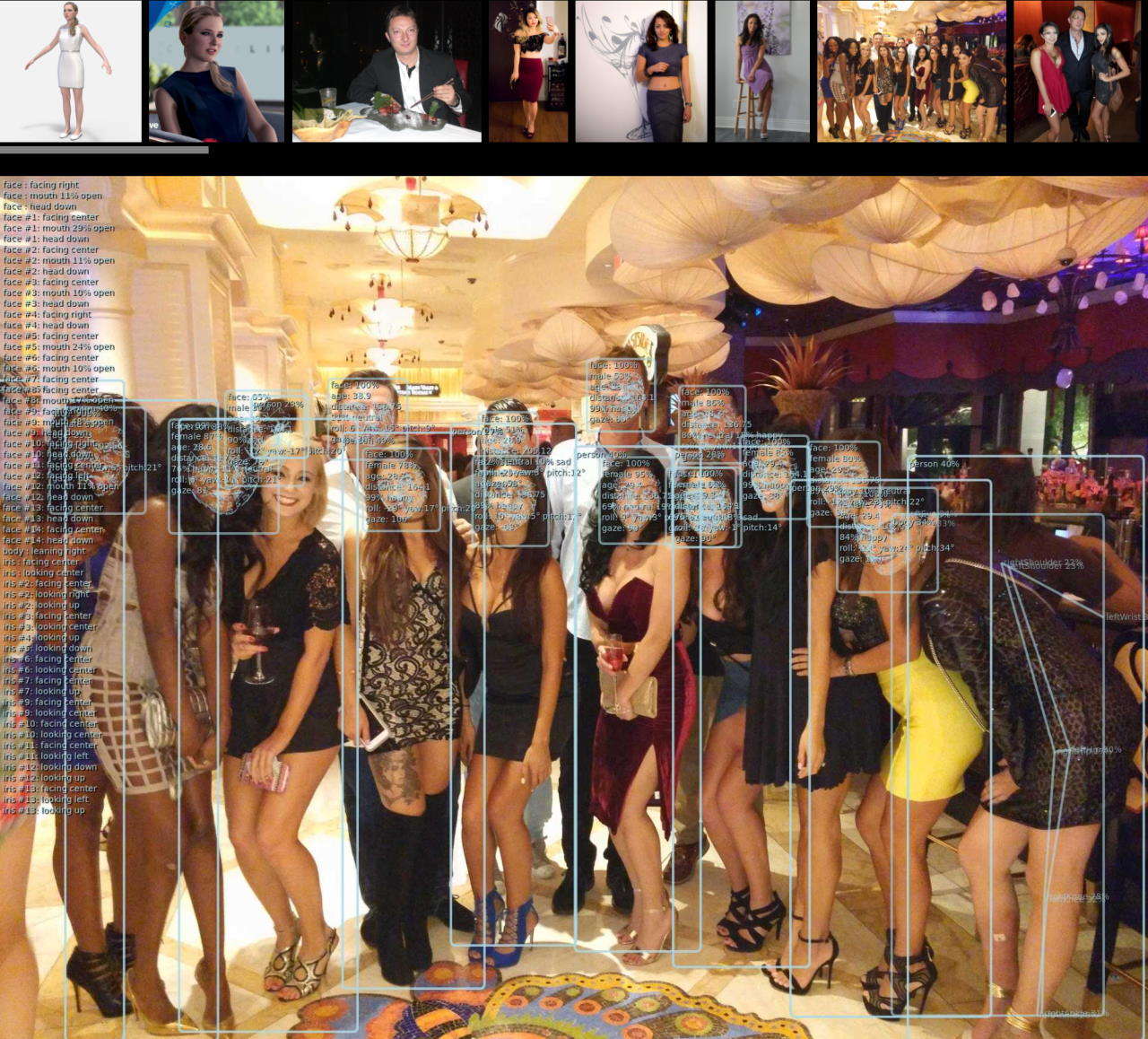
## App Examples
Visit [Examples gallery](https://vladmandic.github.io/human/samples/index.html) for more examples
[ ](assets/samples.jpg)
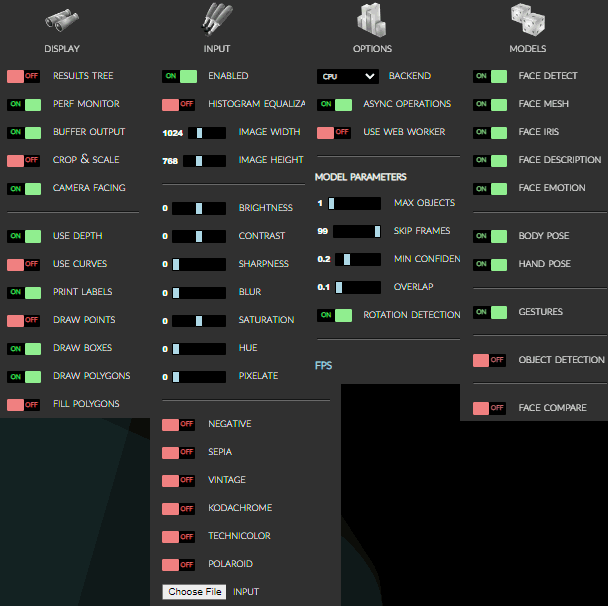
## Options
All options as presented in the demo application...
[demo/index.html](demo/index.html)
[ ](assets/screenshot-menu.png)
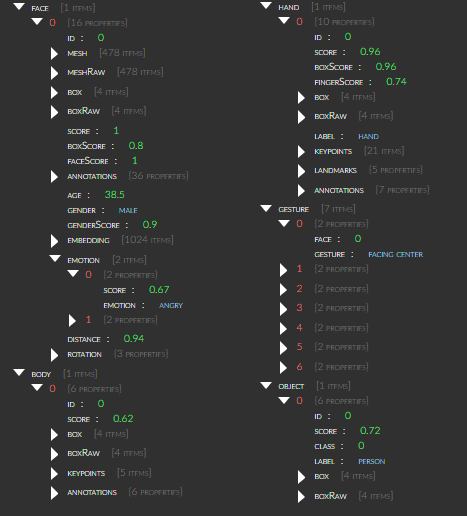
**Results Browser:**
[ *Demo -> Display -> Show Results* ]
[ ](assets/screenshot-results.png)
## Advanced Examples
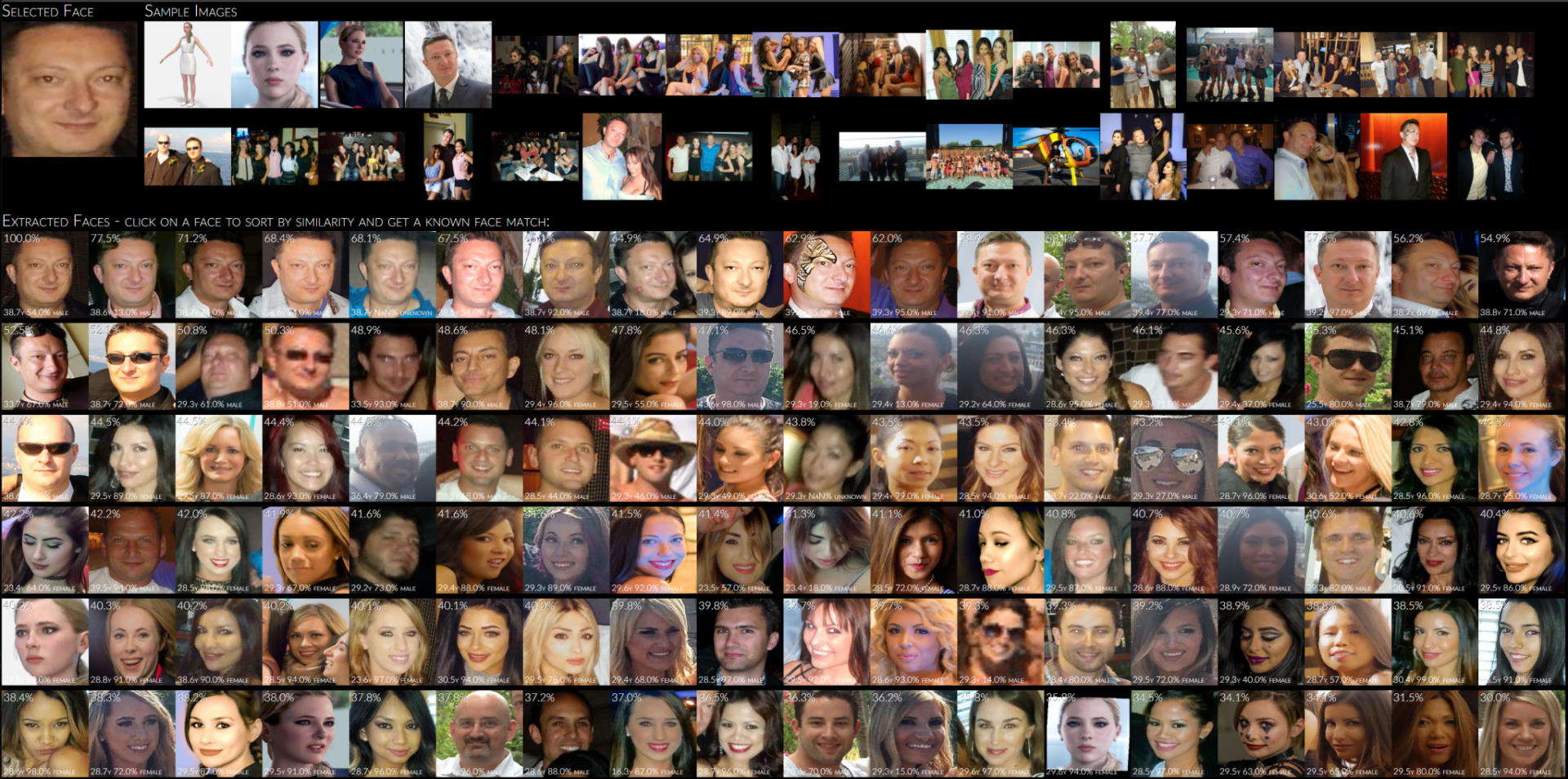
1. **Face Similarity Matching:**
Extracts all faces from provided input images,
sorts them by similarity to selected face
and optionally matches detected face with database of known people to guess their names
> [demo/facematch](demo/facematch/index.html)
[ ](assets/screenshot-facematch.jpg)
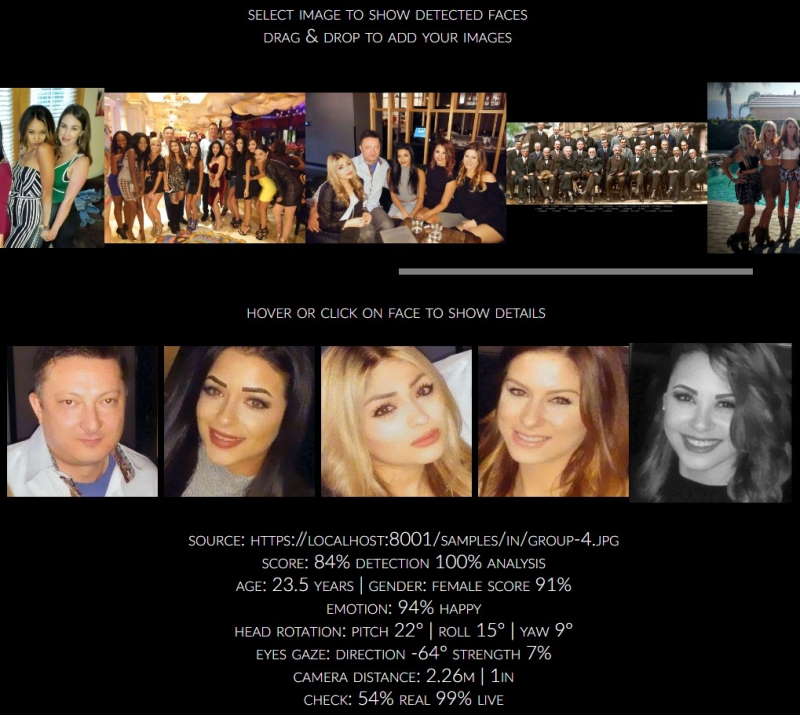
2. **Face Detect:**
Extracts all detect faces from loaded images on-demand and highlights face details on a selected face
> [demo/facedetect](demo/facedetect/index.html)
[
](assets/screenshot-facematch.jpg)
2. **Face Detect:**
Extracts all detect faces from loaded images on-demand and highlights face details on a selected face
> [demo/facedetect](demo/facedetect/index.html)
[ ](assets/screenshot-facedetect.jpg)
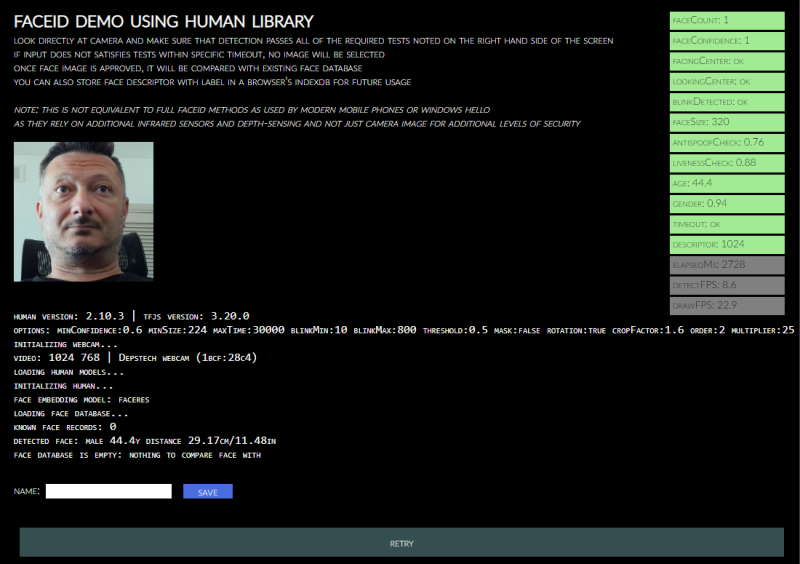
3. **Face ID:**
Performs validation check on a webcam input to detect a real face and matches it to known faces stored in database
> [demo/faceid](demo/faceid/index.html)
[
](assets/screenshot-facedetect.jpg)
3. **Face ID:**
Performs validation check on a webcam input to detect a real face and matches it to known faces stored in database
> [demo/faceid](demo/faceid/index.html)
[ ](assets/screenshot-faceid.jpg)
4. **3D Rendering:**
> [human-motion](https://github.com/vladmandic/human-motion)
[ ](https://github.com/vladmandic/human-motion/raw/main/assets/screenshot-face.jpg)
[
](https://github.com/vladmandic/human-motion/raw/main/assets/screenshot-face.jpg)
[ ](https://github.com/vladmandic/human-motion/raw/main/assets/screenshot-body.jpg)
[
](https://github.com/vladmandic/human-motion/raw/main/assets/screenshot-body.jpg)
[ ](https://github.com/vladmandic/human-motion/raw/main/assets/screenshot-hand.jpg)
5. **VR Model Tracking:**
> [human-three-vrm](https://github.com/vladmandic/human-three-vrm)
> [human-bjs-vrm](https://github.com/vladmandic/human-bjs-vrm)
[ ](https://github.com/vladmandic/human-three-vrm/raw/main/assets/human-vrm-screenshot.jpg)
6. **Human as OS native application:**
> [human-electron](https://github.com/vladmandic/human-electron)
](https://github.com/vladmandic/human-three-vrm/raw/main/assets/human-vrm-screenshot.jpg)
6. **Human as OS native application:**
> [human-electron](https://github.com/vladmandic/human-electron)
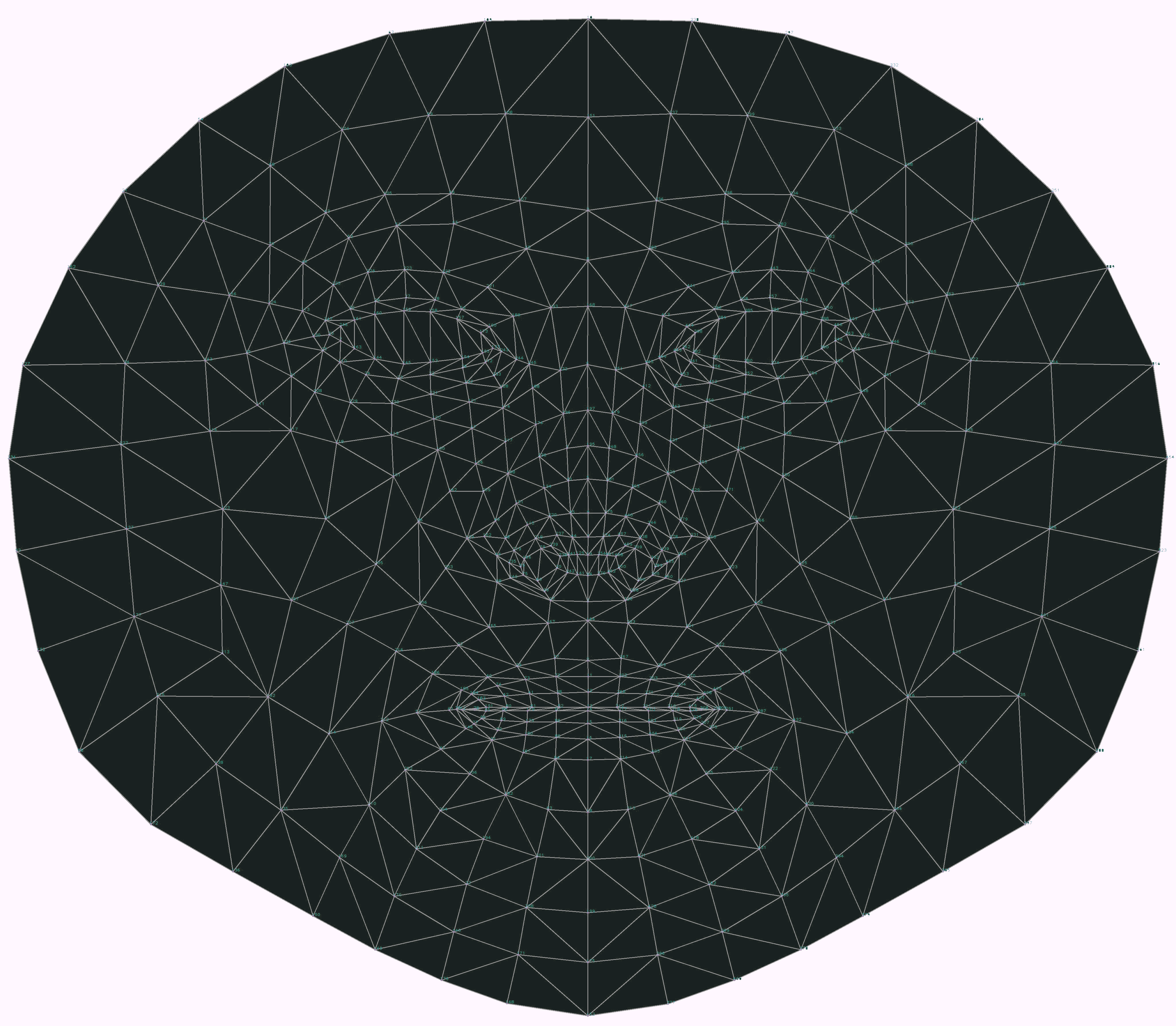
**468-Point Face Mesh Defails:**
(view in full resolution to see keypoints)
[ ](assets/facemesh.png)
## Quick Start
Simply load `Human` (*IIFE version*) directly from a cloud CDN in your HTML file:
(pick one: `jsdelirv`, `unpkg` or `cdnjs`)
```html
```
For details, including how to use `Browser ESM` version or `NodeJS` version of `Human`, see [**Installation**](https://github.com/vladmandic/human/wiki/Install)
## Code Examples
Simple app that uses Human to process video input and
draw output on screen using internal draw helper functions
```js
// create instance of human with simple configuration using default values
const config = { backend: 'webgl' };
const human = new Human.Human(config);
// select input HTMLVideoElement and output HTMLCanvasElement from page
const inputVideo = document.getElementById('video-id');
const outputCanvas = document.getElementById('canvas-id');
function detectVideo() {
// perform processing using default configuration
human.detect(inputVideo).then((result) => {
// result object will contain detected details
// as well as the processed canvas itself
// so lets first draw processed frame on canvas
human.draw.canvas(result.canvas, outputCanvas);
// then draw results on the same canvas
human.draw.face(outputCanvas, result.face);
human.draw.body(outputCanvas, result.body);
human.draw.hand(outputCanvas, result.hand);
human.draw.gesture(outputCanvas, result.gesture);
// and loop immediate to the next frame
requestAnimationFrame(detectVideo);
return result;
});
}
detectVideo();
```
or using `async/await`:
```js
// create instance of human with simple configuration using default values
const config = { backend: 'webgl' };
const human = new Human(config); // create instance of Human
const inputVideo = document.getElementById('video-id');
const outputCanvas = document.getElementById('canvas-id');
async function detectVideo() {
const result = await human.detect(inputVideo); // run detection
human.draw.all(outputCanvas, result); // draw all results
requestAnimationFrame(detectVideo); // run loop
}
detectVideo(); // start loop
```
or using `Events`:
```js
// create instance of human with simple configuration using default values
const config = { backend: 'webgl' };
const human = new Human(config); // create instance of Human
const inputVideo = document.getElementById('video-id');
const outputCanvas = document.getElementById('canvas-id');
human.events.addEventListener('detect', () => { // event gets triggered when detect is complete
human.draw.all(outputCanvas, human.result); // draw all results
});
function detectVideo() {
human.detect(inputVideo) // run detection
.then(() => requestAnimationFrame(detectVideo)); // upon detect complete start processing of the next frame
}
detectVideo(); // start loop
```
or using interpolated results for smooth video processing by separating detection and drawing loops:
```js
const human = new Human(); // create instance of Human
const inputVideo = document.getElementById('video-id');
const outputCanvas = document.getElementById('canvas-id');
let result;
async function detectVideo() {
result = await human.detect(inputVideo); // run detection
requestAnimationFrame(detectVideo); // run detect loop
}
async function drawVideo() {
if (result) { // check if result is available
const interpolated = human.next(result); // get smoothened result using last-known results
human.draw.all(outputCanvas, interpolated); // draw the frame
}
requestAnimationFrame(drawVideo); // run draw loop
}
detectVideo(); // start detection loop
drawVideo(); // start draw loop
```
or same, but using built-in full video processing instead of running manual frame-by-frame loop:
```js
const human = new Human(); // create instance of Human
const inputVideo = document.getElementById('video-id');
const outputCanvas = document.getElementById('canvas-id');
async function drawResults() {
const interpolated = human.next(); // get smoothened result using last-known results
human.draw.all(outputCanvas, interpolated); // draw the frame
requestAnimationFrame(drawResults); // run draw loop
}
human.video(inputVideo); // start detection loop which continously updates results
drawResults(); // start draw loop
```
or using built-in webcam helper methods that take care of video handling completely:
```js
const human = new Human(); // create instance of Human
const outputCanvas = document.getElementById('canvas-id');
async function drawResults() {
const interpolated = human.next(); // get smoothened result using last-known results
human.draw.canvas(outputCanvas, human.webcam.element); // draw current webcam frame
human.draw.all(outputCanvas, interpolated); // draw the frame detectgion results
requestAnimationFrame(drawResults); // run draw loop
}
await human.webcam.start({ crop: true });
human.video(human.webcam.element); // start detection loop which continously updates results
drawResults(); // start draw loop
```
And for even better results, you can run detection in a separate web worker thread
## Inputs
`Human` library can process all known input types:
- `Image`, `ImageData`, `ImageBitmap`, `Canvas`, `OffscreenCanvas`, `Tensor`,
- `HTMLImageElement`, `HTMLCanvasElement`, `HTMLVideoElement`, `HTMLMediaElement`
Additionally, `HTMLVideoElement`, `HTMLMediaElement` can be a standard `