# DiscoveryLab

[](https://www.npmjs.com/package/@veolab/discoverylab)
[](https://www.npmjs.com/package/@veolab/discoverylab)
[](https://github.com/veolab/applab-discovery/stargazers)
[](https://opensource.org/licenses/MIT)
> AI-powered app testing, documentation & knowledge base. A plugin for Claude Code and Claude Desktop.
## Quick Start
```bash
npm install -g @veolab/discoverylab
discoverylab install # auto-detects Claude Code + Claude Desktop
discoverylab serve # opens web UI at localhost:3847
```
`applab` works as an alias for `discoverylab`.
## What It Does
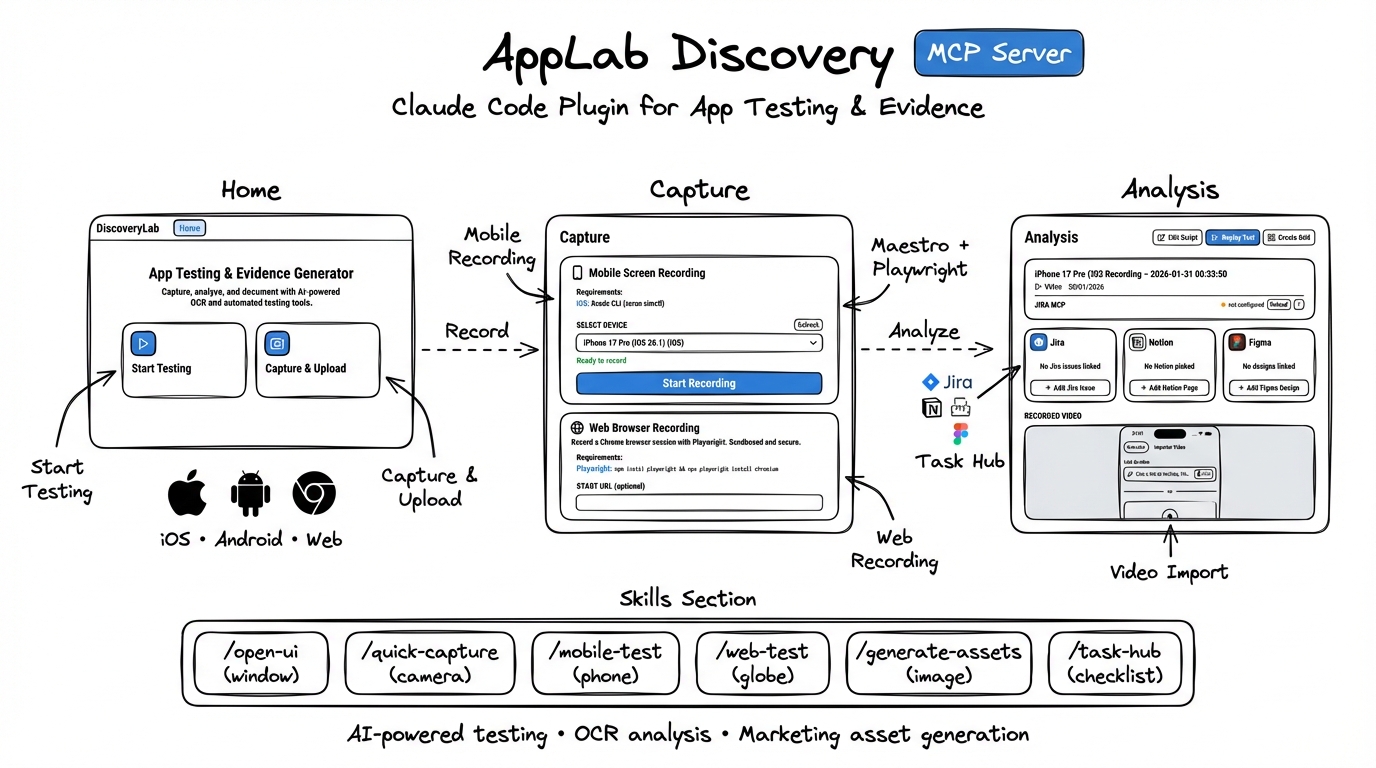
Record app flows. AI analyzes every screen. Ask Claude about any flow in natural language.
```mermaid
flowchart LR
subgraph Capture
A[Mobile App] --> R[Record]
B[Web App] --> R
C[Video File] --> U[Upload]
end
subgraph Analyze
R --> P[Process]
U --> P
P --> AI[AI Analysis]
AI --> K[Knowledge Base]
end
subgraph Use
K --> Q[Ask Claude]
K --> E[Export Assets]
K --> S[Share .applab]
end
```
## Features
| Feature | Description |
|---------|-------------|
| **Screen Capture** | Record iOS/Android emulators or web apps |
| **AI Analysis** | OCR, feature detection, smart summaries (Anthropic, OpenAI, Ollama, Claude CLI) |
| **Knowledge Brain** | Ask Claude about any captured flow — visual answers with interactive infographics |
| **Interactive Visualizations** | Flow Diagram, Device Showcase, Metrics Dashboard, App Flow Map |
| **Grid Assets** | Infographic grids with AI annotations, step badges, flow arrows |
| **Export** | PNG, GIF, MP4, HTML infographic, .applab bundle |
| **Document Composer** | Build rich Notion pages with preview before export |
| **Maestro Testing** | Automated mobile app testing with screenshots |
| **Playwright Testing** | Web testing using your installed Chrome |
| **Task Hub** | Jira, Notion, Figma, GitHub integration |
| **ESVP Protocol** | Mobile sessions, replay, and network traces ([docs](doc/esvp-protocol.md)) |
| **Share** | Export .applab bundles → import on another machine with full context |
## Claude Integration
### Claude Code (CLI)
Skills available after install:
```
/discoverylab:open-ui → Open web interface
/discoverylab:quick-capture → Capture emulator screen
/discoverylab:mobile-test → Mobile testing with Maestro
/discoverylab:web-test → Web testing with Playwright
/discoverylab:generate-assets → Create marketing assets
```
### Claude Desktop
Ask in natural language — Claude opens interactive visuals automatically:
```
"how does the login flow work?" → opens infographic canvas
"what screens do we have captured?" → lists all projects
"show me the onboarding" → visual flow map
```
### MCP Tools
```
dlab.knowledge.open → visual infographic of a flow (HTML canvas)
dlab.knowledge.search → text search across all projects
dlab.knowledge.summary → overview of all captured knowledge
dlab.export.infographic → export self-contained HTML file
dlab.project.import → import shared .applab bundle
```
## CLI Commands
```bash
discoverylab serve # start web UI
discoverylab install # auto-detect + configure MCP
discoverylab install --target desktop # Claude Desktop only
discoverylab export --format infographic --open
discoverylab import # import shared project
discoverylab setup # check dependencies
discoverylab info # version info
```
## Requirements
- Node.js 20+
- FFmpeg (for video/GIF export)
- Maestro CLI (optional, for mobile testing)
- Playwright (optional, for web testing)
## Platform Support
| | macOS | Windows | Linux |
|---|:---:|:---:|:---:|
| Web UI | ✓ | ✓ | ✓ |
| iOS Capture | ✓ | — | — |
| Android Capture | ✓ | ✓ | ✓ |
| Web Recording | ✓ | ✓ | ✓ |
| Apple Vision OCR | ✓ | — | — |
| Claude Desktop | ✓ | ✓ | — |
## License
MIT