# vue-jstree
[](https://github.com/zdy1988/vue-jstree)
[English](./README.md)/[中文](./README-CN.md)
## 介绍
A tree plugin for vue2
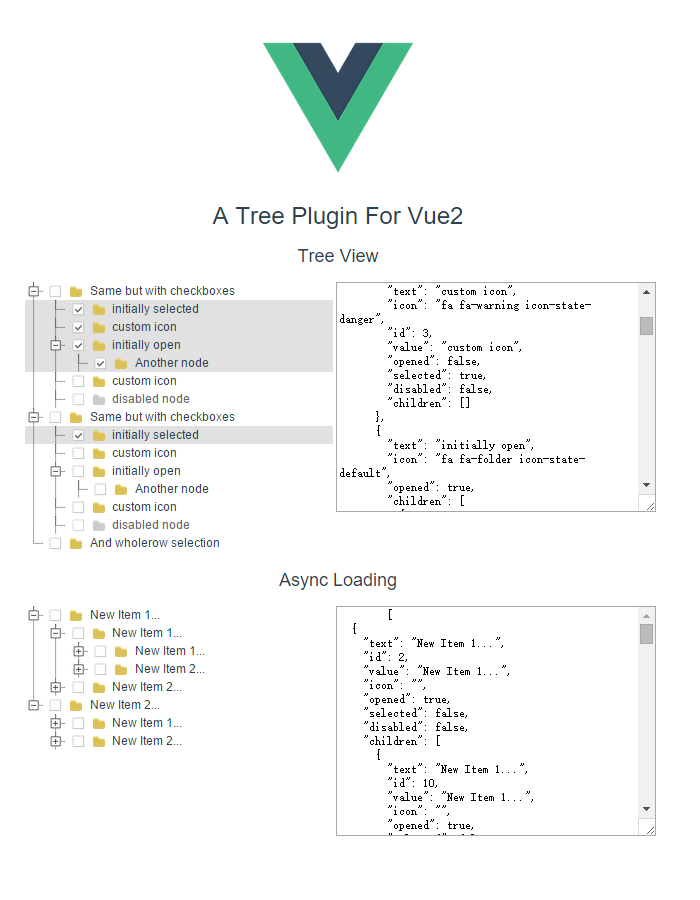 ## 例子
[http://zdy1988.github.io/vue-jstree](http://zdy1988.github.io/vue-jstree)
## NPM
```html
npm install vue-jstree
```
## ES6 调用
```html
import VJstree from 'vue-jstree'
new Vue({
components: {
VJstree
}
})
```
## 安装
```html
npm install
npm run dev
```
## 简单示例
```html
new Vue({
data: {
data: [
{
"text": "Same but with checkboxes",
"children": [
{
"text": "initially selected",
"selected": true
},
{
"text": "custom icon",
"icon": "fa fa-warning icon-state-danger"
},
{
"text": "initially open",
"icon": "fa fa-folder icon-state-default",
"opened": true,
"children": [
{
"text": "Another node"
}
]
},
{
"text": "custom icon",
"icon": "fa fa-warning icon-state-warning"
},
{
"text": "disabled node",
"icon": "fa fa-check icon-state-success",
"disabled": true
}
]
},
{
"text": "Same but with checkboxes",
"opened": true,
"children": [
{
"text": "initially selected",
"selected": true
},
{
"text": "custom icon",
"icon": "fa fa-warning icon-state-danger"
},
{
"text": "initially open",
"icon": "fa fa-folder icon-state-default",
"opened": true,
"children": [
{
"text": "Another node"
}
]
},
{
"text": "custom icon",
"icon": "fa fa-warning icon-state-warning"
},
{
"text": "disabled node",
"icon": "fa fa-check icon-state-success",
"disabled": true
}
]
},
{
"text": "And wholerow selection"
}
]
},
methods: {
itemClick (node) {
console.log(node.model.text + ' clicked !')
}
}
})
```
## API
| Props | Type | Default | Describe |
| ------------- |:-------------:|:-----:|:--------------------------------------------------------|
| data | Array | | 设置树的数据源 |
| size | String | | 设置树节点的大小, 可选值 : 'large' or '' or ''small' |
| show-checkbox | Boolean | false | 设置是否显示选择框 |
| allow-transition | Boolean | true | 设置是否允许使用过渡效果 |
| whole-row | Boolean | false | 设置是否整个树节点高亮 |
| no-dots | Boolean | false | 设置是否显示树节点前的虚线 |
| collapse | Boolean | false | 设置节点全部展开或合并的初始值,不设置按节点自身的 opened 属性控制 |
| multiple | Boolean | false | 设置是否可以多选 |
| allow-batch | Boolean | false | 设置允许批量选择子节点 |
| text-field-name | String | 'text' | 设置 **文字** 的字段名称,默认为 **text** |
| value-field-name | String | 'value' | 设置 **值** 的字段名称,默认为 **value** |
| children-field-name | String | 'children' | 设置 **子节点** 的字段名称,默认为 **children** |
| item-events | Object | {} | 注册任意事件到每个数节点上, [例子](https://github.com/zdy1988/vue-jstree/blob/master/App.vue) |
| async | Function | | 异步加载数据的回调函数 , 如果当前节点没有子项 ,设置树节点中的 'isLeaf: true' 可不现实 + 号 |
| loading-text | String | 'Loading' | 设置 Loading 文字 |
| draggable | Boolean | false | 设置是否启用拖拽 , 默认全部节点可拖拽, 如自定义个别节点禁用拖拽或禁用拖放可设置 'dragDisabled: true' 和 'dropDisabled: true'|
| drag-over-background-color | String | '#C9FDC9' | 设置拖拽进入节点时的背景色 |
| klass | String | | 设置追加 class |
## node.model 中的方法
| Method | Params |
| ------------- |:-------------:|
| addChild | (object) newDataItem |
| addAfter | (object) newDataItem, (object) selectedNode |
| addBefore | (object) newDataItem, (object) selectedNode |
| openChildren | |
| closeChildren | |
## 可选择事件
**@item-click(node, item, e)**
**@item-toggle(node, item, e)**
**@item-drag-start(node, item, e)**
**@item-drag-end(node, item, e)**
**@item-drop-before(node, item, draggedItem, e)**
**@item-drop(node, item, draggedItem, e)**
**node** : 当前节点的 vue 对象
**item** : 当前节点的数据对象
**e** : 事件参数
## 节点的数据参数
| Name | Type | Default | Describe |
| ------------- |:-------------:| -----:|:----------------------------------------------|
| icon | String | | 自定义图标样式 class |
| opened | Boolean | false | 设置节点展开或合并 |
| selected | Boolean | false | 设置节点被选择 |
| disabled | Boolean | false | 设置禁用节点 |
| isLeaf | Boolean | false | 如果节点没有子项 , 设置为 true 可以隐藏 '+' |
| dragDisabled | Boolean | false | 设置当前节点禁止拖拽 |
| dropDisabled | Boolean | false | 设置当前节点禁止拖放 |
## 自定义树节点的例子
```
## 例子
[http://zdy1988.github.io/vue-jstree](http://zdy1988.github.io/vue-jstree)
## NPM
```html
npm install vue-jstree
```
## ES6 调用
```html
import VJstree from 'vue-jstree'
new Vue({
components: {
VJstree
}
})
```
## 安装
```html
npm install
npm run dev
```
## 简单示例
```html
new Vue({
data: {
data: [
{
"text": "Same but with checkboxes",
"children": [
{
"text": "initially selected",
"selected": true
},
{
"text": "custom icon",
"icon": "fa fa-warning icon-state-danger"
},
{
"text": "initially open",
"icon": "fa fa-folder icon-state-default",
"opened": true,
"children": [
{
"text": "Another node"
}
]
},
{
"text": "custom icon",
"icon": "fa fa-warning icon-state-warning"
},
{
"text": "disabled node",
"icon": "fa fa-check icon-state-success",
"disabled": true
}
]
},
{
"text": "Same but with checkboxes",
"opened": true,
"children": [
{
"text": "initially selected",
"selected": true
},
{
"text": "custom icon",
"icon": "fa fa-warning icon-state-danger"
},
{
"text": "initially open",
"icon": "fa fa-folder icon-state-default",
"opened": true,
"children": [
{
"text": "Another node"
}
]
},
{
"text": "custom icon",
"icon": "fa fa-warning icon-state-warning"
},
{
"text": "disabled node",
"icon": "fa fa-check icon-state-success",
"disabled": true
}
]
},
{
"text": "And wholerow selection"
}
]
},
methods: {
itemClick (node) {
console.log(node.model.text + ' clicked !')
}
}
})
```
## API
| Props | Type | Default | Describe |
| ------------- |:-------------:|:-----:|:--------------------------------------------------------|
| data | Array | | 设置树的数据源 |
| size | String | | 设置树节点的大小, 可选值 : 'large' or '' or ''small' |
| show-checkbox | Boolean | false | 设置是否显示选择框 |
| allow-transition | Boolean | true | 设置是否允许使用过渡效果 |
| whole-row | Boolean | false | 设置是否整个树节点高亮 |
| no-dots | Boolean | false | 设置是否显示树节点前的虚线 |
| collapse | Boolean | false | 设置节点全部展开或合并的初始值,不设置按节点自身的 opened 属性控制 |
| multiple | Boolean | false | 设置是否可以多选 |
| allow-batch | Boolean | false | 设置允许批量选择子节点 |
| text-field-name | String | 'text' | 设置 **文字** 的字段名称,默认为 **text** |
| value-field-name | String | 'value' | 设置 **值** 的字段名称,默认为 **value** |
| children-field-name | String | 'children' | 设置 **子节点** 的字段名称,默认为 **children** |
| item-events | Object | {} | 注册任意事件到每个数节点上, [例子](https://github.com/zdy1988/vue-jstree/blob/master/App.vue) |
| async | Function | | 异步加载数据的回调函数 , 如果当前节点没有子项 ,设置树节点中的 'isLeaf: true' 可不现实 + 号 |
| loading-text | String | 'Loading' | 设置 Loading 文字 |
| draggable | Boolean | false | 设置是否启用拖拽 , 默认全部节点可拖拽, 如自定义个别节点禁用拖拽或禁用拖放可设置 'dragDisabled: true' 和 'dropDisabled: true'|
| drag-over-background-color | String | '#C9FDC9' | 设置拖拽进入节点时的背景色 |
| klass | String | | 设置追加 class |
## node.model 中的方法
| Method | Params |
| ------------- |:-------------:|
| addChild | (object) newDataItem |
| addAfter | (object) newDataItem, (object) selectedNode |
| addBefore | (object) newDataItem, (object) selectedNode |
| openChildren | |
| closeChildren | |
## 可选择事件
**@item-click(node, item, e)**
**@item-toggle(node, item, e)**
**@item-drag-start(node, item, e)**
**@item-drag-end(node, item, e)**
**@item-drop-before(node, item, draggedItem, e)**
**@item-drop(node, item, draggedItem, e)**
**node** : 当前节点的 vue 对象
**item** : 当前节点的数据对象
**e** : 事件参数
## 节点的数据参数
| Name | Type | Default | Describe |
| ------------- |:-------------:| -----:|:----------------------------------------------|
| icon | String | | 自定义图标样式 class |
| opened | Boolean | false | 设置节点展开或合并 |
| selected | Boolean | false | 设置节点被选择 |
| disabled | Boolean | false | 设置禁用节点 |
| isLeaf | Boolean | false | 如果节点没有子项 , 设置为 true 可以隐藏 '+' |
| dragDisabled | Boolean | false | 设置当前节点禁止拖拽 |
| dropDisabled | Boolean | false | 设置当前节点禁止拖放 |
## 自定义树节点的例子
```
{{_.model.text}}
```
更优雅的操作方式:
```
{{_.model.text}}
```
**scope** 在 **vue@2.5.0+** 中被替换, **vue@2.5.0+** 以上的版本,请使用 **slot-scope**
## License
Licensed under the [MIT license](https://opensource.org/licenses/mit-license.php).
感谢 [jstree](https://github.com/vakata/jstree) 的 样式支持