# react-native-kakao-share-link
React Native 카카오 링크 라이브러리 입니다. 문제가 있으면 issue에 남겨주시기 바랍니다.
## [주의 사항]
- 안드로이드 minSdkVersion 19 이상
- 안드로이드 gradle 3.6.1 이상
- iOS 11.0 이상
# Change logs
[Change logs 링크](https://github.com/millo-L/react-native-kakao-share-link/blob/master/CHANGELOG.md)
# Deep Link 사용법
카카오 링크를 사용한 딥링크 방식을 제대로 사용하지 못하고 있는 분들을 위한 예시 코드를 작성했습니다. [여기](https://millo-l.github.io/ReactNative-kakao-deep-link/)에서 확인하시고 궁금한 점은 댓글로 남겨주세요.
# Getting started
해당 라이브러리는 [kakao sdk v2](https://developers.kakao.com/docs/latest/ko/getting-started/app)를 사용하므로 안드로이드 minSdkVersion 19이상, iOS 11.0 이상만 지원합니다.
## Installation
```sh
npm install react-native-kakao-share-link
# pod install 명령어는 iOS Deployment Target을 모두 11.0 이상으로 올린 후 진행해야 합니다.
# 자세한 내용은 아래의 iOS 설정 부분에 있습니다.
cd ios
pod install
```
### React Native Link
### RN >= 0.60
---
자동으로 링크가 진행됩니다.
### RN < 0.60
---
react-native link를 사용하시면 빠른 링크가 가능합니다.
```sh
react-native link react-native-kakao-share-link
```
### 수동 링크
#### iOS
---
1. In XCode, in the project navigator, right click Libraries ➜ Add Files to [your project's name]
2. Go to node_modules ➜ react-native-kakao-share-link and add KakaoShareLink.xcodeproj
3. In XCode, in the project navigator, select your project. Add libKakaoShareLink.a to your project's Build Phases ➜ Link Binary With Libraries
4. Run your project (Cmd+R)<
#### Android
---
1. Open up `android/app/src/main/java/[...]/MainActivity.java`
- Add import com.reactnativekakaosharelink.KakaoShareLinkPackage; to the imports at the top of the file
- Add new KakaoShareLinkPackage() to the list returned by the getPackages() method
2. Append the following lines to `android/settings.gradle`
```gradle
// android/settings.gradle
...
include ':react-native-kakao-share-link'
project(':react-native-kakao-share-link').projectDir = new File(rootProject.projectDir, '../node_modules/react-native-kakao-share-link/android')
```
3. nsert the following lines inside the dependencies block in `android/app/build.gradle`
```gradle
// android/app/build.gradle
...
compile project(':react-native-kakao-share-link')
```
## Setting
Kakao 개발자 홈페이지에서 iOS와 Android 각각을 등록하고 네이티브 앱키를 발급받았다고 가정하고 진행하겠습니다.
### iOS
---
1. iOS 설정 관련 사항은 [공식문서 - 메시지 - 카카오링크:iOS](https://developers.kakao.com/docs/latest/ko/message/ios-link)에서 확인하실 수 있습니다.
2. `Podfile`에서 iOS 버전을 11.0 이상으로 설정합니다.
```ruby
# Podfile
...
platform :ios, '11.0' # 혹은 그 이상
```
3. Xcode 상에서 `iOS Deployment Target`을 모두 11.0 이상으로 변경합니다.
4. `Info.plist`에 카카오 네이티브앱 키를 추가합니다.
```diff
CFBundleURLTypes
+
+ CFBundleTypeRole
+ Editor
+ CFBundleURLSchemes
+
+ kakao{카카오 네이티브앱 키}
+
+
CFBundleVersion
1
+ KAKAO_APP_KEY
+ {카카오 네이티브앱 키}
+ LSApplicationQueriesSchemes
+
+
+ kakaokompassauth
+
+ kakaolink
+
```
5. Xcode -> Build Settings -> Search Paths -> Library Search Paths 에서 `"$(TOOLCHAIN_DIR)/usr/lib/swift-5.0/$(PLATFORM_NAME)"` 를 제거합니다. (제거하지 않을 시에는 `ld: symbol(s) not found for architecture x86_64` 오류가 발생합니다.)
6. 모듈이 swift로 개발됐기 때문에 objective-c와 swift 사이에 브릿지 역할을 할 swift 파일을 생성합니다. (이미 생성해 놓으셨다면 넘어가셔도 됩니다.) 아래의 사진을 따라가시면 쉽게 추가하실 수 있습니다.


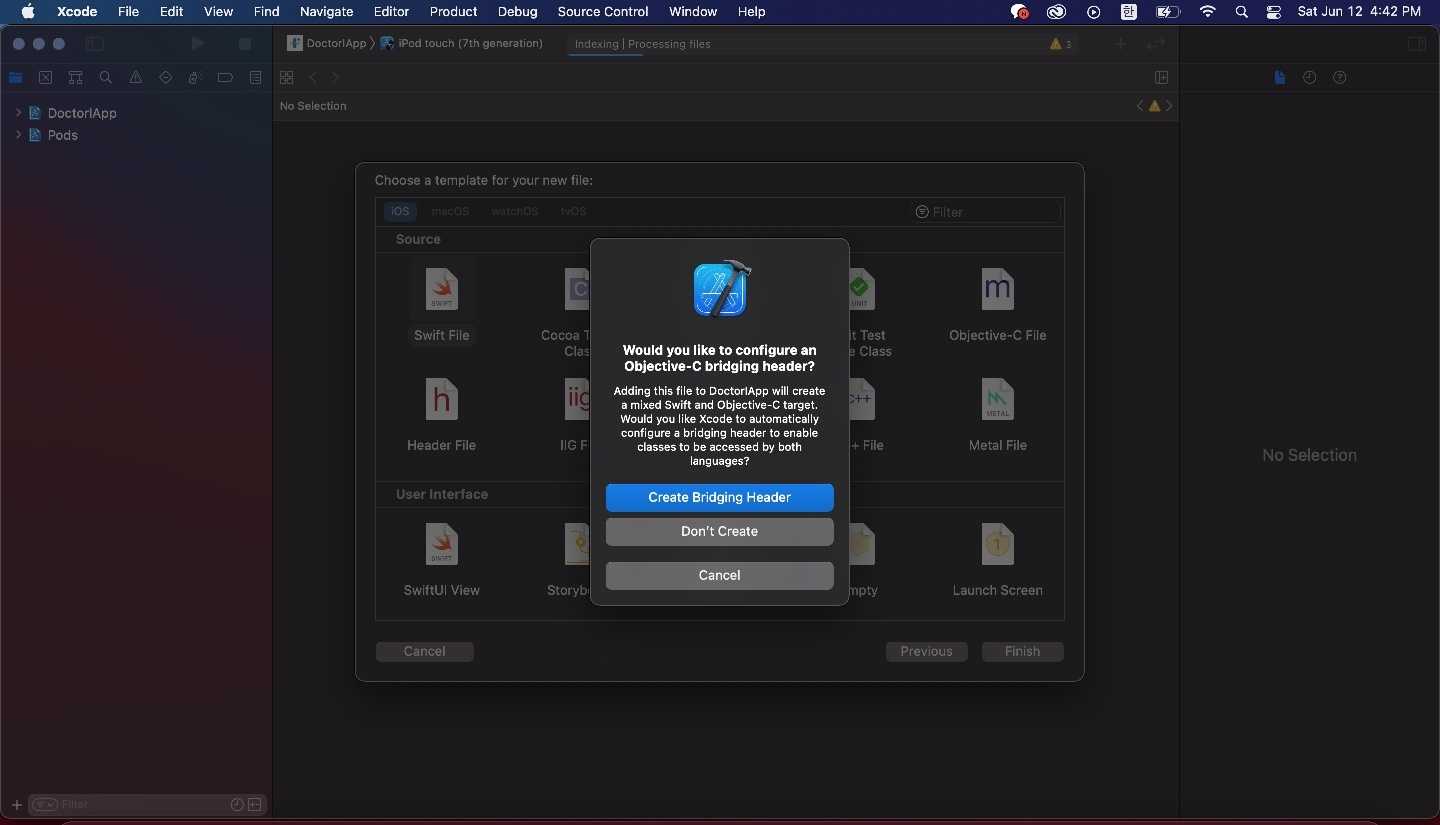
여기서 꼭 `Create Bridging Header`를 눌러주셔야합니다!
7. cocoapods
```sh
cd ios
pod install
cd ..
```
### Android
---
안드로이드 수정시에는 반드시 Android Studio를 사용해주세요!
1. Android 설정 관련 사항은 [공식문서 - 메시지 - 카카오링크:Android](https://developers.kakao.com/docs/latest/ko/message/android-link#before-you-begin)에서 확인하실 수 있습니다.
2. 카카오 SDK 경로를 `android/build.gradle`에 추가하고 minSdkVersion을 19이상, build gradle을 3.6.1이상으로 설정합니다.
build gradle은 각각의 버전 별로 `android/gradle/wrapper/gradle-wrapper.properties`의 `distributionUrl`의 버전도 변경해야합니다.
```gradle
// android/build.gradle
...
buildscript {
ext {
...
minSdkVersion = 19 // 혹은 그 이상
}
...
dependencies {
classpath('com.android.tools.build:gradle:3.6.1') // 혹은 그 이상
}
}
allprojects {
repositories {
...
maven { url 'http://devrepo.kakao.com:8088/nexus/content/groups/public/' }
}
}
```
3. AndroidManifest.xml을 수정합니다.
```diff
...
+
...
+
+
+
+
+
+
```
4. `app/src/main/res/values/string.xml` 을 열어 다음을 추가합니다.
```diff
...
+ {카카오 네이티브 앱키}
...
```
5. 위의 설정까지 마무리하면 디버그 모드에서 기기 테스트 진행 시에는 잘 진행되지만 릴리즈 모드에서는 오류가 납니다. 바로 릴리즈 모드에서 사용되는 축소와 난독화 구성 때문인데, 이를 방지하기 위해 `android/app/proguard-rules.pro` 파일 맨 끝에 아래 두 줄을 추가해줍니다.
```
...
-keep class com.kakao.sdk.**.model.* { ; }
-keep class * extends com.google.gson.TypeAdapter
```
이렇게 하면 com.google.gson.TypeAdapter에 대한 오류가 나올텐데 `android/app/build.gradle`를 수정하고 Sync Now를 눌러줍니다.
```gradle
...
dependencies {
...
implementation 'com.google.code.gson:gson:2.8.5'
}
```
## Usage
### 현재 지원하는 기능
- [`커머스 템플릿`](https://github.com/millo-L/react-native-kakao-share-link/blob/master/README.md#CommerceTemplateType)
- [`리스트 템플릿`](https://github.com/millo-L/react-native-kakao-share-link/blob/master/README.md#ListTemplateType)
- [`피드 템플릿`](https://github.com/millo-L/react-native-kakao-share-link/blob/master/README.md#FeedTemplateType)
- [`위치 템플릿`](https://github.com/millo-L/react-native-kakao-share-link/blob/master/README.md#LocationTemplateType)
- [`텍스트 템플릿`](https://github.com/millo-L/react-native-kakao-share-link/blob/master/README.md#TextTemplateType)
- [`커스텀 템플릿`](https://github.com/millo-L/react-native-kakao-share-link/blob/master/README.md#CustomTemplateType)
#### `[주의사항]`
- 링크 URL은 카카오 디벨로퍼에서 등록한 도메인으로만 설정 가능합니다. 그 외에는 오류가 납니다.
- 링크 실행 우선순위는 `(android/ios)ExecutionParams > mobileWebURL > webURL` 입니다.
- 전송하는 모든 이미지는 최소 200px \* 200px 이상, 2MB 이하여야합니다.
### 예제 코드
#### `ContentType`
| 이름 | 설명 | 타입 | 필수 |
| ----------- | --------------------------------- | ----------------------------------------------------------------------------------------------------- | ---- |
| title | 콘텐츠의 타이틀 | string | O |
| link | 콘텐츠 클릭 시 이동할 링크 정보 | [`LinkType`](https://github.com/millo-L/react-native-kakao-share-link/blob/master/README.md#LinkType) | O |
| imageURL | 콘텐츠의 이미지 URL | string | O |
| desc | 콘텐츠의 상세 설명 | string | X |
| imageWidth | 콘텐츠의 이미지 너비 (단위: 픽셀) | number | X |
| imageHeight | 콘텐츠의 이미지 높이 (단위: 픽셀) | number | X |
#### `LinkType`
| 이름 | 설명 | 타입 | 필수 |
| ---------------------- | --------------------------------------------------------------- | -------------------------------------- | ---- |
| webUrl | PC버전 카카오톡에서 사용하는 웹 링크 URL | string | X |
| mobileWebUrl | 모바일 카카오톡에서 사용하는 웹 링크 URL | string | X |
| androidExecutionParams | 안드로이드 카카오톡에서 사용하는 앱 링크 URL에 사용될 파라미터. | Array<{ key: string; value: string; }> | X |
| iosExecutionParams | iOS 카카오톡에서 사용하는 앱 링크 URL에 사용될 파라미터. | Array<{ key: string; value: string; }> | X |
#### `SocialType`
| 이름 | 설명 | 타입 | 필수 |
| --------------- | ------------------ | ------ | ---- |
| likeCount | 콘텐츠의 좋아요 수 | number | X |
| commentCount | 콘텐츠의 댓글 수 | number | X |
| sharedCount | 콘텐츠의 공유 수 | number | X |
| viewCount | 콘텐츠의 조회 수 | number | X |
| subscriberCount | 콘텐츠의 구독 수 | number | X |
#### `CommerceType`
| 이름 | 설명 | 타입 | 필수 |
| ------------------ | -------------- | ------ | ---- |
| regularPrice | 정상가격 | number | O |
| discountPrice | 할인된 가격 | number | X |
| discountRate | 할인율 | number | X |
| fixedDiscountPrice | 정액 할인 가격 | number | X |
#### `ButtonType`
| 이름 | 설명 | 타입 | 필수 |
| ----- | ------------------------------ | ----------------------------------------------------------------------------------------------------- | ---- |
| title | 버튼의 타이틀 | string | O |
| link | 버튼 클릭시 이동하는 링크 정보 | [`LinkType`](https://github.com/millo-L/react-native-kakao-share-link/blob/master/README.md#LinkType) | O |
### `CommerceTemplateType`
| 이름 | 설명 | 타입 | 필수 |
| ----------- | -------------------------------------------------------------------------------------------- | ------------------------------------------------------------------------------------------------------------- | ---- |
| content | 메시지의 메인 콘텐츠 정보 | [`ContentType`](https://github.com/millo-L/react-native-kakao-share-link/blob/master/README.md#ContentType) | O |
| commerce | 상품에 대한 가격 정보 | [`CommerceType`](https://github.com/millo-L/react-native-kakao-share-link/blob/master/README.md#CommerceType) | O |
| buttonTitle | 기본 버튼 타이틀("자세히 보기")을 변경하고 싶을 때 설정 | string | X |
| buttons | 버튼 목록. 버튼 타이틀과 링크를 변경하고 싶을때, 버튼 두개를 사용하고 싶을때 사용.(최대 2개) | [`ButtonType[]`](https://github.com/millo-L/react-native-kakao-share-link/blob/master/README.md#ButtonType) | X |

```ts
import KakaoShareLink from 'react-native-kakao-share-link';
// ...
try {
const response = await KakaoShareLink.sendCommerce({
content: {
title: 'title',
imageUrl:
'http://t1.daumcdn.net/friends/prod/editor/dc8b3d02-a15a-4afa-a88b-989cf2a50476.jpg',
link: {
webUrl: 'https://developers.kakao.com/',
mobileWebUrl: 'https://developers.kakao.com/',
},
description: 'description',
},
commerce: {
regularPrice: 100000,
discountPrice: 80000,
discountRate: 20,
},
buttons: [
{
title: '앱에서 보기',
link: {
androidExecutionParams: [{ key: 'key1', value: 'value1' }],
iosExecutionParams: [
{ key: 'key1', value: 'value1' },
{ key: 'key2', value: 'value2' },
],
},
},
{
title: '웹에서 보기',
link: {
webUrl: 'https://developers.kakao.com/',
mobileWebUrl: 'https://developers.kakao.com/',
},
},
],
});
console.log(response);
} catch (e) {
console.error(e);
console.error(e.message);
}
```
### `ListTemplateType`
| 이름 | 설명 | 타입 | 필수 |
| ----------- | -------------------------------------------------------------------------------------------- | ------------------------------------------------------------------------------------------------------------- | ---- |
| headerTitle | 리스트 상단에 노출되는 헤더 타이틀 | string | O |
| headerLink | 헤더 타이틀 내용에 해당하는 링크 정보 | [`LinkType`](https://github.com/millo-L/react-native-kakao-share-link/blob/master/README.md#LinkType) | O |
| contents | 리스트에 노출되는 콘텐츠 목록. 최소 2개, 최대 3개 | [`ContentType[]`](https://github.com/millo-L/react-native-kakao-share-link/blob/master/README.md#ContentType) | O |
| buttonTitle | 기본 버튼 타이틀("자세히 보기")을 변경하고 싶을 때 설정 | string | X |
| buttons | 버튼 목록. 버튼 타이틀과 링크를 변경하고 싶을때, 버튼 두개를 사용하고 싶을때 사용.(최대 2개) | [`ButtonType`](https://github.com/millo-L/react-native-kakao-share-link/blob/master/README.md#ButtonType) | X |

```ts
import KakaoShareLink from 'react-native-kakao-share-link';
// ...
try {
const response = await KakaoShareLink.sendList({
headerTitle: 'headerTitle',
headerLink: {
webUrl: 'https://developers.kakao.com/',
mobileWebUrl: 'https://developers.kakao.com/',
},
contents: [
{
title: 'title1',
imageUrl:
'http://t1.daumcdn.net/friends/prod/editor/dc8b3d02-a15a-4afa-a88b-989cf2a50476.jpg',
link: {
webUrl: 'https://developers.kakao.com/',
mobileWebUrl: 'https://developers.kakao.com/',
},
description: 'description1',
},
{
title: 'title2',
imageUrl:
'http://t1.daumcdn.net/friends/prod/editor/dc8b3d02-a15a-4afa-a88b-989cf2a50476.jpg',
link: {
webUrl: 'https://developers.kakao.com/',
mobileWebUrl: 'https://developers.kakao.com/',
},
description: 'description2',
},
{
title: 'title3',
imageUrl:
'http://t1.daumcdn.net/friends/prod/editor/dc8b3d02-a15a-4afa-a88b-989cf2a50476.jpg',
link: {
webUrl: 'https://developers.kakao.com/',
mobileWebUrl: 'https://developers.kakao.com/',
},
description: 'description3',
},
],
});
console.log(response);
} catch (e) {
console.error(e);
console.error(e.message);
}
```
### `LocationTemplateType`
| 이름 | 설명 | 타입 | 필수 |
| ------------ | ----------------------------------------------------------------------------------------------------------------- | ----------------------------------------------------------------------------------------------------------- | ---- |
| content | 위치에 대해 설명하는 콘텐츠 정보 | [`ContentType`](https://github.com/millo-L/react-native-kakao-share-link/blob/master/README.md#ContentType) | O |
| address | 공유할 위치의 주소
예) 경기 성남시 분당구 판교역로 235 | string | O |
| addressTitle | 카카오톡 내의 지도 뷰에서 사용되는 타이틀
예) 카카오판교오피스 | string | X |
| social | 메인 콘텐츠의 부가 소셜 정보 | [`SocialType`](https://github.com/millo-L/react-native-kakao-share-link/blob/master/README.md#SocialType) | X |
| buttonTitle | 기본 버튼 타이틀
("자세히 보기")을 변경하고 싶을 때 설정 | string | X |
| buttons | 버튼 목록. 기본 버튼의 타이틀 외에 링크도 변경하고 싶을 때 설정.
(최대 1개, 오른쪽 "위치 보기" 버튼은 고정) | [`ButtonType`](https://github.com/millo-L/react-native-kakao-share-link/blob/master/README.md#ButtonType) | X |

```ts
import KakaoShareLink from 'react-native-kakao-share-link';
// ...
try {
const response = await KakaoShareLink.sendLocation({
address: '경기 성남시 분당구 판교역로',
addressTitle: '카카오판교오피스',
content: {
title: 'title',
imageUrl:
'http://t1.daumcdn.net/friends/prod/editor/dc8b3d02-a15a-4afa-a88b-989cf2a50476.jpg',
link: {
webUrl: 'https://developers.kakao.com/',
mobileWebUrl: 'https://developers.kakao.com/',
},
description: 'description',
},
});
console.log(response);
} catch (e) {
console.error(e);
console.error(e.message);
}
```
### `FeedTemplateType`
| 이름 | 설명 | 타입 | 필수 |
| ----------- | --------------------------------------------------------------------------------- | ----------------------------------------------------------------------------------------------------------- | ---- |
| content | 메시지의 메인 콘텐츠 정보 | [`ContentType`](https://github.com/millo-L/react-native-kakao-share-link/blob/master/README.md#ContentType) | O |
| social | 콘텐츠에 대한 소셜 정보 | [`SocialType`](https://github.com/millo-L/react-native-kakao-share-link/blob/master/README.md#SocialType) | X |
| buttonTitle | 기본 버튼 타이틀("자세히 보기")을 변경하고 싶을 때 설정 | string | X |
| buttons | 버튼 목록. 버튼 타이틀과 링크를 변경하고 싶을때, 버튼 두개를 사용하고 싶을때 사용 | [`ButtonType[]`](https://github.com/millo-L/react-native-kakao-share-link/blob/master/README.md#ButtonType) | X |

```ts
import KakaoShareLink from 'react-native-kakao-share-link';
// ...
try {
const response = await KakaoShareLink.sendFeed({
content: {
title: 'title',
imageUrl:
'http://t1.daumcdn.net/friends/prod/editor/dc8b3d02-a15a-4afa-a88b-989cf2a50476.jpg',
link: {
webUrl: 'https://developers.kakao.com/',
mobileWebUrl: 'https://developers.kakao.com/',
},
description: 'description',
},
social: {
commentCount: 10,
likeCount: 5,
},
buttons: [
{
title: '앱에서 보기',
link: {
androidExecutionParams: [{ key: 'key1', value: 'value1' }],
iosExecutionParams: [
{ key: 'key1', value: 'value1' },
{ key: 'key2', value: 'value2' },
],
},
},
],
});
console.log(response);
} catch (e) {
console.error(e);
console.error(e.message);
}
```
### `TextTemplateType`
| 이름 | 설명 | 타입 | 필수 |
| ----------- | ------------------------------------------------------------------------------------------------------------------ | ----------------------------------------------------------------------------------------------------------- | ---- |
| text | 최대 200자의 텍스트 정보 | string | O |
| link | 해당 컨텐츠 클릭 시 이동 할 링크 정보 | [`LinkType`](https://github.com/millo-L/react-native-kakao-share-link/blob/master/README.md#LinkType) | O |
| buttonTitle | 기본 버튼 타이틀
("자세히 보기")을 변경하고 싶을 때 설정 | string | X |
| buttons | 메시지 하단에 추가되는 버튼 목록. 버튼 타이틀과 링크를 변경하고 싶을때, 버튼 두개를 사용하고 싶을때 사용. 최대 2개 | [`ButtonType[]`](https://github.com/millo-L/react-native-kakao-share-link/blob/master/README.md#ButtonType) | X |

```ts
import KakaoShareLink from 'react-native-kakao-share-link';
// ...
try {
const response = await KakaoShareLink.sendText({
text: 'text',
link: {
webUrl: 'https://developers.kakao.com/',
mobileWebUrl: 'https://developers.kakao.com/',
},
buttons: [
{
title: '앱에서 보기',
link: {
androidExecutionParams: [{ key: 'key1', value: 'value1' }],
iosExecutionParams: [
{ key: 'key1', value: 'value1' },
{ key: 'key2', value: 'value2' },
],
},
},
],
});
console.log(response);
} catch (e) {
console.error(e);
console.error(e.message);
}
```
### `CustomTemplateType`
| 이름 | 설명 | 타입 | 필수 |
| ----------- | ------------------------------------------------------------------------------------------------------------------ | ----------------------------------------------------------------------------------------------------------- | ---- |
| templateId | 생성해놓은 카카오 링크 [메시지 템플릿](https://developers.kakao.com/docs/latest/ko/message/message-template) | number | O |
| templateArgs | 메시지 템플릿에 유동적으로 넣을 args | Array<{ key: string; value: string; }> | X |

```ts
import KakaoShareLink from 'react-native-kakao-share-link';
const sendCustom = async () => {
try {
const response = await KakaoShareLink.sendCustom({
templateId: 64386,
});
console.log(response);
} catch (e: any) {
console.error(e);
console.error(e.message);
}
};
```
## Contributing
See the [contributing guide](CONTRIBUTING.md) to learn how to contribute to the repository and the development workflow.
## License
MIT