<div markdown="1">
  <sup>Using <a href="https://wangchujiang.com/#/app" target="_blank">my app</a> is also a way to <a href="https://wangchujiang.com/#/sponsor" target="_blank">support</a> me:</sup>
  <br>
  <a target="_blank" href="https://apps.apple.com/app/6758053530" title="Scap: Screenshot & Markup Edit for macOS"><img alt="Scap: Screenshot & Markup Edit" height="52" width="52" src="https://wangchujiang.com/appicon/scap.png"></a>
  <a target="_blank" href="https://apps.apple.com/app/6757317079" title="Screen Test for macOS"><img alt="Screen Test" height="52" width="52" src="https://wangchujiang.com/appicon/screen-test.png"></a>
  <a target="_blank" href="https://apps.apple.com/app/Deskmark/6755948110" title="Deskmark for macOS"><img alt="Deskmark" height="52" width="52" src="https://wangchujiang.com/appicon/deskmark.png"></a>
  <a target="_blank" href="https://apps.apple.com/app/Keyzer/6500434773" title="Keyzer for macOS"><img alt="Keyzer" height="52" width="52" src="https://wangchujiang.com/appicon/keyzer.png"></a>
  <a target="_blank" href="https://github.com/jaywcjlove/vidwall-hub" title="Vidwall Hub for macOS"><img alt="Vidwall Hub" height="52" width="52" src="https://wangchujiang.com/appicon/vidwall-hub.png"></a>
  <a target="_blank" href="https://apps.apple.com/app/VidCrop/6752624705" title="VidCrop for macOS"><img alt="VidCrop" height="52" width="52" src="https://wangchujiang.com/appicon/vidcrop.png"></a>
  <a target="_blank" href="https://apps.apple.com/app/Vidwall/6747587746" title="Vidwall for macOS"><img alt="Vidwall" height="52" width="52" src="https://wangchujiang.com/appicon/vidwall.png"></a>
  <a target="_blank" href="https://wangchujiang.com/mousio-hint/" title="Mousio Hint for macOS"><img alt="Mousio Hint" height="52" width="52" src="https://wangchujiang.com/appicon/mousio-hint.png"></a>
  <a target="_blank" href="https://apps.apple.com/app/6746747327" title="Mousio for macOS"><img alt="Mousio" height="52" width="52" src="https://wangchujiang.com/appicon/mousio.png"></a>
  <a target="_blank" href="https://apps.apple.com/app/6745227444" title="Musicer for macOS"><img alt="Musicer" height="52" width="52" src="https://wangchujiang.com/appicon/musicer.png"></a>
  <a target="_blank" href="https://apps.apple.com/app/6743841447" title="Audioer for macOS"><img alt="Audioer" height="52" width="52" src="https://wangchujiang.com/appicon/audioer.png"></a>
  <a target="_blank" href="https://apps.apple.com/app/6744690194" title="FileSentinel for macOS"><img alt="FileSentinel" height="52" width="52" src="https://wangchujiang.com/appicon/file-sentinel.png"></a>
  <a target="_blank" href="https://apps.apple.com/app/6743495172" title="FocusCursor for macOS"><img alt="FocusCursor" height="52" width="52" src="https://wangchujiang.com/appicon/focus-cursor.png"></a>
  <a target="_blank" href="https://apps.apple.com/app/6742680573" title="Videoer for macOS"><img alt="Videoer" height="52" width="52" src="https://wangchujiang.com/appicon/videoer.png"></a>
  <a target="_blank" href="https://apps.apple.com/app/6740425504" title="KeyClicker for macOS"><img alt="KeyClicker" height="52" width="52" src="https://wangchujiang.com/appicon/key-clicker.png"></a>
  <a target="_blank" href="https://apps.apple.com/app/6739052447" title="DayBar for macOS"><img alt="DayBar" height="52" width="52" src="https://wangchujiang.com/appicon/daybar.png"></a>
  <a target="_blank" href="https://apps.apple.com/app/6739444407" title="Iconed for macOS"><img alt="Iconed" height="52" width="52" src="https://wangchujiang.com/appicon/iconed.png"></a>
  <a target="_blank" href="https://apps.apple.com/app/6737160756" title="Menuist for macOS"><img alt="Menuist" height="52" width="52" src="https://wangchujiang.com/appicon/rightmenu-master.png"></a>
  <a target="_blank" href="https://apps.apple.com/app/6723903021" title="Paste Quick for macOS"><img alt="Quick RSS" height="52" width="52" src="https://wangchujiang.com/appicon/paste-quick.png"></a>
  <a target="_blank" href="https://apps.apple.com/app/6670696072" title="Quick RSS for macOS/iOS"><img alt="Quick RSS" height="52" width="52" src="https://wangchujiang.com/appicon/quick-rss.png"></a>
  <a target="_blank" href="https://apps.apple.com/app/6670167443" title="Web Serve for macOS"><img alt="Web Serve" height="52" width="52" src="https://wangchujiang.com/appicon/web-serve.png"></a>
  <a target="_blank" href="https://apps.apple.com/app/6503953628" title="Copybook Generator for macOS/iOS"><img alt="Copybook Generator" height="52" width="52" src="https://wangchujiang.com/appicon/copybook-generator.png"></a>
  <a target="_blank" href="https://apps.apple.com/app/6471227008" title="DevTutor for macOS/iOS"><img alt="DevTutor for SwiftUI" height="52" width="52" src="https://wangchujiang.com/appicon/devtutor.png"></a>
  <a target="_blank" href="https://apps.apple.com/app/6479819388" title="RegexMate for macOS/iOS"><img alt="RegexMate" height="52" width="52" src="https://wangchujiang.com/appicon/regex-mate.png"></a>
  <a target="_blank" href="https://apps.apple.com/app/6479194014" title="Time Passage for macOS/iOS"><img alt="Time Passage" height="52" width="52" src="https://wangchujiang.com/appicon/time-passage.png"></a>
  <a target="_blank" href="https://apps.apple.com/app/6478772538" title="IconizeFolder for macOS"><img alt="Iconize Folder" height="52" width="52" src="https://wangchujiang.com/appicon/iconize-folder.png"></a>
  <a target="_blank" href="https://apps.apple.com/app/6478511402" title="Textsound Saver for macOS/iOS"><img alt="Textsound Saver" height="52" width="52" src="https://wangchujiang.com/appicon/textsound-saver.png"></a>
  <a target="_blank" href="https://apps.apple.com/app/6476924627" title="Create Custom Symbols for macOS"><img alt="Create Custom Symbols" height="52" width="52" src="https://wangchujiang.com/appicon/create-custom-symbols.png"></a>
  <a target="_blank" href="https://apps.apple.com/app/6476452351" title="DevHub for macOS"><img alt="DevHub" height="52" width="52" src="https://wangchujiang.com/appicon/devhub.png"></a>
  <a target="_blank" href="https://apps.apple.com/app/6476400184" title="Resume Revise for macOS"><img alt="Resume Revise" height="52" width="52" src="https://wangchujiang.com/appicon/resume-revise.png"></a>
  <a target="_blank" href="https://apps.apple.com/app/6472593276" title="Palette Genius for macOS"><img alt="Palette Genius" height="52" width="52" src="https://wangchujiang.com/appicon/palette-genius.png"></a>
  <a target="_blank" href="https://apps.apple.com/app/6470879005" title="Symbol Scribe for macOS"><img alt="Symbol Scribe" height="52" width="52" src="https://wangchujiang.com/appicon/symbol-scribe.png"></a>
  <br><br>
</div>
<hr>

<!--rehype:ignore:start-->

# Abyss Theme

<!--rehype:ignore:end-->

[![Buy me a coffee](https://img.shields.io/badge/Buy%20me%20a%20coffee-048754?logo=buymeacoffee)](https://jaywcjlove.github.io/#/sponsor)
[![npm version](https://img.shields.io/npm/v/@uiw/codemirror-theme-abyss.svg)](https://www.npmjs.com/package/@uiw/codemirror-theme-abyss)

Abyss theme for cm6, generated from [vscode themes](https://github.com/microsoft/vscode/blob/main/extensions/theme-abyss/themes/abyss-color-theme.json).
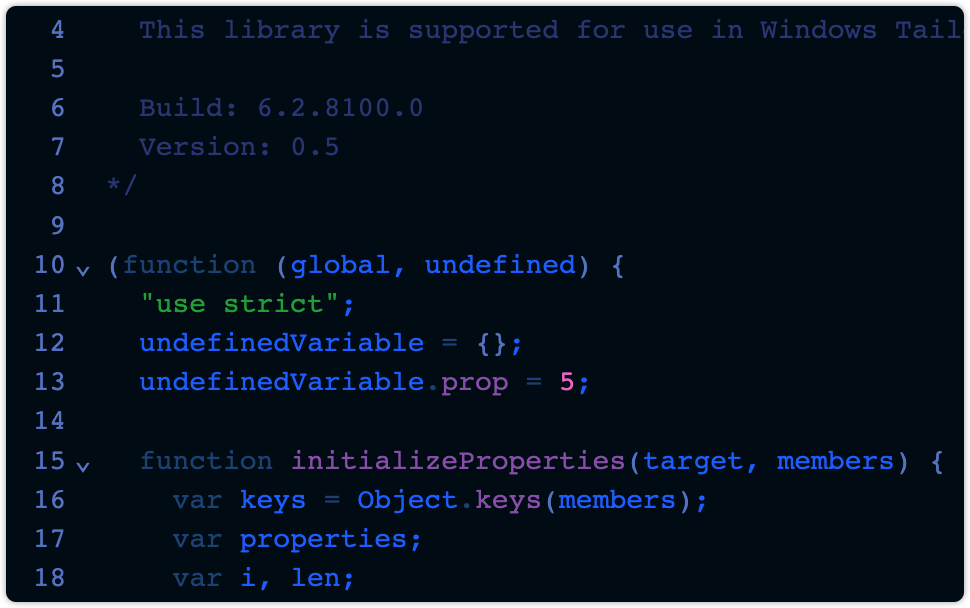
<a href="https://uiwjs.github.io/react-codemirror/#/theme/data/abyss">
  <img width="436" alt="codemirror-theme-abyss" src="https://github.com/uiwjs/react-codemirror/assets/1680273/b1b59053-d370-485e-9dcc-2987b39197a1">
</a>

## Install

```bash
npm install @uiw/codemirror-theme-abyss --save
```

```js
import { EditorState } from '@codemirror/state';
import { javascript } from '@codemirror/lang-javascript';
import { abyss } from '@uiw/codemirror-theme-abyss';

const state = EditorState.create({
  doc: 'my source code',
  extensions: [abyss, javascript({ jsx: true })],
});
```

Using in React:

```jsx
import CodeMirror from '@uiw/react-codemirror';
import { abyss, abyssInit } from '@uiw/codemirror-theme-abyss';

<CodeMirror theme={abyss} />
<CodeMirror
  theme={abyssInit({
    settings: {
      caret: '#c6c6c6',
      fontFamily: 'monospace',
    }
  })}
/>
```

## API

```tsx
import { CreateThemeOptions } from '@uiw/codemirror-themes';
export declare const defaultSettingsQuietlight: CreateThemeOptions['settings'];
export declare const abyssInit: (options?: Partial<CreateThemeOptions>) => import('@codemirror/state').Extension;
export declare const abyss: import('@codemirror/state').Extension;
```

## Usage

```jsx
import CodeMirror from '@uiw/react-codemirror';
import { abyss } from '@uiw/codemirror-theme-abyss';
import { javascript } from '@codemirror/lang-javascript';

function App() {
  return (
    <CodeMirror
      value="console.log('hello world!');"
      height="200px"
      theme={abyss}
      extensions={[javascript({ jsx: true })]}
      onChange={(value, viewUpdate) => {
        console.log('value:', value);
      }}
    />
  );
}
export default App;
```

```js
import { EditorView } from '@codemirror/view';
import { EditorState } from '@codemirror/state';
import { javascript } from '@codemirror/lang-javascript';
import { abyss } from '@uiw/codemirror-theme-abyss';

const state = EditorState.create({
  doc: 'my source code',
  extensions: [abyss, javascript({ jsx: true })],
});

const view = new EditorView({
  parent: document.querySelector('#editor'),
  state,
});
```

## Contributors

As always, thanks to our amazing contributors!
<a href="https://github.com/uiwjs/react-codemirror/graphs/contributors">
  <img src="https://uiwjs.github.io/react-codemirror/CONTRIBUTORS.svg" />
</a>

Made with [github-action-contributors](https://github.com/jaywcjlove/github-action-contributors).

## License

Licensed under the MIT License.